
Vabches J3M026HS0M
Vabches Farmhouse Executive Desk with Hutch User Manual
Model: J3M026HS0M
Product Overview
The Vabches Farmhouse Executive Desk with Hutch is a versatile and spacious workstation designed for home offices and study areas. It features a rustic farmhouse aesthetic with a black finish and sliding barn-style doors on the hutch. This desk provides extensive storage solutions, including multiple drawers, file drawers, and storage cabinets, along with a convenient built-in charging station.

Image: The Vabches Farmhouse Executive Desk with Hutch, showcasing its design and ample workspace with a laptop and decorative items.
Important Safety Information
For your safety and to prevent potential injuries, the assistance of at least one other person is recommended during the assembly process of this desk.
Components List
Before beginning assembly, please ensure all parts are present and undamaged. Refer to the included assembly instructions for a detailed list of all components and hardware.
- Desk panels (top, side, back)
- Hutch panels and shelves
- Sliding barn doors and hardware
- Five drawers (various sizes) and drawer slides
- Storage cabinet door and hinges
- Built-in charging station (4 outlets, 2 USB ports)
- Handles and other assembly hardware
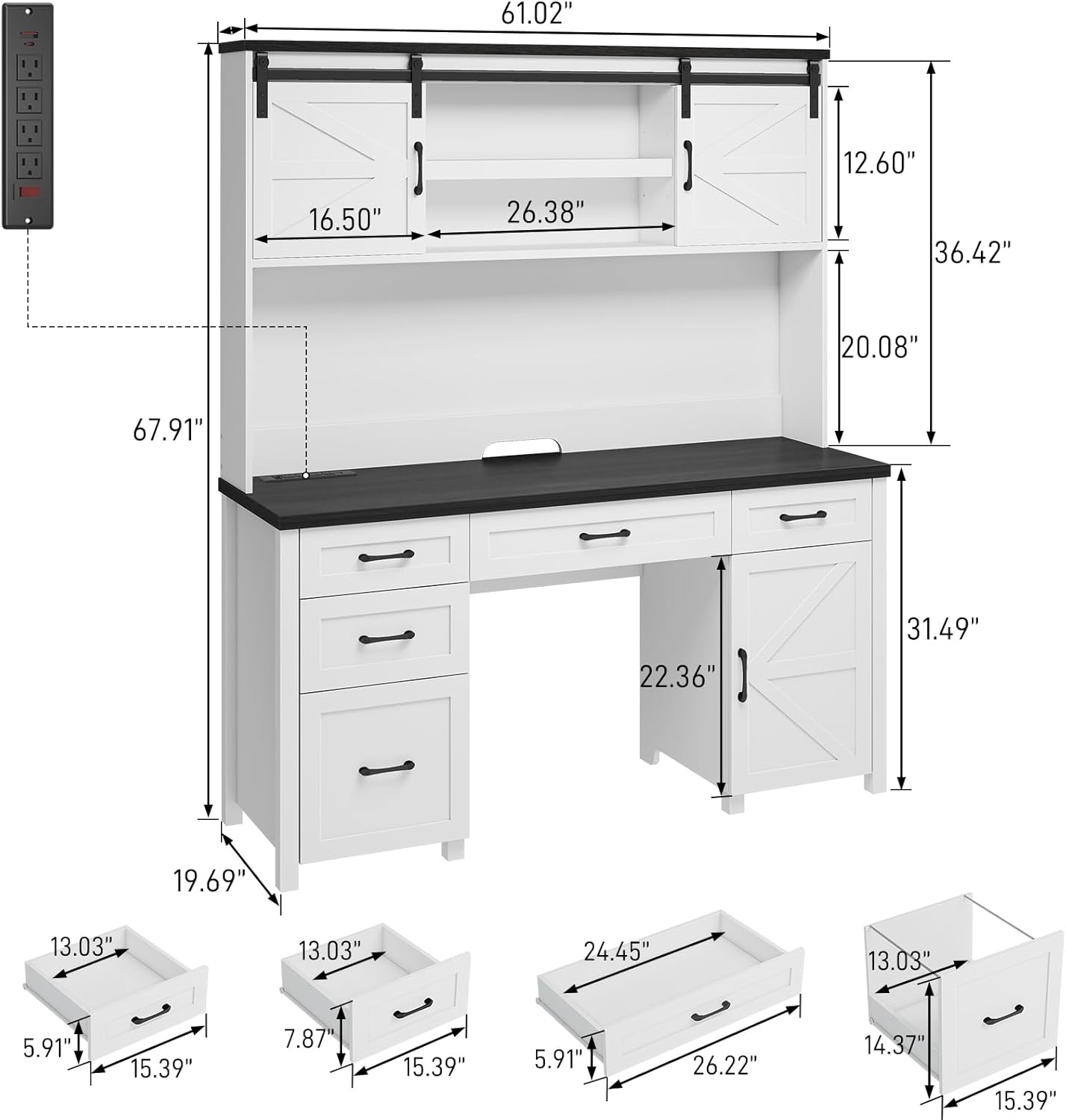
Image: Diagram illustrating the overall dimensions of the desk and hutch, including individual component measurements for planning and assembly.
Setup and Assembly
Your Vabches Executive Desk with Hutch is shipped in two separate packages to ensure safe transit of all components. Please be patient as both packages may arrive at different times. Clear assembly instructions and labeled parts are included to facilitate a straightforward setup process. While assembly is designed to be manageable, it is highly recommended that two people work together to assemble the desk for ease and safety.

Image: Visual representation indicating that the product is delivered in two distinct packages, containing partial boards and accessories.
Assembly Steps (General Guidance):
- Unpack and Organize: Carefully unpack both packages. Lay out all components and hardware, comparing them against the parts list in your instruction manual.
- Assemble Base Structure: Begin by assembling the main desk frame, attaching side panels to the desktop and base supports.
- Install Drawers and Cabinet: Assemble the five drawers and install their respective slides. Attach the storage cabinet door and hinges.
- Attach Hutch: Securely fasten the hutch to the main desk structure.
- Install Sliding Doors: Mount the sliding barn-style doors onto the hutch track.
- Integrate Charging Station: Install the built-in charging station into its designated slot on the desktop.
- Final Touches: Attach all handles and perform a final check for stability and proper function of all moving parts.
Operating Instructions
Charging Station:
The desk is equipped with a convenient charging hub featuring 4 standard outlets and 2 USB ports. This allows for simultaneous charging of up to 6 devices. An on-off switch is provided for safe electricity usage and one-button power-off functionality, enhancing security. Simply plug your devices into the available outlets or USB ports.

Image: The desk surface featuring the built-in charging station, demonstrating its capacity to power multiple devices simultaneously.
Storage Features:
- File Storage Drawer: One dedicated file drawer is designed to hold both letter and A4-sized documents, providing organized storage for your important files.

Image: The file storage drawer, shown with hanging file folders for efficient document organization.
- Box Drawers: Four additional box drawers offer versatile storage for various small items, office supplies, and personal belongings, helping to keep your desktop clutter-free.

Image: A box drawer, demonstrating its capacity for organizing various small office essentials like pens, notebooks, and accessories.
- Storage Cabinet: A spacious storage cabinet with adjustable shelves provides flexible storage options for larger items, books, or electronic accessories.

Image: The storage cabinet, open to reveal its adjustable shelves, suitable for storing books or other items.
- Sliding Doors on Hutch: The hutch features sliding barn-style doors that conceal adjustable shelves. These shelves allow you to easily organize and display your collections or other sized objects while keeping them neatly tucked away when desired.

Image: The hutch section of the desk, highlighting the functional and decorative sliding barn doors that conceal storage compartments.
Maintenance
Proper care and maintenance will ensure the longevity and appearance of your Vabches Executive Desk.
- Cleaning: Wipe surfaces regularly with a soft, damp cloth. Avoid using harsh chemicals, abrasive cleaners, or polishes that may damage the finish.
- Spills: Immediately blot any spills with a clean, dry cloth to prevent staining or water damage.
- Heat and Moisture: Avoid placing hot items directly on the desk surface. Use coasters for drinks to protect against moisture rings.
- Sunlight Exposure: Prolonged exposure to direct sunlight can cause fading or discoloration. Position the desk away from direct sunlight if possible.
- Hardware Check: Periodically check and tighten all screws and fasteners to ensure the desk remains stable and secure.
Troubleshooting
| Problem | Possible Cause | Solution |
|---|---|---|
| Desk feels wobbly or unstable. | Loose fasteners or uneven floor. | Ensure all screws and bolts are securely tightened. Adjust any leveling feet if present, or place shims under the legs on uneven surfaces. |
| Drawers do not slide smoothly. | Improperly installed slides or debris in tracks. | Check that drawer slides are correctly aligned and installed according to instructions. Clear any dust or debris from the tracks. A small amount of silicone lubricant can be applied to the slides if needed. |
| Charging station not working. | Power switch off, not plugged in, or circuit overload. | Ensure the charging station's on-off switch is in the 'on' position. Verify the desk's power cord is securely plugged into a working wall outlet. Avoid overloading the outlets with too many high-power devices. |
| Missing parts during assembly. | Parts in second package or packaging error. | Confirm both packages have arrived. Double-check all packaging materials. If parts are still missing, contact Vabches customer support with your model number and a list of missing components. |
Specifications
- Brand: Vabches
- Model Number: J3M026HS0M
- Product Dimensions (D x W x H): 19.69"D x 61.02"W x 67.91"H
- Color: Black
- Style: Country Rustic
- Base Material: Wood
- Finish Type: Wood
- Special Feature: Engineered Wood
- Mounting Type: Freestanding
- Item Weight: 155 Pounds
- Included Components: Built-in Outlet
- Top Material Type: Engineered Wood
- Drawer Type: Multi-drawer
- Number of Drawers: 5
- Number of Shelves: 2 (in hutch)
- Number of Cabinets: 2 (one main, one hutch)
- Required Assembly: Yes
Warranty and Support
Specific warranty information for the Vabches Farmhouse Executive Desk with Hutch is not provided within this manual. For details regarding warranty coverage, claims, or technical support, please refer to the product packaging, the original purchase documentation, or contact Vabches customer service directly through their official website or the retailer from whom the product was purchased.
Ask a question about this manual
Ask about setup, troubleshooting, compatibility, parts, safety, or missing instructions. Manuals+ will review the question and use this page’s manual context to help answer it.