
1. Introduction
Thank you for choosing the Vhffoso Adjustable Z-Style Keyboard Stand. This stand is designed to provide stable and versatile support for 54 to 88-key electronic and digital pianos. Its adjustable height and width, along with robust construction, ensure a secure and comfortable playing experience. Please read this manual carefully before assembly and use to ensure proper setup and operation.
2. Safety Instructions
- Always ensure all screws and fasteners are securely tightened before placing any instrument on the stand.
- Do not exceed the maximum load capacity of 500 kg (1100 lbs).
- Distribute the weight of your instrument evenly on the stand.
- Keep hands and fingers clear of moving parts during adjustment to prevent pinching.
- Ensure the stand is placed on a stable, level surface to prevent tipping.
- If using caster wheels, ensure they are locked when the stand is in a stationary position to prevent accidental movement.
3. Setup and Assembly
The Vhffoso Z-Style Keyboard Stand requires minimal assembly. Follow these steps to set up your stand:
- Unpack Components: Carefully remove all parts from the packaging. Verify that all components are present.
- Assemble the Z-Frames: Attach the horizontal support bars to the vertical Z-frames. Ensure all bolts are inserted and hand-tightened initially.
- Attach Crossbar: Connect the central adjustable crossbar between the two Z-frames. This bar allows for width adjustment.
- Install Top Support Arms: Secure the top support arms to the upper part of the Z-frames. These arms will hold your keyboard.
- Optional Caster Wheels: If desired, attach the flexible caster wheels to the bottom of the Z-frames. Each wheel is lockable.
- Final Tightening: Once all parts are in place and the stand is roughly assembled, tighten all captive screws firmly. This ensures stability and prevents wobbling.

4. Operating Instructions
The Vhffoso keyboard stand offers various adjustments for optimal positioning of your instrument.
4.1 Height and Width Adjustment
The stand features 12 levels of adjustment for both height and width, allowing you to customize it to your preferred playing position and keyboard size.
- Height Adjustment: To adjust the height, loosen the adjustment knobs on the vertical Z-frames. Carefully raise or lower the top support arms to the desired height (ranging from 61 cm to 92 cm). Once set, tighten the knobs securely.
- Width Adjustment: To adjust the width, loosen the knob on the central crossbar. Extend or retract the crossbar to fit your keyboard (ranging from 56 cm to 92 cm). Ensure the keyboard rests evenly on both support arms. Tighten the knob firmly after adjustment.

4.2 Protective Slide Blocks
The top support arms are equipped with protective slide blocks. These blocks prevent your piano from shifting during play and accommodate widths from 12.5 cm to 42 cm. Adjust them inward or outward to snugly fit the bottom of your keyboard.
4.3 Flexible Wheels
The stand includes 360-degree rotatable, silent, and gentle caster wheels. Each wheel is lockable, allowing for easy repositioning of the stand when unlocked and secure stability when locked. To lock a wheel, press down on the lever. To unlock, lift the lever.

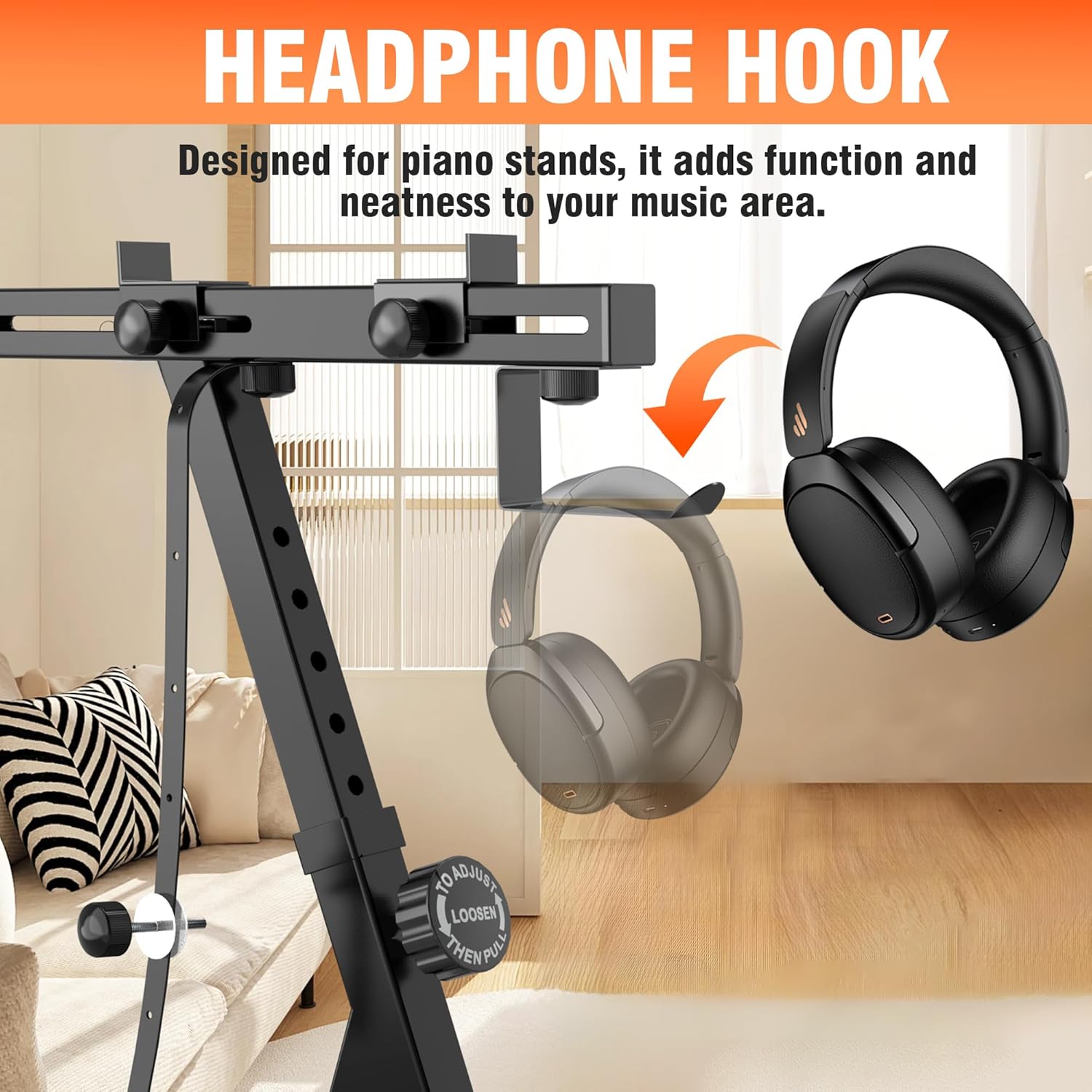
4.4 Headphone Hook
A dedicated headphone hook is integrated into the stand's design. This feature provides a convenient storage solution for your headphones, keeping your music area tidy and organized.
5. Maintenance
- Cleaning: Wipe the stand with a soft, dry cloth to remove dust. For stubborn marks, use a slightly damp cloth and mild soap, then dry thoroughly. Avoid abrasive cleaners or solvents.
- Inspection: Periodically check all screws, bolts, and adjustment knobs to ensure they remain tight. Re-tighten as necessary to maintain stability.
- Storage: When not in use for extended periods, the stand can be folded for compact storage. Ensure it is stored in a dry environment.
6. Troubleshooting
- Stand feels unstable or wobbly:
- Ensure all captive screws and adjustment knobs are fully tightened. Loose connections are a common cause of instability.
- Avoid extending the central crossbar to its absolute maximum. Having more overlap in the telescopic segments provides greater rigidity.
- Verify the stand is on a flat, level surface.
- Keyboard slides on the stand:
- Adjust the protective slide blocks on the top support arms to snugly fit the width of your keyboard.
- Ensure the keyboard is centered and balanced on the support arms.
- Caster wheels not rolling smoothly or locking:
- Check for any debris or obstructions in the wheel mechanism.
- Ensure the locking lever is fully engaged or disengaged.
7. Specifications
| Feature | Detail |
|---|---|
| Model Number | KB01-DE |
| Material | Metal |
| Finish Type | Powder Coated |
| Color | Black |
| Adjustable Height | 61 cm - 92 cm (approx. 24 in - 36.2 in) |
| Adjustable Width | 56 cm - 92 cm (approx. 22 in - 36.2 in) |
| Protective Slide Block Width | 12.5 cm - 42 cm (approx. 4.9 in - 16.5 in) |
| Maximum Load Capacity | 500 kg (approx. 1100 lbs) |
| Item Weight | 7.82 Kilograms (approx. 17.24 lbs) |
| Package Dimensions | 57 x 48.79 x 10.8 cm (approx. 22.4 x 19.2 x 4.25 in) |
| Assembly Required | Yes |

8. Warranty and Support
For information regarding warranty coverage or technical support, please refer to the product packaging or contact Vhffoso customer service directly. Keep your purchase receipt as proof of purchase.