
for Keeson MC120BS JLDP.15.012.001
Replacement Remote Control User Manual
Model: for Keeson MC120BS JLDP.15.012.001
Product Overview
This manual provides detailed instructions for the setup, pairing, and operation of your replacement remote control for compatible adjustable bed bases. Please read this manual carefully before use to ensure proper functionality and to avoid common issues.
Important Compatibility Information
This remote control is not universal. It is specifically designed to work with certain control boxes and adjustable bed base models. To ensure compatibility, it is crucial to verify your existing control box and old remote control's model numbers.
Before purchasing or attempting to pair, please provide clear pictures of your control box and old remote control (front and back), including any product numbers found, especially in the battery compartment. This helps confirm the correct replacement item.

Figure 1: Examples of control box labels and remote control views (front and back with battery compartment) to assist with compatibility verification. Note the model numbers and serial information on the labels.
Setup and Battery Installation
Your new remote control requires 2 AAA batteries (not included). Follow these steps to install the batteries:
- Locate the battery compartment cover on the back of the remote control.
- Slide the cover downwards or press the latch to open it.
- Insert two AAA batteries, ensuring the positive (+) and negative (-) terminals align correctly with the indicators inside the compartment.
- Replace the battery compartment cover, sliding it back into place until it clicks securely.
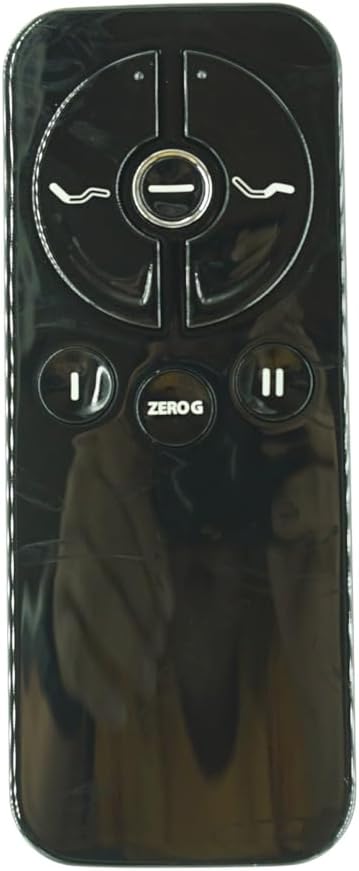
Figure 2: Rear view of the remote control with the battery cover removed, showing the battery slots and a "Pair/Paire" switch.
Pairing Your Remote Control
The remote control must be paired with your adjustable bed base's control box before use. Follow the steps below for the most common pairing procedure. If this method does not work, refer to the alternative methods or your bed base's original manual.
Standard Pairing Procedure (e.g., for Ease 3.0 bases)
- Step 1: Unplug the power cord of your adjustable bed base from the electrical outlet. Wait approximately 5 seconds, then plug it back into the outlet.
- Step 2: Within 10 seconds of plugging the power cord back in, locate the PAIR button on the back of your remote control (often inside the battery compartment or near it). Press and hold this PAIR button.
- Step 3: The PAIR button on the remote will illuminate blue and begin flashing. Continue holding the button.
- Step 4: When the PAIR button stops flashing, the LED light on the control box of your bed base will go out. Release the PAIR button.
- Step 5: The remote is now paired to the adjustable base. Test all remote functions to confirm successful pairing.
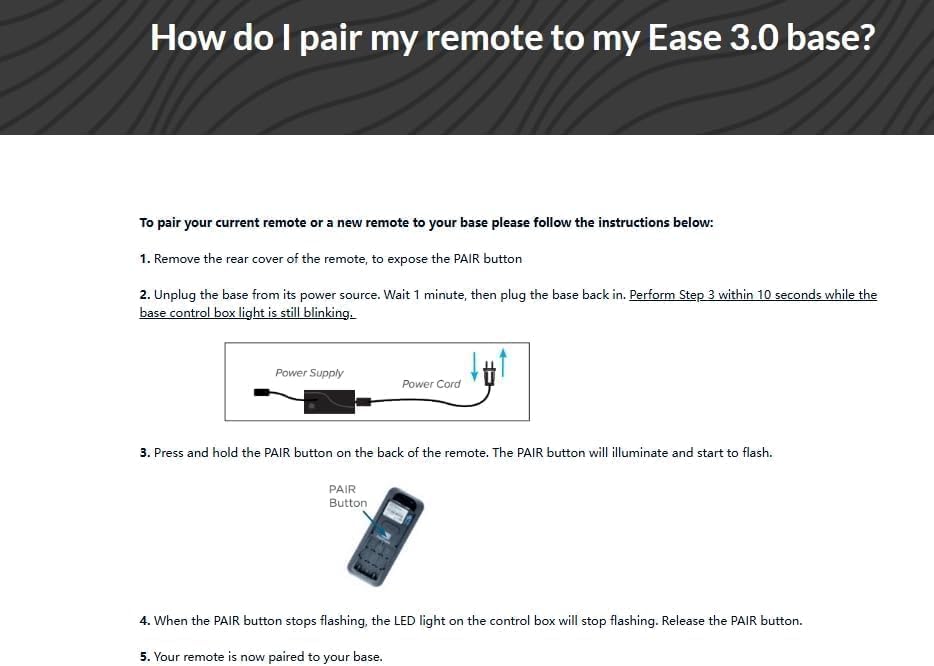
Figure 3: Visual guide for the standard remote pairing process, showing power connection and the PAIR button location.
Alternative Pairing Method (with Power Down Box)
This method applies if your bed base features a "Power Down Box" or similar control unit.
- Step 1: Locate the Power Down Box and press its button TWICE. A light on the Battery Backup Box will illuminate.
- Step 2: Remove the back cover of the remote, then press and hold down the PAIR button. The PAIR button will illuminate blue and start flashing. When the PAIR button stops flashing, the illuminated light on the Battery Backup Box will go out. Release the PAIR button. The remote is now paired to the adjustable base.
- Step 3: After remote is paired, press the following buttons at the same time: Head Up, Head Down, Foot Up and Foot Down. The Power Down Box will blink 4 times in succession to confirm successful pairing.

Figure 4: Detailed steps for pairing using a Power Down Box, including visual cues for the process.
Pairing for Ease 1.0 or Ease 2.0 (Prior Models)
- Step 1: Ensure your base has fresh batteries.
- Step 2: Locate the Battery Backup Box and press the POWER DOWN button twice. A light on the Battery Backup Box will illuminate.
- Step 3: On the back of the remote, press and hold down the PAIR button. The PAIR button will illuminate blue and start flashing. When the PAIR button stops flashing, the illuminated light on the Battery Backup Box will go out.
- Step 4: Release the PAIR button and test all remote functions.

Figure 5: Pairing instructions for older Ease models, highlighting the Battery Backup Box and remote PAIR button.
Operating Your Remote Control
Once paired, your remote control allows you to adjust your bed base. The specific functions may vary slightly depending on your bed base model, but common controls include:

Figure 6: Front view of the remote control, displaying its various function buttons.
- Head Up/Down: Buttons typically located at the top or side, used to raise or lower the head section of the bed.
- Foot Up/Down: Buttons typically located at the top or side, used to raise or lower the foot section of the bed.
- Zero G: A dedicated button (labeled "ZERO G") to move the bed into a "zero gravity" position, which elevates the head and foot to relieve pressure.
- Flat: A button (often represented by a horizontal line or "FLAT") to return the bed to a completely flat position.
- Massage (if applicable): Some remotes may have buttons for massage functions, indicated by wavy lines or specific icons.
- Memory Presets (if applicable): Buttons to save and recall preferred bed positions.
Troubleshooting
| Problem | Possible Cause | Solution |
|---|---|---|
| Remote does not respond. | Batteries are dead or incorrectly inserted. | Replace batteries with new AAA batteries, ensuring correct polarity. |
| Remote is not paired with the bed base. | Initial pairing was unsuccessful or lost. | Follow the "Pairing Your Remote Control" instructions carefully. Ensure the bed base is powered on and the remote is within range. |
| Remote functions are intermittent or unreliable. | Low batteries, interference, or partial pairing. | Replace batteries. Ensure no strong electronic interference nearby. Re-attempt the pairing process. |
| Remote is not compatible with my bed base. | Incorrect model purchased. | This remote is not universal. Verify your control box and old remote model numbers against the product's compatibility information. Contact the seller with photos of your original components for assistance. |
Specifications
- Model Number: for Keeson MC120BS JLDP.15.012.001
- Compatible Devices: Adjustable bed base (specific models only)
- Power Source: 2 x AAA batteries (not included)
- Color: Black
- Max Number of Supported Devices: 1
- Special Feature: Not Universal !!!, Message us if any problems !
Care and Maintenance
- Cleaning: Wipe the remote control with a soft, dry cloth. Do not use abrasive cleaners or solvents.
- Battery Replacement: Replace batteries promptly when they are low to ensure optimal performance and prevent corrosion. Remove batteries if the remote will not be used for an extended period.
- Storage: Store the remote in a dry place, away from extreme temperatures and direct sunlight.
- Avoid Drops: Protect the remote from physical impact, as drops can damage internal components.
Support and Contact Information
If you encounter any issues not covered in this manual or require further assistance, please contact the seller or manufacturer with the following information:
- Your order number.
- Detailed description of the problem.
- Photos of your original control box and remote control (front and back), including any model or serial numbers.
Providing this information will help expedite the support process and ensure you receive the most accurate assistance.
Ask a question about this manual
Ask about setup, troubleshooting, compatibility, parts, safety, or missing instructions. Manuals+ will review the question and use this page’s manual context to help answer it.