
1. Introduction
Thank you for choosing the DUIDESHI M160 Portable Selfie Light. This device is designed to provide optimal lighting for various applications, including photography, video conferencing, makeup, and live streaming. Its compact design, adjustable brightness, and color temperature settings ensure professional-quality illumination wherever you go. Please read this manual thoroughly to understand the product's features and ensure correct operation.
2. Safety Information
- Do not expose the device to water or excessive moisture.
- Avoid disassembling or modifying the device, as this may void the warranty and cause damage.
- Keep out of reach of children. This product is not suitable for children under 6 years old.
- Use only the provided Type-C charging cable or a certified equivalent.
- Do not operate the device in extreme temperatures.
3. Package Contents
Verify that all items are present in your package:
- DUIDESHI M160 Portable Selfie Light
- Clip Mount
- USB Type-C Charging Cable
- Instruction Manual
- Cold Shoe Adapter (for camera mounting)

Image: Package contents of the DUIDESHI M160 Portable Selfie Light.
4. Product Overview and Features
The DUIDESHI M160 is equipped with advanced features for superior lighting performance:
- 90 High-Quality LED Beads: Features a double-layer soft light cover for uniform and soft illumination, preventing glare.
- Adjustable Color Temperature: Infinitely adjustable from 2700K (warm light) to 6500K (cool light), with one-click switching for various atmospheric needs.
- 10 Brightness Levels: Fine-tune the light intensity to suit any environment, ensuring comfortable viewing and optimal photo/video quality.
- Long Battery Life: Up to 12 hours in low brightness mode, and 2 hours at maximum brightness.
- Type-C Fast Charging: Fully charges in approximately 2 hours and supports simultaneous charging and use.
- Multi-Device Compatibility: Easily attaches to smartphones, cameras, and laptops.

Image: Detail of the 90 high-quality LED lamp beads.

Image: Brightness and color temperature adjustment options.

Image: Battery capacity and charging port details.
5. Setup
5.1 Charging the Device
Before first use, fully charge the selfie light. Connect the provided USB Type-C cable to the charging port on the device and plug the other end into a USB power source (e.g., wall adapter, computer USB port).
- A full charge takes approximately 2 hours.
- The device can be used while charging.
5.2 Attaching to a Device (Phone/Laptop/Camera)
The DUIDESHI M160 comes with a versatile clip mount and a cold shoe adapter for various applications.
- For Phones/Laptops:
- Attach the clip mount to the selfie light by sliding it into the designated slot until it clicks securely.
- Open the clip and carefully attach it to the top edge of your phone or laptop screen.
- Important Note: When attaching to a phone, remove the protective case and ensure the clip is inserted deeply to ensure a firm attachment.
- For Cameras:
- Attach the cold shoe adapter to the selfie light.
- Slide the cold shoe adapter into your camera's hot shoe mount and tighten the locking mechanism if available.
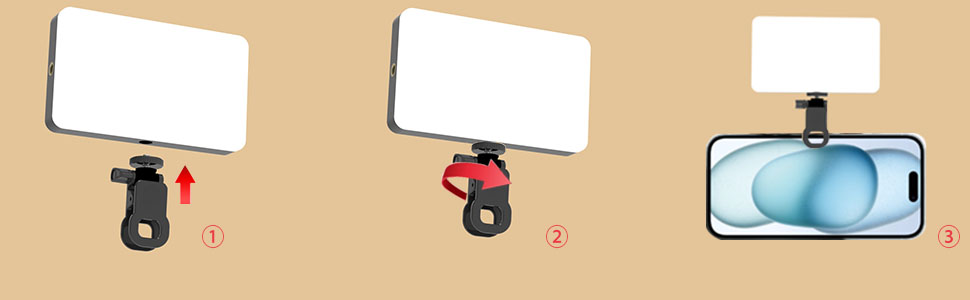
Image: Steps for attaching the selfie light to a phone.

Image: Overview of controls and camera mounting.
6. Operating Instructions
The DUIDESHI M160 features intuitive controls for adjusting light settings.
- Power On/Off: Press and hold the power button (usually indicated by a circle icon) for a few seconds to turn the light on or off.
- Adjusting Brightness: Use the '+' and '-' buttons to increase or decrease the brightness. There are 10 levels of brightness adjustment.
- Changing Color Temperature: Press the mode button (often indicated by a 'M' or light bulb icon) to cycle through the three adjustable modes:
- Cold Light (6500K): Provides a bright, cool tone.
- Warm Light (2700K): Offers a soft, warm tone.
- Sunlight (Neutral Light, 4000K): A balanced, natural light setting.
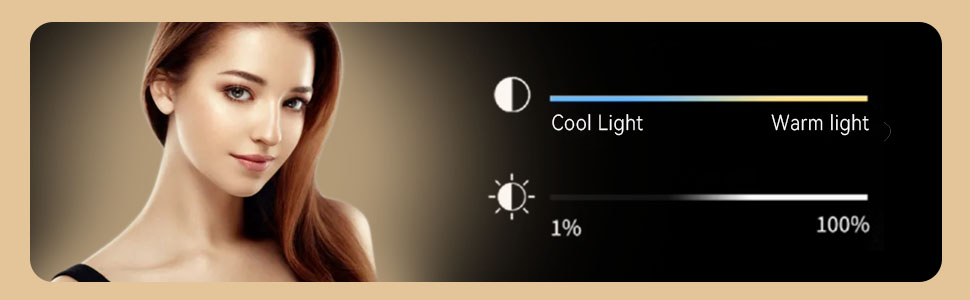
Image: Visual guide for color temperature and brightness controls.
7. Maintenance
- Cleaning: Use a soft, dry cloth to clean the surface of the light. Do not use abrasive cleaners or solvents.
- Storage: Store the device in a cool, dry place away from direct sunlight and extreme temperatures.
- Battery Care: For optimal battery longevity, avoid fully discharging the battery frequently. Charge the device regularly, even if not in use for extended periods.
8. Troubleshooting
| Problem | Possible Cause | Solution |
|---|---|---|
| Light does not turn on. | Battery is depleted. | Charge the device using the Type-C cable. |
| Light turns off unexpectedly. | Low battery. | Recharge the device. |
| Light is unstable when clipped to phone. | Phone case is on; clip not fully inserted. | Remove phone case and ensure the clip is inserted deeply onto the phone. |
| Cannot adjust brightness/color. | Buttons unresponsive. | Ensure the device is powered on. If issue persists, try resetting by turning off and on. |
9. Specifications
- Model: M160
- LED Count: 90
- Color Temperature: 2700K - 6500K (Adjustable)
- Brightness Levels: 10
- Battery Capacity: 2000mAh (1 9V battery included)
- Battery Life: 2-12 hours (depending on brightness)
- Charging Port: USB Type-C
- Charging Time: Approximately 2 hours
- Input Voltage: 5V/1A
- Max Power: 2.5W
- Dimensions: 120mm x 72mm x 19mm (approx. 4.7 x 2.8 x 0.74 inches)
- Item Weight: 5.9 ounces

Image: Product parameters from packaging.
10. Warranty and Support
The DUIDESHI M160 Portable Selfie Light comes with a standard manufacturer's warranty. Please refer to the warranty card included in your package for specific terms and conditions.
For technical support, troubleshooting assistance, or warranty claims, please contact DUIDESHI customer service through the retailer where the product was purchased or visit the official DUIDESHI website for contact information.
Manufacturer: Non (as per product data, likely a generic manufacturer or brand name is the manufacturer)