
1. Introduction
Thank you for choosing the Five Stars FS4D 4D Cross Line Laser Level. This professional-grade instrument is designed for precise horizontal and vertical alignment tasks in various construction and renovation projects. Featuring 16 green laser lines, 360-degree coverage, and self-leveling capabilities, it offers high accuracy and efficiency. Please read this manual thoroughly before operation to ensure safe and correct use, and retain it for future reference.

Image 1.1: The Five Stars FS4D 4D Cross Line Laser Level complete set, showcasing the laser unit, adjustable tripod, batteries, charger, remote control, and protective carrying case.
2. Safety Instructions
Always observe the following safety precautions to prevent injury and damage to the device:
- Laser Radiation: This product emits Class 2 laser radiation. Do not stare directly into the laser beam. Avoid direct eye exposure.
- Children: Keep the device out of reach of children.
- Operating Environment: Do not operate the laser level in explosive atmospheres, such as in the presence of flammable liquids, gases, or dust.
- Modifications: Do not attempt to modify or disassemble the laser level. Repairs should only be performed by authorized service personnel.
- Power Source: Use only the specified charger and batteries provided with the device.
- Storage: Store the device in a dry, cool place, away from direct sunlight and extreme temperatures.
3. Package Contents
Verify that all items listed below are included in your package:
- Five Stars 4D Cross Line Laser Level (1x)
- Adjustable Tripod (1x)
- 360° Rotating Mini Tripod (1x)
- Fully Adjustable Lifting Platform (1x)
- Wall Mount with Accessories (1x)
- Remote Control (1x)
- Sturdy Storage Case (1x)
- Rechargeable Batteries (2x)
- Charger (1x)
- User Manual (1x)
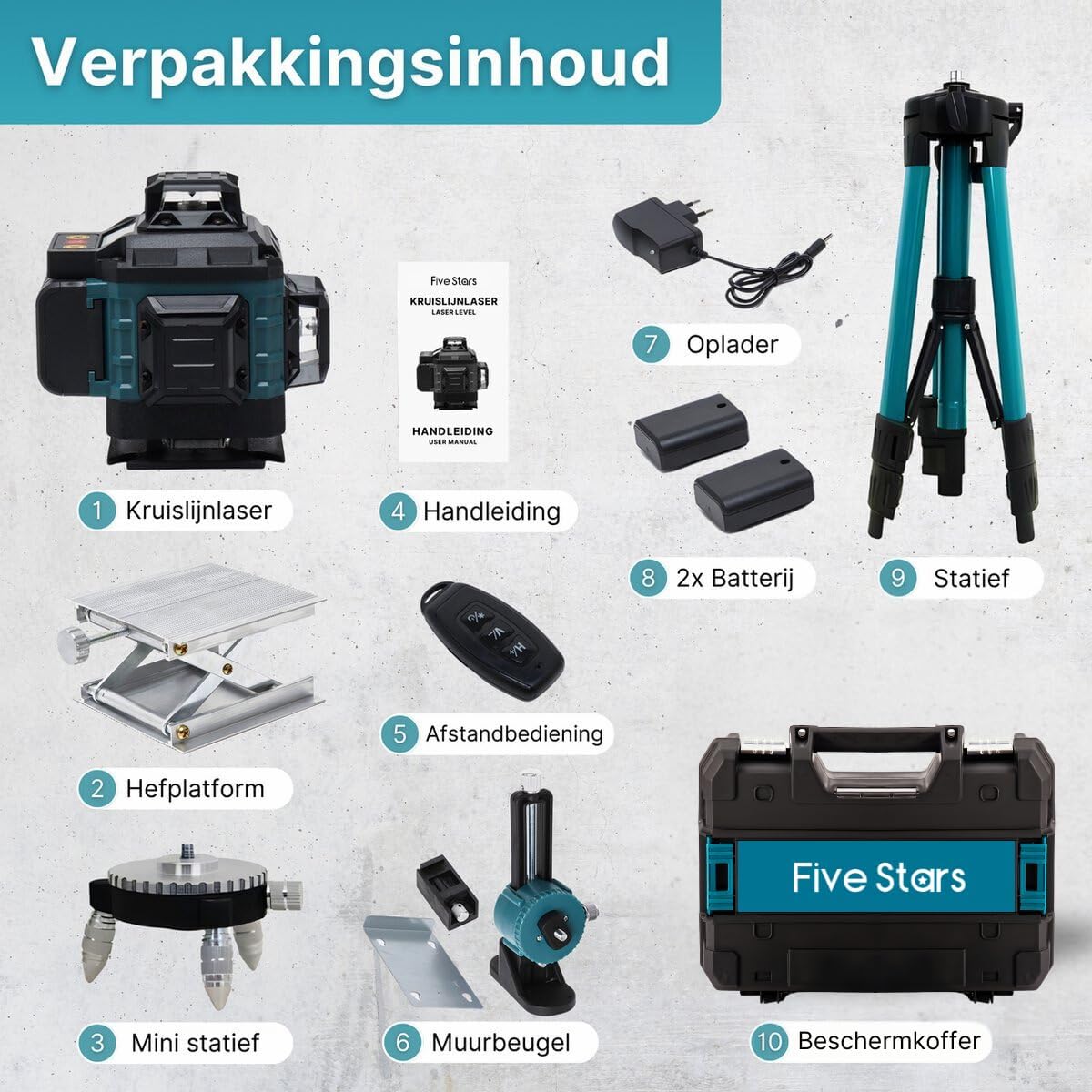
Image 3.1: Visual representation of all components included in the Five Stars FS4D 4D Cross Line Laser Level package.
4. Product Overview
4.1 Laser Unit (FS4D)
The main laser unit features a robust housing, typically teal and black, designed for durability and protection against dust and splashes (IP54 rated).

Image 4.1: The Five Stars FS4D Laser Level, demonstrating its IP54 water and dust resistant design.
4.2 Controls and Display
The laser level is equipped with intuitive controls and an LCD screen for easy operation and status monitoring.
- Power Switch: Located on the side, used to turn the device ON/OFF.
- H Button: Activates/deactivates horizontal laser lines.
- V Button: Activates/deactivates vertical laser lines.
- Outdoor Mode Button: For enhanced visibility in bright conditions.
- LCD Screen: Displays battery level and operating status.

Image 4.2: The LCD screen of the laser level, showing the battery indicator and charging status.
5. Setup
5.1 Battery Installation and Charging
- Open the battery compartment cover on the laser unit.
- Insert the rechargeable battery, ensuring correct polarity.
- Close the battery compartment cover securely.
- To charge, connect the charger to the laser unit and a power outlet. The LCD will indicate charging status.
5.2 Mounting Options
The FS4D laser level offers versatile mounting options for various applications:
- Adjustable Tripod: For stable placement and height adjustment (40 to 100 cm).
- 360° Rotating Mini Tripod: For fine adjustments on flat surfaces.
- Lifting Platform: Provides additional height adjustment for precise positioning.
- Wall Mount: Allows attachment to walls or magnetic surfaces for elevated or angled projections.

Image 5.1: The laser level shown with its 360-degree rotating magnetic wall bracket and mini tripod, illustrating flexible positioning.
6. Operating Instructions
6.1 Powering On/Off
Slide the power switch to the 'ON' position to power on the device. Slide it to 'OFF' to power off.
6.2 Self-Leveling Mode
When powered on, the laser level automatically enters self-leveling mode. If the device is placed on an uneven surface (beyond 4 degrees inclination), it will emit an audible warning and the laser lines will flash. Adjust the device's position until it is within the self-leveling range and the warning stops.
6.3 Manual Mode
To use the laser level for projecting angled lines, activate manual mode. This typically involves holding down a specific button (refer to the device's interface for exact button, often the 'Outdoor Mode' button) while powering on, or pressing a button after self-leveling is complete. In manual mode, the self-leveling function is deactivated, allowing the laser to project lines at any angle.
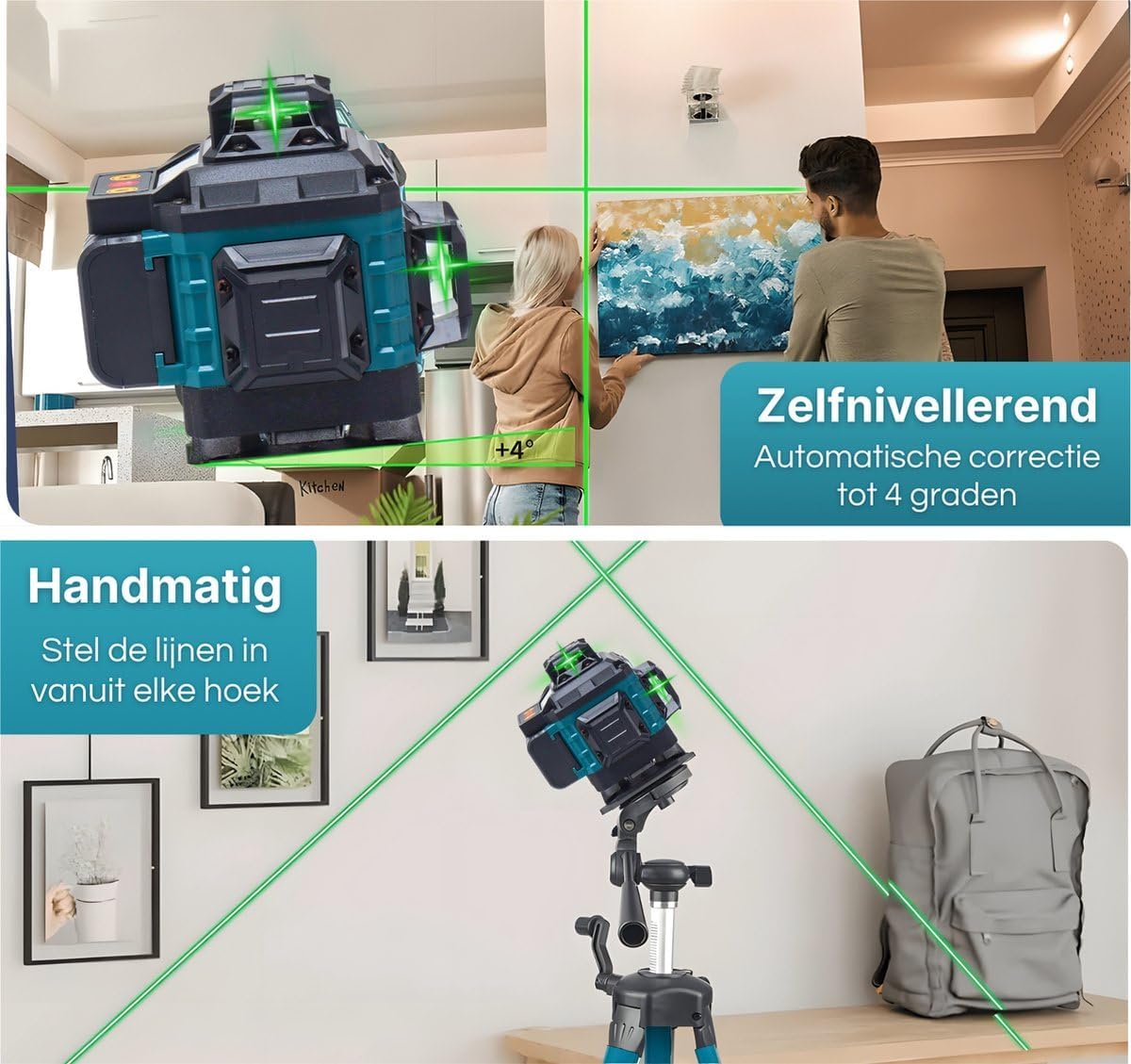
Image 6.1: Demonstrations of the laser level operating in self-leveling mode for automatic correction and manual mode for custom angled projections.
6.4 Line Selection
Use the 'H' button to toggle horizontal lines and the 'V' button to toggle vertical lines. The 4D system allows for various combinations, including 360-degree horizontal and vertical planes.

Image 6.2: Examples of the 4D 16-line laser level's output, showing different combinations of horizontal and vertical laser lines for diverse measurement needs.
6.5 Remote Control Usage
The included remote control allows for convenient operation from a distance, enabling you to switch between horizontal and vertical lines without touching the unit, which can be useful for maintaining precise positioning.
7. Applications
The Five Stars FS4D laser level is suitable for a wide range of applications, including but not limited to:
- Installing flooring and tiles
- Framing and drywall installation
- Hanging pictures and shelves
- Cabinet and fixture installation
- Electrical and plumbing layout
- Outdoor landscaping and grading (with detector, if applicable)

Image 7.1: The laser level in use for various tasks such as tiling, bricklaying, hanging wall decor, and ceiling work, demonstrating its versatility.
8. Maintenance
- Cleaning: Use a soft, damp cloth to clean the device. Do not use abrasive cleaners or solvents. Ensure the laser apertures are clean for optimal beam clarity.
- Storage: When not in use, store the laser level and its accessories in the provided sturdy storage case. Remove batteries if storing for extended periods.
- Calibration: While the device is self-calibrating within its range, regular professional calibration is recommended for critical applications to ensure continued accuracy.
9. Troubleshooting
| Problem | Possible Cause | Solution |
|---|---|---|
| Laser lines are flashing and/or device beeps. | Device is outside its self-leveling range (>4°). | Place the device on a more level surface or adjust the tripod/mount until the warning stops. |
| No laser lines appear. | Low battery or device is off. | Charge the battery or replace it. Ensure the power switch is ON. |
| Laser lines are dim. | Operating in bright conditions or dirty laser apertures. | Activate outdoor mode. Clean the laser apertures with a soft cloth. |
| Remote control not working. | Remote battery depleted or obstruction. | Replace remote control battery. Ensure no obstructions between remote and laser unit. |
10. Specifications
- Model: FS4D
- Laser Class: Class 2
- Laser Color: Green
- Number of Lines: 16 (4D)
- Self-Leveling Range: ±4°
- Working Range: Up to 50 meters
- Accuracy: ±1mm at 7m (typical)
- IP Rating: IP54 (Dust and Splash Water Resistant)
- Power Source: Battery-Powered (Rechargeable Non-standard battery)
- Operating Mode: Automatic
- Material: Plastic, Metal
- Weight: 5 Kilograms (approx. for complete set)
- Package Dimensions: 60 x 40 x 20 cm (approx.)
11. Warranty and Support
Five Stars stands behind the quality of its products. This product comes with a satisfaction guarantee. For any questions, technical assistance, or warranty claims, please contact our customer support team. You can typically reach us through the Amazon platform where the product was purchased. Please provide your order details and a clear description of the issue for prompt assistance.
