
1. Introduction
This user manual provides detailed instructions for the installation, operation, and maintenance of your Wireless Barcode Scanner LCB-5600. Designed for efficiency and convenience, this scanner offers reliable barcode reading for various applications, including retail, logistics, and office environments. Its wireless capability and ergonomic design ensure comfortable and flexible use.
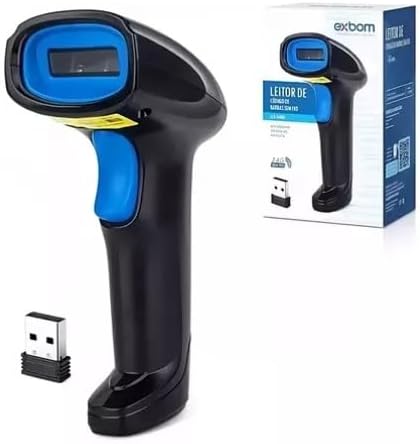
Image 1.1: The Wireless Barcode Scanner LCB-5600, showing the scanner unit, its retail packaging, and the compact USB receiver.
2. Safety Information
Please read all safety instructions carefully before using the device. Failure to follow these instructions may result in injury or damage to the device.
- Do not expose the scanner to extreme temperatures, humidity, or direct sunlight.
- Avoid dropping the device or subjecting it to strong impacts.
- Do not attempt to disassemble or repair the scanner yourself. Refer all servicing to qualified personnel.
- Keep the scanner away from water and other liquids.
- Use only the charging cable provided or recommended by the manufacturer.
3. Package Contents
Verify that all items listed below are present in your product package:
- 1 x Wireless Barcode Scanner LCB-5600
- 1 x USB Wireless Receiver
- 1 x USB Charging Cable
- 1 x User Manual (this document)
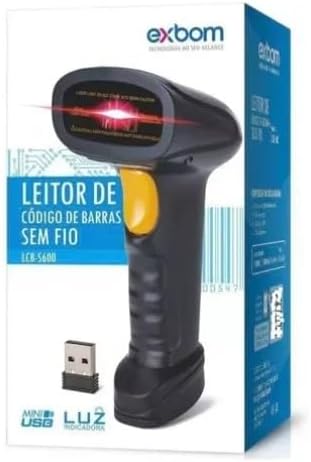
Image 3.1: The barcode scanner and its packaging, clearly indicating the LCB-5600 model.
4. Setup
4.1 Initial Setup and Connection
The LCB-5600 scanner is designed for plug-and-play operation, requiring no additional software installation for basic functionality.
- Charge the Scanner: Before first use, ensure the scanner is fully charged. Connect the USB charging cable to the scanner's charging port and the other end to a USB power source (e.g., computer USB port, USB wall adapter). The charging indicator light will show the charging status.
- Insert USB Wireless Receiver: Plug the USB wireless receiver into an available USB port on your computer, POS system, or notebook.
- Power On the Scanner: Press and hold the power button (if available) or trigger button on the scanner to turn it on. The scanner will automatically attempt to pair with the USB receiver. A successful connection is usually indicated by a specific sound or light pattern on the scanner.
- Test Connection: Open a text editor (e.g., Notepad, Word) or any application where you want to input scanned data. Scan any barcode. If the connection is successful, the barcode data will appear in the opened application.
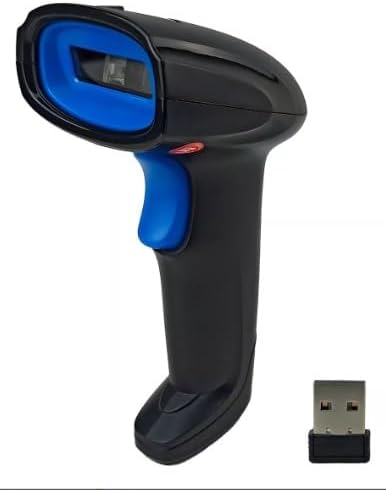
Image 4.1: The LCB-5600 scanner alongside its USB wireless receiver, ready for connection.
4.2 Charging the Device
The scanner is equipped with a rechargeable lithium-ion battery. To charge, connect the provided USB cable to the scanner and a power source. A full charge ensures hours of continuous operation. The device supports bivolt (110V/220V) power sources automatically.
5. Operating Instructions
5.1 Basic Barcode Scanning
- Aim the Scanner: Point the scanning window of the LCB-5600 directly at the barcode you wish to scan.
- Press the Trigger: Press the trigger button on the handle of the scanner. A red laser line or light will emit from the scanning window.
- Confirm Scan: Once the barcode is successfully read, the scanner will typically emit a beep sound and/or a green indicator light will flash. The scanned data will then be transmitted to your connected device.
5.2 Supported Barcode Types
The LCB-5600 scanner is compatible with a wide range of 1D barcodes, including but not limited to:
- EAN (European Article Number)
- UPC (Universal Product Code)
- Code 39, Code 93, Code 128
- Interleaved 2 of 5
- Codabar
- Specific formats like Brazilian Boleto and DANFE (Documento Auxiliar da Nota Fiscal Eletrônica)

Image 5.1: The scanner demonstrating its capability to read various barcode types, including those specific to Brazilian financial documents (Boleto) and electronic invoices (DANFE).
6. Maintenance
6.1 Cleaning and Care
To ensure optimal performance and longevity of your scanner, follow these cleaning guidelines:
- Exterior Cleaning: Use a soft, dry, lint-free cloth to wipe the exterior of the scanner. For stubborn dirt, slightly dampen the cloth with water or a mild, non-abrasive cleaner.
- Scanning Window: Gently clean the scanning window with a soft, clean cloth. Avoid using abrasive materials or harsh chemicals that could scratch the surface.
- Avoid Liquids: Do not spray cleaning solutions directly onto the scanner. Ensure no liquid enters the device.
6.2 Battery Care
Proper battery care extends the life of your scanner's battery:
- Avoid fully discharging the battery frequently.
- Store the scanner in a cool, dry place when not in use for extended periods.
- Recharge the battery regularly, even if the scanner is not in frequent use, to maintain its capacity.
7. Troubleshooting
If you encounter issues with your LCB-5600 scanner, refer to the following table for common problems and their solutions.
| Problem | Possible Cause | Solution |
|---|---|---|
| Scanner does not turn on. | Low battery or no charge. | Connect the scanner to a power source using the USB cable and allow it to charge. |
| Scanner does not read barcodes. | Barcode damaged, scanner not aimed correctly, or not paired. | Ensure the barcode is clear. Aim the laser directly across the barcode. Re-pair the scanner with the USB receiver if necessary. |
| Scanned data does not appear on computer. | USB receiver not properly connected or scanner not paired. | Ensure the USB receiver is securely plugged into a working USB port. Verify the scanner is paired. Test with a different application. |
| Short battery life. | Battery not fully charged or aging battery. | Ensure the scanner is fully charged before use. If the issue persists, the battery may need replacement (contact support). |
8. Specifications
Detailed technical specifications for the Wireless Barcode Scanner LCB-5600:
| Feature | Description |
|---|---|
| Brand | Generic |
| Manufacturer | Exbom |
| Product Type | Office Products (Barcode Scanner) |
| Read Rate | 100 scans/second |
| Compatible Devices | Computer, POS System, Notebook |
| Number of Units | 1 |
| Power Source Type | Rechargeable Battery |
| Connection Technology | Wireless (USB Receiver), USB Cable |
| Actual Viewing Angle | 60 degrees |
| Product Weight | 250 g (0.55 lbs) |
| Product Dimensions | 15 x 9 x 7 cm (5.9 x 3.5 x 2.8 inches) |
| Battery Type | 1 Lithium Ion battery (required) |
| ASIN | B0DZW1QCSV |
9. Warranty and Support
9.1 Manufacturer's Warranty
This product comes with a manufacturer's warranty of 90 days. This warranty covers defects in materials and workmanship under normal use. It does not cover damage caused by misuse, accidents, unauthorized modifications, or external causes.
9.2 Customer Support
For technical assistance, warranty claims, or any questions regarding your Wireless Barcode Scanner LCB-5600, please contact the retailer or manufacturer's customer support. Refer to your purchase documentation for specific contact details.