
LINGDU V630
LINGDU V630 4K 3-Channel Wireless Dash Camera User Manual
Model: V630 | Brand: LINGDU
Introduction
Thank you for choosing the LINGDU V630 4K 3-Channel Wireless Dash Camera. This advanced dash camera system provides comprehensive surveillance for your vehicle, featuring front, interior, and rear cameras for complete coverage. With built-in GPS, Wi-Fi 6, voice control, and 24-hour parking monitoring, the V630 is designed to enhance your driving safety and provide reliable evidence in case of incidents. Please read this manual carefully to ensure proper installation and operation of your device.
Key Features
- 3-Channel Recording: Simultaneous recording from front (4K), interior (1080P), and rear (1080P) cameras.
- Built-in GPS: Records driving route, speed, latitude, and longitude data, viewable via LINGDU GPS Player.
- Built-in Wi-Fi 6: Connect to the 'LINGDU App' for video playback, download, and management on iOS/Android devices.
- Super Night Vision: Enhanced low-light performance with WDR technology and IR LEDs for clear recordings.
- Smart Voice Control & Notification: Control functions like video locking, photo taking, and Wi-Fi on/off with voice commands.
- Loop Recording: Automatically overwrites old footage when the SD card is full, ensuring continuous recording.
- Emergency Recording: Automatic locking via G-sensor, voice control, or manual button press to protect important footage.
- 24-Hour Parking Mode: G-sensor activated collision detection and time-lapse recording (1fps) for continuous surveillance while parked.
- Included 64GB SD Card: Ready for immediate use; requires initial formatting.
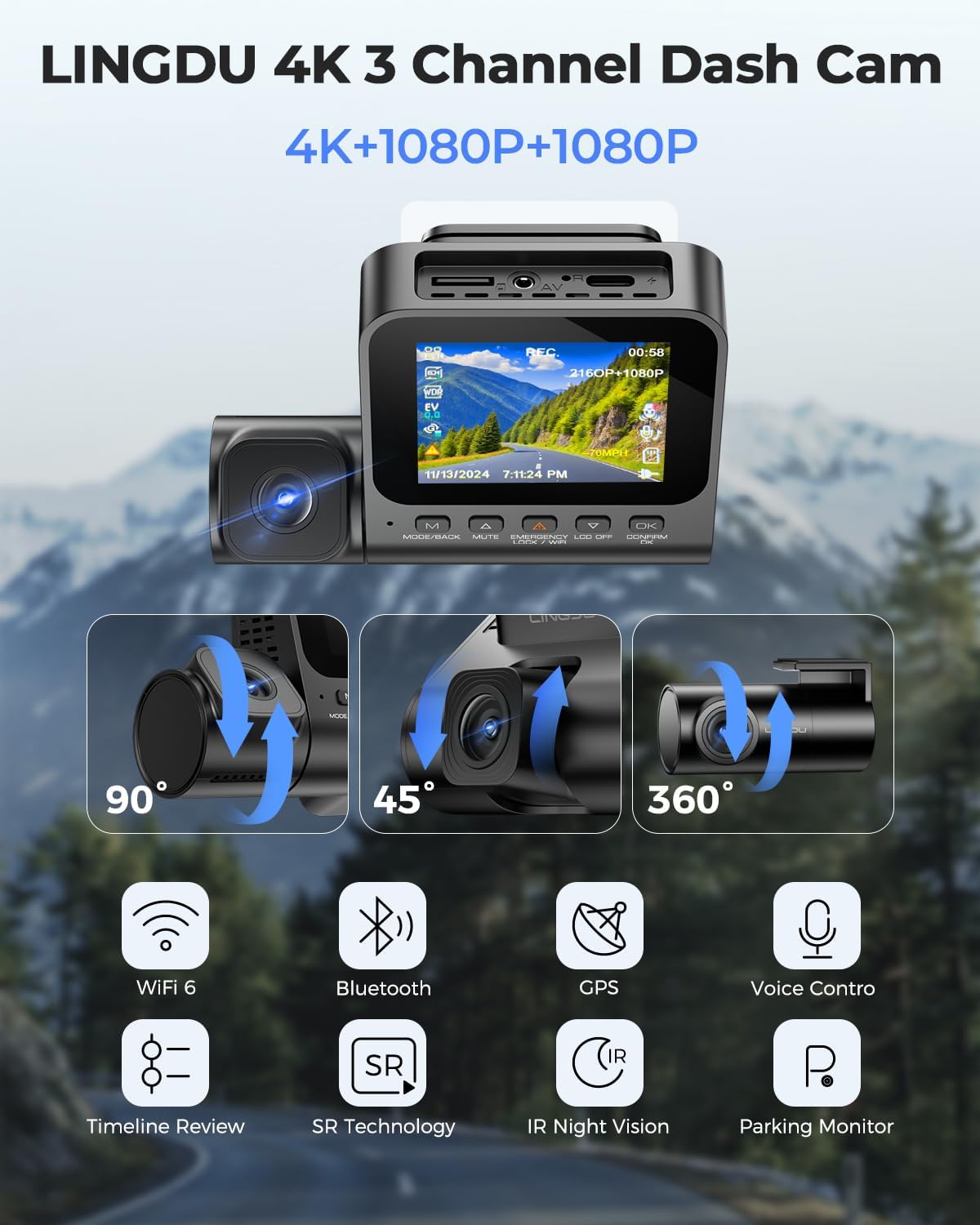
Figure 1: Overview of LINGDU V630's key features including connectivity, recording modes, and monitoring capabilities.
Package Contents
Before installation, please verify that all items listed below are included in your package:
- 1 x LINGDU V630 Dash Camera (Main Unit)
- 1 x Rear Camera (6M/20ft cable)
- 4 x Electrostatic Films
- 1 x Dual USB Car Charger
- 1 x Type-C USB Power Cable (3.5M/12ft)
- 1 x 64GB Storage Card
- 5 x Cable Clips
- 1 x Pry Tool
- 1 x User Manual
Setup and Installation
1. Prepare the SD Card
The included 64GB SD card must be formatted before its first use to ensure optimal performance and compatibility with the V630 dash camera. Insert the SD card into the dash camera's SD card slot. Power on the dash camera and navigate to the system settings to find the "Format" option. Confirm to format the card. This process will erase all data on the card, so ensure no important files are present.
2. Mount the Front Dash Camera
Choose a location on your windshield, preferably behind the rearview mirror, that does not obstruct your view. Clean the area thoroughly. Apply one of the electrostatic films to the chosen spot on the windshield. Then, attach the dash camera mount to the electrostatic film. Ensure the camera lens has a clear view of the road ahead and the interior camera has a clear view of the cabin.

Figure 2: Main components of the LINGDU V630 system, including the dash camera, rear camera, SD card, and a representation of the mobile application interface.
3. Install the Rear Camera
Connect the rear camera to the main dash camera unit using the provided 6M/20ft cable. Route the cable neatly along the vehicle's headliner and A-pillars to the rear of the vehicle. Mount the rear camera on the rear windshield, ensuring it has a clear view of the road behind. Use the cable clips and pry tool to hide the cable for a clean installation.
4. Power Connection
Plug the Type-C USB power cable into the dash camera and the other end into the dual USB car charger. Insert the car charger into your vehicle's cigarette lighter socket. The dash camera will power on automatically when the vehicle's ignition is turned on.
Operating Instructions
Recording Modes
The LINGDU V630 supports various recording configurations:
- 3-Channel Mode: Records simultaneously from front (4K), interior (1080P), and rear (1080P) cameras.
- Dual Mode: Records from the front (4K) and rear (1080P) cameras. The interior camera can be turned off if not needed.

Figure 3: Illustration of the 3-channel and dual recording modes available on the V630 dash camera.
Loop Recording
The dash camera continuously records in short segments (e.g., 1, 2, or 3 minutes). When the SD card is full, the oldest unlocked footage is automatically overwritten by new recordings. This ensures that recording never stops due to a full memory card.
Emergency Recording (G-Sensor & Manual Lock)
In the event of a sudden impact or collision, the built-in G-sensor will automatically detect the event and lock the current video segment (typically 1-3 minutes) to a protected folder, preventing it from being overwritten by loop recording. You can also manually lock a video segment by pressing the "lock" button on the dash camera or by using a voice command.

Figure 4: Methods for activating emergency recording to secure important video footage.
24-Hour Parking Mode
The V630 offers two parking surveillance options:
- Collision Detection (G-sensor): If a collision is detected while parked, the dash camera will automatically power on and record a short video clip, then lock it.
- Time-Lapse Recording: The camera can record continuously at a low frame rate (1fps) for 24 hours, compressing long periods into short, viewable videos. This requires a continuous power supply (hardwire kit, sold separately, may be needed for extended use).

Figure 5: Visual representation of the 24-hour parking monitoring capabilities.
Smart Voice Control
The V630 responds to specific voice commands, allowing hands-free operation. This helps you stay focused on driving. Examples of commands include:
- "Lock the Video"
- "Take Picture"
- "Turn on Audio" / "Turn off Audio"
- "Turn on Wi-Fi" / "Turn off Wi-Fi"
- "Turn on Recording" / "Turn off Recording"

Figure 6: Examples of voice commands for controlling the LINGDU V630 dash camera.
Wi-Fi 6 & App Control
Connect your smartphone to the V630 via Wi-Fi 6 for seamless control and file management. Download the 'LINGDU App' from the App Store (iOS) or Google Play Store (Android). Once connected, you can:
- View live video preview.
- Playback recorded videos.
- Download videos to your phone.
- Manage dash camera settings.
- Share moments with friends and family.

Figure 7: The LINGDU App interface for managing and interacting with the dash camera via Wi-Fi and Bluetooth.
Built-in GPS Functionality
The integrated GPS module records precise driving data. Using the LINGDU GPS Player software (available for download), you can review your driving route, speed, altitude, longitude, and latitude alongside the recorded video footage. This provides crucial context and evidence for any recorded events.

Figure 8: Visualization of the GPS tracking capabilities and data display through the LINGDU GPS Player.
Super Night Vision
The V630 is equipped with advanced night vision technology, including Wide Dynamic Range (WDR) and IR LEDs. This ensures clear and detailed video recordings even in challenging low-light conditions, both for exterior and interior views.

Figure 9: Demonstration of Super Night Vision technology with WDR and IR illumination for improved clarity in low-light environments.
Maintenance
SD Card Management
Regularly format the SD card (e.g., once a month) to maintain optimal recording performance and prevent data corruption. This can be done through the dash camera's settings menu. Back up any important videos before formatting, as this action will erase all data on the card.
Cleaning the Lenses
Use a soft, lint-free cloth to gently clean the camera lenses. Avoid using abrasive cleaners or solvents that could damage the lens coating.
Troubleshooting
| Problem | Possible Cause | Solution |
|---|---|---|
| Dash camera does not power on. | No power supply; loose connection; faulty car charger. | Check power cable connection to camera and car charger. Ensure car charger is firmly in the cigarette lighter socket. Test car charger with another device. |
| Recording stops or freezes. | SD card error; full SD card; incompatible SD card. | Format the SD card. Use a high-speed (Class 10 or U3) SD card. Replace the SD card if issues persist. |
| Wi-Fi connection issues. | Incorrect Wi-Fi password; app not updated; interference. | Ensure correct Wi-Fi password. Update LINGDU App to the latest version. Try connecting in a different location to rule out interference. |
| Voice control not responding. | Voice control disabled; noisy environment; unclear commands. | Ensure voice control is enabled in settings. Speak clearly and directly to the camera. Reduce background noise. |
| Poor video quality at night. | Dirty lens; extreme low light; WDR/IR settings. | Clean the camera lenses. Ensure WDR and IR LEDs are enabled in settings for optimal night vision. |
Specifications
| Brand | LINGDU |
| Model Name | V630 |
| Recording Channels | 3 (Front, Inside, Rear) |
| Video Resolution | Front: 4K (3840x2160), Inside: 1080P, Rear: 1080P |
| Included Memory Card | 64 GB (MicroSD) |
| Connectivity | Built-in Wi-Fi 6, Bluetooth, Built-in GPS |
| Special Features | Voice Control, IR Night Vision, WDR, G-Sensor, Loop Recording, 24H Parking Mode, App Control |
| Control Method | App, Voice |
| Product Dimensions | 24 x 5.99 x 13.99 cm (Main Unit) |
| Item Weight | 620 Grams |
| Batteries | 1 x 12V battery (included, rechargeable) |
Warranty and Support
For warranty information and technical support, please refer to the official LINGDU website or contact their customer service directly. Keep your purchase receipt as proof of purchase for any warranty claims.
Manufacturer: SHENZHEN LINGDU TECHNOLOGY CO., LTD.
Place of Business: 1801-1808 Haiyun Building, No. 468 Minzhi Avenue, Longhua, Shenzhen, China. 518000
Related documentsV630


Ask a question about this manual
Ask about setup, troubleshooting, compatibility, parts, safety, or missing instructions. Manuals+ will review the question and use this page’s manual context to help answer it.