
BAWAZINA S-2000W (380V, 0-80V 0-25A)
CHUX 2000W Switching Power Supply User Manual
Brand: BAWAZINA | Model: S-2000W (380V, 0-80V 0-25A)
1. Introduction
Thank you for choosing the CHUX 2000W Switching Power Supply. This high-performance AC to DC power supply is designed to provide a stable and adjustable output for various applications. This manual will guide you through the proper installation, operation, and maintenance of your power supply to ensure safe and efficient performance.
This specific model, S-2000W, features a 380V AC input and an adjustable DC output ranging from 0-80V and 0-25A, delivering up to 2000W of power.
2. Important Safety Instructions
WARNING: Improper use can lead to electric shock, fire, or serious injury. Please read all instructions carefully before use.
- Always connect the power supply to a properly grounded outlet.
- Ensure the input voltage matches the power supply's specifications (380V AC for this model).
- Do not operate the power supply in wet or damp conditions.
- Do not open the casing of the power supply. There are no user-serviceable parts inside. Refer all servicing to qualified personnel.
- Ensure adequate ventilation around the unit to prevent overheating. Do not block ventilation openings.
- Disconnect power before making any connections or adjustments.
- Keep out of reach of children.
3. Package Contents
Please check the package contents upon receipt. If any items are missing or damaged, contact your supplier immediately.
- CHUX 2000W Switching Power Supply (Model S-2000W)
- User Manual (this document)
- Power Cord (may vary by region)
4. Product Overview
The CHUX 2000W Switching Power Supply is designed for high-power applications requiring stable and adjustable DC voltage and current. It features robust construction and multiple protection mechanisms.

Figure 4.1: Side view of the CHUX 2000W Switching Power Supply, showing its compact and robust design. Note: The label in this image may show a different model variant (e.g., S-2000-36) but is representative of the S-2000W series.
Key Features:
- Adjustable Output: Precisely control both voltage (0-80V) and current (0-25A) to meet specific application requirements.
- High Efficiency: Designed for optimal power conversion, reducing energy waste and heat generation.
- Comprehensive Protection: Built-in safeguards protect the unit and connected devices.

Figure 4.2: Top view of the power supply, highlighting the adjustment points for output voltage and current. These potentiometers allow fine-tuning of the power output.
Protection Features:

Figure 4.3: Visual representation of the multiple protection features integrated into the power supply, ensuring safety and longevity of the unit and connected equipment.
- Overcurrent Protection (OCP): Prevents damage from excessive current draw.
- Overload Protection (OLP): Protects against sustained output power beyond rated capacity.
- Short Circuit Protection (SCP): Automatically shuts down output in case of a short circuit.
- Overvoltage Protection (OVP): Safeguards connected devices from excessively high output voltage.
5. Setup
Follow these steps to set up your power supply:
- Unpacking: Carefully remove the power supply from its packaging and inspect it for any signs of damage.
- Placement: Place the power supply on a stable, flat surface in a well-ventilated area. Ensure there is sufficient space around the unit for airflow (at least 10 cm on all sides). Avoid placing it near heat sources or in direct sunlight.
- Input Wiring: Connect the AC input power cord to the designated input terminals on the power supply. Ensure correct polarity (Live, Neutral, Ground). For this 380V model, professional installation is recommended.
- Output Wiring: Connect your load (device to be powered) to the DC output terminals. Observe correct polarity: positive (+) to positive, negative (-) to negative. Use appropriate gauge wires for the expected current draw.
- Initial Check: Before connecting the load, it is recommended to power on the unit and verify the output voltage with a multimeter to ensure it is within a safe range for your application.
6. Operating Instructions
This power supply allows for precise adjustment of both output voltage and current.
- Power On: Connect the power supply to the AC mains. The indicator light (if present) should illuminate.
- Adjusting Voltage: Use the 'Adjust Voltage' potentiometer (refer to Figure 4.2) to set the desired output voltage. Turn clockwise to increase voltage, counter-clockwise to decrease. Monitor the voltage with a multimeter for accuracy.
- Adjusting Current: Use the 'Adjust Current' potentiometer (refer to Figure 4.2) to set the desired output current limit. This acts as a current limiting feature. When the load draws current exceeding this set limit, the power supply will enter constant current mode, and the output voltage will drop to maintain the set current.
- Connecting Load: Once voltage and current limits are set, connect your device to the output terminals.
- Monitoring: Continuously monitor the output voltage and current, especially during initial operation, to ensure stable performance and prevent damage to your load.
7. Maintenance
Proper maintenance ensures the longevity and reliable operation of your power supply.
- Cleaning: Regularly clean the exterior of the power supply with a soft, dry cloth. Do not use liquid cleaners or solvents. Ensure ventilation openings are free from dust and debris.
- Ventilation: Periodically check that the cooling fan (if present) is operating correctly and that airflow is not obstructed.
- Storage: When not in use for extended periods, store the power supply in a cool, dry place, away from direct sunlight and extreme temperatures.
- Inspection: Periodically inspect the power cord and output cables for any signs of wear or damage. Replace if necessary.
8. Troubleshooting
If you encounter issues with your power supply, refer to the table below for common problems and solutions.
| Problem | Possible Cause | Solution |
|---|---|---|
| No output voltage/power | No AC input power; Blown fuse; Internal fault; Protection activated. | Check power cord and outlet; Check input fuse (if accessible and safe); Disconnect load and restart; If problem persists, seek professional service. |
| Output voltage too low/unstable | Overload; Incorrect voltage adjustment; Loose connections. | Reduce load; Adjust voltage potentiometer; Check all wiring connections. |
| Unit overheats | Insufficient ventilation; Excessive load. | Ensure proper airflow around the unit; Reduce load to within specifications. |
| Protection circuit trips frequently | Short circuit in load; Overcurrent/Overvoltage condition. | Check load for short circuits; Ensure load current/voltage is within power supply limits. |
9. Specifications
The following specifications apply to the CHUX 2000W Switching Power Supply, Model S-2000W (380V, 0-80V 0-25A).
- Model Number: S-2000W
- Input Voltage: 380V AC
- Output Voltage: Adjustable 0-80V DC
- Output Current: Adjustable 0-25A DC
- Output Power: 2000W (Max)
- Output Frequency: 47~63HZ
- Dimensions: Approximately 291 x 132 x 68 mm (11.46 x 5.20 x 2.68 inches)
- Item Weight: Approximately 200 Grams (7.1 ounces)
- Protection Features: Overcurrent, Overload, Short Circuit, Overvoltage Protection
Note: The following images display specification tables for the S-1500 series of power supplies. While they illustrate the typical range of specifications for similar products from the manufacturer, please refer to the textual specifications above for the exact details of your S-2000W (380V, 0-80V 0-25A) model.
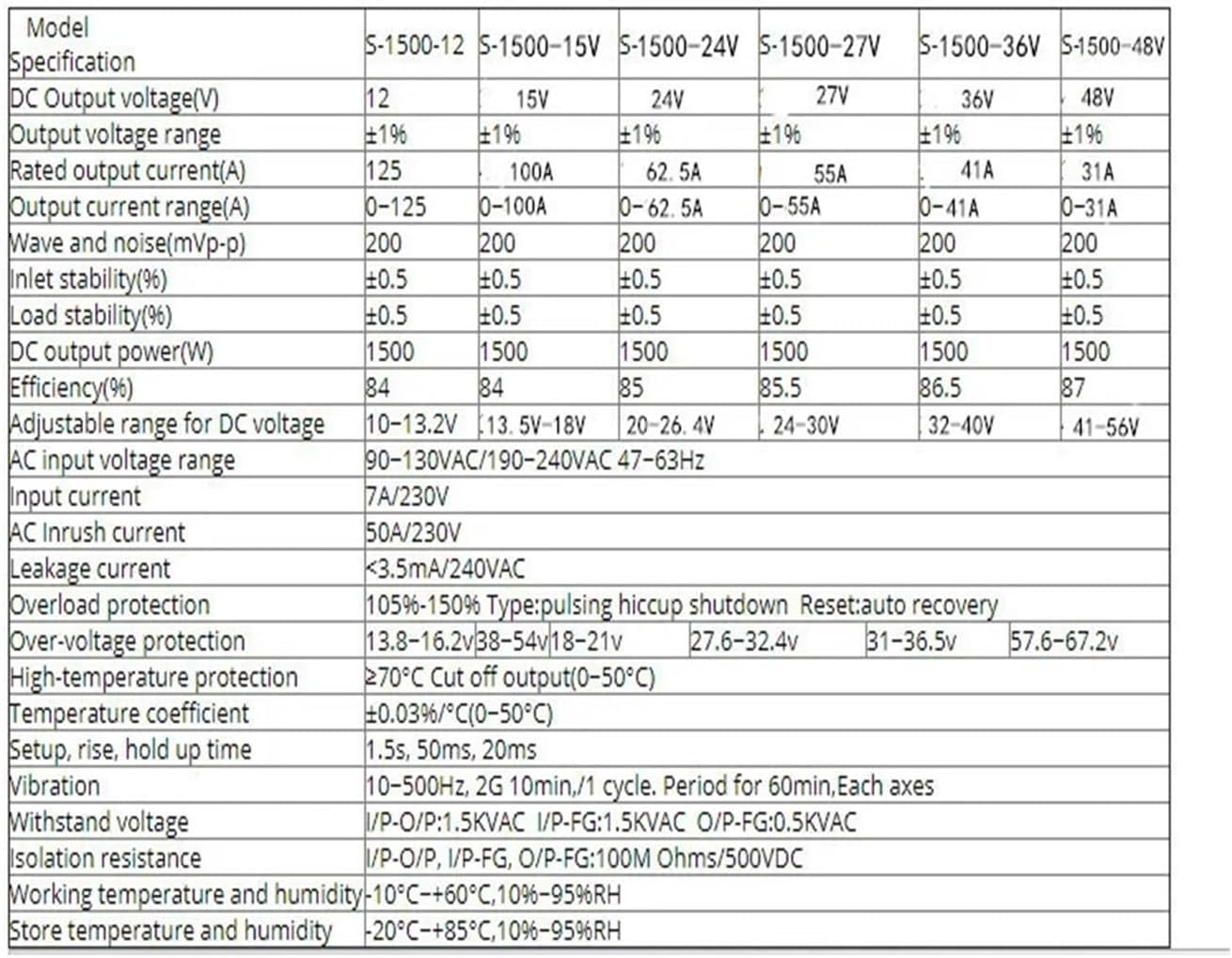
Figure 9.1: Illustrative specification table for S-1500 series models (part 1), showing various voltage and current configurations.
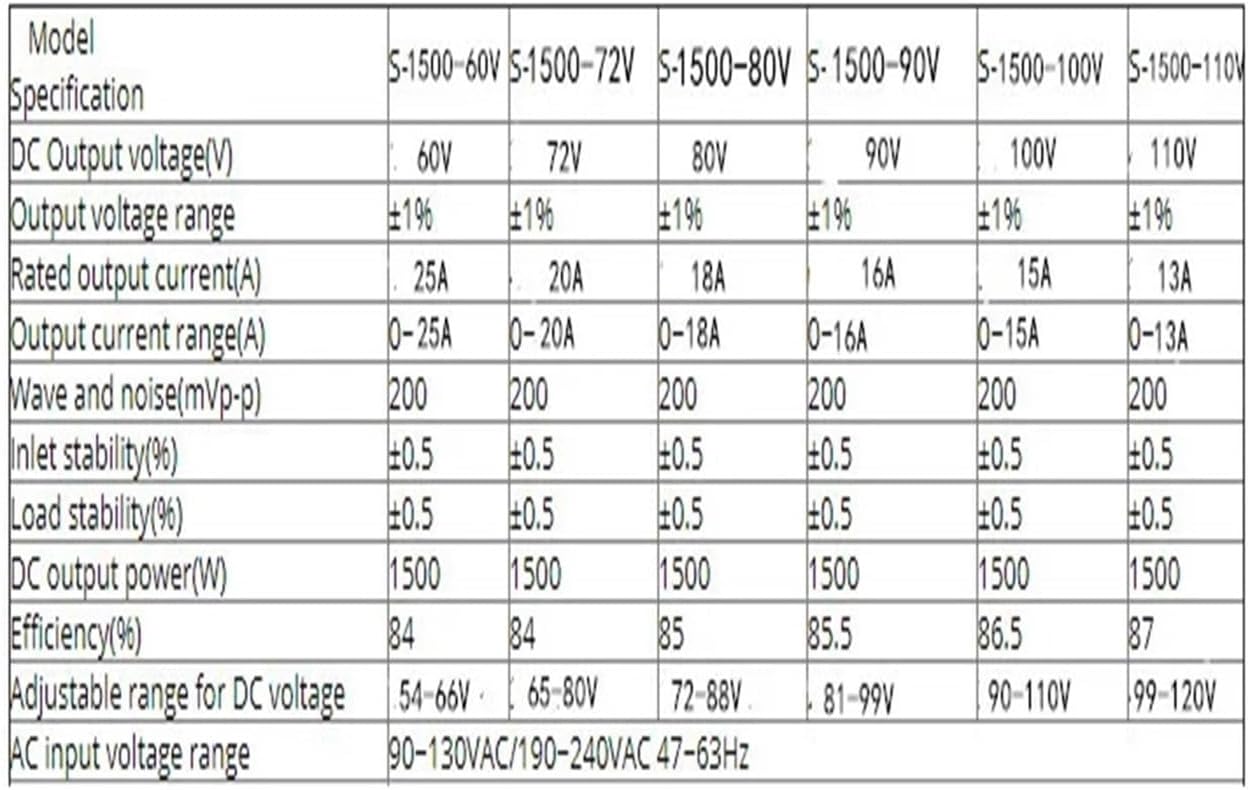
Figure 9.2: Illustrative specification table for S-1500 series models (part 2), detailing higher voltage configurations and common electrical parameters.
10. Warranty and Support
For warranty information and technical support, please refer to the documentation provided with your purchase or contact the manufacturer directly. Warranty terms typically cover manufacturing defects for a specified period from the date of purchase.
When contacting support, please have your product model number (S-2000W) and purchase details ready.
Related Documents - S-2000W (380V, 0-80V 0-25A)
 |
Small Frequency Converter Operation Manual: Installation, Operation, and Technical Specifications This operation manual provides detailed instructions for the installation, wiring, commissioning, and operation of small frequency converters. It includes technical specifications, safety precautions, and parameter tables for various models. |
 |
Harristian HRSTI 320 Серия: Руководство по эксплуатации преобразователя частоты Подробное руководство по эксплуатации для преобразователей частоты серии Harristian HRSTI 320. Ознакомьтесь с установкой, настройкой и безопасным использованием. |
 |
Harristian HRSTI 320 Series Operation Manual: Small Frequency Converters Explore the Harristian HRSTI 320 Series Operation Manual for detailed technical data, installation guides, operating procedures, and troubleshooting for their small frequency converters (VFDs), available in 220V and 400V models. |
 |
ISIGMA CEE Red Socket Extend Cable User Guide User guide and safety precautions for the ISIGMA CEE Red Socket Extend Cable (16A, 380V, 0.3m). |
 |
Techtop Topdrive350 Series VFD Quick Startup Guide This document provides a quick start guide for the Techtop TD350 Series Variable Frequency Drive (VFD). It covers essential information including safety precautions, nameplate identification, power and control connections, keypad operation, drive initialization, auto-tuning, resetting parameters, and a list of frequently used parameters. Designed for industrial applications, it helps users quickly set up and operate the TD350 VFD. |
 |
INVT Goodrive880 Series Active Rectifier Component Hardware Manual Discover the INVT Goodrive880 Series Active Rectifier Component with this comprehensive hardware manual. It covers product specifications, configuration, electrical principles, wiring, and dimensions for industrial VFD systems. |
Ask a question about this manual
Ask about setup, troubleshooting, compatibility, parts, safety, or missing instructions. Manuals+ will review the question and use this page’s manual context to help answer it.