
UNIQUITE 3391B2
UNIQUITE 9-Drawer Dresser with LED Light and Power Outlet - Instruction Manual
Model: 3391B2
Important Safety Information
Please read all instructions carefully before assembly and use. Keep this manual for future reference.
- Anti-Tipping Kit: Always install the included anti-tipping kit to securely fasten the dresser to the wall. This is crucial to prevent accidental tipping, especially in households with children or pets.
- Weight Distribution: Distribute weight evenly across drawers and shelves. Do not overload drawers.
- Electrical Safety: Ensure the power outlet is connected to a properly grounded electrical source. Avoid exposing electrical components to moisture.
- Assembly: Two people are recommended for assembly to ensure safety and ease of construction.
- Placement: Place the dresser on a flat, stable surface.

Image Description: This image illustrates the importance of the anti-tipping design. It shows a diagram of a dresser securely anchored to a wall with an anti-tipping strap, preventing it from falling forward. Below it, a diagram shows a dresser tipping over without the anti-tipping mechanism, emphasizing the safety risk.
Package Contents
Before beginning assembly, please verify that all parts and hardware listed below are present and undamaged. If any items are missing or damaged, please contact customer service.
Parts List
| Part | Description | Quantity |
|---|---|---|
| A | Top Panel (with power outlet cutout) | 1 |
| B | Back Panel (top shelf) | 1 |
| C | Bottom Panel (top shelf) | 1 |
| D | Left Side Panel | 1 |
| E | Right Side Panel | 1 |
| F | Middle Support Panel | 2 |
| G | Horizontal Support Bar | 3 |
| H | Vertical Divider (top shelf) | 3 |
| I | Back Panel (main body) | 2 |
| J | Bottom Base Panel | 1 |
| K | Top Shelf Back Panel | 1 |
| L | Drawer Side Panel (Left) | 9 |
| M | Drawer Side Panel (Right) | 9 |
| N | Drawer Front Panel | 9 |
| O | Drawer Back Panel | 9 |
| P | Drawer Bottom Panel | 9 |
Hardware List
| Item # | Description | Quantity |
|---|---|---|
| 1 | Cam Lock Screw | 16 |
| 2 | Wooden Dowel | 16 |
| 3 | Small Screw | 38 |
| 4 | Cam Lock | 88 |
| 5 | Large Screw | 88 |
| 6 | Drawer Handle | 9 |
| 7 | Handle Screw | 18 |
| 8 | Back Panel Nail | 24 |
| 9 | Back Panel Screw | 26 |
| 10 | Drawer Slide Screw | 111 |
| 11 | Drawer Slide (Left) | 9 |
| 12 | Drawer Slide (Right) | 9 |
| 13 | Main Body Slide (Left) | 9 |
| 14 | Main Body Slide (Right) | 9 |
| 15 | LED Strip Clip | 3 |
| 16 | LED Strip Clip Screw | 6 |
| 17 | Cable Management Clip | 8 |
| 18 | Power Outlet Unit | 1 |
| 19 | Anti-Tipping Bracket | 1 |
| 20 | LED Light Strip | 1 |
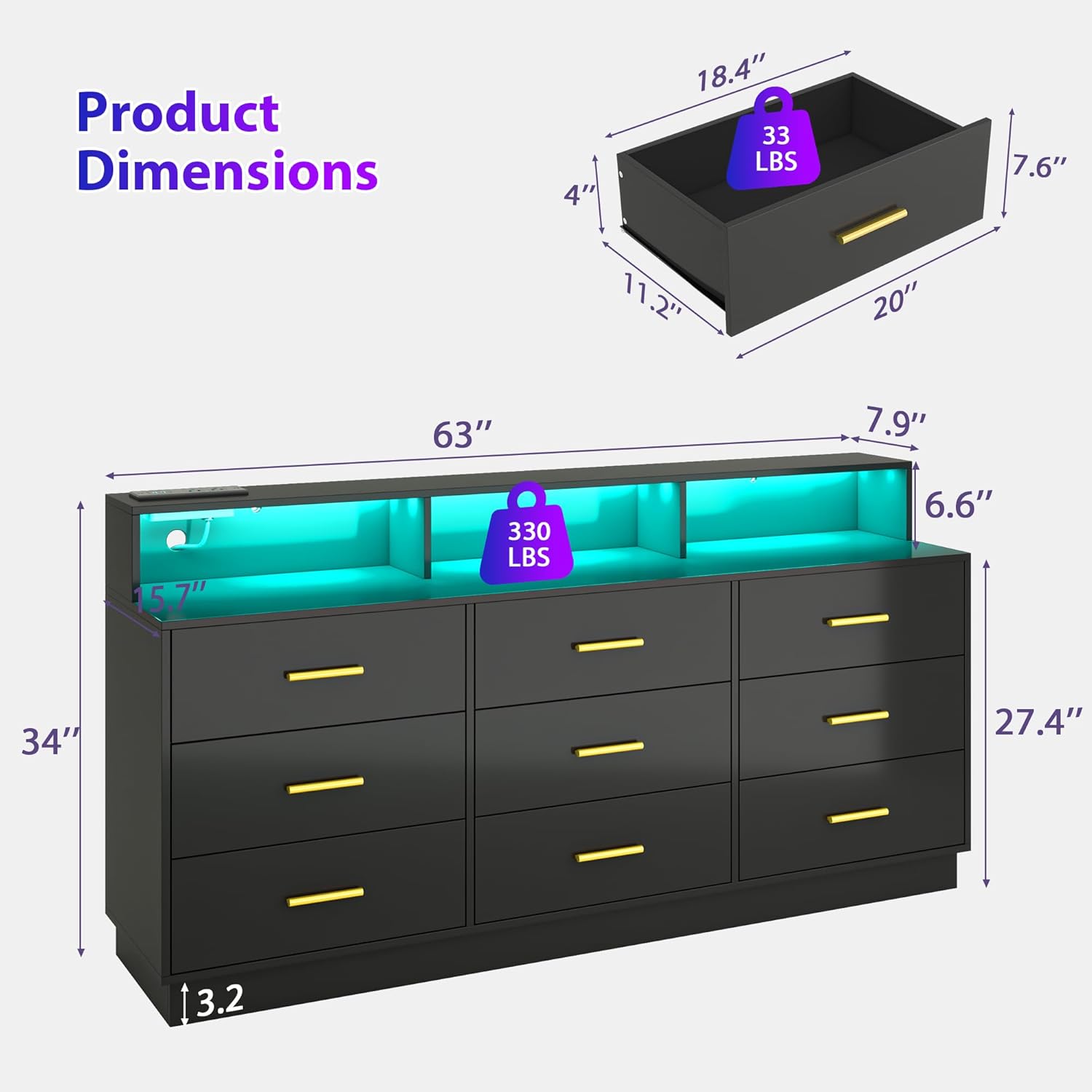
Image Description: This image provides an exploded view of the dresser, detailing each wooden panel and hardware piece required for assembly. Each component is labeled with a letter (for panels) or a number (for hardware) to correspond with the parts and hardware lists.
Assembly Instructions
Follow these steps carefully for proper assembly. It is highly recommended to watch the official installation video for visual guidance.
Step-by-Step Assembly Video
Video Description: This official UNIQUITE installation video provides a detailed, step-by-step guide for assembling the 9-drawer dresser. It demonstrates how to connect panels, install drawer slides, attach handles, and integrate the LED lighting and power outlet components.
General Assembly Overview
- Prepare Components: Lay out all numbered parts and hardware on a clean, soft surface to prevent scratches.
- Assemble Drawers: Construct each of the nine drawers by connecting the side (L, M), front (N), and back (O) panels with screws (3, 4, 5) and dowels (2). Secure the bottom panel (P) and attach the handles (6) using handle screws (7).
- Install Drawer Slides: Attach the drawer slides (11, 12) to the assembled drawers and the main body side panels (D, E, F) using drawer slide screws (10).
- Construct Main Body: Assemble the main dresser frame using the side panels (D, E), middle support panels (F), and horizontal support bars (G). Secure with cam locks (4) and screws (5).
- Install Top Shelf Unit: Assemble the top shelf unit using panels A, B, C, K, and vertical dividers H. Install the LED light strip (20) using clips (15) and screws (16). Secure the power outlet unit (18) into its designated cutout.
- Attach Top Shelf to Main Body: Carefully place and secure the assembled top shelf unit onto the main dresser body using screws (5).
- Insert Drawers: Slide the completed drawers into their respective slots on the main body.
- Install Anti-Tipping Kit: Secure the anti-tipping bracket (19) to the back of the dresser and to a wall stud using appropriate wall anchors and screws.
Operating Instructions
Drawer Usage
The dresser features nine smooth-gliding drawers designed for organized storage of clothing, accessories, and other personal items. To open and close, gently pull or push the gold-colored handles. Avoid forcing drawers to prevent damage to the slides.
LED Lighting System
The integrated RGB LED lighting strips offer customizable illumination for your space. You can control the lighting in two ways:
- Smartphone App Control: Download the compatible smartphone application to access 16 million colors, adjust brightness levels, and select dynamic lighting effects to match your mood or activity.
- Key Remote Control: Use the provided key remote to switch between colors, adjust brightness, and activate various lighting modes.
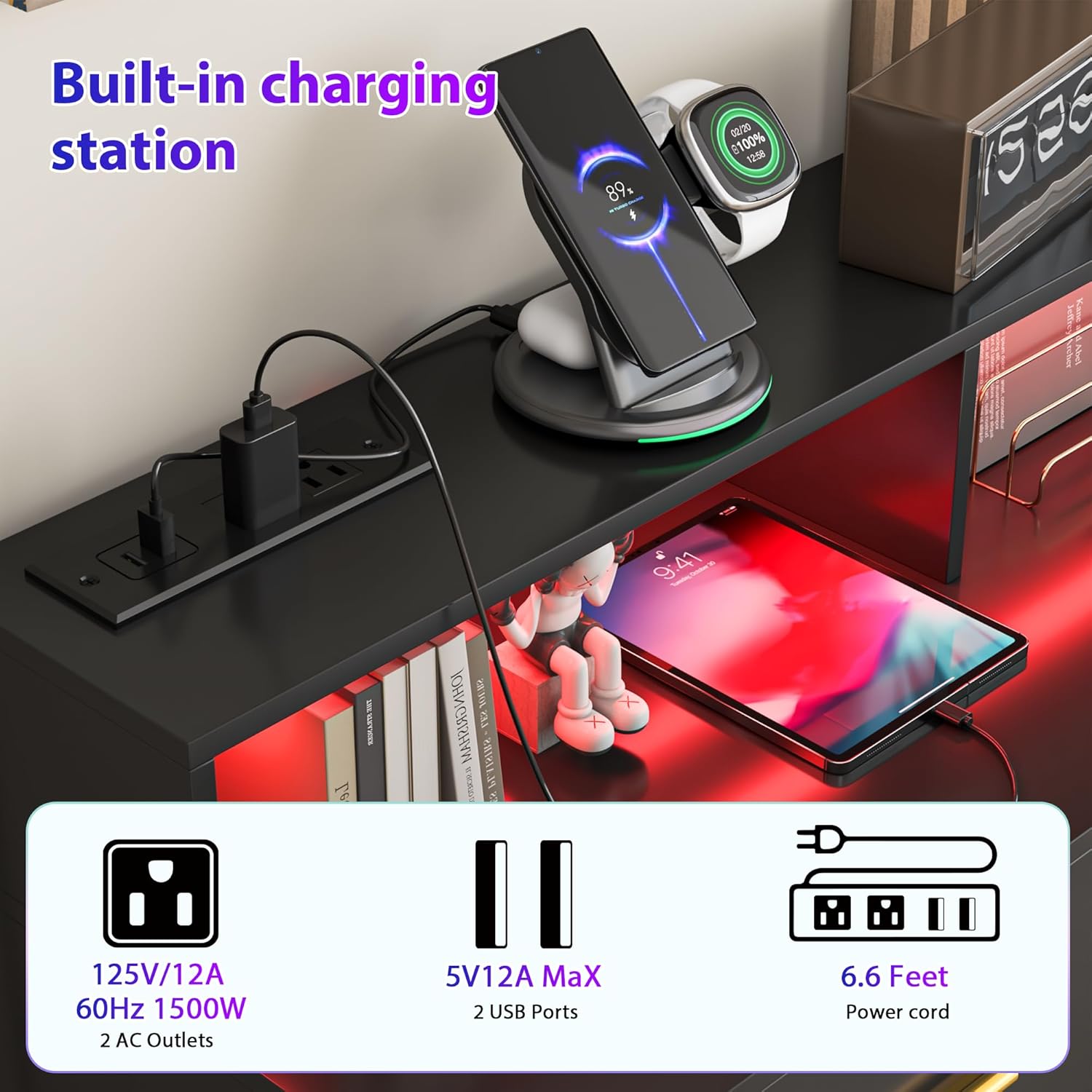
Image Description: This image displays the dresser with its top shelf illuminated by multi-color LED lights, demonstrating the adjustable RGB feature. Icons for key remote control, RGB color selection, light mode, music mode, and smartphone app control are shown, highlighting the various ways to operate the lighting system.
Built-in Power Outlet
The dresser includes a convenient power outlet with 2 AC outlets and 2 USB ports. This allows for easy charging of electronic devices and powering small appliances directly from the dresser top.
- AC Outlets: Provide standard power for devices like lamps, hair dryers, or small electronics.
- USB Ports: Ideal for charging smartphones, tablets, smartwatches, and other USB-powered devices.
- Power Cord: The unit comes with a 6.6-foot power cord for flexible placement.

Image Description: A close-up view of the dresser's built-in charging station, featuring two standard AC power outlets and two USB ports. A smartphone and a tablet are shown charging, illustrating the convenience of the integrated power solution.
Maintenance
Regular maintenance helps prolong the life and appearance of your dresser.
- Cleaning: Wipe surfaces with a soft, damp cloth. Avoid using abrasive cleaners, harsh chemicals, or excessive moisture, as these can damage the painted finish.
- Hardware Check: Periodically check all screws, cam locks, and other fasteners to ensure they remain tight. Retighten as necessary.
- Drawer Slides: If drawers become stiff, a small amount of silicone-based lubricant can be applied to the drawer slides.
- LED Strips: Ensure the LED light strips are securely attached and free from dust.
- Power Outlet: Keep the power outlets and USB ports free from dust and debris.
Troubleshooting
Refer to this section for common issues and their solutions.
Drawers not sliding smoothly
- Check if the drawer slides are properly aligned and securely fastened.
- Ensure there are no obstructions in the drawer tracks.
- Verify that the drawer is not overloaded or unevenly weighted.
LED lights not working
- Confirm that the dresser's power cord is securely plugged into a working wall outlet.
- Check the connection of the LED strip to the power source.
- If using a remote, ensure its battery is functional. If using an app, verify Bluetooth/Wi-Fi connection.
Power outlet not functioning
- Ensure the dresser is plugged into a live wall outlet.
- Check your home's circuit breaker to see if it has tripped.
- Test the outlet with another device to confirm it's not an issue with the device itself.
Dresser wobbles
- Verify that all assembly screws and cam locks are fully tightened.
- Ensure the dresser is placed on a completely level surface. Adjust if necessary.
- Confirm that the anti-tipping kit is correctly installed and securely anchored to the wall.
Product Specifications
- Brand: UNIQUITE
- Model Number: 3391B2
- Dimensions: 15.75"D x 63"W x 34"H
- Material: Wood (MDF)
- Finish Type: Painted
- Number of Drawers: 9
- Power Outlet: 2 AC outlets, 2 USB ports (125V/12A, 60Hz, 1500W)
- Lighting: Adjustable RGB LED strips
- Item Weight: Approximately 113.9 pounds

Image Description: This image provides a detailed diagram of the dresser's dimensions, including overall width (63"), height (34"), and depth (15.8"). It also shows the internal dimensions of the drawers and the weight capacity of the top surface (330 lbs) and individual drawers (33 lbs).
Warranty and Support
UNIQUITE is committed to providing quality products and customer satisfaction. If you encounter any issues with your product, such as scratches, breakage, or missing parts, please do not hesitate to contact our customer service team.
Our professional customer service team will respond within 24 hours to provide a satisfactory solution. Please have your purchase details and model number (3391B2) ready when contacting support.
Extended protection plans may be available for additional coverage beyond the standard warranty. Please refer to your purchase documentation for details on available protection plans.
Ask a question about this manual
Ask about setup, troubleshooting, compatibility, parts, safety, or missing instructions. Manuals+ will review the question and use this page’s manual context to help answer it.