
BAWAZINA S-2000W (110VAC, 0-60V 0-33)
CHUX 2000W Switching Power Supply User Manual
Model: BAWAZINA S-2000W (110VAC, 0-60V 0-33)
Brand: BAWAZINA
1. Introduction
This manual provides essential information for the safe and efficient operation of your CHUX 2000W Switching Power Supply. This high-power AC to DC converter offers adjustable output voltage and current, making it suitable for a wide range of applications requiring stable and reliable power.
Please read this manual thoroughly before installation and operation to ensure proper usage and to prevent damage to the unit or connected devices.
2. Safety Information
Always observe the following safety precautions to prevent electric shock, fire, or damage to the power supply and connected equipment:
- Ensure the input voltage matches the power supply's rating (110VAC for this model).
- Do not operate the power supply in wet or damp conditions.
- Ensure proper ventilation around the unit to prevent overheating.
- Do not open the casing of the power supply. There are no user-serviceable parts inside.
- Disconnect power before making any connections or adjustments.
- Use appropriate wiring and connectors for the power rating.
- Keep out of reach of children.
3. Product Features
The CHUX 2000W Switching Power Supply is designed with advanced features for reliable performance:
- High Power Output: Up to 2000W.
- Adjustable Output: Provides adjustable DC voltage (0-60V for this model) and current (0-33A for this model).
- Wide Input Frequency: 47~63Hz.
- Compact Size: Approximately 291 x 132 x 68 mm.
- Multiple Protection Mechanisms:
- Overcurrent Protection: Safeguards against excessive current draw.
- Overload Protection: Prevents damage from exceeding the power supply's capacity.
- Short Circuit Protection: Automatically shuts down in case of a short circuit.
- Overvoltage Protection: Protects connected devices from voltage spikes.

Figure 3.1: Built-in Protection Features
This image illustrates the four key protection mechanisms integrated into the power supply: overcurrent protection, overload protection, short circuit protection, and overvoltage protection. These features ensure the safety and longevity of both the power supply and the connected equipment.
4. Setup and Installation
Follow these steps for proper setup and installation:
- Unpacking: Carefully remove the power supply from its packaging and inspect for any signs of damage.
- Placement: Place the power supply on a stable, flat surface with adequate ventilation. Ensure no vents are blocked.
- Input Power Connection:
- Connect the AC input power cord to the designated input terminals (L, N, FG) on the power supply. Ensure the input voltage matches the unit's specification (110VAC for this model).
- Secure all connections firmly.
- Output Power Connection:
- Connect your load (device to be powered) to the DC output terminals (+V, -V).
- Observe correct polarity: positive to positive, negative to negative.
- Ensure all output connections are secure.

Figure 4.1: Power Supply Overview
This image provides a general view of the power supply unit, highlighting its sturdy construction and the location of the input and output terminals. Proper connection to these terminals is crucial for safe operation.
5. Operating Instructions
This power supply features adjustable voltage and current outputs.
- Power On: After all connections are made, connect the AC input power cord to a suitable power outlet. The unit will power on.
- Adjusting Voltage:
- Locate the "Adjust Voltage" potentiometer (typically a small screw-type adjustment).
- Using a small screwdriver, carefully turn the potentiometer clockwise to increase the output voltage or counter-clockwise to decrease it.
- Monitor the output voltage using an external multimeter for precise adjustment, as the unit may not have an integrated display.
- Adjusting Current:
- Locate the "Adjust Current" potentiometer.
- Turn this potentiometer to set the maximum output current limit. This is crucial for protecting your connected load.
- It is recommended to set the current limit slightly above the maximum expected current draw of your device.
- Operation: Once voltage and current are set, the power supply will deliver stable DC power to your connected load.

Figure 5.1: Voltage and Current Adjustment Points
This image highlights the specific locations of the adjustment potentiometers for both output voltage and output current. These are typically small, recessed screws that require a precision screwdriver for fine-tuning.
6. Maintenance
To ensure the longevity and optimal performance of your power supply:
- Cleaning: Regularly clean the exterior of the unit with a soft, dry cloth. Do not use liquid cleaners or solvents.
- Ventilation: Ensure the ventilation openings are free from dust and obstructions. Use compressed air to clear dust from cooling fins if necessary.
- Connections: Periodically check all input and output connections to ensure they remain tight and secure.
- Storage: If storing the unit for an extended period, disconnect it from power and store it in a cool, dry place.
7. Troubleshooting
If you encounter issues with your power supply, refer to the following common problems and solutions:
| Problem | Possible Cause | Solution |
|---|---|---|
| No output voltage/power |
|
|
| Output voltage is unstable or incorrect |
|
|
| Unit is hot to the touch |
|
|
If the problem persists after trying these solutions, please contact customer support.
8. Specifications
Detailed specifications for the BAWAZINA CHUX 2000W Switching Power Supply (110VAC, 0-60V 0-33 model):
| Feature | Specification |
|---|---|
| Brand | BAWAZINA |
| Model Number | S-2000W |
| Output Power | 2000W |
| Input Voltage (AC) | 110VAC (for this specific model) |
| Output Voltage (DC) | 0-60V (Adjustable) |
| Output Current (DC) | 0-33A (Adjustable) |
| Output Frequency | 47~63Hz |
| Dimensions (L*W*H) | 291 x 132 x 68 mm (approx.) |
| Item Weight | 7.1 ounces (200 Grams) |
| Overload Protection | 105%-150% Type: pulsing hiccup shutdown, Reset auto recovery |
| High-temperature protection | ≥70°C Cut off output (0-50°C) |
| Temperature coefficient | ±0.03%/°C (0-50°C) |
| Setup, rise, hold up time | 1.5s, 50ms, 20ms |
| Vibration | 10-500Hz, 2G 10min./1 cycle. Period for 60min. Each axes |
| Withstand voltage | I/P-O/P:1.5KVAC I/P-FG:1.5KVAC O/P-FG:0.5KVAC |
| Isolation resistance | I/P-O/P, I/P-FG, O/P-FG:100M Ohms/500VDC |
| Working temperature and humidity | -10°C~+60°C, 10%-95%RH |
| Store temperature and humidity | -20°C~+85°C, 10%-95%RH |
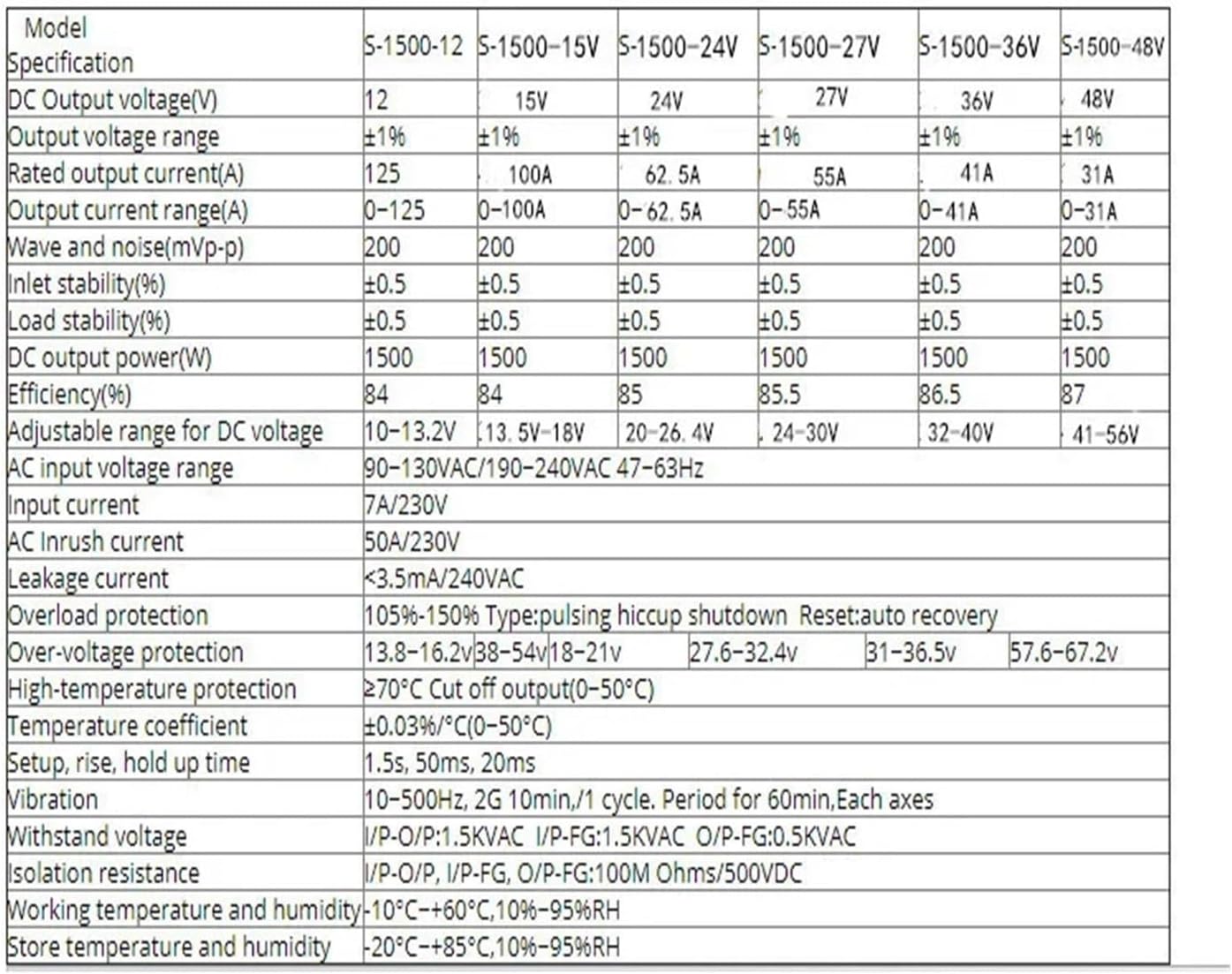
Figure 8.1: Reference Specifications Table (Part 1)
This table provides comprehensive technical specifications for various models within the S-1500 series. While the specific model covered by this manual is the S-2000W, this table offers general reference for similar power supply characteristics such as DC output voltage, rated output current, efficiency, and protection parameters. Please refer to the table above for the exact specifications of your S-2000W model.

Figure 8.2: Reference Specifications Table (Part 2)
This is the second part of the S-1500 series specifications table, extending to higher output voltage models. It details parameters such as output voltage range, rated current, and AC input voltage range. This table is for reference only; consult the main specifications table for your S-2000W model.
9. Warranty and Support
The BAWAZINA CHUX 2000W Switching Power Supply comes with a standard manufacturer's warranty. For specific warranty terms and conditions, please refer to the documentation provided with your purchase or contact the seller directly.
Customer Support:
For technical assistance, troubleshooting beyond this manual, or warranty claims, please contact your point of purchase or the manufacturer, BAWAZINA. Please have your model number (S-2000W) and purchase details ready when contacting support.
Protection plans are also available for purchase, offering extended coverage. For details, please refer to the product listing or contact your retailer.
Ask a question about this manual
Ask about setup, troubleshooting, compatibility, parts, safety, or missing instructions. Manuals+ will review the question and use this page’s manual context to help answer it.