
1. Introduction
This manual provides essential information for the safe and efficient operation of your BAWAZINA CHUX S-2000W Adjustable AC to DC Switching Power Supply. This unit is designed to convert AC input voltage to a stable, adjustable DC output, suitable for various applications requiring precise voltage and current control. The specific model covered here operates with a 220VAC input and provides an adjustable output from 0-80V DC at up to 25A.
Key features include high efficiency, compact design, and multiple protection mechanisms to ensure reliable performance.
2. Safety Instructions
WARNING: Failure to follow these safety instructions may result in electric shock, fire, or serious injury.
- Professional Installation: Installation and wiring should only be performed by qualified personnel.
- Proper Grounding: Ensure the power supply is properly grounded to prevent electric shock. Connect the FG (Frame Ground) terminal to an earth ground.
- Input Voltage: Verify that the input voltage matches the specifications of your unit (220VAC for this model). Incorrect voltage can cause damage.
- Ventilation: Ensure adequate ventilation around the power supply. Do not block ventilation openings. Overheating can lead to malfunction or fire.
- Environment: Do not operate the power supply in environments with high humidity, dust, corrosive gases, or flammable materials.
- Load Connection: Connect the load to the output terminals only after the input power is disconnected. Ensure correct polarity.
- No User Serviceable Parts: Do not attempt to open or repair the power supply. Refer all servicing to qualified service personnel.
- Emergency Shutdown: Know how to quickly disconnect power in an emergency.
3. Product Features and Protection
The S-2000W power supply incorporates several features and protection mechanisms for safe and reliable operation:
- Adjustable Output: Independent adjustment for both output voltage and current.
- Overcurrent Protection (OCP): Automatically limits output current to prevent damage to the power supply or connected load.
- Overload Protection (OLP): Protects the unit from excessive power draw.
- Short Circuit Protection (SCP): Shuts down output in case of a short circuit to prevent damage.
- Overvoltage Protection (OVP): Prevents output voltage from exceeding a safe limit.
- High-Temperature Protection: Shuts down the unit if internal temperature exceeds safe operating limits.

Figure 1: Overview of the power supply's protection features. These include safeguards against overcurrent, overload, short circuits, and overvoltage conditions.
4. Setup and Wiring
Before connecting the power supply, ensure all power sources are disconnected.
- Mounting: Securely mount the power supply in a well-ventilated area, ensuring sufficient clearance for airflow around all sides.
- Input Wiring (AC):
- Connect the Live (L) wire from your 220VAC source to the 'L' terminal.
- Connect the Neutral (N) wire from your 220VAC source to the 'N' terminal.
- Connect the Frame Ground (FG) wire to a reliable earth ground.
- Ensure all connections are tight and secure.
- Output Wiring (DC):
- Connect the positive (+) terminal of your load to the '+' output terminal of the power supply.
- Connect the negative (-) terminal of your load to the '-' output terminal of the power supply.
- Double-check polarity to prevent damage to the load or power supply.
- Initial Check: Before applying power, visually inspect all wiring for correctness and security. Ensure no bare wires are exposed or touching.

Figure 2: Output terminals and adjustment points. The red arrow points to the 'Adjust Voltage' potentiometer, and the other red arrow points to the 'Adjust Current' potentiometer.
5. Operating Instructions
Once the power supply is correctly wired and mounted, you can begin operation:
- Power On: Connect the AC input power. The power supply's indicator light (if present) should illuminate.
- Adjusting Voltage: Use a small screwdriver to carefully turn the 'Adjust Voltage' potentiometer (refer to Figure 2). Turn clockwise to increase voltage, counter-clockwise to decrease. Monitor the output voltage with a multimeter connected to the output terminals.
- Adjusting Current: To set the current limit, first short-circuit the output terminals (briefly and safely, using an appropriate current meter in series, or connect a known resistive load). Then, turn the 'Adjust Current' potentiometer (refer to Figure 2) to set the desired maximum output current. Turn clockwise to increase the current limit, counter-clockwise to decrease. Remove the short circuit or resistive load after adjustment.
- Connecting Load: With the desired voltage and current limits set, connect your DC load. The power supply will deliver power up to the set voltage and current limits.
- Monitoring: Continuously monitor the output voltage and current, especially during initial operation, to ensure stable performance and prevent damage to your load.
- Power Off: To shut down, first disconnect the load, then disconnect the AC input power.
6. Maintenance
Regular maintenance ensures the longevity and optimal performance of your power supply.
- Cleaning: Periodically clean the exterior of the power supply with a soft, dry cloth. Ensure the unit is powered off and disconnected from all sources before cleaning. Do not use liquid cleaners or solvents.
- Ventilation: Regularly check that the ventilation openings are clear of dust and debris. Use compressed air to gently clear any blockages.
- Connections: Periodically inspect all input and output wiring connections for tightness and signs of wear or corrosion. Re-tighten if necessary.
- Environmental Conditions: Ensure the operating environment remains within the specified temperature and humidity ranges.
7. Troubleshooting
If you encounter issues with your power supply, refer to the following common troubleshooting steps:
- No Output Voltage/Current:
- Check if the AC input power is connected and active.
- Verify all input and output wiring connections are secure.
- Ensure the voltage and current adjustment potentiometers are not set to zero.
- Check for tripped circuit breakers or blown fuses in your AC supply line.
- If the unit has an indicator light, check its status.
- Output Voltage/Current is Unstable:
- Ensure the load is stable and not drawing intermittent current.
- Check for loose connections on both input and output.
- Verify the power supply is not operating in an excessively hot environment, which could trigger thermal protection.
- Unit Shuts Down Unexpectedly:
- This could indicate activation of a protection feature (overload, overcurrent, overvoltage, or high-temperature).
- Reduce the load or ensure it is within the power supply's specifications.
- Check for proper ventilation and clear any obstructions.
- Inspect the load for short circuits or excessive current draw.
If the problem persists after performing these checks, contact customer support for assistance.
8. Specifications
The following table details the technical specifications for the BAWAZINA CHUX S-2000W Switching Power Supply (220VAC, 0-80V 0-25A model):
| Parameter | Specification |
|---|---|
| Model Number | S-2000W |
| Input Voltage (AC) | 220VAC (Specific variant) |
| Output Voltage Range (DC) | 0-80V |
| Output Current Range (DC) | 0-25A |
| Rated Output Power | 2000W |
| Output Frequency | 47~63Hz |
| Size (L*W*H) | 291mm * 132mm * 68mm |
| Wave and Noise (mVp-p) | 200 |
| Inlet Stability (%) | ±0.5 |
| Load Stability (%) | ±0.5 |
| Efficiency (%) | 84-87 (depending on model/output) |
| Overload Protection | 105%-150% Type: pulsing hiccup shutdown, Reset: auto recovery |
| High-Temperature Protection | ≥70°C Cut off output (0-50°C) |
| Working Temperature & Humidity | -10°C ~ +60°C, 10%-95%RH (non-condensing) |
| Storage Temperature & Humidity | -20°C ~ +85°C, 10%-95%RH (non-condensing) |
For detailed specifications across different voltage/current configurations, please refer to the tables below (Figures 3 and 4).
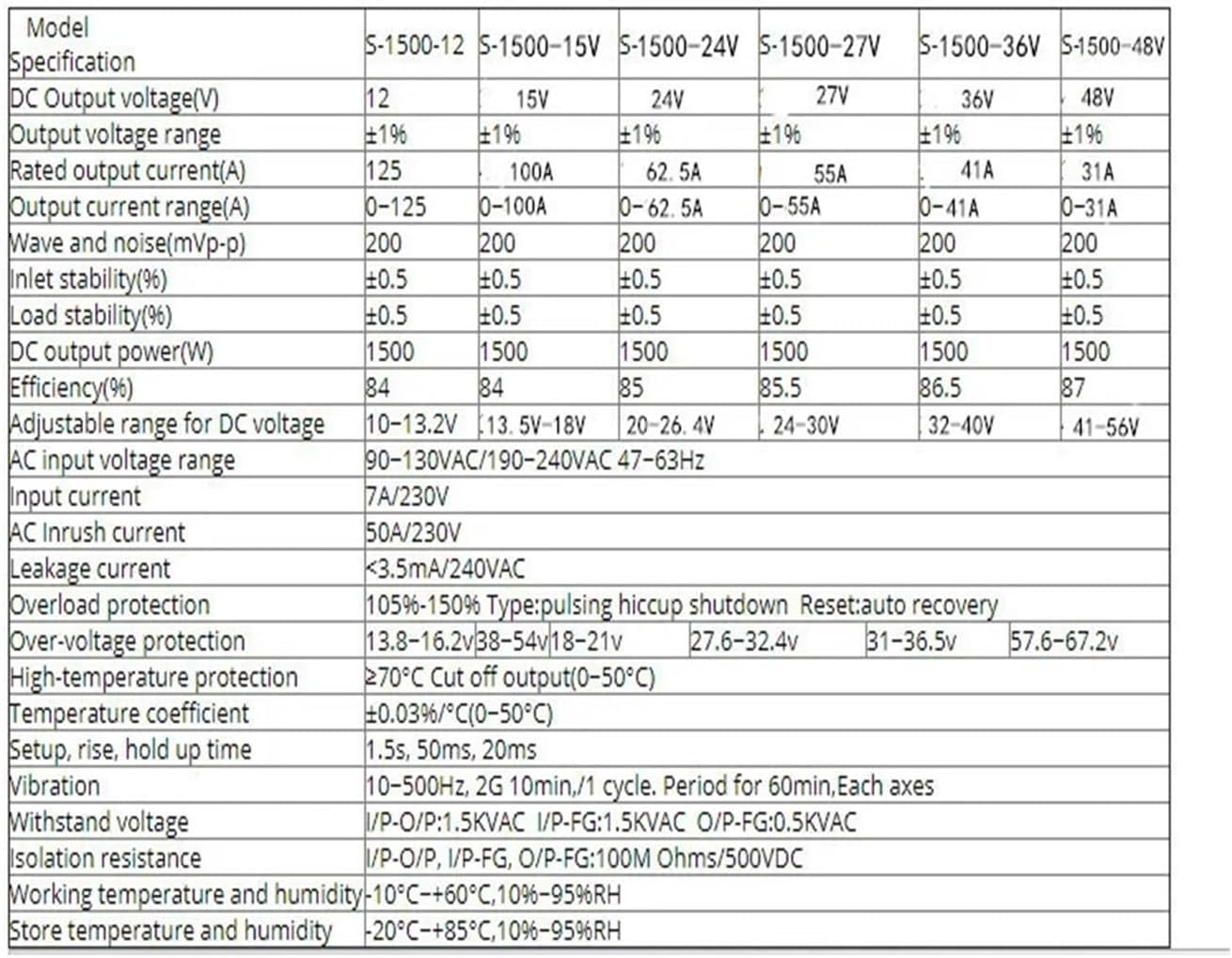
Figure 3: Detailed specifications for S-1500 series models (Part 1). Note: While this table shows S-1500 models, the general parameters are indicative of the S-2000W series. Specific values for the S-2000W 0-80V 0-25A model are provided in the text above.
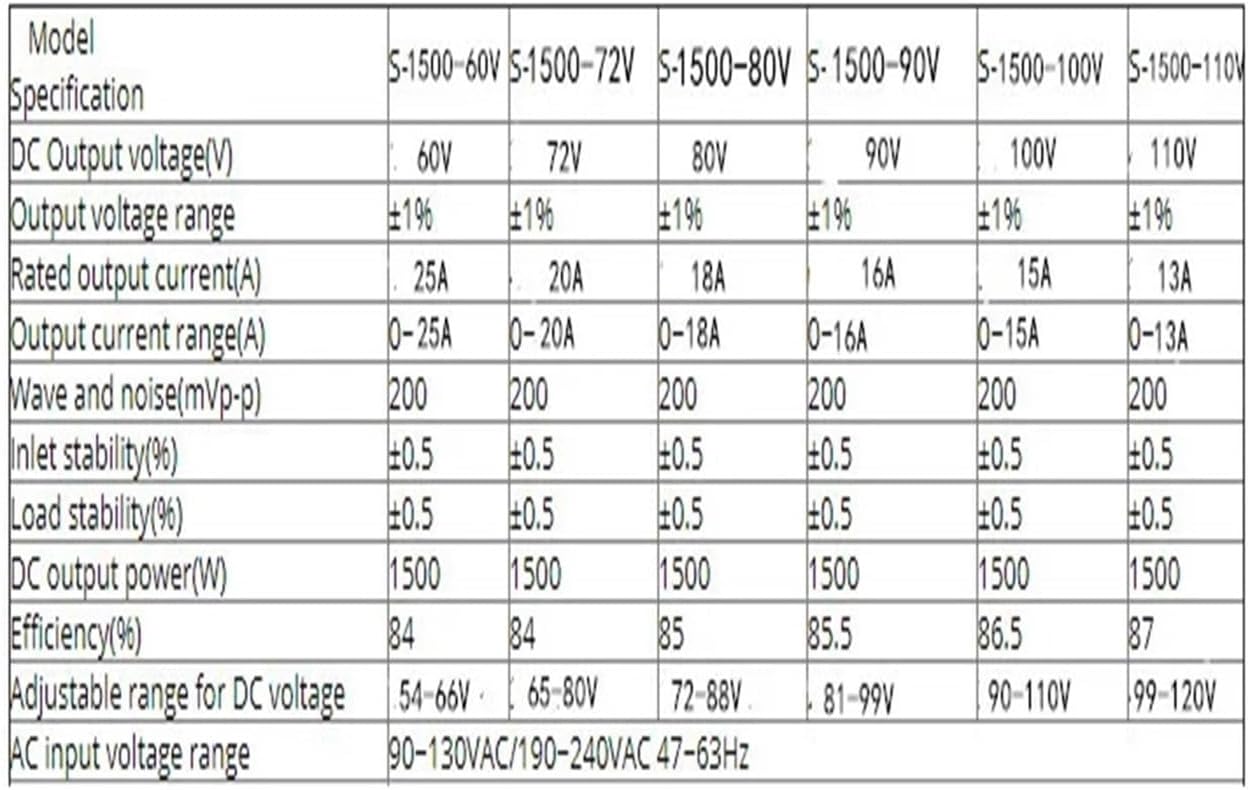
Figure 4: Detailed specifications for S-1500 series models (Part 2). This table extends the specifications to higher voltage outputs.
9. Warranty and Support
Warranty: This BAWAZINA product is covered by a limited manufacturer's warranty against defects in materials and workmanship. Please refer to your purchase documentation for specific warranty terms and duration. The warranty does not cover damage caused by improper installation, misuse, unauthorized modifications, or operation outside of specified environmental conditions.
Customer Support: For technical assistance, troubleshooting beyond this manual, or warranty claims, please contact your retailer or the manufacturer directly. When contacting support, please have your product model number (S-2000W) and purchase information readily available.
Manufacturer: BAWAZINA