
1. Introduction
This manual provides essential information for the safe and effective use of your new xbvxzvbn BP21625A 21.6V 2.5Ah Li-ion replacement battery. This battery is designed for compatibility with Midea P5 Pro handheld vacuum cleaners (BP21625 series). Please read this manual thoroughly before installation and use to ensure optimal performance and safety.

Image 1.1: Top view of the xbvxzvbn BP21625A replacement battery, clearly displaying the "21.6V" marking and release button.
2. Safety Information
Your safety is paramount. Please observe the following precautions:
- Compatibility Check: Always ensure the battery model (BP21625A) and part number match your device (Midea P5 Pro, BP21625 series) before installation. If unsure, consult the manufacturer or seller.
- Cooling Period: After heavy use, allow the battery to cool down for 15-30 minutes before charging. This helps maintain battery health and longevity.
- Protection Circuits: The battery is equipped with built-in over-current, over-charge, over-voltage, over-temperature, and short-circuit protection circuits for safe operation.
- Storage: Store the battery in a cool, dry place away from direct sunlight, heat sources, and flammable materials.
- Disposal: Do not dispose of batteries in household waste. Follow local regulations for proper recycling of Li-ion batteries.
- Damage: Do not use the battery if it shows signs of damage, swelling, or leakage.
- Disassembly: Do not attempt to disassemble, modify, or repair the battery.
3. Product Features
The xbvxzvbn BP21625A replacement battery offers the following features:
- Voltage: 21.6V rated voltage.
- Capacity: 2.5Ah (54Wh) large capacity for extended cleaning time.
- Type: Rechargeable Lithium-ion (Li-ion) battery.
- Compatibility: Specifically designed for Midea P5 Pro handheld vacuum cleaners (BP21625 series).
- Safety: Integrated protection against over-current, over-charge, over-voltage, over-temperature, and short-circuit.

Image 3.1: The battery highlighting its compatibility with Midea P5 Pro (BP21625 series) vacuum cleaners.
4. Setup and Installation
Follow these steps to safely install the replacement battery:
- Power Off: Ensure your Midea P5 Pro handheld vacuum cleaner is completely turned off and unplugged from any charging source.
- Locate Battery: Identify the battery compartment on your vacuum cleaner. Refer to your vacuum cleaner's original manual if needed.
- Remove Old Battery: Press the release button (if present) and carefully slide out the old battery.
- Insert New Battery: Align the xbvxzvbn BP21625A replacement battery with the compartment and slide it in until it clicks securely into place. Ensure it is fully seated.
- Initial Charge: For optimal performance, fully charge the new battery before its first use.
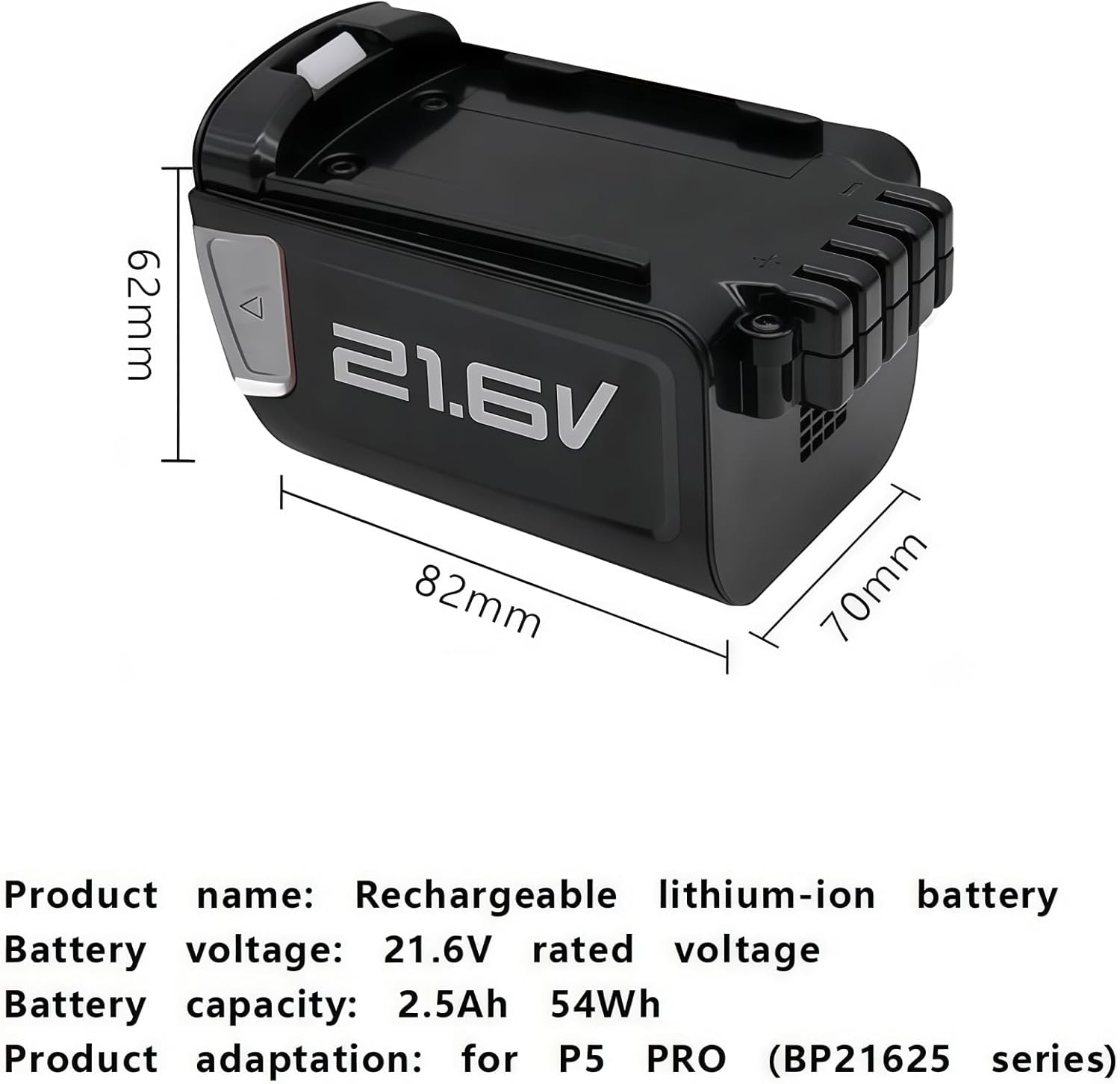
Image 4.1: Dimensional view of the battery, illustrating its physical size for proper fitment.
5. Operating Instructions
Using your vacuum cleaner with the new battery:
- Charging: Use the original Midea P5 Pro charger to charge the battery. Do not use incompatible chargers.
- First Use: It is recommended to fully charge the battery before its initial use to calibrate the battery management system.
- Discharge: Avoid completely draining the battery frequently, as this can reduce its overall lifespan. Recharge when the vacuum cleaner indicates low power.
- Temperature: Operate the vacuum cleaner and charge the battery within recommended temperature ranges (typically 0°C to 40°C or 32°F to 104°F).
6. Maintenance
Proper maintenance extends the life of your battery:
- Regular Cleaning: Keep the battery contacts clean and free from dust or debris. Use a dry cloth to wipe them if necessary.
- Storage: If storing the battery for an extended period, charge it to approximately 50-60% capacity and store it in a cool, dry place. Recharge every 3-6 months to prevent deep discharge.
- Avoid Extremes: Do not expose the battery to extreme temperatures (hot or cold) or high humidity.
7. Troubleshooting
If you encounter issues with your battery, consider the following:
| Problem | Possible Cause | Solution |
|---|---|---|
| Battery not charging |
|
|
| Short operating time |
|
|
| Vacuum cleaner not turning on |
|
|
8. Specifications
| Attribute | Value |
|---|---|
| Product Name | Rechargeable Lithium-ion Battery |
| Brand | xbvxzvbn |
| Model Number | BP21625A |
| Battery Voltage | 21.6V |
| Battery Capacity | 2.5Ah (54Wh) |
| Battery Type | Li-ion |
| Compatibility | Midea P5 Pro (BP21625 series) Handheld Vacuum Cleaners |
| Protection Features | Over-current, Over-charge, Over-voltage, Over-temperature, Short-circuit |
| Item Weight | 1.76 ounces (50 Grams) |
| Approximate Battery Dimensions (L x W x H) | 82mm x 70mm x 62mm |
| Package Dimensions | 1.18 x 0.79 x 0.39 inches |
9. Warranty and Support
For any questions, concerns, or support regarding your xbvxzvbn BP21625A replacement battery, please contact the seller or manufacturer directly through your purchase platform. Please have your order number and product details ready for faster assistance.
Tip: Make sure the model and battery part number match your device. If you are unsure, please email us with your battery details or pictures for verification before purchase or installation.