
Introduction
This manual provides detailed instructions for the assembly, operation, and maintenance of your KEIKI Full Size Loft Bed with Stairs and Storage. Please read all instructions carefully before assembly and use to ensure safe and proper functioning of the product. Keep this manual for future reference.
Safety Information
WARNING: Failure to follow these warnings and instructions could result in serious injury or death.
- Do not load more than 350 pounds on the loft bed. Exceeding this weight capacity can compromise the structural integrity and lead to collapse.
- Always ensure all bolts, screws, and connectors are securely tightened before use and periodically check for tightness.
- The loft bed is designed for use with a full-size mattress. Ensure the mattress fits properly within the bed frame and does not exceed the maximum recommended thickness to maintain guardrail effectiveness.
- Guardrails are provided for safety. Never remove or modify them.
- An anti-tipping device is included for added stability. Ensure it is properly installed according to assembly instructions.
- Do not allow children under 6 years of age to use the upper bunk.
- Periodically inspect the bed for any signs of wear, damage, or loose components. Discontinue use if any damage is found and contact customer support for replacement parts.
- Use only replacement parts supplied or approved by the manufacturer.
Setup and Assembly
Before beginning assembly, ensure all parts and hardware are present. Refer to the included hardware and instructions for specific component identification. Two adults are recommended for assembly.
- Step 1: Assemble the Base Frame. Carefully unpack all components. Begin by connecting the main support beams and legs to form the base structure of the loft bed. Ensure all connections are finger-tightened initially.
- Step 2: Attach the Stairs. The stairs can be positioned on either the left or right side of the bed frame. Securely attach the stair unit to the main frame using the provided hardware. Ensure the storage compartments within the stairs are correctly aligned.
- Step 3: Secure the Upper Bed Platform. Lift and secure the upper bed platform onto the assembled frame. Attach the guardrails to the upper bed platform. Ensure all slats are securely fixed with plastic stoppers to prevent noise.
- Step 4: Install the TV Cabinet and Other Storage Components. Assemble and integrate the TV cabinet, wardrobe, and additional shelving units into the loft bed structure. Connect any electrical components for the LED lighting and charging station as per the detailed diagram in the separate assembly guide.
- Step 5: Final Tightening and Inspection. Once all components are in place, systematically tighten all bolts and screws using the provided tools. Do not overtighten. Verify that the bed is stable and all parts are securely fastened. Install the anti-tipping device to a wall stud if possible.

Image: Overall view of the KEIKI Full Size Loft Bed with Stairs and Storage.

Image: Front view of the loft bed, showcasing the integrated TV cabinet and shelving.

Image: Detailed view of the stairs with integrated storage and the small wardrobe.
Operating Instructions
Using the TV Cabinet and Entertainment Hub
The built-in TV cabinet is designed to accommodate a television or gaming console. Ensure the TV is placed securely on the designated shelf. The surrounding shelves provide space for media devices, remotes, and other entertainment accessories.

Image: Close-up of the TV cabinet area with LED lighting activated.
LED Lighting and Charging Station
The TV cabinet includes an integrated LED light strip. Connect the power adapter to a standard wall outlet. Use the provided remote control (if applicable) or switch to cycle through 16 color options. The charging station features 2 standard outlets and 2 USB ports for convenient device charging. Plug your devices directly into these ports.

Image: Detail of the integrated charging station with power outlets and USB ports.
Storage Features
The stairs are equipped with built-in storage compartments, ideal for shoes, books, or small items. The small wardrobe provides space for hanging clothes. Utilize the various shelves for organizing personal belongings, decor, or study materials.
Maintenance
- Cleaning: Wipe down the metal frame and shelves with a soft, damp cloth. Avoid using harsh chemicals or abrasive cleaners, which can damage the finish.
- Hardware Check: Periodically (every 3-6 months) inspect all bolts, screws, and connections to ensure they remain tight. Re-tighten any loose hardware to maintain stability and safety.
- Structural Integrity: Regularly check the bed frame for any signs of bending, cracks, or structural fatigue. If any damage is observed, discontinue use immediately and contact customer support.
- Electrical Components: Ensure the LED light strip and charging station cables are not pinched or damaged. If any electrical component malfunctions, unplug it and contact customer support.
Troubleshooting
| Problem | Possible Cause | Solution |
|---|---|---|
| Bed feels wobbly or unstable. | Loose hardware; uneven floor; anti-tipping device not installed. | Check and tighten all bolts and screws. Ensure the bed is on a level surface. Install the anti-tipping device securely to a wall stud. |
| Squeaking noises from the bed. | Loose connections; mattress rubbing against frame; slats not properly seated. | Re-tighten all hardware. Ensure mattress is centered. Verify all plastic stoppers for slats are in place and secure. |
| LED lights not working. | Power adapter unplugged; faulty connection; damaged LED strip. | Check if the power adapter is securely plugged into the wall outlet and the bed. Inspect connections. If still not working, contact customer support. |
| Charging ports (outlets/USB) not functioning. | Power not connected; overloaded circuit; faulty port. | Ensure the bed's power cable is plugged into a live outlet. Avoid plugging too many high-power devices simultaneously. If the issue persists, contact customer support. |
Specifications
| Feature | Detail |
|---|---|
| Model Number | LX01017 |
| Brand | KEIKI |
| Size | Full |
| Material | Metal |
| Color | Black |
| Product Dimensions (L x W x H) | 93.5"L x 56.7"W x 68.7"H |
| Item Weight | 112.2 pounds |
| Maximum Weight Recommendation | 350 pounds |
| Special Features | No Box Spring Needed, Squeak Resistant, Integrated TV Cabinet, Wardrobe, Shelves, LED Lighting, 2 Outlets, 2 USB Ports |
| Included Components | Hardware, Instructions |
| UPC | 761578627227 |
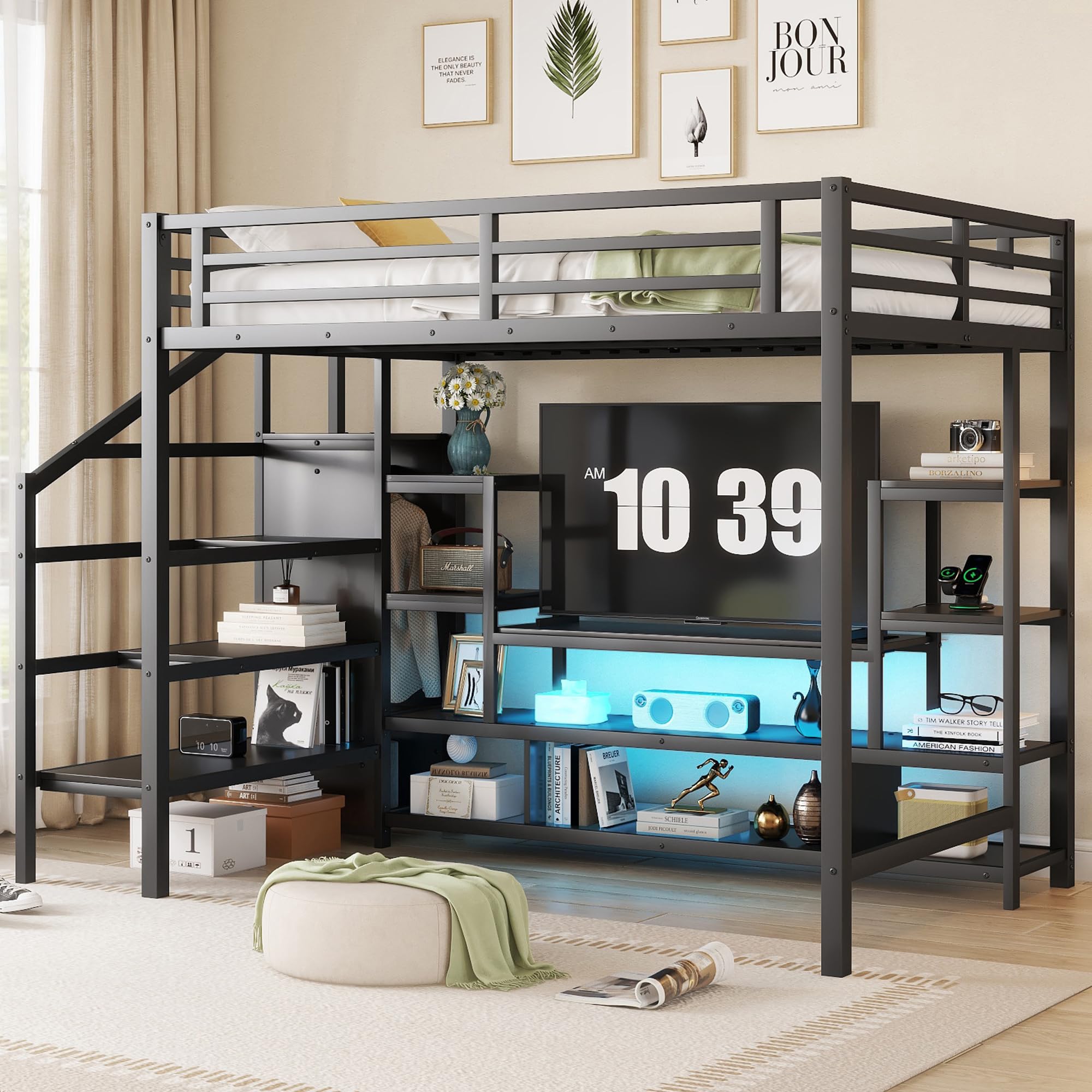
Image: Detailed dimensions of the KEIKI Full Size Loft Bed.
Warranty and Support
For warranty information or technical support, please refer to the contact details provided with your purchase documentation or visit the official KEIKI website. Please have your model number (LX01017) and purchase date available when contacting support.
Customer Support: For assistance, please contact KEIKI customer service through the retailer where the product was purchased or via the contact information on the KEIKI brand website.