
Introduction
This manual provides instructions for the proper use and maintenance of your Tekswamp Replacement Remote Control. This remote is designed to function with various Onkyo audio system models, including A-807, A-809, TX-840, TX-840M, TX-860, TX-860M, TX-900, and TX-902. No additional programming is required for its operation.
The remote control provides most of the original commands for your device, ensuring core functionalities such as power on/off, menu navigation, and input signal selection are readily available. Please note that some specific functions, such as page flip, keystone correction, video adjustment, and number pad functions, may not work properly with all compatible devices in rare cases. This remote does not include a laser pointer function.
Product Overview
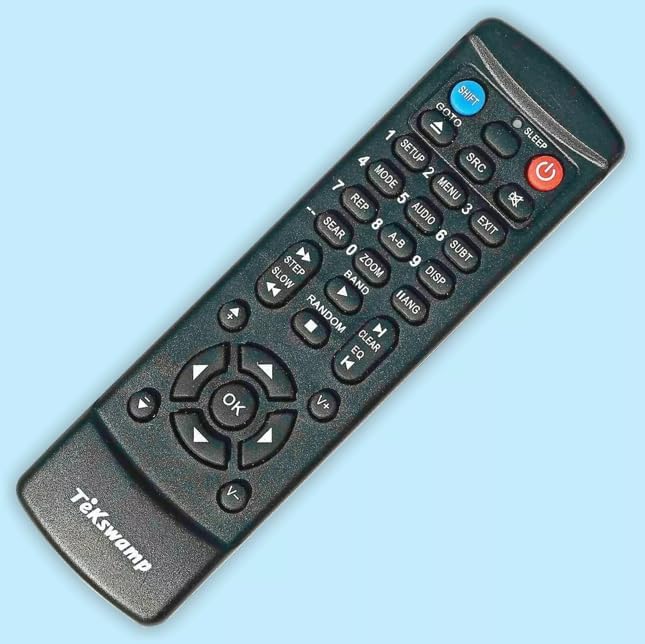
Image: Tekswamp Replacement Remote Control. This image displays the black remote control with various buttons for power, input selection, menu navigation, and numerical input, featuring the 'Tekswamp' logo at the bottom.
The Tekswamp Replacement Remote Control features a compact, rectangular body with comfortable, easy-to-reach buttons. Its design prioritizes everyday usability and portability.
Key Features:
- Ergonomic Design: Comfortable, easy-to-reach buttons in a compact, rectangular body for convenient daily use and transportation.
- Low Power Consumption: The electrical circuit is designed for minimal power usage, allowing operation even when batteries are low.
- IR Signal Indicator: An "ON" indicator light illuminates when any active button is pressed, confirming proper remote function and IR signal transmission.
- Durable Construction: Manufactured from strong, durable plastic to resist breakage. Buttons are designed to be comfortable yet not overly sensitive, preventing accidental signals and wear.
- Childproofing Feature: Includes a security screw to prevent unauthorized access to internal small parts, addressing potential choking hazards.
Setup
Battery Installation:
- Locate the battery compartment cover on the back of the remote control.
- If present, loosen the security screw using a small screwdriver to open the battery compartment.
- Insert two AAA batteries (not included) into the compartment, ensuring the correct polarity (+ and -) as indicated inside the compartment.
- Replace the battery compartment cover and tighten the security screw if applicable.
Note: This remote control does not require any programming. It is ready for use once batteries are installed.
Operating Instructions
Point the remote control directly at the infrared receiver on your Onkyo audio system. Ensure there are no obstructions between the remote and the device.
Basic Functions:
- Power (⏻): Press the red power button to turn your Onkyo device on or off.
- Input Selection (SRC): Use the 'SRC' button to cycle through available input sources (e.g., CD, Tuner, AUX).
- Volume Control (V+, V-): Use the 'V+' button to increase volume and 'V-' to decrease volume.
- Mute (🔇): Press the mute button to temporarily silence the audio. Press again to restore sound.
- Menu Navigation (Arrow buttons, OK): Use the directional arrow buttons (Up, Down, Left, Right) to navigate through menus. Press 'OK' to confirm selections.
- Exit (EXIT): Press 'EXIT' to leave the current menu or screen.
- Numerical Input (0-9): Use the numbered buttons for direct input or channel selection where applicable.
Advanced Functions (Refer to your Onkyo device manual for specific functionality):
- SETUP: Access the setup menu of your device.
- MODE: Change operating modes.
- AUDIO: Access audio settings.
- SUBT: Subtitle control.
- REP: Repeat function.
- A-B: A-B repeat function.
- DISP: Display information.
- ZOOM: Zoom function.
- GOTO: Go to specific time/track.
- SHIFT: Access secondary functions of buttons.
- SLEEP: Set sleep timer.
- STEP/SLOW: Step-by-step playback or slow motion.
- BAND: Select radio band.
- RANDOM: Random playback.
- CLEAR: Clear input or selection.
- EQ: Equalizer settings.
Maintenance
- Cleaning: Wipe the remote control with a soft, dry cloth. Do not use liquid cleaners or abrasive materials.
- Battery Replacement: Replace batteries when the remote's response becomes sluggish or the "ON" indicator light fails to illuminate consistently. Always replace both batteries at the same time with new AAA batteries.
- Storage: If the remote will not be used for an extended period, remove the batteries to prevent leakage and potential damage.
- Avoid Extreme Conditions: Do not expose the remote to direct sunlight, high temperatures, humidity, or water.
Troubleshooting
- Remote is not responding:
- Check if the batteries are inserted correctly with the proper polarity.
- Replace the batteries with new AAA batteries.
- Ensure there are no obstructions between the remote control and the Onkyo device's infrared receiver.
- Confirm that the remote is pointed directly at the device.
- Some functions do not work:
- While this remote provides most original commands, some specific or advanced functions (e.g., page flip, keystone correction, video adjustment, certain number pad functions) may not be fully compatible with all Onkyo models. Refer to your original Onkyo device manual for specific button mappings.
- Ensure you are pressing the correct button for the desired function.
- "ON" indicator light does not illuminate:
- This indicates a battery issue. Replace the batteries.
- Ensure batteries are inserted correctly.
Specifications
| Feature | Detail |
|---|---|
| Brand | Tekswamp |
| Compatible Devices | Onkyo A-807, A-809, TX-840, TX-840M, TX-860, TX-860M, TX-900, TX-902 Audio Systems |
| Power Source | 2 x AAA Batteries (not included) |
| Color | Black |
| Special Feature | Universal (for specified models) |
| Max Number of Supported Devices | 1 |
| Item Weight | 2 ounces (approx. 56.7 grams) |
| Package Dimensions | 8.39 x 3.46 x 1.14 inches (approx. 21.3 x 8.8 x 2.9 cm) |
Warranty and Support
For warranty information or technical support, please refer to the seller's return policy or contact Tekswamp customer service directly through their official channels. The product is typically covered by a standard return policy, which may include a refund or replacement within a specified duration (e.g., 30 days).
For further assistance, please visit the Tekswamp Store on Amazon.