
LSENLTY PTH-26P
LSENLTY 4-in-1 PM2.5 and PM10 Air Quality Monitor User Manual
Model: PTH-26P
1. Introduction
Thank you for choosing the LSENLTY 4-in-1 PM2.5 and PM10 Air Quality Monitor. This device is designed to provide accurate and reliable measurements of particulate matter (PM2.5 and PM10), temperature, and humidity in your indoor environment. Please read this manual thoroughly before use to ensure proper operation and to maintain the device's longevity.
2. Safety Information
- Do not expose the device to extreme temperatures, direct sunlight, or high humidity.
- Avoid dropping or subjecting the device to strong impacts.
- Do not attempt to disassemble or modify the device. This will void the warranty.
- Keep the device away from water and other liquids.
- Ensure the charging cable is compatible with the device's specifications.
- This device is intended for indoor use only.
3. Product Overview
The LSENLTY PTH-26P is a compact and portable air quality monitor featuring a high-definition color screen. It provides real-time readings for PM2.5, PM10, temperature, and humidity.

Figure 3.1: Front view of the LSENLTY 4-in-1 Air Quality Monitor, displaying various environmental parameters.
3.1 Key Features
- 4-in-1 Detection: Measures PM2.5, PM10, Temperature, and Humidity.
- Advanced Laser Sensor: Ensures high-precision readings for particulate matter.
- Three-Color Air Quality Indicator: Visual indication of PM2.5 levels (Green, Orange, Red).
- Audible Alarm: Alerts when PM2.5/PM10 concentration exceeds a customizable threshold.
- Energy-Saving Design: Automatic screen-off and shutdown to conserve battery.
- Portable Design: Compact size with magnetic back and lanyard hole for easy carrying and placement.
3.2 Device Components

Figure 3.2: Diagram of the device's display and button functions.
- Display Screen: Shows PM2.5, PM10, Temperature, Humidity, Battery Status.
- Up Button (Mute/Disable Mute): Used to mute or unmute the alarm.
- Center Button (Power ON/OFF): Press and hold to power on/off. Short press to activate screen from sleep mode.
- Down Button (Temp Unit Switch): Toggles between Celsius (°C) and Fahrenheit (°F) for temperature display.
- PM2.5/PM10 Indicator Light: Changes color based on PM2.5 concentration (Green, Orange, Red).
- Air Inlet Vents: Located on both sides for air sampling.
- Input Port (Type-C): For charging the device.
- Electromagnet Chucks: For magnetic attachment.
- Portable Lanyard Hole: For attaching a lanyard.
4. Setup
4.1 Charging the Device
The device includes a built-in Lithium Polymer battery. Before first use, fully charge the monitor using the provided Type-C USB cable and a standard USB power adapter (not included).
- Connect the Type-C end of the cable to the device's input port.
- Connect the USB-A end to a power source (e.g., computer USB port, wall adapter).
- The battery icon on the display will indicate charging status.
- A full charge typically takes a few hours.
4.2 Powering On/Off
- To Power On: Press and hold the center button for approximately 3 seconds until the screen illuminates.
- To Power Off: Press and hold the center button for approximately 3 seconds. The device will display a shutdown animation and turn off.
5. Operating Instructions
5.1 Taking Measurements
Once powered on, the device will automatically begin sampling the air and displaying real-time readings for PM2.5, PM10, temperature, and humidity. Ensure the air inlet vents on the sides are not obstructed for accurate readings.

Figure 5.1: The monitor provides accurate and quick detection of air quality parameters.
5.2 Understanding the Display
The high-definition color screen clearly shows the following:
- PM2.5 Value: Particulate matter 2.5 micrometers or less in diameter (µg/m³).
- PM10 Value: Particulate matter 10 micrometers or less in diameter (µg/m³).
- Temperature: Ambient temperature (°C or °F).
- Humidity: Relative humidity (%).
- Battery Indicator: Shows remaining battery life.
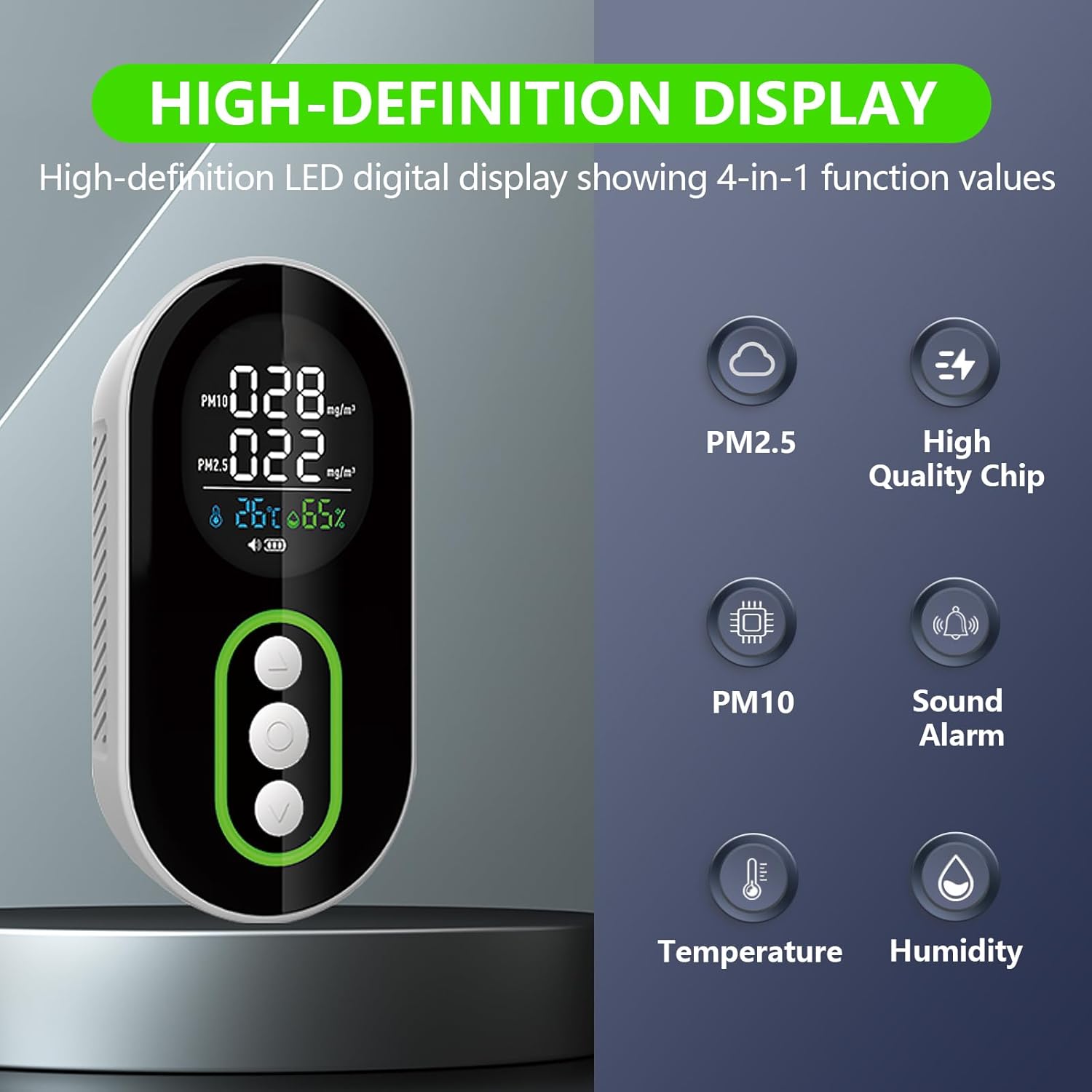
Figure 5.2: High-definition display showing 4-in-1 function values.
5.3 PM2.5 Air Quality Indicator Light
The device features a three-color breathing light to intuitively indicate PM2.5 air quality:
- Green Light: 0 to 34 µg/m³ (Good air quality)
- Orange Light: 35 to 110 µg/m³ (Warning, moderate air quality)
- Red Light: Above 110 µg/m³ (Danger, poor air quality)
5.4 Alarm Function
When the PM2.5 or PM10 concentration exceeds a customizable safety threshold, the device will emit an audible alarm and the indicator light will flash red. This alerts you to potentially unhealthy air conditions.
- To Mute/Unmute Alarm: Short press the 'Up' button.
- The alarm volume is approximately 90 decibels within a 3-meter range.

Figure 5.3: The device features an ultra-high volume alarm for critical air quality levels.
5.5 Changing Temperature Units
To switch between Celsius (°C) and Fahrenheit (°F), short press the 'Down' button.
5.6 Energy-Saving Mode
To extend battery life, the device has an energy-saving mode:
- If there is no operation for 5 minutes, the screen will automatically turn off.
- To restore the screen, click any button or gently blow air into the vent.
- If there is no operation for 25 minutes, the device will automatically shut down.
6. Understanding Air Quality Readings
Understanding the particulate matter readings is crucial for assessing indoor air health.

Figure 6.1: Impact of PM2.5 and PM10 on indoor air health.
6.1 PM2.5 (Particulate Matter 2.5)
PM2.5 refers to fine inhalable particles, with diameters that are generally 2.5 micrometers and smaller. These particles can penetrate deep into the lungs and even enter the bloodstream, affecting respiratory and cardiovascular health. High levels of PM2.5 can lead to conditions such as asthma, bronchitis, and other respiratory issues.
6.2 PM10 (Particulate Matter 10)
PM10 refers to inhalable particles, with diameters that are generally 10 micrometers and smaller. These particles can enter the respiratory tract but are typically filtered out by the body's natural defenses (e.g., nose hairs, mucus) and are less likely to reach the deep lungs compared to PM2.5. While less harmful than PM2.5, prolonged exposure to high PM10 levels can still cause respiratory irritation.
6.3 Temperature and Humidity
Monitoring temperature and humidity helps maintain a comfortable and healthy indoor environment. Optimal humidity levels can prevent the growth of mold and dust mites, and also help with respiratory comfort.
7. Maintenance
7.1 Cleaning
- Wipe the device with a soft, dry cloth.
- Do not use abrasive cleaners, solvents, or harsh chemicals.
- Ensure no dust or debris blocks the air inlet vents.
7.2 Storage
- Store the device in a cool, dry place when not in use.
- Avoid storing in areas with extreme temperatures or high humidity.
- If storing for an extended period, charge the battery periodically to maintain its health.
8. Troubleshooting
| Problem | Possible Cause | Solution |
|---|---|---|
| Device does not power on. | Low battery or no charge. | Charge the device using the provided Type-C cable. |
| Inaccurate readings. | Air inlet vents obstructed; device not calibrated; external interference. | Ensure vents are clear. Move device to a different location. Contact support if issues persist. |
| Alarm sounds frequently. | High PM2.5/PM10 concentration; alarm threshold set too low. | Check air quality. Consider improving ventilation. Mute alarm if desired. |
| Screen turns off too quickly. | Energy-saving mode activated. | This is normal behavior. Press any button or blow into the vent to reactivate the screen. |
| Device automatically shuts down. | Energy-saving auto-shutdown; low battery. | This is normal behavior after 25 minutes of inactivity. Recharge the device if battery is low. |
9. Specifications
| Parameter | Value |
|---|---|
| Model Number | PTH-26P |
| PM2.5 Measurement Range | 0 to 1000 µg/m³ |
| PM10 Measurement Range | 0 to 1000 µg/m³ |
| Temperature Measurement Range | -10 °C to 50 °C (14 °F to 122 °F) |
| Humidity Measurement Range | 0% to 95% RH |
| Power Source | Battery Powered (1 Lithium Polymer battery included) |
| Battery Capacity | 1000 mAh (approx. 10 days standby) |
| Charging Voltage | 3.7V |
| Product Dimensions | 0.98"D x 2.05"W x 4.09"H (24mm D x 52mm W x 105mm H) |
| Item Weight | 3.52 ounces |
| Alarm Type | Audible (approx. 90 dB) |
| Material | Plastic |
| Included Components | Air Quality Detector x1, User Manual x1 |

Figure 9.1: Portable design and dimensions of the device.
10. Warranty and Support
LSENLTY is committed to providing high-quality products and customer satisfaction. This product comes with the following support:
- Manufacturer Warranty: 5-Year manufacturer warranty.
- Return Policy: 30-day unconditional return and exchange.
- Customer Support: Lifetime support and 24-hour service.
For technical assistance, warranty claims, or any questions regarding your LSENLTY Air Quality Monitor, please contact our customer support team through the retailer's platform or visit the official LSENLTY store online.
Ask a question about this manual
Ask about setup, troubleshooting, compatibility, parts, safety, or missing instructions. Manuals+ will review the question and use this page’s manual context to help answer it.