
VEVOR EML3500-24L
VEVOR 2-in-1 Hybrid Solar Inverter 3500W User Manual
Model: EML3500-24L | Brand: VEVOR
1. Product Overview
The VEVOR 2-in-1 Hybrid Solar Inverter is an advanced power solution designed for off-grid solar PV systems. It seamlessly integrates an inverter and a charge controller, providing a pure sine wave output for various applications. This 3500W model (EML3500-24L) is engineered for high performance and efficiency, ensuring a stable and reliable power supply for both home and office environments.

Figure 1.1: Front view of the VEVOR 2-in-1 Hybrid Solar Inverter, showcasing its compact design and integrated LCD display.
2. Key Features
- Integrated 2-in-1 Hybrid Design: Combines a 3500W 220V/230V AC inverter with a charge controller, delivering pure sine wave output for diverse applications.
- Efficient MPPT Technology: Features a built-in 60A MPPT solar charge controller, supporting a maximum battery charge of 120A (PV + AC) and achieving up to 96% solar energy conversion efficiency. It handles solar arrays up to 1500W with a voltage range of 30-160V DC.
- Versatile Battery Compatibility: Designed for 24V battery systems, supporting Lithium-Ion, Lead-Acid, and custom battery types. Optimized for Lithium-Ion systems with BMS communication and activation functions.
- Multiple Protection Functions: Equipped with comprehensive safety features including over-temperature, over-current, over-voltage, under-voltage, short-circuit, and overload protection to ensure circuit and power supply safety.
- Smart Control & LCD Display: Provides real-time system data and operational status via an LCD display. Integrated buttons allow easy adjustment of charging modes (Solar, Utility, Hybrid) and discharge modes (UTL, SOL, SBU, SUB).

Figure 2.1: Overview of the inverter's key specifications, including max AC output power, MPPT charge controller details, and PV operating voltage.

Figure 2.2: Illustration highlighting the 96% conversion efficiency achieved through advanced MPPT technology compared to PWM.
3. Setup and Installation
Proper installation is crucial for the safe and efficient operation of your VEVOR Hybrid Solar Inverter. Ensure all connections are secure and follow local electrical codes. It is recommended to have installation performed by a qualified professional.
3.1 Connection Overview
The inverter features clearly labeled terminals for AC input, AC output, PV input, and battery connections. Refer to the diagram below for a visual guide to setting up your solar AC power system.

Figure 3.1: Schematic diagram illustrating the connections for solar charging, AC charging, 24V battery, and AC output to appliances.
3.2 Physical Installation
- Mount the inverter in a well-ventilated area, away from direct sunlight, moisture, and flammable materials.
- Ensure adequate clearance around the unit for proper airflow, especially around the cooling vents.
- Securely fasten the inverter to a sturdy vertical surface using appropriate mounting hardware.
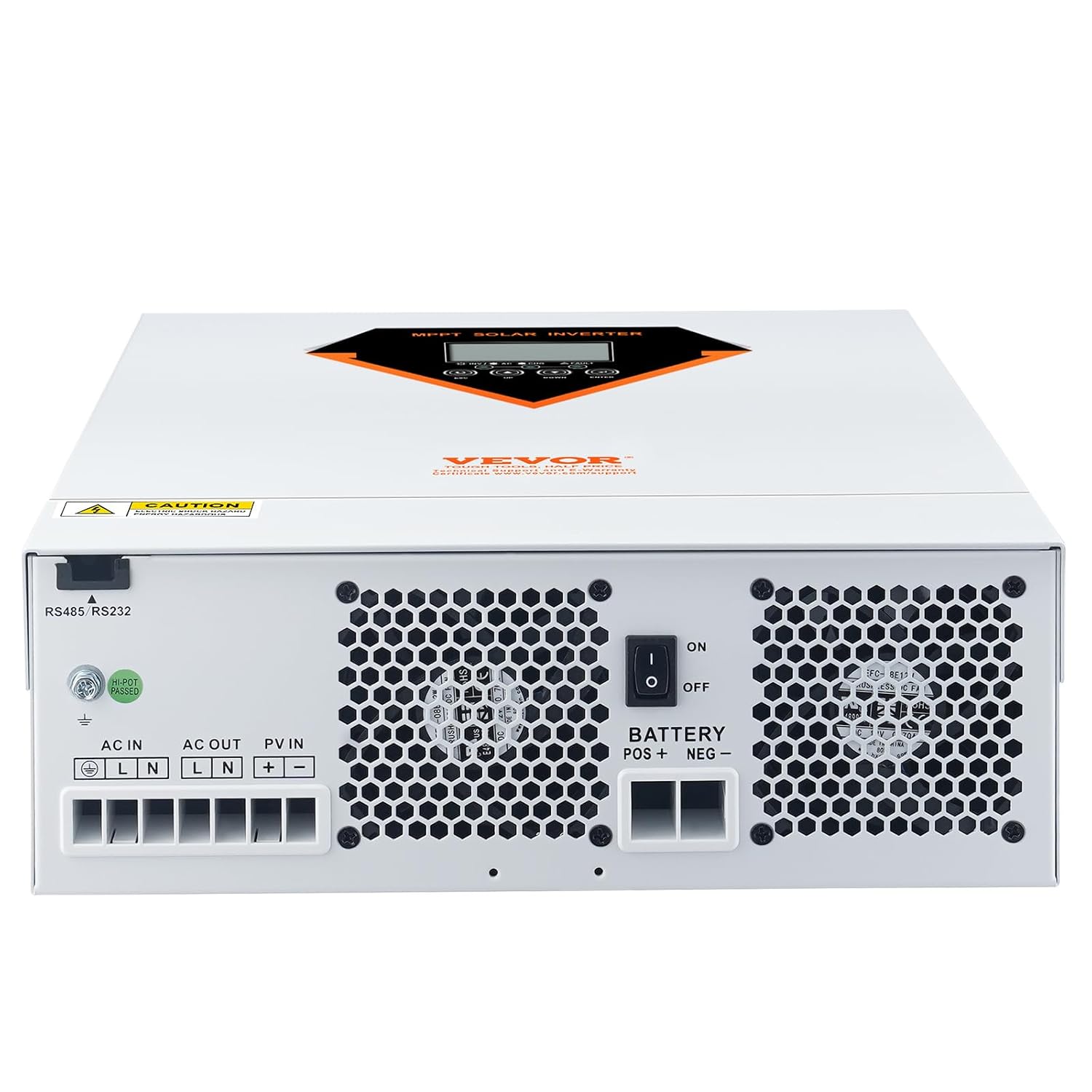
Figure 3.2: Rear panel of the inverter, detailing the AC IN, AC OUT, PV IN, and BATTERY POS/NEG terminals for electrical connections.
3.3 Battery Connection
The inverter is compatible with 24V battery systems, including Lead-Acid, Lithium Iron Phosphate (LiFePO4), and Lithium Nickel Manganese Cobalt Oxide (NMC) batteries. Ensure correct polarity when connecting the battery to the inverter.

Figure 3.3: Visual representation of the inverter's compatibility with various 24V battery types, including VRLA, LiFePO4, and NMC.
For Lithium-Ion batteries, the inverter supports BMS communication and activation functions, allowing for optimized charging and monitoring. If the battery runs out, the inverter can automatically activate and charge it without manual intervention via the RS232/RS485 communication port.

Figure 3.4: Illustration of the Lithium Battery Activation feature, showing the RS232/RS485 communication port for battery status monitoring.
4. Operating Modes
The VEVOR Hybrid Solar Inverter offers flexible operating modes to suit various power management needs. These modes can be configured via the integrated LCD display.
4.1 Charging Modes
The inverter supports three distinct charging modes:
- Solar Charging: Prioritizes charging the battery using power from solar panels.
- Utility Charging: Charges the battery using power from the AC utility grid.
- Hybrid Charging: Combines solar and utility power to charge the battery, optimizing charging efficiency and speed.
4.2 Load Output Modes
The inverter provides four load output modes to manage power distribution to connected appliances:
- UTL Mode (Utility Priority): The inverter primarily uses utility power to supply the load. Solar power is used to charge the battery.
- SOL Mode (Solar Priority): The inverter prioritizes solar power to supply the load. If solar power is insufficient, it will draw from the battery.
- SBU Mode (Solar-Battery-Utility): The inverter first uses solar power, then battery power. If both are insufficient, it switches to utility power.
- SUB Mode (Solar-Utility-Battery): The inverter first uses solar power, then utility power. If both are insufficient, it switches to battery power.

Figure 4.1: Visual representation of the three input charging modes (Solar, Utility, Hybrid) and four load output modes (UTL, SOL, SBU, SUB).
4.3 LCD Display and Control
The multi-functional LCD panel allows for effortless monitoring of system status and parameters. Use the integrated buttons (UP, DOWN, ENTER, ESC) to navigate menus and adjust settings.

Figure 4.2: Detailed view of the LCD panel, displaying real-time input/output voltage, bypass status, and battery charge level, along with indicators for various system information.
5. Safety and Protection
The VEVOR Hybrid Solar Inverter is equipped with multiple safety features to protect the unit, connected devices, and the user. Adhere to all safety warnings and guidelines during installation and operation.
- Over-Temperature Protection: Shuts down the unit if internal temperatures exceed safe limits.
- Over-Current Protection: Prevents damage from excessive current draw.
- Over-Voltage Protection: Safeguards against damage from input or output voltage spikes.
- Under-Voltage Protection: Protects batteries from deep discharge.
- Short-Circuit Protection: Automatically disconnects power in case of a short circuit.
- Overload Protection: Prevents damage when connected loads exceed the inverter's capacity.

Figure 5.1: A visual representation of the inverter's multi-layered protection system, including over-current, over-voltage, under-voltage, short-circuit, over-temperature, and overload protection.
6. Specifications
The following table details the technical specifications of the VEVOR 2-in-1 Hybrid Solar Inverter 3500W (Model: EML3500-24L).

Figure 6.1: Detailed specifications of the VEVOR EML3500-24L model, including input/output voltage, rated power, and dimensions.
| Parameter | Value |
|---|---|
| Model Number | EML3500-24L |
| Input Voltage | 220V / 230V AC |
| Output Voltage | AC 230V, 50 Hz |
| Rated Power | 3500W ±10% |
| Output Waveform | Pure Sine Wave |
| Battery Type | 24V Lead-Acid Batteries and Lithium Batteries |
| Max. Charging Current | 60A (PV) / 80A (AC) / 120A (PV+AC) |
| PV Array MPPT Voltage Range | 30-160V DC |
| No-load Self-consumption | ≤ 20W |
| Product Dimensions (L x W x H) | 38.99 x 30 x 11 cm (14.4 x 12.2 x 4.2 in) |
| Net Weight | 6.35 kg (14 lbs) |
| UPC | 197988075462 |
7. Troubleshooting
This section provides guidance on common issues you might encounter with your VEVOR Hybrid Solar Inverter. For more complex problems, please contact customer support.
7.1 Common Issues and Solutions
- No Power Output:
- Check all AC input and output connections for secure fit.
- Verify that the battery is properly connected and sufficiently charged.
- Ensure the PV input voltage is within the specified MPPT range (30-160V DC).
- Check the circuit breakers or fuses.
- Inverter Display Off:
- Confirm the battery is connected and has adequate voltage.
- Check the main power switch on the inverter.
- Overload Alarm:
- Reduce the total load connected to the inverter.
- Disconnect non-essential appliances.
- High Temperature Warning:
- Ensure the inverter is in a well-ventilated area.
- Clear any obstructions from the cooling vents.
- Verify ambient temperature is within operating limits.
Always refer to the LCD display for error codes or warning messages, which can provide more specific diagnostic information.
8. Maintenance
Regular maintenance helps ensure the longevity and optimal performance of your VEVOR Hybrid Solar Inverter.
- Cleaning: Periodically clean the exterior of the inverter with a soft, dry cloth. Ensure cooling vents are free from dust and debris. Do not use liquid cleaners.
- Connection Check: Annually inspect all electrical connections (AC input/output, PV, battery) to ensure they are tight and free from corrosion.
- Battery Inspection: If using lead-acid batteries, check electrolyte levels and terminal cleanliness as per battery manufacturer guidelines. For lithium batteries, monitor their health via the inverter's display or connected BMS.
- Environmental Check: Ensure the installation environment remains within specified temperature and humidity ranges.
Before performing any maintenance, ensure the inverter is turned off and disconnected from all power sources (AC, PV, and battery).
9. Warranty and Support
VEVOR products are designed for durability and performance. For warranty information and technical support, please refer to the official VEVOR website or contact their customer service department.
For assistance, please visit: www.vevor.com/support
Please have your model number (EML3500-24L) and purchase details ready when contacting support.
Ask a question about this manual
Ask about setup, troubleshooting, compatibility, parts, safety, or missing instructions. Manuals+ will review the question and use this page’s manual context to help answer it.