
Lancelot M1630 Pro
Lancelot M1630 Pro DTF Printer User Manual
Model: M1630 Pro
1. Product Overview
The Lancelot M1630 Pro is an A3 Direct-to-Film (DTF) printer designed for efficient T-shirt and apparel printing. This printer bundle includes the printer, pre-loaded software, a dedicated laptop, ink, and film, providing a comprehensive solution for direct-to-film applications. Key features include a Smart Holiday Mode for printhead maintenance, an Automatic Film Cutter, and an integrated white ink circulation system.

Figure 1: Lancelot M1630 Pro DTF Printer bundle components.
Key Features
- Smart Holiday Mode: Automatically maintains printhead health during periods of inactivity to prevent clogging.
- Automatic Film Cutter: Built-in system for precise and efficient trimming of transfer film.
- Foolproof Protection: Equipped with smart sensors for low ink levels and full waste tanks, providing real-time alerts.
- Pro-Grade Ink System: Features an integrated white ink mixer and auto-circulation to prevent sedimentation and ensure consistent print quality.
- Enhanced Speed: Offers significantly faster printing speeds compared to previous models, achieving A4 prints in approximately 3 minutes and A3 prints in 7 minutes.

Figure 2: Detailed overview of Lancelot M1630 Pro DTF Printer features.

Figure 3: Print speed comparison of M1630 Pro with other models.
Product Demonstration Video
Video 1: A comprehensive demonstration of the Lancelot M1630 Pro DTF Printer, showcasing its features and operation for T-shirt printing.
2. Setup and Installation
The Lancelot M1630 Pro DTF Printer bundle is designed for a streamlined setup process. Due to its weight (approximately 227 pounds or 103 kg), it is recommended that two individuals handle the printer during unboxing and placement.
Dedicated Laptop Integration
The printer comes with a dedicated laptop that is pre-configured with all necessary drivers, software, and tutorials. This ensures compatibility and minimizes potential software conflicts often encountered with existing computer systems. The laptop is designed to handle large image files efficiently without lag.

Figure 4: Benefits of using the dedicated DTF laptop.

Figure 5: Details of the dedicated DTF laptop and its interface.
Initial Setup Steps
- Unboxing and Placement: Carefully remove the printer from its packaging. Due to its weight, ensure a sturdy surface for placement.
- Ink Installation: Fill the ink reservoirs with the provided DTF inks. The white ink system includes stirring and circulation features to prevent pigment settling.
- Film Loading: Load either roll film or individual sheets into the upgraded film feeder system.
- Software Initialization: Power on the dedicated laptop. The pre-installed software is ready for immediate use.
- Connectivity: Connect the printer to the laptop via the provided USB cable.
For detailed guidance, refer to the tutorials pre-loaded on the laptop. Lancelot also offers technical support via WhatsApp for installation and operational assistance.
3. Operating Instructions
The M1630 Pro is designed for user-friendly operation, producing high-resolution prints with vivid colors.
Printing Process
- Design Preparation: Use the pre-installed software on the dedicated laptop to prepare your design.
- Print Initiation: Send the design to the printer. The printer features a vacuum suction platform to ensure stable film feeding during printing.
- Film Handling: The upgraded film feeder system supports both roll film and individual sheets, adapting to various project needs.
- Automatic Cutting: After printing, the built-in automatic film cutter precisely trims the transfer film, eliminating the need for manual cutting.
- Transfer Application: Once printed and cut, the film is ready for the heat press process (heat press machine not included in this specific bundle but is a necessary step for DTF).
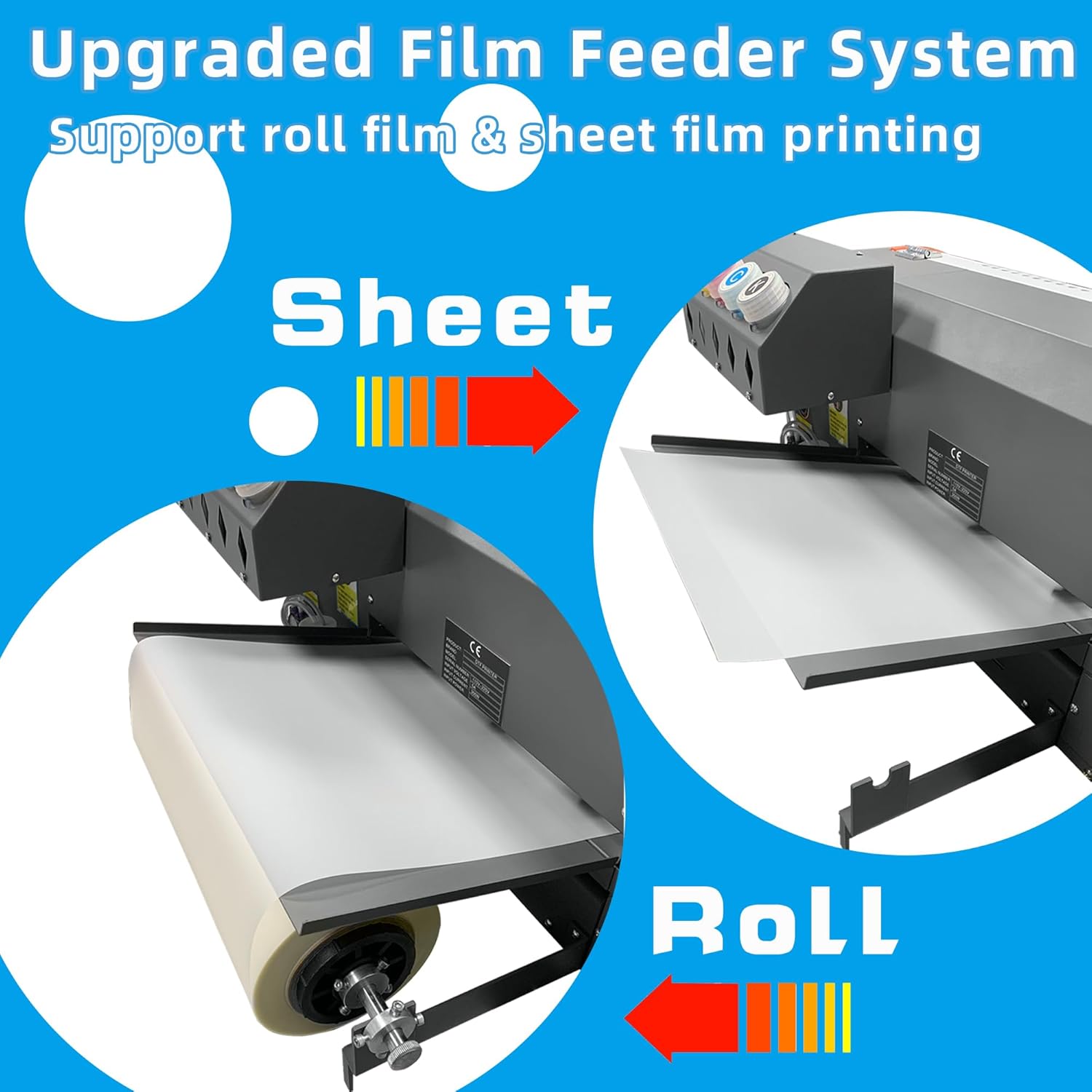
Figure 6: Upgraded film feeder system supporting roll and sheet film.
Automatic Film Cutter
The integrated auto film cutter streamlines the production process by trimming transfers smoothly and precisely. This feature saves time and reduces material waste by ensuring clean cuts without manual intervention.

Figure 7: Automatic film cutter in operation.
4. Maintenance
Proper maintenance ensures the longevity and optimal performance of your Lancelot M1630 Pro DTF Printer.
Smart Holiday Mode
The Smart Holiday Mode is a crucial feature for preventing printhead clogs during extended periods of inactivity. When activated, the printer automatically performs maintenance cycles to keep the printheads clear and functional. This eliminates concerns about clogged printheads or ink tubes when the printer is not in use for vacations or business trips.

Figure 8: Smart Holiday Mode for printhead maintenance.
Ink System Maintenance
- White Ink Circulation: The printer features an automatic white ink circulation system to prevent pigment settling, which is common with white DTF ink. Ensure this system is active.
- Low Ink Alarm: The ink supply bottles are equipped with sensors that trigger an alarm when ink levels are low, prompting timely refills.
- Waste Ink Alarm: A sensor in the waste ink bottle alerts you when it is full, indicating it needs to be emptied to prevent overflow.
5. Troubleshooting
This section addresses common issues and how the Lancelot M1630 Pro's features help mitigate them.
Printhead Clogging
The primary cause of printhead issues in DTF printers is ink drying or settling. The M1630 Pro's Smart Holiday Mode and white ink circulation system are designed to actively prevent this. If you experience clogging, ensure Holiday Mode is activated during idle periods and that the white ink circulation is functioning correctly. Regular use and proper ink storage also contribute to preventing clogs.
Ink and Waste Management
The printer's low ink alarm system and waste ink bottle full alarm system provide proactive alerts to prevent interruptions. Respond to these alarms promptly by refilling ink or emptying the waste tank to maintain continuous operation and prevent potential spills or damage.
Software and Connectivity Issues
The dedicated laptop included with the bundle is pre-configured to minimize software conflicts and ensure optimal performance. If you encounter any software or connectivity issues, first ensure all cables are securely connected. If problems persist, utilize the pre-loaded tutorials on the laptop or contact Lancelot technical support for assistance.
6. Technical Specifications
| Feature | Specification |
|---|---|
| Model Name | M1630 Pro (M1630-S) |
| Product Dimensions (D x W x H) | 13"D x 6"W x 7"H |
| Item Weight | 227 pounds (103 Kilograms) |
| Printing Technology | Inkjet (DTF Ink) |
| Maximum Media Size | 13 x 19 inch (A3+) |
| Maximum Color Print Resolution | 720x1440 dpi |
| Maximum Black and White Print Resolution | 720x1440 dpi |
| Max Print Speed (Color) | 3 ppm |
| Max Print Speed (Monochrome) | 2.5 ppm |
| Max Input Sheet Capacity | 50 |
| Dual-sided printing | No (Simplex) |
| Hardware Interface | USB |
| Ink Colors | Black, Cyan, Magenta, Yellow, White |
| Special Feature | Portable |
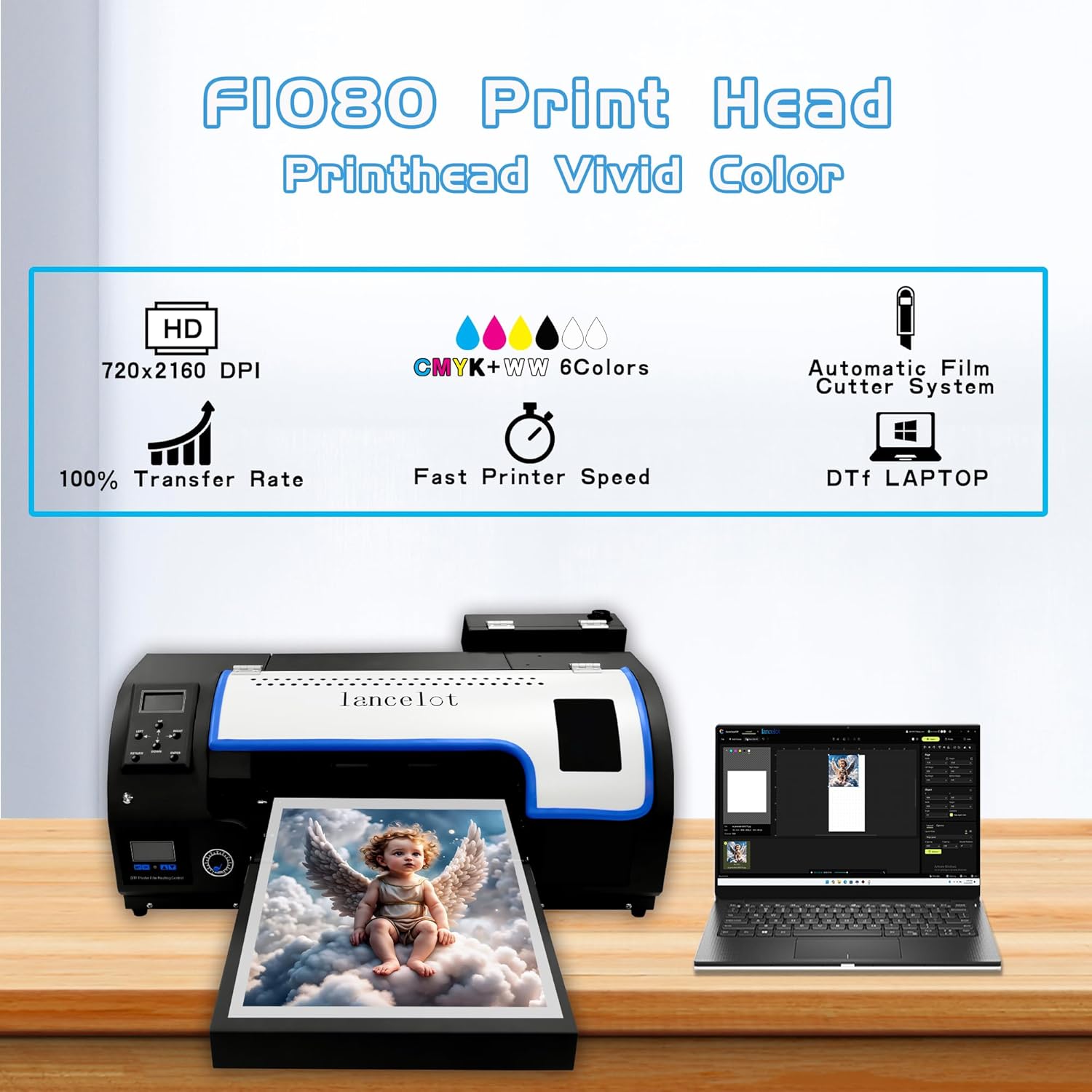
Figure 9: F1080 Print Head capabilities and features.
7. Warranty and Support
The Lancelot M1630 Pro DTF Printer comes with a limited warranty. For specific terms and conditions, please refer to the warranty documentation included with your product.
Technical Support
Lancelot provides lifetime technical support for the M1630 Pro printer. For assistance with setup, operation, troubleshooting, or any technical inquiries, please contact Lancelot Technical Support. Support is often available via platforms like WhatsApp for quick and efficient communication.
Refer to the contact information provided in your product packaging or on the Lancelot official website for the most up-to-date support channels.
Ask a question about this manual
Ask about setup, troubleshooting, compatibility, parts, safety, or missing instructions. Manuals+ will review the question and use this page’s manual context to help answer it.