
Teskee LX30-7KW-APP
Teskee Wallbox Type 2 Single-Phase 7.4 kW EV Charging Station User Manual
Model: LX30-7KW-APP
1. Introduction
This manual provides essential instructions for the safe and efficient installation, operation, and maintenance of your Teskee Wallbox Type 2 Single-Phase 7.4 kW EV Charging Station. Please read this manual thoroughly before using the product and retain it for future reference.
2. Safety Information
Always observe the following safety precautions to prevent injury or damage to the product and property:
- Installation must be performed by a qualified electrician in accordance with all local and national electrical codes and regulations.
- Do not attempt to open, disassemble, repair, or modify the charging station. This may cause electric shock, fire, or other hazards.
- Ensure the charging cable and connector are free from damage before each use. Do not use if damaged.
- Keep the charging station away from flammable, explosive, or corrosive materials.
- Do not immerse the charging station or its components in water or other liquids.
- This product is designed for charging electric vehicles equipped with a Type 2 charging port.
3. Product Overview
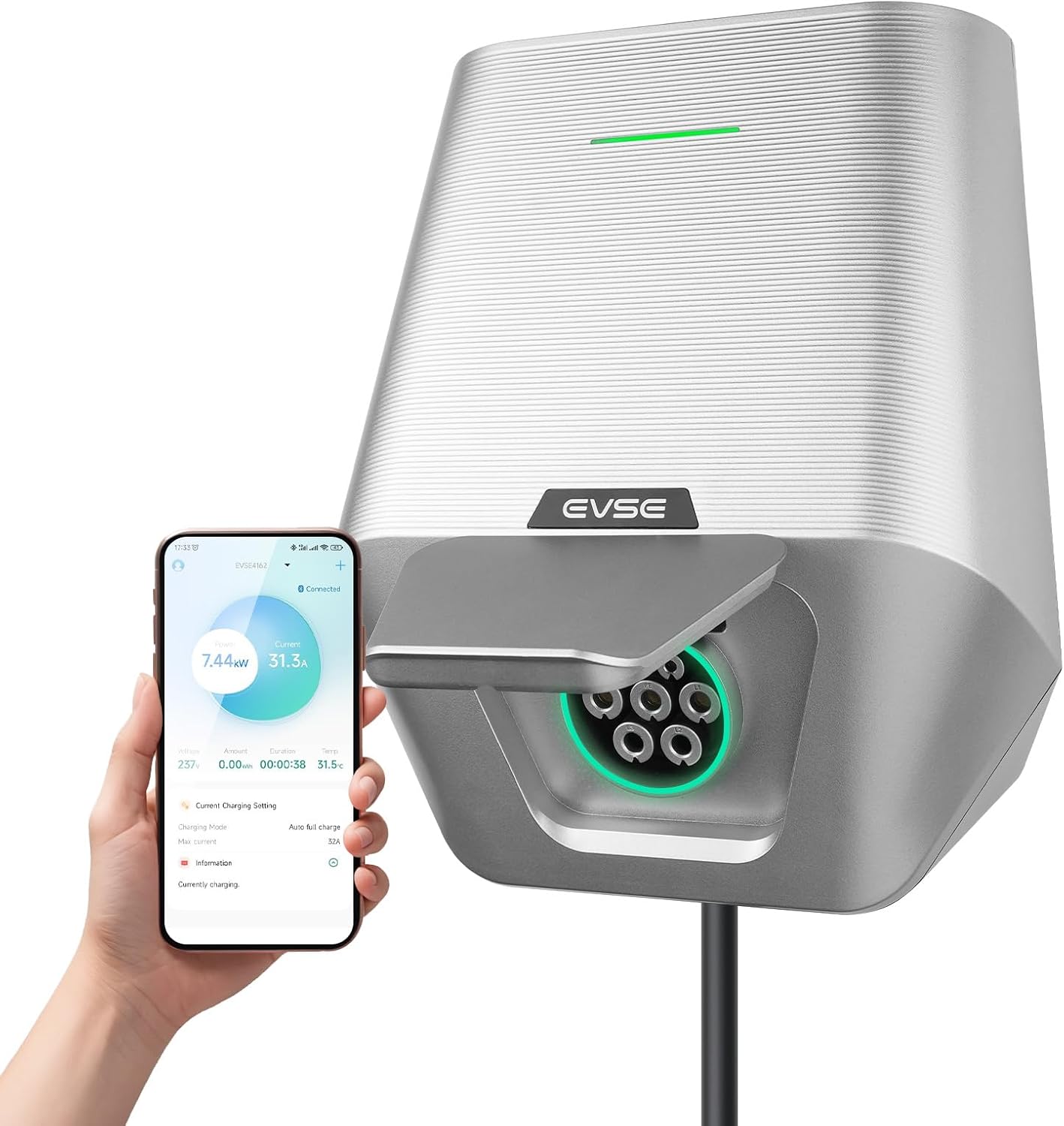
The Teskee Wallbox is a robust and efficient EV charging solution designed for home use, offering a maximum charging power of 7.4 kW. It features app control for adjustable current and scheduling, ensuring safe and reliable charging for all Type 2 electric and plug-in hybrid vehicles.
Key Features:
- Fast and Stable Charging: Maximum 7.4 kW power, 32 Amp output, single-phase, Type 2 EV cable connection.
- Adjustable Charging Current: Set current from 6 A to 32 A via mobile application.
- Robust and Durable Design: IP65 protection against dust and water, suitable for outdoor and indoor installation.
- Comprehensive Safety Mechanisms: Built-in protection against overvoltage, overcurrent, leakage, overtemperature, and lightning. CE and FCC certified.
- App Control: Remote adjustment of current and charging duration.

4. Setup and Installation
The Teskee Wallbox is designed for easy installation, but electrical connections must be handled by a certified professional to ensure safety and compliance.
4.1 Package Contents
Verify that all components are present:
- Teskee Wallbox Charging Station
- Mounting Bracket
- Installation Guide
- Necessary accessories for installation (screws, anchors)
4.2 Mounting the Wallbox
- Choose a suitable location for installation, ensuring it is within reach of your vehicle's charging port and a power source. The location should be flat and sturdy enough to support the weight of the unit.
- Use the provided mounting bracket as a template to mark drilling points on the wall.
- Drill holes and insert wall anchors.
- Secure the mounting bracket to the wall using the provided screws.
- Carefully attach the Teskee Wallbox to the mounted bracket.

4.3 Electrical Connection
WARNING: Electrical installation must be performed by a qualified and licensed electrician.
- Ensure the main power supply to the installation area is turned off at the circuit breaker.
- Connect the single-phase power supply cables (L1, N, and PE) to the corresponding terminals inside the Wallbox. Refer to the internal wiring diagram.
- Verify all connections are secure and properly insulated.
- Close the Wallbox cover securely.
- Restore power to the circuit. The Wallbox should power on and indicate readiness.

5. Operating Instructions
The Teskee Wallbox offers convenient charging controlled via its dedicated mobile application.
5.1 Initial Setup and App Connection
- Download the Teskee EV charging app from your smartphone's app store.
- Open the app and follow the on-screen instructions to create an account and pair your Wallbox via Bluetooth. Ensure your phone's Bluetooth is enabled and you are within range of the Wallbox.
- Once connected, the app will display the Wallbox status and charging options.
5.2 Charging Your EV
- Ensure your vehicle is parked safely and the Wallbox is powered on.
- Connect the Type 2 charging cable from the Wallbox to your vehicle's charging port. Ensure a secure connection.
- Open the Teskee app. You can initiate charging directly or adjust settings.
- Adjusting Current: Within the app, navigate to the current settings. You can select a desired charging current between 6 A and 32 A to match your vehicle's needs or your home's electrical capacity.
- Scheduling Charging: The app allows you to set custom charging schedules, including start/stop times and repeated charging days. This is useful for taking advantage of off-peak electricity rates.
- Once charging is complete, safely disconnect the cable from your vehicle first, then from the Wallbox.


6. Maintenance
Regular maintenance ensures the longevity and optimal performance of your Teskee Wallbox.
- Cleaning: Periodically wipe the exterior of the Wallbox with a soft, damp cloth. Do not use abrasive cleaners or solvents. Ensure the unit is powered off before cleaning.
- Cable Inspection: Regularly inspect the charging cable and connector for any signs of wear, cuts, cracks, or damage. If any damage is found, discontinue use immediately and contact customer support.
- Connection Check: Occasionally check that the Wallbox is securely mounted and that all visible connections are tight.
7. Troubleshooting
If you encounter issues with your Teskee Wallbox, refer to the following common problems and solutions:
| Problem | Possible Cause | Solution |
|---|---|---|
| Wallbox does not power on | No power supply; circuit breaker tripped | Check the main power supply and circuit breaker. Ensure proper electrical installation. |
| Vehicle not charging | Cable not properly connected; charging schedule active; vehicle fault | Ensure cable is securely connected. Check app for active charging schedules. Consult vehicle manual. |
| App cannot connect to Wallbox | Bluetooth off; out of range; app issue | Ensure phone Bluetooth is on. Move closer to Wallbox. Restart app or phone. |
| Charging stops unexpectedly | Overtemperature protection; power fluctuation; vehicle fault | Allow Wallbox to cool down. Check power supply stability. Consult vehicle manual. |
If the problem persists after attempting these solutions, please contact Teskee customer support.
8. Specifications
Detailed technical specifications for the Teskee Wallbox Model LX30-7KW-APP:
| Specification | Value |
|---|---|
| Model | LX30-7KW-APP |
| Manufacturer | Jiangsu Wissenergy Technology Co., Ltd |
| Charging Power | 7.4 kW (Max) |
| Rated Current | 32 Amperes |
| Phase | Single-Phase |
| Connector Type | Type 2 |
| Protection Rating | IP65 (Dust and Water Resistant) |
| Certifications | CE, FCC |
| Product Weight | 2.8 kg |
| Dimensions (L x W x H) | Approx. 23.6 cm x 19 cm x 26.5 cm |

9. Warranty and Support
Teskee products are manufactured to high-quality standards. For warranty information, technical support, or service inquiries, please refer to the warranty card included with your product or visit the official Teskee website. Please have your product model number (LX30-7KW-APP) and purchase details ready when contacting support.
Ask a question about this manual
Ask about setup, troubleshooting, compatibility, parts, safety, or missing instructions. Manuals+ will review the question and use this page’s manual context to help answer it.