
1. Introduction
Thank you for choosing the YITAHOME Queen Bed Frame. This manual provides essential information for the safe assembly, operation, and maintenance of your new bed frame. Please read all instructions carefully before beginning assembly and retain this manual for future reference.
Important Safety Information
- Do not overload the bed frame beyond its specified weight capacity. The maximum weight capacity for this Queen bed frame is 1212 lbs.
- Exercise caution during assembly and handling to avoid sharp edges.
- Ensure all connections are securely tightened before use. Periodically check and re-tighten fasteners.
- Keep small parts away from children during assembly.
- Assemble on a soft, clean surface to prevent damage to the product.
2. Parts List
Before assembly, verify that all components are present and undamaged. If any parts are missing or damaged, please contact YITAHOME customer support.
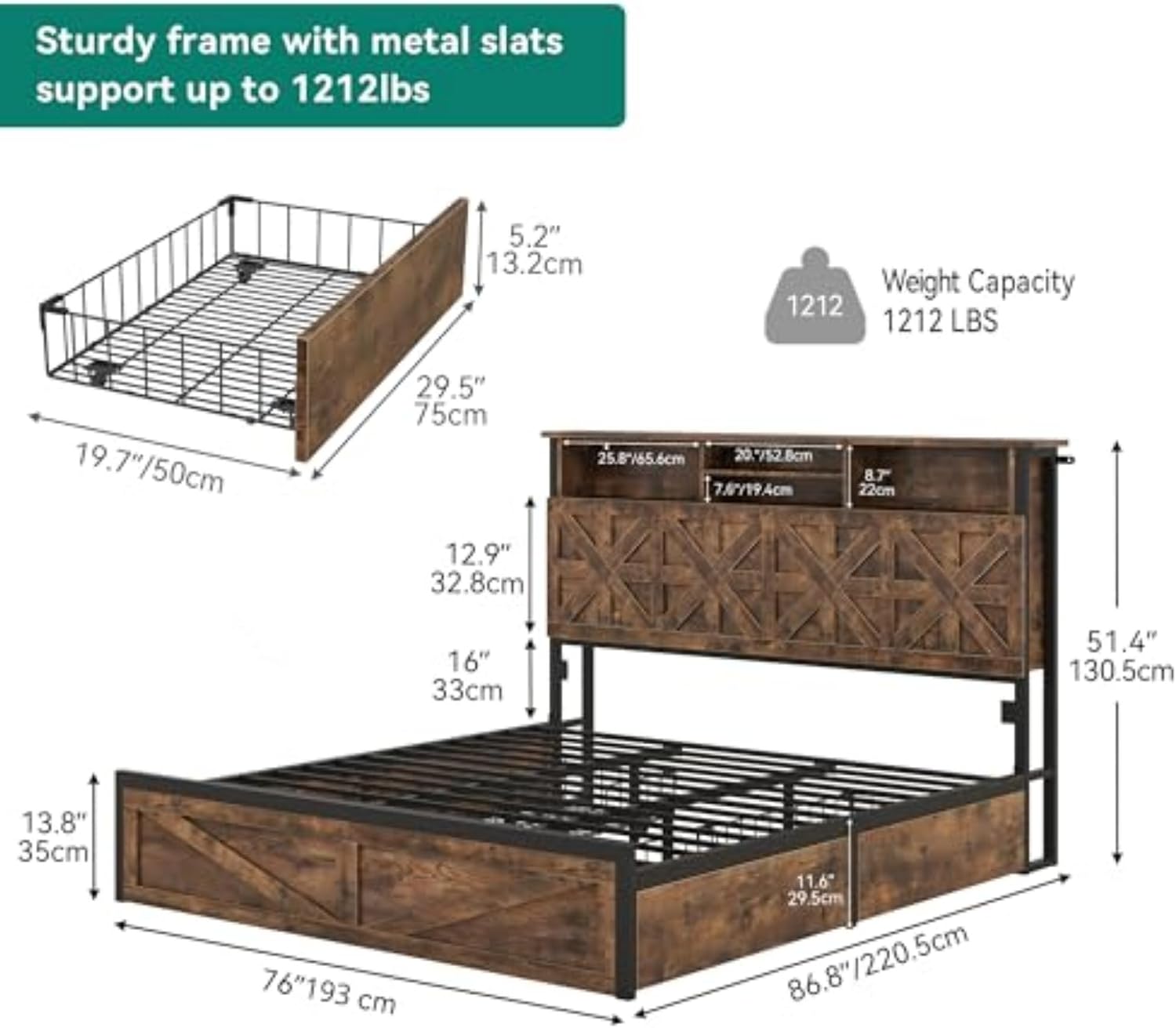
Figure 2.1: Overall dimensions and key components.
This diagram illustrates the bed frame's dimensions, including its length (86.8 inches), width (60 inches), and headboard height (51.4 inches). It also shows the structure of the headboard, frame, and storage drawers, along with the 1212 lbs weight capacity.
Refer to the included installation manual for a detailed list of all numbered parts and hardware.
3. Assembly Instructions
Assembly typically requires two adults. Follow the steps below in sequence. Do not fully tighten screws until all components are loosely assembled, then tighten all connections.
Tools Required:
- Hex Key (usually included)
- Screwdriver (Phillips head, not always included)
Assembly Steps:
- Unpack and Identify Parts: Carefully remove all components from the packaging. Lay them out on a clean, soft surface to prevent scratches. Refer to the parts list in your separate installation manual to identify each piece.
- Assemble the Headboard: Attach the headboard panels and support beams. Ensure the LED lighting components and charging station housing are correctly oriented.
- Connect Side Rails: Attach the side rails to the assembled headboard and footboard (if separate).
- Install Center Support Legs and Beams: Secure the central support legs and beams to the frame for added stability.
- Place Slats: Lay the wood slats across the frame. Ensure they are evenly spaced and secured according to the manual. The bed frame features strong wood slat support, eliminating the need for a box spring.
- Assemble Storage Drawers: Construct the four storage drawers. Attach the wheels to the bottom of each drawer.
- Insert Drawers: Slide the assembled drawers into their designated compartments beneath the bed frame.
- Install Charging Station: Secure the charging station unit into the designated slot in the headboard. Connect the power cord.
- Final Tightening: Once all components are in place, systematically tighten all screws and bolts. Do not overtighten.

Figure 3.1: Key structural features for assembly.
This image highlights the robust construction of the bed frame, including its noiseless design, stable metal structure, and extra leg support, all contributing to its ease of assembly and durability.
4. Operating Instructions
4.1. Using the Charging Station
The integrated charging station in the headboard provides convenient power access for your devices.
- Power Connection: Plug the bed frame's main power cord into a standard wall outlet.
- AC Outlets: Use the 125V/12A AC outlets for powering lamps, laptops, or other electronics.
- USB Ports: Use the 5V/2A USB ports for charging smartphones, tablets, and other USB-powered devices.

Figure 4.1: Headboard charging station details.
This image provides a detailed view of the functional headboard, showcasing its two-tier storage shelves and the integrated charging station with two AC outlets and two USB ports, along with a 6.5-foot power cord.
4.2. Controlling the LED Lighting
The headboard features integrated LED lighting for ambient illumination.
- Remote Control: Use the provided remote control to turn the lights on/off, change colors (over 60,000 options), adjust brightness, and select dynamic modes.
- App Control: Download the compatible mobile application to control the LED lights via your smartphone. The app offers advanced customization options, including night light mode.

Figure 4.2: LED lighting features.
This image demonstrates the RGB LED bed frame with integrated lighting, highlighting its app and remote control capabilities, offering over 60,000 colors, night light function, and various dynamic modes.
4.3. Utilizing Storage Drawers
The four under-bed storage drawers provide ample space for organizing various items.
- Access: Simply pull the drawers out from under the bed. They are equipped with wheels for smooth operation.
- Capacity: Each drawer is designed to hold items such as clothing, linens, books, or storage boxes.
- Organization: Utilize the drawers to keep your bedroom tidy and maximize space.

Figure 4.3: Under-bed storage drawer.
This close-up image shows one of the under-bed storage drawers, highlighting its spacious interior and the smooth-rolling wheels for easy access. It illustrates how the drawers can store items like slippers, towels, storage boxes, and books.
5. Maintenance
Regular maintenance will help prolong the life and appearance of your bed frame.
- Cleaning: Wipe surfaces with a soft, damp cloth. Avoid harsh chemicals or abrasive cleaners. For the upholstered headboard, use a fabric cleaner suitable for linen materials.
- Fasteners: Periodically check all screws and bolts to ensure they remain tight. Re-tighten as necessary to maintain stability and prevent noise.
- Drawer Rails: Keep drawer rails free of dust and debris to ensure smooth operation.
- Electrical Components: Ensure the charging station and LED light connections are secure. Do not attempt to repair electrical components yourself; contact qualified personnel if issues arise.
6. Troubleshooting
This section addresses common issues you might encounter.
| Problem | Possible Cause | Solution |
|---|---|---|
| Bed frame is wobbly or noisy. | Loose fasteners; uneven assembly. | Ensure all bolts and screws are fully tightened. Check that the bed frame is on a level surface. |
| Drawers do not slide smoothly. | Debris in rails; misaligned drawers; damaged wheels. | Clean drawer rails. Re-align drawers. Inspect wheels for damage and contact support if necessary. |
| Charging station not working. | Power cord unplugged; faulty outlet; internal wiring issue. | Check if the power cord is securely plugged into a working wall outlet. Test the outlet with another device. If still not working, contact customer support. |
| LED lights not functioning. | Power issue; remote control battery dead; app connection issue. | Ensure the bed frame is powered. Replace remote control batteries. Re-pair the app with the LED system if needed. |
7. Specifications
- Brand: YITAHOME
- Model Number: MAYIHgQycI
- UPC: 197839730892
- Size: Queen
- Product Dimensions: 86.8"L x 60"W x 51.4"H
- Color: Rustic Brown (Linen-Beige upholstery)
- Material: Upholstered (Linen-Beige), Wood, Metal
- Weight Capacity: 1212 lbs
- Special Features: 4 Storage Drawers, Charging Station (2 AC Outlets, 2 USB Ports), Wingback Headboard, LED Lighting (App & Remote Control), No Box Spring Needed, Noise-Free Design
- Assembly Required: Yes
8. Warranty and Support
YITAHOME products are designed for durability and customer satisfaction. For specific warranty details, please refer to the warranty card included with your purchase or visit the official YITAHOME website.
If you encounter any issues or require assistance, please contact YITAHOME customer support:
- Customer Support: Refer to the contact information provided in your purchase documentation or on the YITAHOME official website.
- Online Resources: Visit the YITAHOME store on Amazon for FAQs and additional product information: YITAHOME Store