
M9
M9 Automatic Soap Dispenser User Manual
Model: M9
1. Product Overview
The M9 Automatic Soap Dispenser is a touch-free foam dispenser designed for both liquid soap and hand sanitizer. Its automatic-sensing technology ensures hygienic dispensing, making it suitable for various environments such as bathrooms, kitchens, hotels, and offices. The dispenser features a modern white design with a ribbed texture and a transparent window for monitoring liquid levels. It offers flexible installation options, allowing for wall mounting or desktop placement.
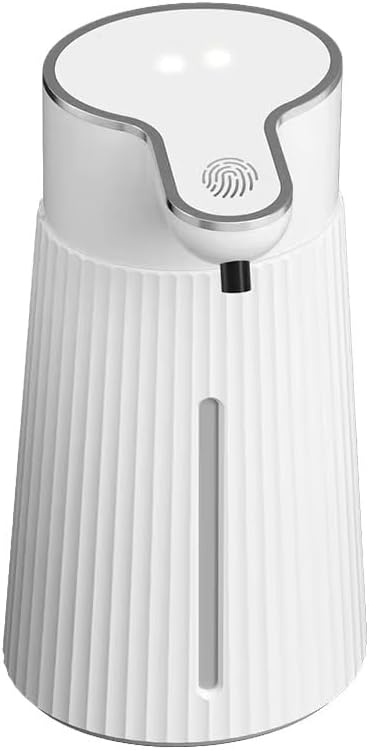
Figure 1: Front view of the M9 Automatic Soap Dispenser, showcasing its sleek design and transparent liquid level window.
2. Key Features
- Touchless Operation: Advanced infrared sensor technology for hands-free dispensing.
- Versatile Placement: Can be wall-mounted or used as a desktop unit.
- Multi-Purpose Use: Compatible with foam soaps, hand sanitizers, facial cleansers, and laundry detergents.
- Sleek Design: White exterior with ribbed texture, clear window, and fingerprint-resistant finish.
- Convenient Refill: Large capacity tank with easy-to-access top opening.
3. Package Contents
Please check the package for the following items:
- M9 Automatic Soap Dispenser Unit
- User Manual
- Wall Mounting Accessories (if applicable)
4. Setup Guide
- Install Batteries: Open the battery compartment (usually at the bottom or back) and insert the required batteries (not included). Ensure correct polarity.
- Fill with Liquid: Open the top cap of the dispenser. Pour your desired foam soap, liquid soap (diluted for foaming), or hand sanitizer into the reservoir. Do not overfill.
- Choose Placement:
- Desktop Use: Place the dispenser on a flat, stable surface.
- Wall Mount: Use the provided mounting accessories to securely attach the dispenser to a wall. Ensure it is placed at a convenient height and away from direct water spray.
- Power On: Locate the power button (if any) and turn the dispenser on. Some models may power on automatically upon battery insertion.

Figure 2: Illustration of filling the dispenser with different types of liquid, such as foam soap, hand sanitizer, laundry detergent, or facial cleanser.
5. Operating Instructions
- Dispensing Foam: Place your hand approximately 2-3 inches directly under the nozzle. The infrared sensor will detect your hand and automatically dispense a measured amount of foam.
- Adjusting Foam Output (if applicable): Some models may have a button or setting to adjust the volume of foam dispensed. Refer to the specific controls on your device for this feature.
- Indicator Lights: Observe any indicator lights for status, such as low battery or dispensing activity.

Figure 3: A hand positioned under the dispenser's nozzle, demonstrating the automatic foam dispensing action.
6. Maintenance
- Refilling: When the liquid level in the transparent window is low, refill the dispenser as described in the "Setup Guide" (Section 4).
- Cleaning: Wipe the exterior of the dispenser with a soft, damp cloth. Do not submerge the unit in water or use abrasive cleaners.
- Battery Replacement: Replace batteries when the dispenser's performance diminishes or indicator lights signal low power.
- Prevent Clogging: If using liquid soap, ensure it is diluted appropriately for foaming. Use a 1:3 or 1:4 soap-to-water ratio for best results.
7. Troubleshooting
| Problem | Possible Cause | Solution |
|---|---|---|
| No foam dispensed. | Low battery; Empty reservoir; Clogged nozzle; Hand not positioned correctly. | Replace batteries; Refill reservoir; Clean nozzle; Reposition hand under sensor. |
| Weak or inconsistent foam. | Incorrect soap dilution; Low battery. | Adjust soap-to-water ratio (e.g., 1:3); Replace batteries. |
| Sensor not responding. | Obstruction near sensor; Low battery; Unit turned off. | Clear sensor area; Replace batteries; Turn unit on. |
| Leaking. | Overfilled reservoir; Unit not upright. | Do not overfill; Ensure unit is on a flat, stable surface or securely mounted. |
8. Specifications
| Attribute | Value |
|---|---|
| Model Number | M9 |
| Brand | Generic |
| Color | White |
| Material | Palastic (polypropylene, acrylonitrile butadiene styrene ABS) |
| Product Dimensions (L x W x H) | 3.74" x 3.74" x 7.48" |
| Liquid Volume Capacity | 14 Fluid Ounces |
| Item Weight | 11.3 ounces |
| Power Source | Batteries (not included) |
9. Warranty and Support
This product comes with a standard manufacturer's warranty. For specific warranty details, please refer to the packaging or contact the retailer where the product was purchased. For technical support or further assistance, please contact the manufacturer's customer service.
Keep your purchase receipt as proof of purchase for warranty claims.
Related documentsM9


Ask a question about this manual
Ask about setup, troubleshooting, compatibility, parts, safety, or missing instructions. Manuals+ will review the question and use this page’s manual context to help answer it.