
Introduction
The Ants on a Melon RGB Critter BT is a versatile, app-controlled RGB flashlight designed for various creative applications, including flow arts, light painting, and performance. This manual provides essential information for setting up, operating, maintaining, and troubleshooting your device.
The RGB Critter BT offers extensive customization with 16 million colors, 100 brightness levels, and 8 dynamic effects. It can be controlled via a dedicated mobile application or its onboard buttons, and supports synchronization of up to 10 devices for coordinated displays. Its robust construction ensures durability for demanding use.
Package Contents and Setup
Before using your RGB Critter BT, please ensure all components are present and follow the initial setup instructions.

Figure 1: Contents of the RGB Critter BT package, including the flashlight unit, rechargeable battery, and USB-C charging cable.
What's in the Box:
- RGB Critter BT Flashlight Unit
- Replaceable 2500mAh Rechargeable Battery
- USB-C Charging Cable
Initial Setup:
- Battery Installation: Insert the provided 2500mAh rechargeable battery into the battery compartment of the RGB Critter BT flashlight. Ensure correct polarity.
- Initial Charge: Connect the USB-C charging cable to the flashlight's USB-C port and plug the other end into a compatible USB power adapter (not included). Charge the device fully before first use. The battery level indicators will provide charging status.
- App Download (Optional): For full control and customization, download the official Ants on a Melon app from your device's app store.
Operating Instructions
The RGB Critter BT can be operated using its onboard buttons or through the dedicated mobile application.

Figure 2: The RGB Critter BT flashlight and its accompanying mobile application for control.
Onboard Button Control:
The device features three onboard buttons for quick and intuitive use:
- Power Button: Press and hold to turn the device on/off. Short press to cycle through basic modes or confirm selections.
- Mode Button: Cycles through different light effects (e.g., solid color, strobe, fade, ribbon, pulse).
- Brightness Button: Adjusts the brightness level of the current effect.

Figure 3: Overview of control methods, including the mobile app and onboard buttons.
Bluetooth App Control:
- Pairing: Ensure Bluetooth is enabled on your smartphone. Open the Ants on a Melon app and follow the on-screen instructions to pair with your RGB Critter BT.
- Color and Effect Selection: Use the app to select from 16 million colors, adjust 100 brightness levels, and choose from 8 dynamic effects including strobe, fade, ribbon, and pulse.
- Custom Modes and Playlists: The app allows you to save and transfer custom light modes and create personalized playlists for various performances or artistic needs.
- Device Synchronization: For multi-prop performances, the app supports syncing up to 10 RGB Critter BT devices simultaneously for coordinated light shows.
Accessory Compatibility:
The RGB Critter BT features a threaded lens designed for compatibility with over 200 twist-on accessories. These include fiber optic whips, light sabers, and various light painting tools, expanding the device's creative applications.
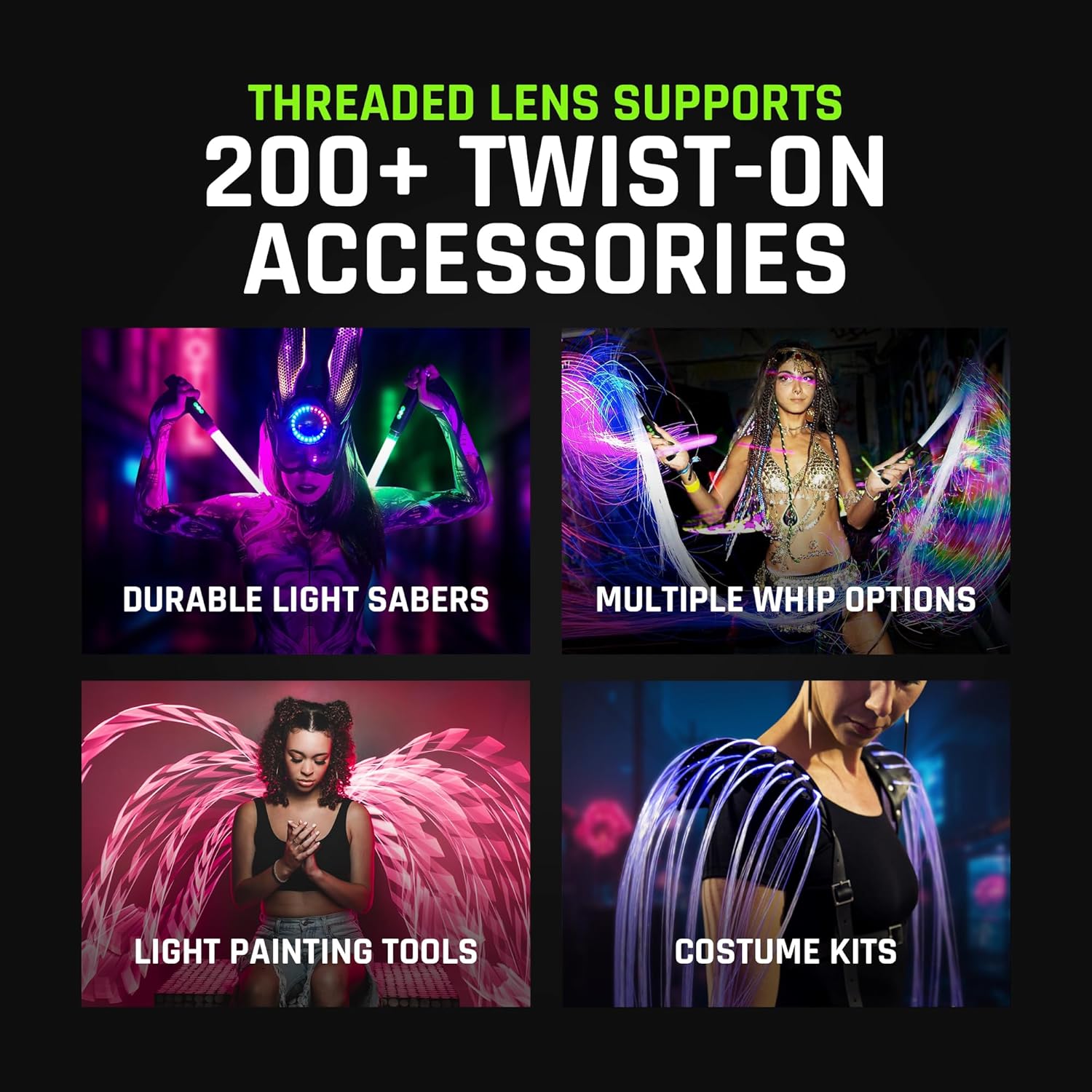
Figure 4: The RGB Critter BT's threaded lens and examples of compatible twist-on accessories.
Maintenance
Proper maintenance ensures the longevity and optimal performance of your RGB Critter BT.
- Cleaning: Use a soft, dry cloth to clean the exterior of the flashlight. Avoid abrasive cleaners or solvents.
- Battery Care: Recharge the battery regularly, even if not in frequent use, to maintain battery health. Store the device in a cool, dry place when not in use.
- Storage: When storing for extended periods, remove the battery if possible and store the device in a protective case to prevent damage.
- Water Resistance: Note that the RGB Critter BT is not water resistant. Avoid exposure to water or high humidity.
Troubleshooting
If you encounter issues with your RGB Critter BT, refer to the following common troubleshooting steps:
| Problem | Possible Cause | Solution |
|---|---|---|
| Device does not turn on. | Low or depleted battery. Incorrect battery installation. | Charge the battery fully. Ensure the battery is inserted with correct polarity. |
| Cannot connect to app via Bluetooth. | Bluetooth is off on phone. Device is out of range. App issue. | Ensure Bluetooth is enabled. Bring device closer to phone. Restart the app and/or device. |
| Light output is dim or inconsistent. | Low battery. Brightness setting too low. | Recharge the battery. Increase brightness using the app or onboard button. |
| Device not responding to button presses. | Device frozen. | Perform a soft reset by holding the power button for 10 seconds. If unresponsive, remove and reinsert the battery. |
If the issue persists after attempting these steps, please contact customer support.
Specifications
| Feature | Detail |
|---|---|
| Model Number | RGB045 |
| Light Source Type | LED |
| Brightness | 170 lumens |
| Color Options | 16 Million |
| Brightness Levels | 100 |
| Dynamic Effects | 8 (Strobe, Fade, Ribbon, Pulse, etc.) |
| Power Source | Battery Powered (Rechargeable) |
| Battery Type | 2500mAh Lithium Ion |
| Runtime | Up to 7 hours |
| Charging Port | USB-C |
| Material | Aluminum, Silicone |
| Dimensions (Package) | 7 x 3.25 x 1.5 inches |
| Weight | 10.1 ounces |
| Water Resistance | Not Water Resistant |
| UPC | 850051519392 |
Warranty and Support
The RGB Critter BT is backed by a 2-year warranty, covering defects in materials and workmanship under normal use.
For technical assistance, troubleshooting beyond this manual, or warranty claims, please contact Ants on a Melon customer support. Our responsive US-based customer support team is available to assist you.
Please visit the official Ants on a Melon website for the most up-to-date contact information and support resources.