
1. Introduction
Thank you for choosing the EVVO CLIMA AC650 Evaporative Air Cooler. This appliance is designed to provide a refreshing cooling effect by evaporating water, making it an ideal solution for small to medium-sized indoor spaces such as living rooms, bedrooms, or offices. Please read this manual carefully before operating the device to ensure safe and efficient use. Keep this manual for future reference.
2. Safety Instructions
To reduce the risk of fire, electric shock, or injury, always follow these basic safety precautions:
- Ensure the power supply voltage matches the rating label on the appliance.
- Do not immerse the appliance, cord, or plug in water or other liquids.
- Unplug from the outlet when not in use, before cleaning, or before moving.
- Do not operate any appliance with a damaged cord or plug, or after the appliance malfunctions or has been damaged in any manner.
- Keep the appliance on a stable, flat surface to prevent tipping.
- Do not block air inlets or outlets.
- Do not insert fingers or foreign objects into the air vents.
- Only use clean tap water in the water tank.
- Do not use the appliance outdoors.
- Supervise children to ensure they do not play with the appliance.
3. Product Components
The EVVO CLIMA AC650 Evaporative Air Cooler consists of the following main components:
- Main Unit with Control Panel
- Water Tank (3.5 Liters capacity)
- Multidirectional Wheels (pre-installed for easy mobility)
- Ice Packs (2 included)
- Power Cord

Image: Front view of the EVVO CLIMA AC650 Evaporative Air Cooler, showing the main air outlet and water level indicator.

Image: Diagram illustrating the dimensions of the EVVO CLIMA AC650. The unit measures 25 cm in width, 30 cm in depth, and 56 cm in height.

Image: Close-up view of the transparent water tank, highlighting its 3.5-liter capacity and maximum fill line.
4. Setup Guide
- Unpacking: Carefully remove the air cooler from its packaging. Retain the packaging for future storage or transport.
- Placement: Place the air cooler on a firm, level surface. Ensure there is adequate space around the unit for proper airflow. The multidirectional wheels allow for easy movement.
- Fill Water Tank: Pull out the water tank from the bottom rear of the unit. Fill the tank with clean tap water, ensuring the water level does not exceed the 'MAX' mark. The tank has a capacity of 3.5 liters.
- Insert Ice Packs: For enhanced cooling, place the two included ice packs in a freezer until completely frozen. Once frozen, place them directly into the water tank. This helps to lower the water temperature, providing cooler air.
- Connect Power: Insert the power plug into a suitable 220 Volt electrical outlet.
5. Operating Instructions
The EVVO CLIMA AC650 features an intuitive control panel and can also be operated via a remote control (not pictured, but included).
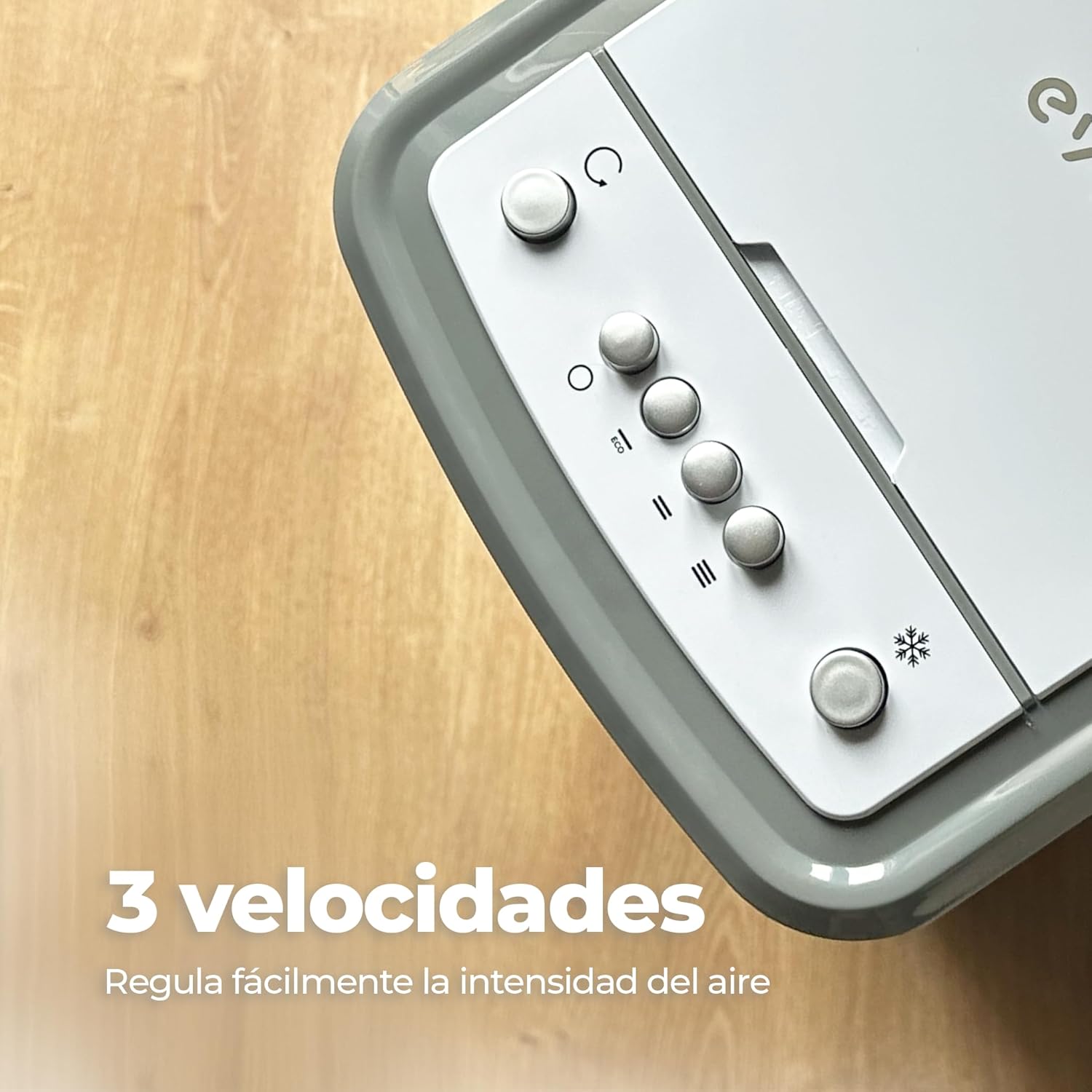
Image: Close-up of the top control panel, showing buttons for power, mode, and fan speed settings.
- Power On/Off: Press the power button on the control panel or remote to turn the unit on or off. The unit will start in a default mode.
- Adjust Fan Speed: The unit offers three adjustable fan speeds. Press the fan speed button (often indicated by fan blade icons or 'I', 'II', 'III') repeatedly to cycle through low, medium, and high settings.
- Activate Oscillation: Press the oscillation button (often indicated by a circular arrow icon) to activate the automatic 70° oscillation function. This distributes cool air evenly across the room. Press again to stop oscillation.

Image: The EVVO CLIMA AC650 operating in a room, demonstrating its automatic 70-degree oscillation feature for wide air distribution.
6. Maintenance and Care
Regular maintenance ensures optimal performance and extends the lifespan of your air cooler.
- Cleaning the Water Tank: Empty and clean the water tank regularly, especially if the unit is not used for extended periods. Use a soft cloth and mild detergent. Rinse thoroughly.
- Cleaning the Air Filter: The air filter (located at the back of the unit) should be cleaned periodically. Remove the filter, rinse it under running water, and allow it to dry completely before reinserting.
- Exterior Cleaning: Wipe the exterior of the unit with a soft, damp cloth. Do not use abrasive cleaners or solvents.
- Storage: If storing the unit for a long time, ensure the water tank is empty and dry, and the unit is clean. Store in a cool, dry place.
7. Troubleshooting
If you encounter issues with your EVVO CLIMA AC650, refer to the following common problems and solutions:
| Problem | Possible Cause | Solution |
|---|---|---|
| Unit does not turn on | No power supply; Power button not pressed. | Check if the power cord is securely plugged in. Press the power button. |
| Weak airflow | Air filter is dirty; Water tank is empty. | Clean the air filter. Refill the water tank. |
| No cooling effect | Water tank is empty; Ice packs not used or not frozen. | Ensure water tank is filled. Use frozen ice packs for better cooling. |
| Unusual noise | Unit not on a level surface; Obstruction in fan. | Place the unit on a flat, stable surface. Check for any obstructions and remove them after unplugging the unit. |
If the problem persists after trying these solutions, please contact customer support.
8. Technical Specifications
| Feature | Specification |
|---|---|
| Model Name | CLIMA AC650 |
| Power | 65 W |
| Voltage | 220 Volts |
| Water Tank Capacity | 3.5 Liters |
| Dimensions (L x W x H) | 30 x 25 x 56 cm |
| Weight | 4.1 kg |
| Fan Speeds | 3 adjustable speeds |
| Oscillation | Automatic 70° |
| Control Type | Remote |
| Airflow | 6.7 Microliters per Minute |
9. Warranty and Support
For warranty information and customer support, please refer to the warranty card included with your product or visit the official EVVO website. You may also contact the retailer where you purchased the product for assistance. Please have your model number and purchase date ready when contacting support.