
CristalRecord 85-458-48-000
Stel TL 31W 2980Lm CCT Dim LED Ceiling Fan User Manual
Model: 85-458-48-000
1. Introduction
Thank you for choosing the Stel TL 31W 2980Lm CCT Dim LED Ceiling Fan. This silent, six-speed ceiling fan is designed to provide both illumination and ventilation for rooms ranging from 13 to 20 square meters. It features a combined LED lighting system, including a main light and a decorative ring, offering versatile lighting options.
This manual provides detailed instructions for the safe installation, operation, and maintenance of your new ceiling fan. Please read it thoroughly before beginning installation or operation to ensure proper function and safety.

Image 1.1: The Stel TL 31W 2980Lm CCT Dim LED Ceiling Fan, showcasing its sleek design with integrated LED lighting and three blades.
2. Safety Instructions
Always follow basic safety precautions when installing and operating electrical appliances to reduce the risk of fire, electric shock, and personal injury.
- Ensure the power supply is disconnected at the main circuit breaker before installation or maintenance.
- All electrical connections must be made in accordance with local codes and ordinances, and by a qualified electrician if necessary.
- The mounting structure must be capable of supporting a minimum of 15 kg (33 lbs).
- Do not operate the fan with damaged wiring or if the fan is visibly damaged.
- Keep hands, hair, and clothing away from moving fan blades.
- This appliance is not intended for use by persons (including children) with reduced physical, sensory or mental capabilities, or lack of experience and knowledge, unless they have been given supervision or instruction concerning use of the appliance by a person responsible for their safety.
3. Package Contents
Carefully unpack your ceiling fan and ensure all items are present and undamaged. If any items are missing or damaged, contact your retailer immediately.
- Fan Motor Assembly
- Fan Blades (x3)
- LED Light Kit (main light and decorative ring)
- Remote Control with Wall Mount
- Mounting Bracket
- Downrod
- Hardware Pack (screws, washers, wire nuts)
- User Manual
4. Setup and Installation
Before installation, ensure the power is turned off at the circuit breaker. It is recommended to have two people for installation.
4.1 Pre-Installation Checks
- Verify that the installation location has a suitable electrical box and support structure.
- Ensure there is adequate clearance from walls and other obstructions. The fan has a diameter of 1200mm.
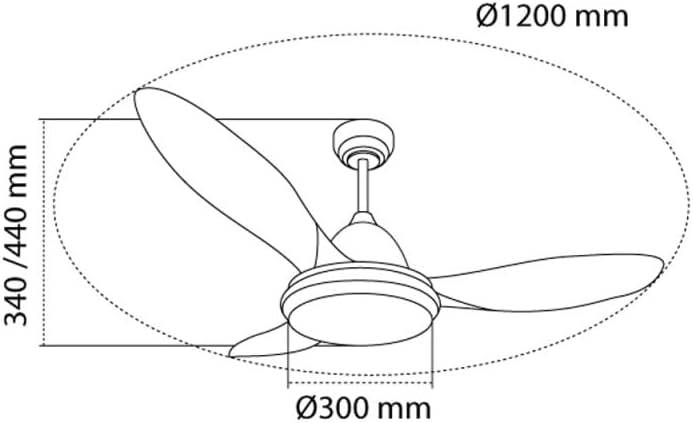
Image 4.1: Diagram illustrating the dimensions of the ceiling fan, with a diameter of 1200mm and height options of 340mm/440mm, crucial for installation planning.
4.2 Mounting the Bracket
- Attach the mounting bracket securely to the ceiling electrical box using the provided screws.
4.3 Wiring
- Connect the fan's electrical wires to the house wiring according to the wiring diagram in the separate installation guide (if provided) or standard electrical practices (Live to Live, Neutral to Neutral, Ground to Ground).
- Ensure all connections are secure using wire nuts.
4.4 Attaching the Fan Body and Blades
- Carefully lift the fan motor assembly and hang it on the mounting bracket.
- Secure the fan body to the bracket.
- Attach the fan blades to the motor assembly using the provided screws. Ensure they are firmly tightened.
4.5 Installing the Light Kit
- Connect the light kit's wires to the fan's light wires.
- Secure the light kit to the bottom of the fan motor assembly.

Image 4.2: The Stel TL 31W 2980Lm CCT Dim LED Ceiling Fan elegantly installed in a modern living room setting, demonstrating its aesthetic integration.
5. Operating Instructions
Your Stel TL ceiling fan is controlled by the included remote control. Ensure the remote has batteries installed (not included, typically 2x AAA).
5.1 Remote Control Functions
- Power Button: Turns the fan and light on/off.
- Fan Speed Buttons: Adjusts the fan speed through six levels. Look for buttons typically marked with fan icons or numbers 1-6.
- Light On/Off Button: Toggles the LED light on or off independently of the fan.
- CCT (Correlated Color Temperature) Adjustment: Changes the color temperature of the LED light (e.g., warm white, neutral white, cool white).
- Dimming Buttons: Adjusts the brightness of the LED light.
- Reverse Function: Changes the direction of the fan blades (clockwise for downdraft in summer, counter-clockwise for updraft in winter).
- Timer Function: Sets the fan to turn off automatically after a set period (e.g., 1 hour, 2 hours, 4 hours).
- Memory Function: The fan remembers the last light setting (brightness and CCT) when turned off and on again.
6. Maintenance
Regular maintenance will help prolong the life and performance of your ceiling fan.
- Cleaning: Dust the fan blades and motor housing periodically with a soft, damp cloth. Do not use abrasive cleaners or solvents. Ensure power is off before cleaning.
- Tightening Screws: Check all screws on the fan blades and mounting hardware annually to ensure they are secure. Loose screws can cause noise and wobble.
- No Lubrication Required: The fan motor is permanently lubricated and does not require oiling.
7. Troubleshooting
If you experience issues with your fan, refer to the following common problems and solutions:
| Problem | Possible Cause | Solution |
|---|---|---|
| Fan does not start | No power to the fan; Loose wire connections; Remote control issues. | Check circuit breaker; Verify all wire connections are secure; Replace remote batteries or re-pair remote. |
| Light does not work | Loose wire connection to light kit; Faulty LED module; Remote control issue. | Check light kit wiring; Contact customer support if LED module is suspected faulty; Check remote batteries. |
| Fan wobbles | Loose blade screws; Unbalanced blades; Loose mounting bracket. | Tighten all blade screws; Use a balancing kit (not included) if necessary; Ensure mounting bracket is securely fastened. |
| Noisy operation | Loose screws; Fan not level; Internal motor issue. | Check and tighten all screws; Ensure fan is installed level; If noise persists, contact customer support. |
| Remote control not responding | Dead batteries; Remote not paired with fan; Obstruction between remote and receiver. | Replace batteries; Refer to pairing instructions (if applicable); Ensure clear line of sight. |
8. Specifications
| Feature | Detail |
|---|---|
| Brand | CristalRecord |
| Manufacturer | CRISTALRECORD |
| Model Reference | 85-458-48-000 |
| Power Consumption (Fan) | 31W |
| Luminous Flux (Light) | 2980Lm |
| Light Type | Integrated LED with CCT Dimming |
| Fan Speeds | 6 |
| Recommended Room Size | 13-20 m² |
| Product Weight | Approx. 100 g (Note: This weight seems unusually low for a ceiling fan and might be a data entry error. Please refer to product packaging for accurate weight.) |
| ASIN | B0DZHFMLQ9 |
| First Available Date | March 6, 2025 |
9. Warranty and Support
For warranty information or technical support, please refer to the documentation provided with your purchase or contact your retailer. Keep your proof of purchase for any warranty claims.
For further assistance, you may also contact CristalRecord customer service through their official website or the contact information provided by your seller.
Ask a question about this manual
Ask about setup, troubleshooting, compatibility, parts, safety, or missing instructions. Manuals+ will review the question and use this page’s manual context to help answer it.