1. Introduction
This manual provides detailed instructions for the installation and use of the QSZN Android Canbus Box FT-RZ-01/FT-RZ-02 wiring harness. This product is designed to integrate an aftermarket Android car radio with your vehicle's existing electrical system, enabling communication between the radio and the vehicle's CAN bus for functions such as steering wheel controls, door status, and reverse gear signals.
2. Vehicle Compatibility
The QSZN Canbus Box and wiring harness are compatible with various Toyota models. Please verify your vehicle's year and model against the lists below to ensure proper fitment.
2.1. FT-RZ-01 Cable Set Compatibility:
- 2012-2015 Toyota CAMRY
- 2015-2017 Toyota CAMRY
- 2013-2018 Toyota RAV4
- 2010-2020 Toyota REIZ/MARK X
- 2014-2016 Toyota COROLLA
- 2018 Toyota IZOA/CHR
- 2011-2015 Toyota SIENNA
- 2017 Toyota Corolla
- 2015-2019 Toyota HIGHLANDER/KLUGER
- 2014 Toyota LEVIN
- 2016+ Toyota LAND CRUISER
- 2015 Coaster
- 2016-2018 Toyota SIENNA
- 2014 Toyota COROLLA
- Toyota IZOA
- 2013-2018 Toyota RAV4
- 2015 American Camry
2.2. FT-RZ-02 Cable Set Compatibility:
- 2014-2017 Toyota PRADO/120
- 2018-2020 Toyota PRADO/120
- 2007-2013 Toyota TUNDRA
- 2008 Toyota ALPHARD
- 2019 Toyota COROLLA/Altis/Auris
- 2019 Toyota RAV4
- 2014 Toyota TUNDRA
- 2020 RAV4
- 2011 Toyota VENZA
3. Package Contents
The package includes the following components:
- 1 x QSZN Canbus Box (FT-RZ-01 or FT-RZ-02, depending on selection)
- 1 x Wiring Harness Cable Set
Note: Other products not listed above are not included.
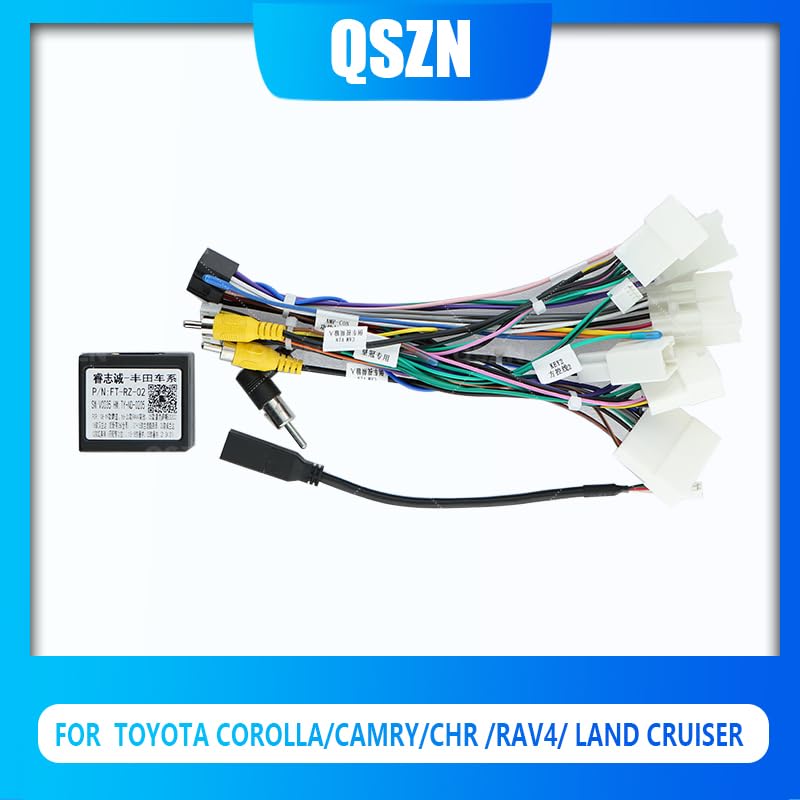
Image 1: QSZN Canbus Box (FT-RZ-02 shown) connected to the wiring harness. This image displays the main components included in the package, featuring the black Canbus box with a QR code and model number, along with a multi-colored wiring harness with various connectors.
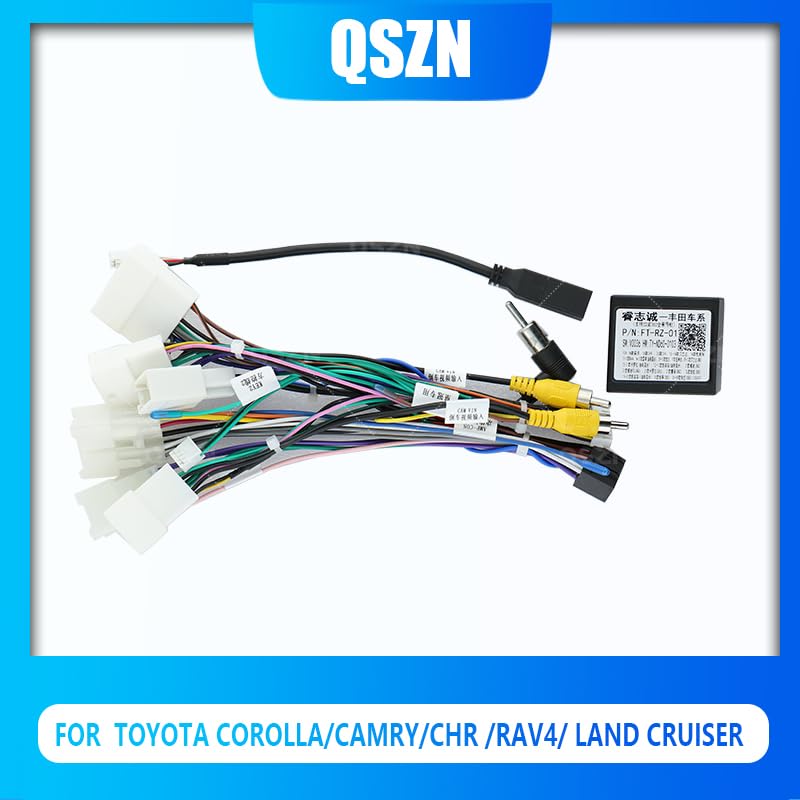
Image 2: QSZN Canbus Box (FT-RZ-02 shown) and wiring harness, highlighting the RCA connectors. This image provides another view of the components, emphasizing the audio/video input/output connectors (yellow, white, red RCA plugs) present on the harness, alongside the main power and data connectors.
4. Setup and Installation
Installation of the QSZN Canbus Box and wiring harness requires basic knowledge of car audio wiring. If you are unsure about any steps, it is recommended to seek professional installation.
- Safety First: Before beginning any installation, disconnect the vehicle's negative battery terminal to prevent electrical shorts and damage.
- Remove Existing Radio: Carefully remove your vehicle's factory radio or existing aftermarket head unit. Refer to your vehicle's service manual for specific instructions on dash disassembly.
- Identify Connectors: Locate the factory wiring harness connectors in your vehicle's dashboard.
- Connect QSZN Harness: Connect the QSZN wiring harness to the corresponding factory connectors. Ensure all connections are secure. The harness is designed for a plug-and-play fit for compatible vehicles.
- Connect Canbus Box: Plug the QSZN Canbus Box into the designated connector on the QSZN wiring harness.
- Connect to Android Radio: Connect the other end of the QSZN wiring harness to your aftermarket Android car radio. This typically involves connecting the main power/speaker harness, RCA cables for audio/video, and specific data wires for CAN bus communication.
- Test Connections: Before fully reassembling the dashboard, reconnect the vehicle's negative battery terminal. Turn on the ignition and test the Android radio's basic functions, including power, audio, steering wheel controls, and reverse camera input (if applicable).
- Secure Wiring: Once all functions are verified, carefully route and secure all wiring to prevent pinching or interference.
- Reassemble Dashboard: Reassemble the vehicle's dashboard and trim panels.
Note: The specific wiring configuration may vary slightly depending on your Android radio model. Consult your Android radio's manual for detailed wiring diagrams.
5. Operating Principles
The QSZN Canbus Box acts as an interface between your vehicle's CAN bus system and your aftermarket Android car radio. It translates the digital signals from the vehicle (e.g., steering wheel button presses, vehicle speed, reverse gear status, door open/close status) into a format that the Android radio can understand and utilize.
Once correctly installed, the Canbus Box enables features such as:
- Steering Wheel Control Integration: Allows you to use your vehicle's factory steering wheel buttons to control the Android radio (e.g., volume up/down, track skip, mode change).
- Reverse Gear Signal: Automatically switches the radio to a reverse camera display when the vehicle is put into reverse.
- Illumination Control: Synchronizes the radio's button illumination with the vehicle's dashboard lighting.
- Vehicle Information Display: Depending on the Android radio and vehicle, some vehicle data (e.g., door status, climate control information) may be displayed on the radio screen.
Ensure that your Android radio's settings are configured to recognize and utilize the Canbus protocol provided by the QSZN box. This usually involves selecting the correct Canbus type in the radio's factory settings or system settings menu.
6. Maintenance
The QSZN Canbus Box and wiring harness are designed for long-term, maintenance-free operation. No regular maintenance is required. To ensure optimal performance:
- Ensure all connections remain secure and free from corrosion.
- Avoid exposing the components to extreme temperatures or moisture.
- Do not attempt to open or modify the Canbus box, as this may void any warranty and could damage the unit.
7. Troubleshooting
If you encounter issues after installation, consider the following troubleshooting steps:
- No Power to Radio:
- Check all power connections from the QSZN harness to the vehicle and the Android radio.
- Verify the vehicle's fuse for the radio circuit.
- Ensure the negative battery terminal is securely reconnected.
- Steering Wheel Controls Not Working:
- Confirm that the correct Canbus type is selected in your Android radio's settings.
- Check the connection of the Canbus box to the harness and the harness to the radio.
- Some Android radios require a "learning" process for steering wheel controls; refer to your radio's manual.
- Reverse Camera Not Activating:
- Ensure the reverse signal wire from the QSZN harness is correctly connected to the Android radio's reverse input.
- Verify the camera itself is powered and connected correctly.
- Intermittent Functionality:
- Check all connections for looseness or poor contact.
- Ensure no wires are pinched or damaged.
If problems persist after following these steps, contact your product vendor or a qualified car audio technician for assistance.
8. Specifications
| Feature | Detail |
|---|---|
| Product Type | Android Canbus Box & Wiring Harness |
| Model Numbers | FT-RZ-01, FT-RZ-02 |
| Brand | Generic (QSZN) |
| Material | Plastic (for Canbus box and connectors) |
| Origin | Mainland China |
| Compatibility | Specific Toyota models and years (refer to Section 2) |
9. Warranty and Support
Specific warranty information for this product is typically provided by the seller or manufacturer at the time of purchase. Please retain your proof of purchase for any warranty claims.
For technical support or further assistance, please contact the retailer or the manufacturer directly. Ensure you have your product model number (FT-RZ-01 or FT-RZ-02) and vehicle details ready when seeking support.


