
Introduction
Welcome to the StrucToys 1/64 RC Off-Road Car R01 user manual. This guide provides essential information for setting up, operating, maintaining, and troubleshooting your new remote control vehicle. Please read this manual thoroughly before use to ensure safe and optimal performance.
Safety Warning: This product is recommended for users aged 16 and above. Adult supervision is advised for younger users.
Package Contents
Verify that all items listed below are included in your package:
- 1 x StrucToys R01 Car Model
- 1 x CT03 Remote Controller
- 1 x USB Charger
- 1 x User Manual (this document)
- 1 x Tool Kit
- 2 x Stickers

Image of the StrucToys R01 RC car, remote controller, and carrying case.
Product Overview
The StrucToys R01 is a 1/64 scale 2.4GHz RC off-road vehicle designed for precise control and exceptional traversal across various terrains. It features a durable construction and an interactive light set.
Key Features:
- High-Performance Remote Control: 2.4G proportional synchronized control system with precise throttle and steering.
- Exceptional Off-Road Capability: Multi-link chassis, independent suspension, and rear-wheel drive.
- Premium Build Quality: Constructed with ABS and PVC materials, metal gears, and a shock-resistant body.
- Ready to Play: Fully assembled RTR (Ready-To-Run) model with rechargeable Li-ion battery and USB charger included.

Close-up image of the yellow StrucToys R01 RC car, highlighting its detailed exterior.
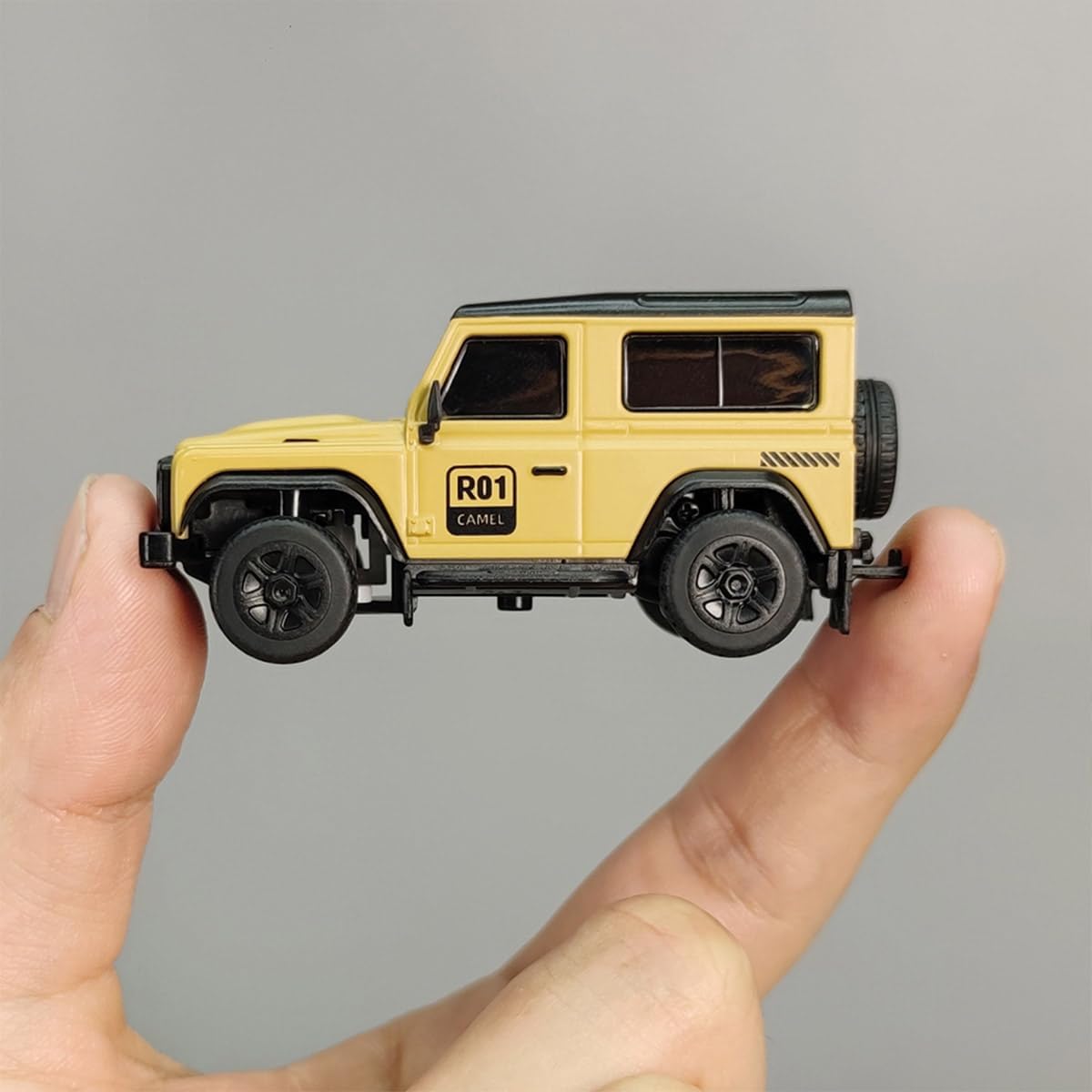
Image of the R01 RC car held in a hand, providing a sense of its compact 1/64 scale.
Remote Controller (CT03):
The CT03 remote controller provides proportional synchronous control for precise vehicle operation. It features an ergonomic handwheel, 10 channels, voltage display, and USB charging capability.

Image of the CT03 remote controller, detailing its ergonomic design and control features.
RC Performance Structure:
The R01 car incorporates advanced structural elements for enhanced performance:
- Independent servo for precise steering and easy maintenance.
- Spur gear transmission for smoother operation.
- Rear suspension ball joint structure for realistic movement.
- Equipped with 4 bearings for smoother rotation.
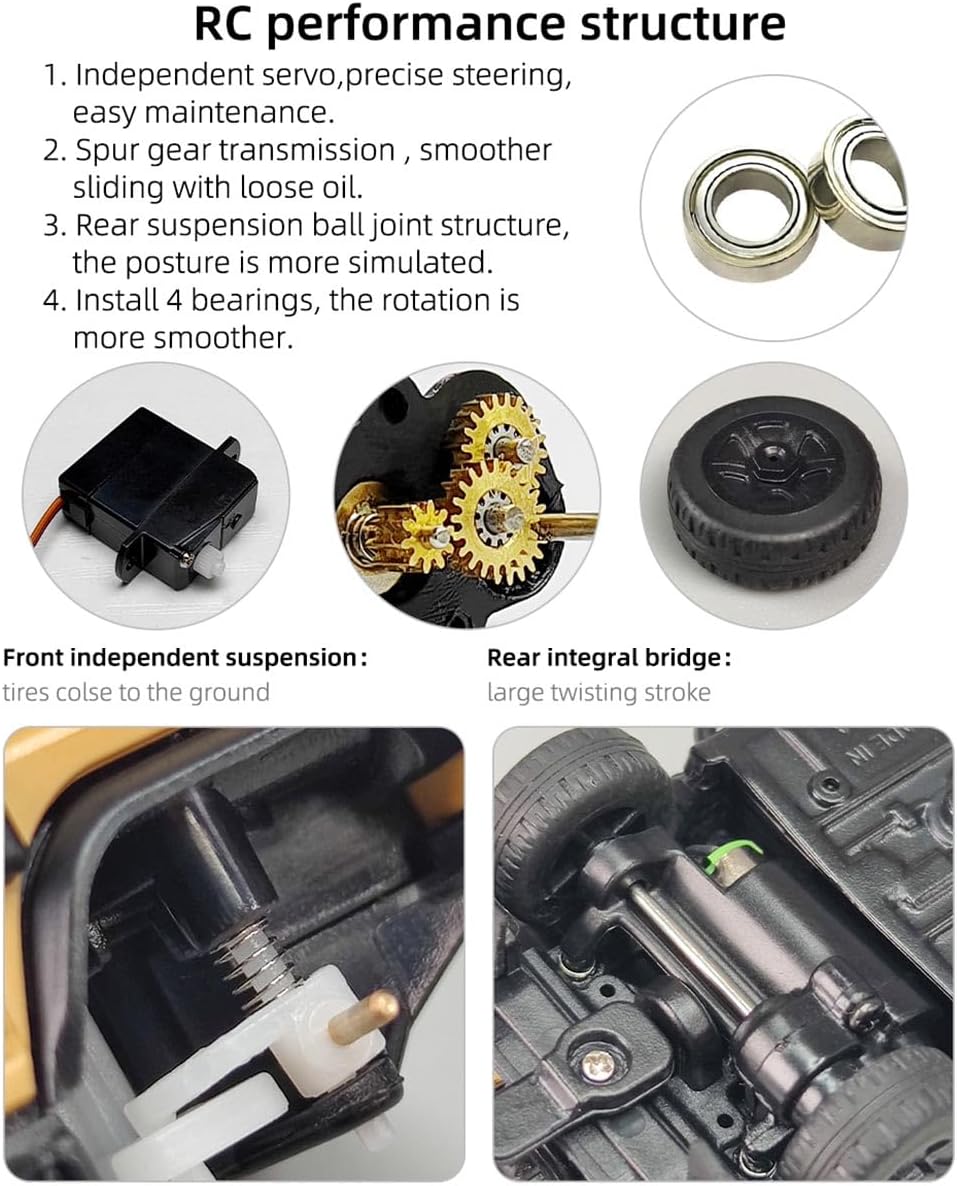
Diagram illustrating the internal RC performance structure of the car, including the servo, gears, and suspension components.
Setup
1. Charging the Vehicle Battery:
- Locate the 3.7V 95mAh Li-po battery inside the car.
- Connect the included USB charger to a compatible USB power source (e.g., computer, USB wall adapter).
- Connect the car's battery to the USB charger. The charging indicator on the charger will show the charging status.
- Charging typically takes approximately 4.5 hours for a full charge. Do not overcharge.
A fully charged battery provides approximately 30 minutes of run time at full speed.
2. Installing Remote Controller Batteries:
- Open the battery compartment on the back of the CT03 remote controller.
- Insert 2 x AA batteries (not included), ensuring correct polarity (+/-).
- Close the battery compartment securely.

Images demonstrating the USB-C charging port, battery protection system, and the remote controller's display showing signal strength and voltage.
Operating Instructions
1. Power On and Pairing:
- Turn on the remote controller first.
- Turn on the power switch on the RC car.
- The remote controller and car should automatically pair. If pairing fails, turn both off and repeat the process.
2. Basic Controls:
- Throttle Trigger: Pull the trigger to move forward, push to brake or reverse.
- Steering Wheel: Turn the wheel left or right to steer the car.
3. Driving Tips:
- Start with slow speeds to familiarize yourself with the controls.
- Avoid driving in wet conditions or through deep puddles to prevent damage to electronic components.
- Operate within the remote control distance of approximately 98 feet (30 meters).
Maintenance
1. Cleaning:
- After each use, gently clean the car to remove dirt, dust, or debris.
- Use a soft, dry cloth or a small brush. Avoid using water or chemical cleaners.
2. Storage:
- When not in use, store the car and remote controller in a cool, dry place, away from direct sunlight and extreme temperatures.
- Remove batteries from the remote controller if storing for extended periods to prevent leakage.
- Ensure the vehicle battery is partially charged (not fully charged or fully discharged) for long-term storage to maintain battery health.
Troubleshooting
- Car does not respond to remote:
Check if both the car and remote controller are powered on. Ensure batteries are correctly installed and charged. Re-pair the remote and car. - Short run time:
The vehicle battery may not be fully charged. Ensure the battery is charged for the recommended 4.5 hours. Battery performance can decrease over time. - Vehicle stops or lights flash:
This indicates a low voltage status alarm. The front and rear lights will flash quickly, and the vehicle will cease operation. Recharge the vehicle battery immediately. - Poor control range:
Ensure you are within the specified remote control distance. Avoid areas with strong electromagnetic interference.
Specifications
R01 Car Model Specifications:
| Feature | Specification | Feature | Specification |
|---|---|---|---|
| Model | R01 | Battery | 3.7V 95mAh Li-po |
| Scale | 1:64 | Tire Diameter | 0.5 inch (12.8mm) |
| Top Speed | ~1 m/s | Gear Ratio | 1:8 |
| Drive System | Rear-Wheel Drive | Run Time | ~30 minutes (full speed) |
| Motor | Brushed 612 Motor | Charging Time | ~4.5 hours |
| Servo | S20 Servo | Product Dimensions | 2.74 × 1.30 × 1.26 inch (69.5 × 33 × 32mm) |
| Material | Plastic + Metal + Electronic Components | Product Weight | ~28g (car only) / 9.5 ounces (total item weight) |
| Wheelbase | 0.15 inch (39mm) | Min Ground Clearance | 2mm |
CT03 Remote Controller Specifications:
| Feature | Specification | Feature | Specification |
|---|---|---|---|
| Model | CT03 | Screen | LCD |
| Frequency | 2.4 GHz | Channels | 10 |
| Remote Control Distance | ≥98.4 feet (30 meters) | Battery | 2 x AA Batteries (not included) |
| Control Type | Proportional Synchronous | Weight | ~168g |
| Material | Electronics, Metal, Plastic | Dimensions | 105 × 87 × 155mm |

Diagram showing the dimensions and technical specifications for the R01 RC car and CT03 remote controller.
Safety Information
- Age Recommendation: This product is intended for users aged 16 and above.
- Battery Safety: Use only the specified battery type and charger. Do not attempt to charge non-rechargeable batteries. Do not short-circuit, disassemble, or expose batteries to extreme heat or fire. Dispose of batteries responsibly.
- Operating Environment: Operate the RC car in open, clear areas, away from people, pets, and obstacles. Avoid public roads, crowded places, and areas with potential hazards. Do not operate in rain, snow, or wet conditions.
- Interference: Avoid operating near other radio-controlled devices or strong electromagnetic sources to prevent signal interference.
- Supervision: Adult supervision is recommended, especially for inexperienced users.
Warranty and Support
For warranty information, technical support, or replacement parts, please contact StrucToys customer service through your original point of purchase or visit the official StrucToys website. Please retain your proof of purchase for warranty claims.