
KROAK KROAK 45L Portable Compressor Cooler (Model: kh47J4b06)
KROAK 45L Portable Compressor Cooler User Manual
Model: kh47J4b06
1. Introduction
Thank you for choosing the KROAK 45L Portable Compressor Cooler. This versatile appliance is designed to keep your food and beverages perfectly chilled or frozen, whether you're on a road trip, camping, or simply need extra cooling capacity at home. Featuring a powerful compressor, dual-zone functionality, and convenient Bluetooth app control, this cooler offers reliable performance and ease of use.
Please read this manual thoroughly before operating the cooler to ensure safe and efficient use.

Figure 1: KROAK 45L Portable Compressor Cooler Overview
2. Safety Instructions
To prevent injury to the user or damage to the product, please observe the following safety precautions:
- Ensure the power supply voltage matches the cooler's requirements (12V/24V DC or 100-240V AC).
- Do not operate the cooler if the power cord is damaged or if the appliance shows any signs of malfunction.
- Keep the cooler away from heat sources and direct sunlight to ensure optimal cooling performance.
- Allow adequate ventilation around the cooler (at least 10 cm clearance from walls) to prevent overheating.
- Do not store explosive substances such as aerosol cans with a flammable propellant in this appliance.
- Avoid placing the cooler on unstable surfaces where it could tip over.
- Unplug the cooler before cleaning or performing any maintenance.
3. Package Contents
Upon opening the package, verify that all items are present and in good condition:
- KROAK 45L Portable Compressor Cooler Unit
- DC Power Cable (12V/24V)
- AC Power Cable and Adapter (100-240V)
- Removable Divider / Cutting Board
- User Manual (this document)
Video 1: Unboxing and Overview of the KROAK Compressor Cooler. This video demonstrates the initial unboxing process and highlights the main components included in the package, such as the cooler unit, power cables, and accessories.
4. Setup
4.1 Initial Placement
After receiving and unpacking the refrigerator, please leave it standing upright for at least 12 hours before its first use. This allows the refrigerant to settle properly, ensuring optimal performance.
4.2 Power Connection
The KROAK cooler supports multiple power input methods:
- DC 12V/24V: Connect to your vehicle's cigarette lighter socket.
- AC 100-240V: Use the provided AC adapter to connect to a standard wall outlet.
- Solar Panel / Power Station: The cooler can also be powered by compatible solar panels or portable power stations (adapter may be required, not included unless specified).

Figure 2: Multiple Power Supply Methods
4.3 Door Opening Direction Adjustment
The cooler's lid can be adjusted to open from either side for convenience. To change the opening direction:
- Open the lid to a 45-degree angle.
- Carefully detach the lid from its current hinge side.
- Align the lid's shaft with the hole on the desired new hinge side and insert it.
- Close the lid to secure the new opening direction.

Figure 3: Two-Way Door Design
4.4 Dual-Zone Functionality and Divider
The cooler features a removable divider that allows you to create two separate temperature zones (e.g., one for cooling and one for freezing). Removing the divider converts the cooler into a single large compartment for maximum storage.
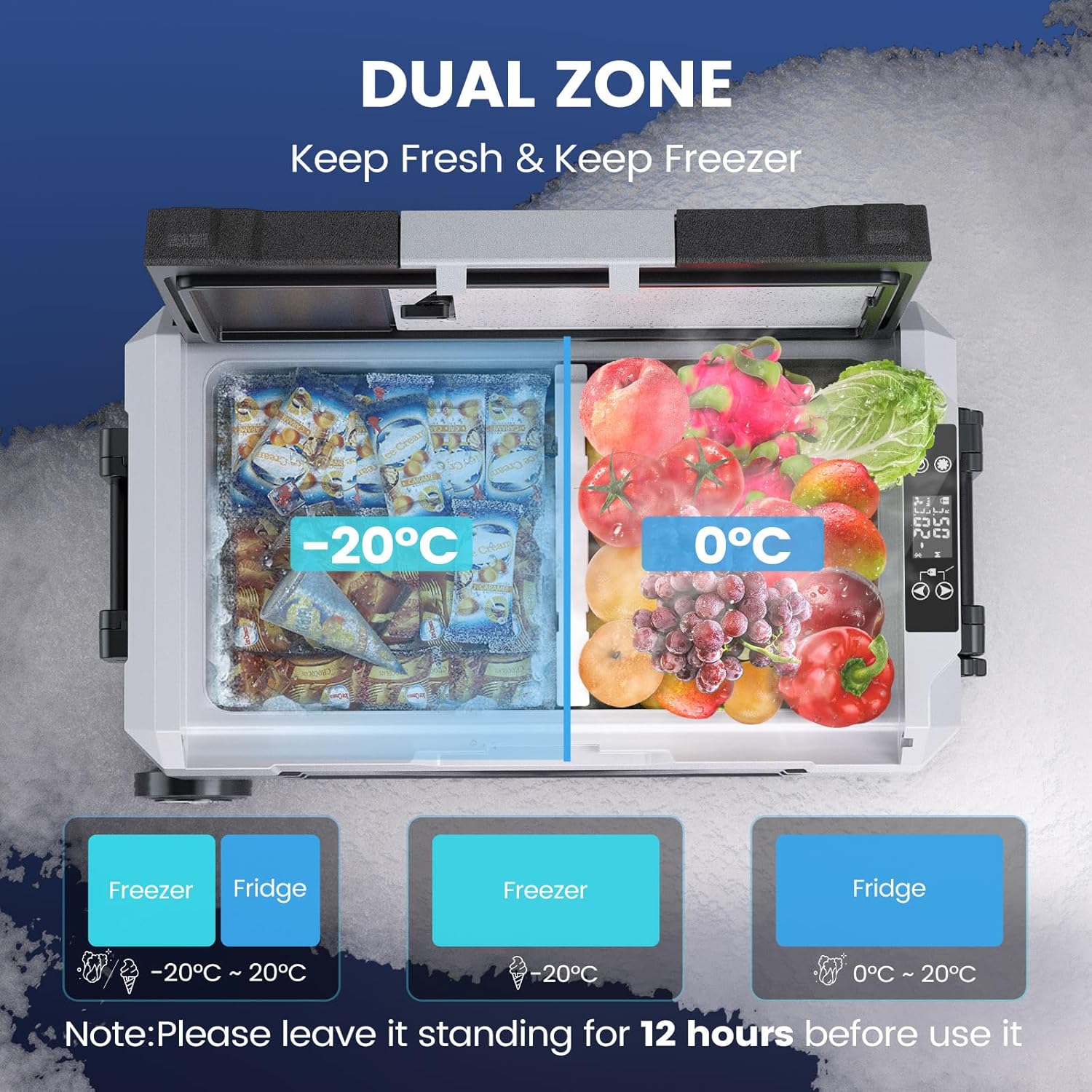
Figure 4: Dual-Zone System
The lid also integrates a small cutting board, providing a convenient surface for food preparation on the go.

Figure 5: Key Features and Components
5. Operating Instructions
5.1 Power On/Off
To turn on the refrigerator, press and hold the power button for 3 seconds. The display will illuminate, showing the current internal temperature. To turn off, press and hold the power button again for 3 seconds.
Video 2: Operation Video for LDW Series Car Refrigerators. This video provides a step-by-step guide on how to operate the cooler, including power on/off and basic functions.
5.2 Temperature Adjustment
The temperature can be adjusted using the Up and Down arrow buttons on the control panel. Note that only the left side of the refrigerator can be adjusted directly. The right side's temperature will adjust relative to the left side when the divider is in place.
Video 3: Display Functions for LDW Series Car Refrigerators. This video details how to use the display panel for temperature adjustments and other settings.
5.3 Child Lock
To activate the child lock, press and hold the Up and Down buttons simultaneously for 3 seconds. The lock icon will appear on the display. To deactivate, repeat the same action.
5.4 Mode Selection (ECO/MAX)
The cooler offers two operating modes:
- MAX Mode: Provides rapid cooling, reaching -20°C in less than 4 hours. Ideal for quick chilling or freezing.
- ECO Mode: Energy-saving mode, consuming only 0.18kWh per day. Suitable for maintaining temperature over longer periods.
To switch between modes, touch the setting button (gear icon) on the control panel.

Figure 6: Energy-Saving ECO Mode
5.5 Switching Temperature Units (°F & °C)
To switch the temperature display between Celsius (°C) and Fahrenheit (°F), press and hold the setting button (gear icon) for 3 seconds. The temperature indicator will flash, then use the Up/Down buttons to select your preferred unit.
5.6 Battery Protection
The cooler features battery protection settings (HML - High, Medium, Low) to prevent draining your vehicle's battery. To adjust this setting, press and hold the setting button for 3 seconds until the voltage flashes, then use the Up/Down buttons to select the desired protection level.
5.7 Bluetooth App Control
Control your KROAK cooler remotely using the dedicated Bluetooth app (available for iOS and Android). The app allows you to:
- Unlock or lock the cooler.
- Monitor real-time temperature.
- Adjust temperature settings.
- Switch between ECO and MAX modes.
- Access memory function for previous settings.
Troubleshooting Bluetooth Connection: If the Bluetooth connection cannot be established, ensure the device is powered on. Then, press and hold the Power On/Off button and the Setting button simultaneously for 3 seconds to reset the Bluetooth function. Afterward, restart the connection process.

Figure 7: Bluetooth App for Remote Operation
6. Maintenance
6.1 Cleaning
Regular cleaning helps maintain the cooler's efficiency and hygiene:
- Unplug the cooler before cleaning.
- Wipe the interior and exterior surfaces with a damp cloth and mild detergent. Avoid abrasive cleaners.
- For thorough cleaning, remove the drain plug located at the bottom of the cooler to allow water to escape.
- Ensure the cooler is completely dry before storing or reconnecting to power.
Note: Video 2 (Operation Video for LDW Series Car Refrigerators) also shows the drain plug feature for easy cleaning.
6.2 General Care
- When not in use for extended periods, store the cooler in a dry, well-ventilated area with the lid slightly ajar to prevent odors.
- The cooler is equipped with robust wheels and a non-slip handle for easy transport. Avoid dragging the cooler over extremely rough terrain to prevent damage to the wheels.

Figure 8: Easy to Carry Design
7. Troubleshooting
If you encounter issues with your KROAK cooler, refer to the following common problems and solutions:
| Problem | Possible Cause | Solution |
|---|---|---|
| Cooler not turning on. | No power, faulty cable, low battery voltage. | Check power connection. Ensure vehicle battery is charged or AC outlet is functional. Adjust battery protection setting if voltage is too low. |
| Cooling performance is poor. | Insufficient ventilation, excessive ambient temperature, lid not sealed properly, too much content. | Ensure adequate clearance around the cooler. Avoid direct sunlight. Check lid seal. Do not overfill. Switch to MAX mode for faster cooling. |
| Bluetooth app cannot connect. | Bluetooth function needs reset, app issue. | Ensure cooler is powered on. Press and hold Power On/Off and Setting buttons simultaneously for 3 seconds to reset Bluetooth. Restart app and try connecting again. |
| Unusual noise from the cooler. | Cooler not level, internal components vibrating. | Place the cooler on a stable, level surface. If noise persists and is excessive, contact customer support. |
8. Specifications
| Feature | Detail |
|---|---|
| Brand | KROAK |
| Model Number | kh47J4b06 (also 0c2b415b-219e-478c-b773-f6185b7824e1) |
| Capacity | 45 Liters |
| Product Dimensions (L x W x H) | 71 x 44.5 x 52.5 cm |
| Temperature Range | -20°C to +20°C |
| Power Input | 12V/24V DC, 100-240V AC |
| Energy Consumption (ECO Mode) | 0.18 kWh/day |
| Noise Level | <45 dB |
| Special Features | Portable, App-control, Dual-Zone, Energy-efficient, Wheels, Non-slip handle, Cutting board |
| Energy Efficiency Rating (EU) | E (EPREL Link) |

Figure 9: Energy Label
9. Warranty and Support
KROAK products are manufactured to high-quality standards and come with a manufacturer's warranty. For specific warranty details, claims, or technical support, please refer to the warranty card included in your package or contact the retailer where you purchased the product.
For general inquiries or further assistance, please visit the official KROAK website or contact their customer service department.
Related documentsKROAK 45L Portable Compressor Cooler (Model: kh47J4b06)


Ask a question about this manual
Ask about setup, troubleshooting, compatibility, parts, safety, or missing instructions. Manuals+ will review the question and use this page’s manual context to help answer it.