
Bluefeel BF-MHEADZFAN
Bluefeel Portable Handheld Turbo Fan User Manual
Model: BF-MHEADZFAN
Brand: Bluefeel
Introduction
Welcome to the user manual for your new Bluefeel Portable Handheld Turbo Fan. This innovative personal fan is engineered to deliver powerful and instant cooling, making it an ideal companion for travel, outdoor activities, home, or office use. With its compact design, adjustable turbo mode, and long-lasting battery, you can enjoy refreshing airflow wherever you go. Please read this manual thoroughly to ensure safe and optimal operation of your device.
Important Safety Instructions
To reduce the risk of fire, electric shock, or injury, please observe the following safety precautions:
- Do not immerse the fan or charging cable in water or other liquids.
- Keep the fan away from open flames, heat sources, and direct sunlight.
- Do not disassemble, modify, or attempt to repair the fan yourself. Contact qualified service personnel for repairs.
- Ensure the fan is used on a stable surface when not handheld.
- Keep fingers, hair, and loose clothing away from the fan blades during operation.
- This appliance is not intended for use by persons (including children) with reduced physical, sensory, or mental capabilities, or lack of experience and knowledge, unless they have been given supervision or instruction concerning use of the appliance by a person responsible for their safety.
- Use only the provided USB-C charging cable or a certified equivalent.
- Unplug the fan when not in use for extended periods or before cleaning.
Package Contents
Please check the package contents to ensure all items are present:
- Bluefeel Portable Handheld Turbo Fan (Peach Pink)
- USB-C Charging Cable
- User Manual
Product Overview
Key Features
- 4X Stronger Wind Power: Delivers up to 16m/s wind speed for instant cooling.
- Powerful Turbo Fan with 5 Speeds: Includes a dedicated turbo mode for maximum airflow.
- Long-Lasting 3000mAh Battery: Provides up to 16 hours of continuous cooling on a single charge.
- Ultra-Mini Size, Pro-Level Design: Compact and portable, smaller than an iPhone Pro Max.
Components Diagram
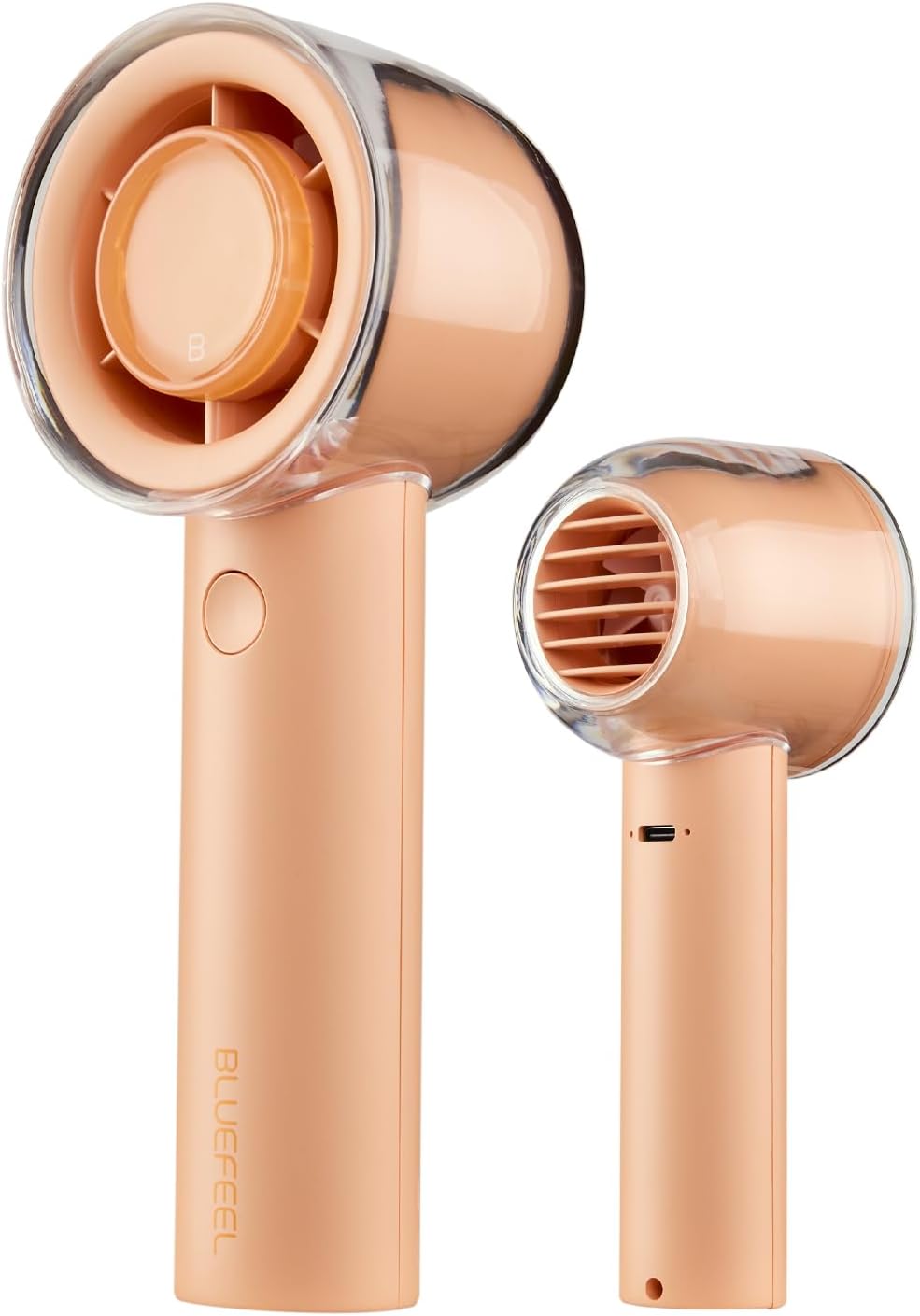
Figure 1: Front and side view of the Bluefeel Portable Handheld Turbo Fan in Peach Pink, showcasing its compact design and clear fan housing.

Figure 2: Close-up view of the fan's recessed blades, highlighting the safety-first design where the blades are protected within the housing. A finger is shown pressing the power button.

Figure 3: An exploded view illustrating the internal compact jet-style turbine motor, emphasizing its powerful 14,000 RPM airflow.
Setup
Charging the Fan
- Locate the USB-C charging port on the side of the fan handle.
- Connect the provided USB-C charging cable to the fan.
- Plug the other end of the USB-C cable into a compatible USB power adapter (not included) or a computer's USB port.
- The indicator light will illuminate during charging. Once fully charged, the light may change color or turn off (refer to specific product indicator behavior if detailed in packaging).
- A full charge provides up to 16 hours of cooling time, depending on the speed setting used.
Operating Instructions
Power On/Off
- To turn the fan ON, press the power button located on the handle. The fan will start at the lowest speed setting.
- To turn the fan OFF, cycle through all speed settings until the fan powers down, or press and hold the power button for a few seconds.
Adjusting Fan Speed
The fan features 5 adjustable speed settings, including a powerful turbo mode:
- Press the power button once to turn on the fan (Speed 1).
- Press the power button repeatedly to cycle through Speed 2, Speed 3, Speed 4, and Speed 5 (Turbo Mode).
- Each press will increase the fan speed. After the highest speed, pressing again will typically turn the fan off.

Figure 4: An illustration showing the fan's airflow and battery life across its five speed settings, indicating up to 16 hours of cooling time at the lowest setting.
Maintenance
Cleaning the Fan
- Ensure the fan is turned off and unplugged before cleaning.
- Use a soft, dry cloth to wipe the exterior of the fan.
- For stubborn dirt, slightly dampen the cloth with water and mild soap, then wipe dry immediately.
- Do not use abrasive cleaners, solvents, or harsh chemicals, as these may damage the fan's finish.
- Do not attempt to clean the internal blades directly with water. Use a soft brush or compressed air to remove dust from the air inlet/outlet if necessary.
Storage
When not in use, store the fan in a cool, dry place, away from direct sunlight and extreme temperatures. It is recommended to fully charge the fan before storing for long periods to maintain battery health.
Troubleshooting Guide
If you encounter any issues with your Bluefeel Portable Handheld Turbo Fan, please refer to the table below for common problems and their solutions:
| Problem | Possible Cause | Solution |
|---|---|---|
| Fan does not turn on. | Battery is depleted. | Charge the fan using the provided USB-C cable. |
| Fan does not turn on. | Power button not pressed correctly. | Ensure the power button is pressed firmly. |
| Weak airflow. | Fan is on a low speed setting. | Press the power button to increase the speed setting. |
| Weak airflow. | Air inlet/outlet blocked by dust or debris. | Clean the air inlet/outlet with a soft brush or compressed air. |
| Fan is not charging. | Charging cable or adapter issue. | Try a different USB-C cable or power adapter. Ensure connections are secure. |
| Fan makes unusual noise. | Debris inside the fan. | Turn off the fan immediately. Do not attempt to open. Contact customer support. |
Product Specifications
| Specification | Detail |
|---|---|
| Brand | Bluefeel |
| Model Name | Mini Head Z Fan |
| Item Model Number | BF-MHEADZFAN |
| Color | Peach Pink |
| Power Source | Battery Powered |
| Battery Capacity | 3000mAh |
| Max Cooling Time | Up to 16 hours |
| Number of Power Levels | 5 |
| Control Method | Touch (Button) |
| Product Dimensions | 2.44"D x 6.14"W x 2.05"H |
| Item Weight | 6 ounces |
| Included Components | Cord (USB-C) |
| Indoor/Outdoor Usage | Indoor, Outdoor |
| Special Feature | Lightweight, Portable |
Warranty and Customer Support
Bluefeel products are manufactured to the highest quality standards. For information regarding warranty coverage, please refer to the warranty card included with your product or visit the official Bluefeel website. If you have any questions, require technical assistance, or need to report an issue, please contact Bluefeel customer support through the contact information provided on our website or product packaging.
Please retain your purchase receipt as proof of purchase for warranty purposes.
Related Documents - BF-MHEADZFAN
 |
Jamay F5Pro Portable Handheld Turbo Fan User Manual and Specifications Comprehensive user manual for the Jamay F5Pro Portable Handheld Turbo Fan. This rechargeable electric fan features strong wind with 199 adjustable gears, an LED digital display, and a compact design. Includes safety precautions, detailed specifications, product descriptions, and operating instructions for outdoor and personal use. |
 |
BelFone Products Series Quick Guide: Professional Trunking Communication Solutions Explore BelFone's comprehensive range of professional trunking communication solutions, including DMR, PoC, and analog radios, base stations, repeaters, and integrated systems designed for efficiency and safety. |
 |
Portable Turbo Fan User Manual - Features, Specifications, and Instructions User manual for the Portable Turbo Fan, detailing its functions, specifications, user instructions, and troubleshooting. Features include powerful airflow, a high-speed brushless motor, adjustable speed settings from 1-5, and a 'Violent Mode' (Gear 6). Specifications include a 2550mAh battery, 55m/s max wind speed, and 7.4V working voltage. Includes after-sales service information. |
 |
Kinscoter F53K Portable Fan User Manual and Instructions Detailed user manual for the Kinscoter F53K portable fan, covering fan functions, cooling mode, display indicators, and product diagram. Learn how to operate your rechargeable handheld fan. |
 |
Uživatelská příručka pro amatérské rádio BF-5 RH/RM Series Komplexní uživatelská příručka pro dvoupásmové amatérské rádio BF-5 RH/RM Series, poskytující podrobné pokyny k obsluze, nabíjení baterie, instalaci příslušenství a pokročilým funkcím pro optimální výkon a bezpečnou komunikaci. |
 |
Manual de Instrucciones Ventilador de Mano newstyle C06 Manual de instrucciones detallado para el ventilador de mano newstyle C06. Incluye especificaciones técnicas, guía de operación y advertencias de seguridad para un uso correcto y seguro del dispositivo. |
Ask a question about this manual
Ask about setup, troubleshooting, compatibility, parts, safety, or missing instructions. Manuals+ will review the question and use this page’s manual context to help answer it.