
Product Overview
This manual provides detailed instructions for the installation, operation, and maintenance of your bojioderf Phone Case, designed specifically for the Foxx FOXXD A67U, and the accompanying Tempered Glass Screen Protector. The case features a durable PC + Silicone construction, a 360° rotatable metal ring holder, and magnetic car mount compatibility.
Key Features:
- 360° Rotatable Ring Holder: Provides a secure grip and functions as a kickstand for hands-free viewing.
- Magnetic Car Mount Compatibility: Designed to attach directly to magnetic car mount holders (mount not included).
- Shockproof Design: Features a soft silicone frame, hard PC backplane, thickened four corners, and a silicone buffer layer for enhanced protection.
- Precision Cutouts: Ensures full access to all ports, buttons, and speakers.
- High-Quality Materials: Made from durable TPU material, offering scratch-proof and fingerprint-proof properties.
- Tempered Glass Screen Protector: Provides 9H high hardness, shatterproof protection, perfect adhesion, and high transparency.

Figure 1: bojioderf Phone Case and Tempered Glass Screen Protector for Foxx FOXXD A67U. This image displays the purple phone case from the back, showcasing the integrated ring holder, and a separate view of the phone with the screen protector applied.
Setup and Installation
1. Installing the Phone Case
- Ensure your Foxx FOXXD A67U phone is clean and free of dust or debris.
- Align the phone with the case, starting with one side.
- Gently press the phone into the case, ensuring all corners and edges are securely fitted. The flexible silicone frame allows for easy installation while providing a snug fit.
- Verify that all ports, buttons, and camera cutouts align perfectly with your phone's features.

Figure 2: Illustration of the phone case's shockproof design. This image highlights the reinforced corners and silicone buffer layer, demonstrating how the case protects the phone from impacts.
2. Installing the Tempered Glass Screen Protector
- Clean the Screen: Use the provided alcohol wipe to thoroughly clean your phone's screen. Remove any smudges, dust, or fingerprints.
- Dry the Screen: Use the microfiber cloth to dry the screen completely. Ensure no lint or dust particles remain.
- Remove Dust: Use the dust-absorber sticker to pick up any remaining dust particles.
- Align the Protector: Carefully peel off the protective film from the adhesive side of the tempered glass. Hold the protector by its edges and align it precisely with your phone's screen, paying attention to the speaker, camera, and home button cutouts.
- Apply: Once aligned, gently lower the screen protector onto the screen. It will naturally adhere. If bubbles appear, gently push them towards the edges using the microfiber cloth or a soft card.
- Final Wipe: Give the screen protector a final wipe with the microfiber cloth to ensure a clean, bubble-free finish.

Figure 3: Key features of the tempered glass screen protector. This graphic illustrates properties such as 9H high hardness, perfect adhesion, shatterproof quality, case friendliness, 99.9% super transparency, and anti-fingerprint coating.

Figure 4: Demonstration of the screen protector's scratch-proof capability. This image shows a hammer striking the screen protector, illustrating its resistance to scratches and abrasion.
Operating Instructions
1. Using the 360° Rotatable Ring Holder
The integrated metal ring holder provides multiple functionalities:
- Secure Grip: Insert your finger through the ring for a more secure hold on your phone, reducing the risk of accidental drops.
- Kickstand Function: Rotate the ring to your desired angle and prop your phone up on a flat surface for hands-free viewing of videos, video calls, or browsing. The ring can rotate 360 degrees and pivot 180 degrees for optimal positioning.
- One-Hand Operation: The ring holder allows you to comfortably reach more areas of your screen with one hand.
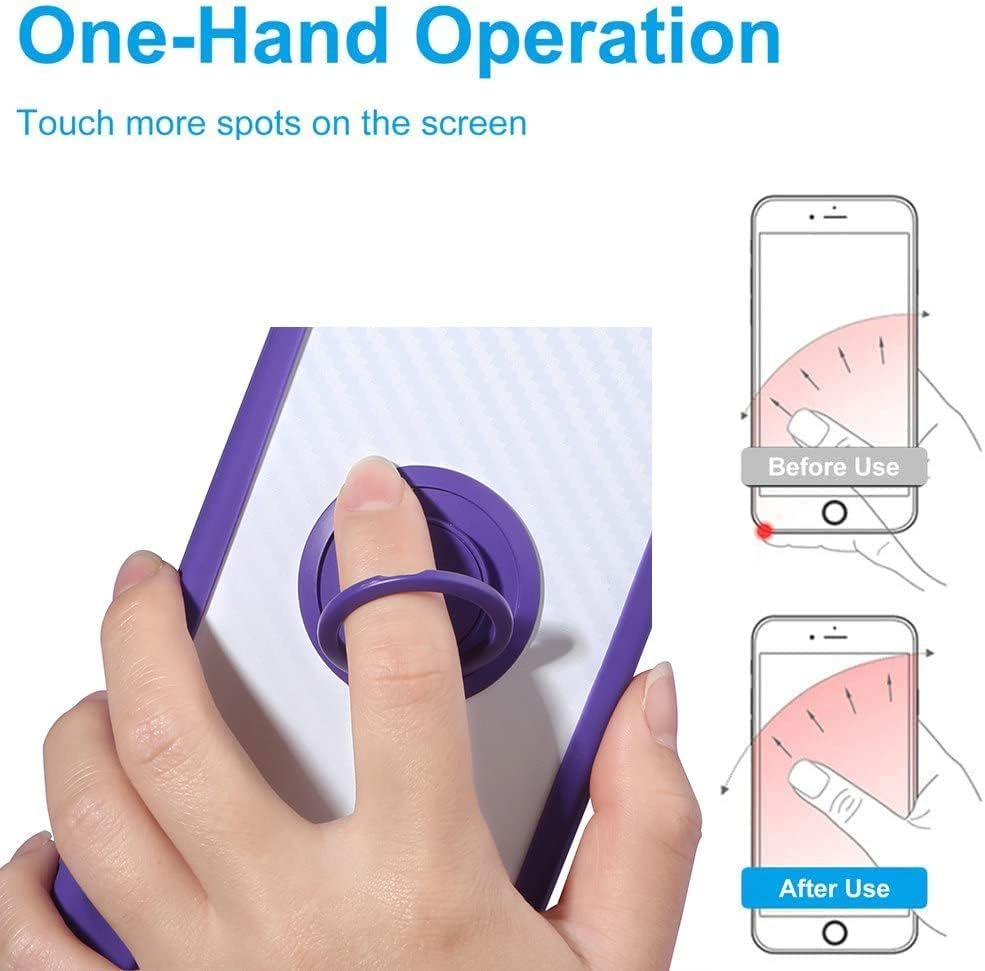
Figure 5: Demonstration of one-hand operation using the ring holder. This image shows how the ring holder improves reach across the phone screen for easier single-handed use.

Figure 6: Close-up view of the 360-degree rotatable ring holder. This image provides a detailed look at the design of the metal ring, highlighting its rotational capability.
2. Utilizing the Magnetic Car Mount Function
The metal plate integrated into the back of the case allows for direct adsorption onto magnetic car mount holders (not included). This feature enables convenient and secure placement of your phone in your vehicle for navigation or hands-free calls.
- Simply attach the back of your phone case to a compatible magnetic car mount.
- No additional metal plates or patches are required on your phone or case.
- Note: This case does not support wireless charging due to the integrated metal ring/plate. Please remove the case for wireless charging or use a wired charger.

Figure 7: Illustration of the magnetic car mount support. This image shows the phone case being attached to a magnetic car mount, demonstrating its compatibility for in-car use.
Maintenance and Care
To ensure the longevity and appearance of your phone case and screen protector, follow these care instructions:
- Cleaning the Case: Wipe the phone case regularly with a soft, damp cloth. For tougher stains, a mild soap solution can be used. Avoid harsh chemicals or abrasive cleaners, as they may damage the material or finish.
- Cleaning the Screen Protector: Use a microfiber cloth to gently wipe the screen protector. For smudges, a screen cleaner spray designed for electronics can be applied to the cloth (not directly to the screen) and then wiped.
- Avoid Extreme Temperatures: Do not expose the case or screen protector to extreme heat or cold, as this may affect their material integrity.
- Handle with Care: While the case and protector offer protection, avoid unnecessary drops or impacts to maximize their lifespan.
Troubleshooting
If you encounter any issues with your product, please refer to the following common solutions:
- Screen Protector Bubbles: If small bubbles appear after installation, gently push them towards the edges using a soft cloth or a credit card wrapped in cloth. For persistent bubbles, lift the nearest corner of the protector slightly to release the air, then re-apply. Ensure the screen is completely dust-free before re-application.
- Ring Holder Stiffness: The ring holder is designed to be firm to provide stable support. If it feels too stiff, gently rotate it a few times to loosen it slightly. Avoid excessive force.
- Case Fit Issues: Ensure your phone model is indeed Foxx FOXXD A67U. If the case does not fit correctly, double-check the phone's alignment within the case.
- Magnetic Mount Adhesion: Ensure your magnetic car mount is clean and free of obstructions. The case's integrated metal plate should adhere firmly. If not, check the strength of your car mount's magnet.
Specifications
| Brand | bojioderf |
| Model Number | GX2503-33 CSKB-ZI |
| Compatible Devices | Foxx FOXXD A67U |
| Material Type | TPU (Thermoplastic Polyurethane) and PC (Polycarbonate) |
| Special Features | 360° Rotating Ring, Magnetic Car Mount Compatibility, Shockproof Design |
| Mounting Hardware | 1 x Phone Case, 1 x Tempered Glass Screen Protector |
| Product Dimensions | 1 x 1 x 1 cm |
| Item Weight | 70 g |
Warranty and Support
Warranty Information:
Specific warranty details for this product are typically provided at the point of purchase or within the product packaging. Please refer to your purchase receipt or contact the seller for information regarding warranty coverage and terms.
Customer Support:
For any questions, concerns, or technical assistance not covered in this manual, please contact the seller or manufacturer directly through the platform where the product was purchased. Provide your order number and a detailed description of your inquiry for prompt assistance.