
1. Introduction
The Mecurate 5-in-1 Stud Finder is an advanced wall scanner designed to assist homeowners and DIY enthusiasts in safely and accurately locating various objects behind walls. This device features multiple detection modes, an intuitive LCD display, and safety alerts for live wires, making it an essential tool for a wide range of projects.

Figure 1: Mecurate 5-in-1 Stud Finder and included 9V battery.
2. Safety Information
- Always read the user manual thoroughly before operating the device to understand its functions and limitations.
- The device performs best on single-layer drywall. Performance may vary on other wall types such as stucco, tile, flooring, carpet, or roofing.
- Live Wire Detection: The built-in AC detection feature emits a warning sound when live wires are present. Exercise extreme caution when this alert is active to prevent electrical hazards. Always turn off power to the area if drilling near detected AC wires.
- Do not rely solely on the stud finder for safety. Always use appropriate safety gear and verify findings with other methods if uncertainty exists.
3. Package Contents
Verify that all items are present in the package:
- Mecurate 5-in-1 Stud Finder (x1)
- 9V Battery (x1)
- Carrying Pouch (x1)
- User Manual (x1)

Figure 2: Included components in the Mecurate Stud Finder package.
4. Product Overview
The Mecurate 5-in-1 Stud Finder is equipped with upgraded sensors and smart chip technology for precise detection. Its high-definition LCD screen provides clear, real-time data, making it user-friendly for all skill levels. The device offers five distinct scanning modes:
- Standard Scan Mode: Detects studs up to 3/4 inch (19mm) deep.
- Deep Scan Mode: Detects studs up to 1-1/2 inches (38mm) deep.
- Metal Scan Mode: Detects metal objects up to 2-3/8 inches (60mm) deep.
- AC Wire Scan Mode: Detects live AC wires up to 2 inches (51mm) deep.
- Audio Alerts: Provides audible signals for detected objects.
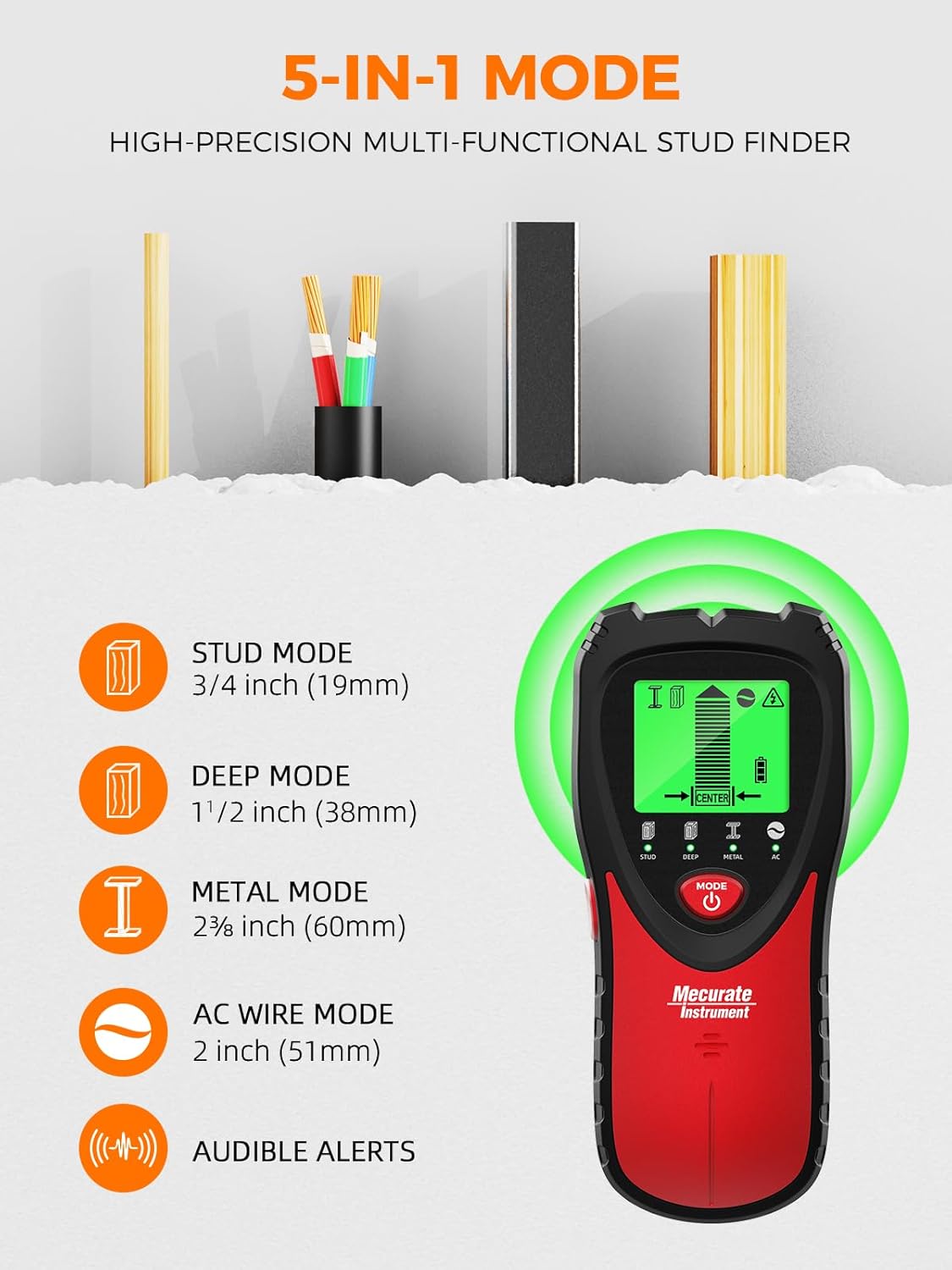
Figure 3: Overview of the 5-in-1 detection modes.

Figure 4: Features of the backlit LCD and ergonomic design.
5. Setup
5.1. Battery Installation
- Locate the battery compartment cover on the back of the device.
- Slide the cover open.
- Insert the included 9V alkaline battery, ensuring correct polarity (+/-).
- Close the battery compartment cover securely.
5.2. Calibration
Proper calibration is crucial for accurate detection. Calibrate the device before each scan or when moving to a new scanning area.
- Place the stud finder flat against the wall where you intend to scan. Ensure there are no studs, metal, or AC wires in the immediate area where you begin calibration.
- Press and hold the side button (power/scan button). The LCD screen will illuminate, and the device will begin calibrating.
- Keep the device stationary against the wall until the calibration is complete (usually indicated by a stable display and/or a beep).
- Release the side button. The device is now calibrated and ready for use.
6. Operating Modes
Use the "MODE" button to cycle through the different detection modes:
6.1. Stud Scan Mode (Standard & Deep)
- Select the "STUD" mode for standard stud detection (up to 3/4 inch).
- Select the "DEEP" mode for deeper stud detection (up to 1-1/2 inches).
- The device will indicate the presence of wood studs and their edges.

Figure 5: Precision detection on different wall types.
6.2. Metal Scan Mode
- Select the "METAL" mode to detect metal objects such as pipes, rebar, or metal studs (up to 2-3/8 inches).
- The LCD will display an icon indicating metal detection.
6.3. AC Wire Scan Mode
- Select the "AC" mode to detect live AC electrical wires (up to 2 inches).
- An audible warning and a lightning bolt icon on the LCD will indicate the presence of live wires.
- Caution: Always proceed with extreme care when live wires are detected.

Figure 6: Safety alerts for live wire detection.
7. How to Use
- Power On and Calibrate: Press and hold the side button to power on and calibrate the device against the wall in an area free of objects.
- Select Mode: Press the "MODE" button to choose the desired scanning mode (Stud, Deep, Metal, or AC).
- Scan the Wall: While continuously holding the side button, slowly slide the device horizontally across the wall surface.
- Interpret Display:
- As the device approaches an object, bars on the LCD will gradually increase.
- An arrow will indicate the direction towards the object.
- When the center of a stud or metal object is detected, the "CENTER" indicator will appear, and an audible beep will sound.
- For AC wires, a lightning bolt icon and an audible warning will activate.
- Mark Location: Once the center of the desired object is found, mark its location with a pencil.
- Verify: For critical applications, scan the area from multiple directions to confirm the object's location and dimensions.

Figure 7: Easy-to-read graphical instructions for scanning.

Figure 8: The stud finder in action during a home project.
8. Maintenance
- Cleaning: Wipe the device with a soft, dry cloth. Do not use abrasive cleaners or solvents.
- Storage: Store the stud finder in its carrying pouch in a cool, dry place when not in use. Remove the battery if storing for extended periods to prevent leakage.
- Battery Replacement: Replace the 9V battery when the low battery indicator appears on the LCD screen.
9. Troubleshooting
| Problem | Possible Cause | Solution |
|---|---|---|
| Inaccurate readings | Improper calibration, wall material, or moisture. | Recalibrate the device on a clear section of the wall. Ensure the wall is dry. Note that performance varies on non-drywall surfaces. |
| Device does not power on | Dead or incorrectly installed battery. | Check battery polarity. Replace with a fresh 9V alkaline battery. |
| Constant beeping/false positives | High humidity, nearby electrical interference, or metal objects. | Recalibrate in a different spot. Move away from potential interference. Switch to Metal or AC mode to identify other objects. |
10. Specifications
| Feature | Detail |
|---|---|
| Model Number | MSF60A |
| Detection Modes | Stud (3/4"), Deep (1-1/2"), Metal (2-3/8"), AC (2") |
| Power Source | 1 x 9V 6F22 Battery (Alkaline) |
| Item Weight | 9 ounces |
| Package Dimensions | 7.91 x 3.54 x 1.73 inches |
| Material | ABS |
| Color | Red |
11. Warranty and Support
For warranty information, technical support, or customer service inquiries, please refer to the contact details provided on the product packaging or visit the official Mecurate website. Keep your purchase receipt for warranty claims.

