
AP-BM-UFA
Bluetooth Smart Battery Monitor User Manual
Model: AP-BM-UFA
1. Introduction
This user manual provides comprehensive instructions for the Bluetooth Smart Battery Monitor. This device is designed to wirelessly monitor your vehicle's battery health, including voltage, temperature, charging, and cranking performance. It offers real-time data and alerts to help you maintain optimal battery condition across various vehicle types.
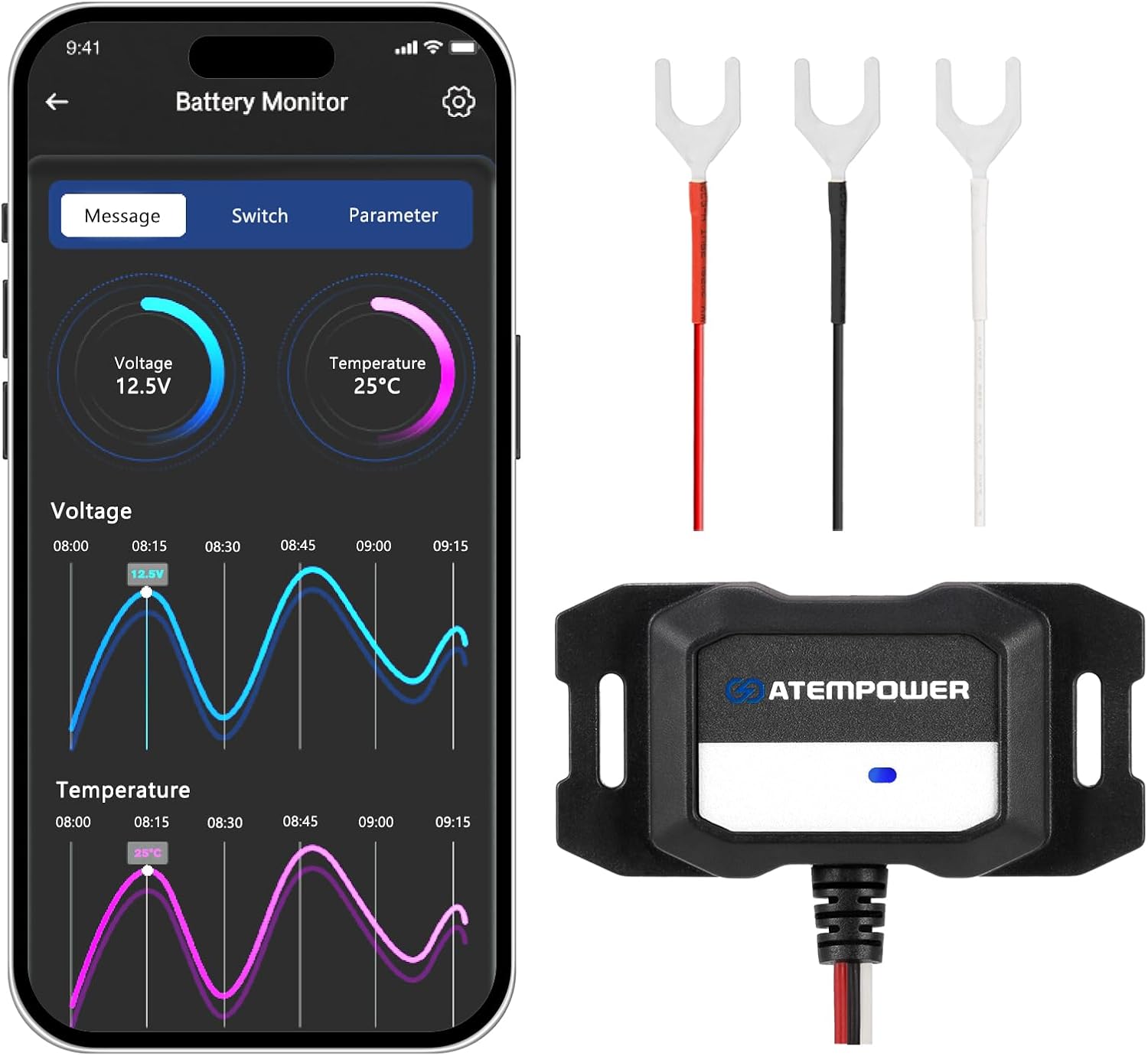
Figure 1: Bluetooth Smart Battery Monitor device and its mobile application interface displaying real-time voltage and temperature data.
2. Product Features
- Tailored Settings & Enhanced Efficiency: Features an integrated signal output wire for personalized voltage and temperature settings, activating connected devices as required. Consumes less than 1mA in standby, ensuring continuous connection without significant battery drain.
- Real-Time Precision & Instant Monitoring: Achieves precise monitoring with voltage accuracy of ±0.1V and temperature precision of ±1°C. The ATEM POWER app provides real-time data on battery cranking performance and overall condition.
- Versatile Power & Seamless Compatibility: Supports 12V and 24V systems and is compatible with Lead Acid, AGM/GEL, Calcium, and LiFePO4 batteries. Suitable for a wide range of vehicles including cars, trucks, hybrids, SUVs, boats, RVs, and motorcycles.
- Advanced Protection for Maximum Reliability: Equipped with reverse polarity and short-circuit protection to prevent system failure or damage. Features an IP67 rating for resistance against water and dust, ensuring reliable performance in various environments.
- Smart Monitoring Made Easy: Utilizes Bluetooth 5.0 with a 30-meter range for effortless control via a smartphone. Fully compatible with iOS 13+ and Android 15 devices, providing a seamless connection.

Figure 2: Key features and advantages of the Smart Battery Monitor compared to other products.

Figure 3: Multifunctional capabilities and basic wiring illustration of the battery monitor.
3. Package Contents
- Smart Battery Monitor × 1
4. Setup and Installation
Follow these steps to install and set up your Smart Battery Monitor:
- Connect the Monitor: Connect the red wire to the positive (+) battery terminal and the black wire to the negative (-) battery terminal. The white wire (signal output) can be connected to a compatible device like a relay to activate it based on voltage/temperature settings. If the white wire is left unconnected, it is recommended to attach it to the battery's negative terminal.
- Mount the Monitor: Secure the monitor in a suitable location near the battery. While super-stick mounting tape is suggested, consider more durable options to minimize vibration and ensure longevity in the automotive environment.
- Download the App: Search for "ATEM POWER" in your device's app store (compatible with iOS 13+ and Android 15). Download and install the application.
- Pair via Bluetooth: Open the ATEM POWER app on your smartphone. The app will guide you through the Bluetooth pairing process. Once the indicator light on the monitor turns solid blue, the Bluetooth connection is established, and the device is operational.
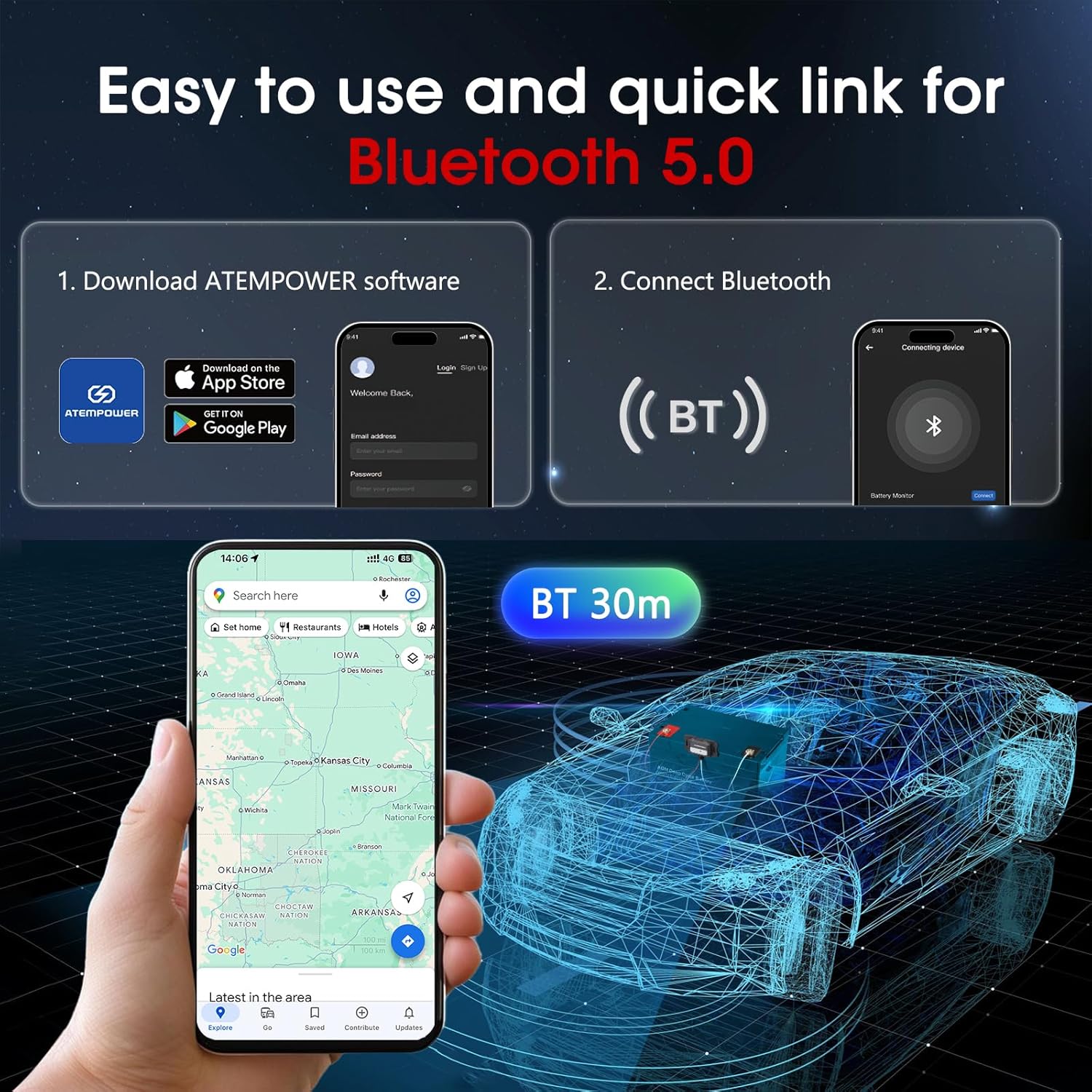
Figure 4: Steps for app download and Bluetooth connection, highlighting the 30-meter range.

Figure 5: Visual guide for installation and initial setup of the battery monitor.
5. Operating Instructions
Once connected, the ATEM POWER app provides a comprehensive interface for monitoring your battery:
- Real-Time Data: View current voltage and temperature readings. The app displays historical data in graph format, allowing you to track trends over time.
- Battery Tests: Perform various tests including Voltage Test, Cranking Test, Charging Test, and Battery Load Test to assess your battery's performance and health.
- Temperature Detection: Monitor battery temperature to prevent overheating or freezing, ensuring optimal operating conditions.
- Cranking Performance: Analyze the battery's cranking voltage to determine its ability to start the vehicle, providing insights into its overall health.
- Customizable Alerts: Set personalized voltage and temperature thresholds. The app can notify you if readings fall outside your desired range.

Figure 6: Intelligent battery detection capabilities of the monitor.

Figure 7: Real-time monitoring interface displaying battery health, voltage, and temperature.
6. Maintenance
The Smart Battery Monitor is designed for durability and minimal maintenance:
- IP67 Waterproof Design: The device is resistant to water and dust, making it suitable for harsh environments. No special waterproofing maintenance is required.
- Low Power Consumption: The monitor consumes less than 1mA in standby, ensuring it does not significantly drain your battery even when connected continuously.
- Cleaning: Periodically wipe the exterior of the monitor with a clean, damp cloth to remove any dirt or debris. Ensure connections remain clean and secure.

Figure 8: The IP67 waterproof design ensures durability in various conditions.
7. Troubleshooting
If you encounter issues with your Smart Battery Monitor, consider the following:
- No Bluetooth Connection:
- Ensure the monitor is correctly wired to the battery terminals and receiving power.
- Verify Bluetooth is enabled on your smartphone.
- Move your smartphone closer to the monitor. The Bluetooth signal can be affected by metal components in the vehicle. The effective range is approximately 30 meters in open air.
- Restart the ATEM POWER app and attempt to reconnect.
- App Not Functioning Correctly:
- Ensure you have downloaded the official "ATEM POWER" app from your device's app store.
- Check for app updates and ensure your smartphone's operating system (iOS 13+ or Android 15) is compatible.
- Clear the app's cache or reinstall the app if issues persist.
- Inaccurate Readings:
- Verify that the monitor's connections to the battery terminals are clean and secure.
- Ensure the battery type selected in the app (if applicable) matches your actual battery type (Lead Acid, AGM/GEL, Calcium, LiFePO4).
8. Specifications
| Attribute | Value |
|---|---|
| Brand | Generic |
| Manufacturer | ATEM POWER |
| Model Number | AP-BM-UFA |
| Style | SMART BATTERY MONITOR |
| Color | black |
| Power Source | Corded Electric |
| Min. Operating Voltage | 12 Volts |
| Item Weight | 2.89 ounces |
| Package Dimensions | 6.1 x 4.06 x 1.06 inches |
| ASIN | B0DZCHRRDD |
| Date First Available | March 5, 2025 |

Figure 9: The monitor is compatible with a wide range of 12V/24V vehicles.

Figure 10: The monitor supports multiple 12V/24V battery types.
9. Warranty and Support
This product comes with a 1-year warranty from the date of purchase. For warranty claims, technical support, or any inquiries regarding the product, please contact the manufacturer, ATEM POWER, directly through their official support channels. Refer to the product packaging or the manufacturer's website for contact information.
Related Documents - AP-BM-UFA
 |
ATEM POWER 1500W DC-AC Pure Sine Wave Inverter User Manual User manual for the ATEM POWER 1500W DC-AC Pure Sine Wave Inverter, detailing product features, applications, technical specifications, safety information, installation, operation, troubleshooting, and warranty. |
 |
PATLITE Signal Phone BM Series Instruction Manual Comprehensive instruction manual for the PATLITE Signal Phone BM series, detailing specifications, mounting, wiring, safety operation, and model information for commercial use. |
 |
White Lightning BMC24 Aviation Battery Maintenance Charger Operator's Manual Operator's manual for the White Lightning BMC24 10-Amp 24-Volt Aviation Battery Maintenance Charger, designed for lead-acid aircraft batteries. Features multi-stage charging, desulfation, and integration with the SmartGPU system. |
 |
ECTIVE 2024/2025 Catalog: Mobile & Self-Sufficient Power Solutions Explore the ECTIVE 2024/2025 catalog for comprehensive mobile and self-sufficient power solutions, including solar panels, batteries, inverters, and all-in-one systems for campers, boats, and off-grid living. Visit ective.de for more. |
 |
ZF-POWERLINE Stage 1-2 Truck Transmission Repair Manual Official repair instructions for ZF-POWERLINE Stage 1-2 truck transmissions. Covers maintenance, troubleshooting, and component replacement for models 8 AP 600 T through 8 AP 860 TN. |
 |
EKA Electronic Black Mask Ovens Operating and Instruction Manual Comprehensive operating and instruction manual for EKA Electronic Black Mask Ovens, including models MKF 464 BM to MKF 2011 BM. This guide covers installation, safety, operation, cooking functions, recipe management, cleaning, troubleshooting, and warranty information for professional kitchen use. |