Introduction
The Audio-Technica AT-UMX3 WH is a versatile USB audio mixer and interface designed for a wide range of audio applications, including live streaming, music production (DTM), and general audio recording. It offers high-quality sound with low noise, making it suitable for both beginners and experienced users. This manual provides detailed instructions for setting up and operating your AT-UMX3 WH.
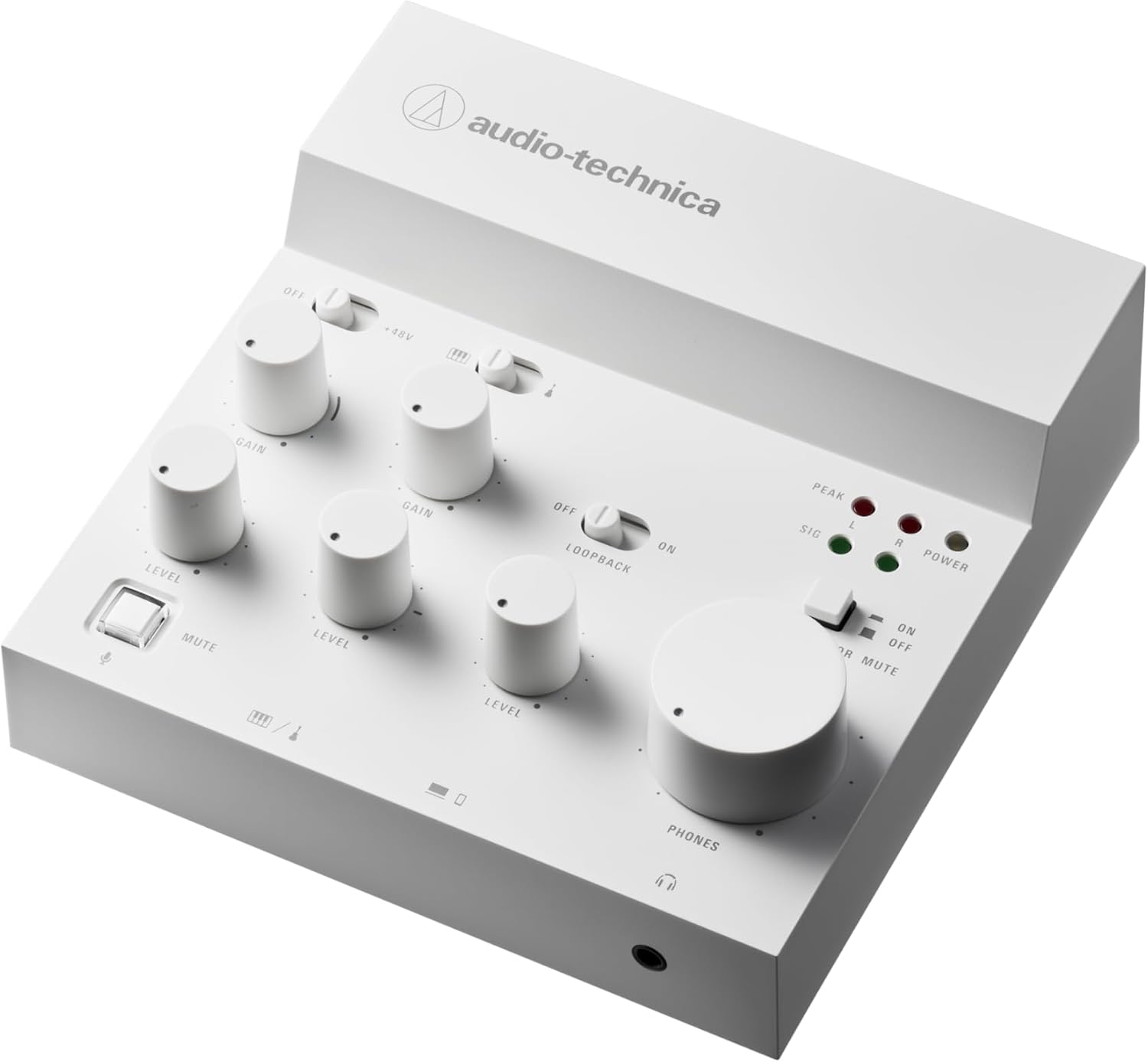
Figure 1: Top-down view of the Audio-Technica AT-UMX3 WH USB Audio Mixer.
Setup
The AT-UMX3 WH is designed for plug-and-play operation, requiring no dedicated drivers. Simply connect it to your device via USB.
Connecting to Devices
- PC/Mac: Connect the AT-UMX3 WH to your computer using the supplied USB cable. The device is USB class compliant and will be recognized automatically.
- Smartphones/Tablets (iPhone, iPad, Android): Connect your smartphone or tablet to the AT-UMX3 WH via the USB terminal. Important: After connecting the mobile device, connect a commercially available USB power adapter to the unit's 5V DC USB power terminal to ensure stable power supply.
- Gaming Consoles (PS4, PS5): The AT-UMX3 WH has been verified for operation with PlayStation 4 and PlayStation 5 consoles. Connect using the supplied USB cable.

Figure 2: The AT-UMX3 WH supports direct USB connection to PCs, smartphones/tablets, and PlayStation consoles.
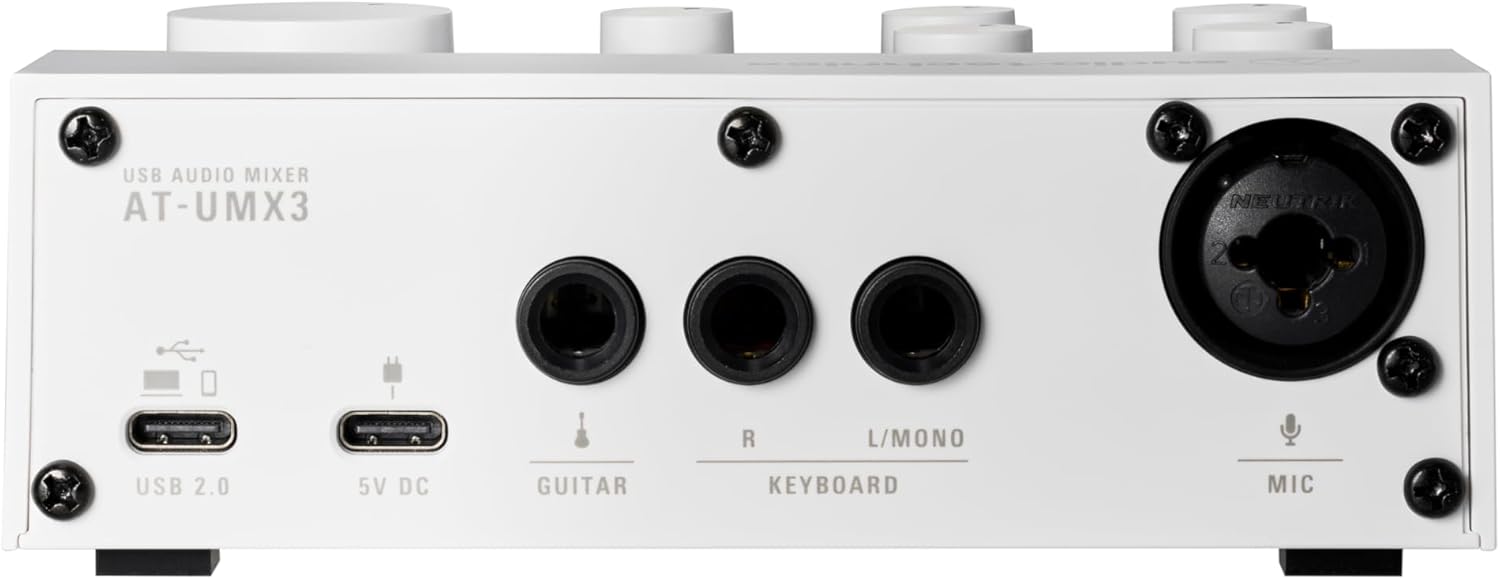
Figure 3: The product includes USB cables and an adapter for various connections.
Input/Output Connections
The rear panel of the AT-UMX3 WH features various input and output terminals:
- USB 2.0 Terminal: For connecting to your computer or mobile device.
- 5V DC USB Power Terminal: For external power supply, especially when connecting to smartphones/tablets.
- Line Input Terminals (Guitar, Keyboard): For connecting instruments or other line-level audio sources. The Guitar input supports Hi-Z.
- Mic Input Terminal: For connecting a microphone (XLR).
- Headphone Output: A 3.5mm jack on the front for monitoring audio.
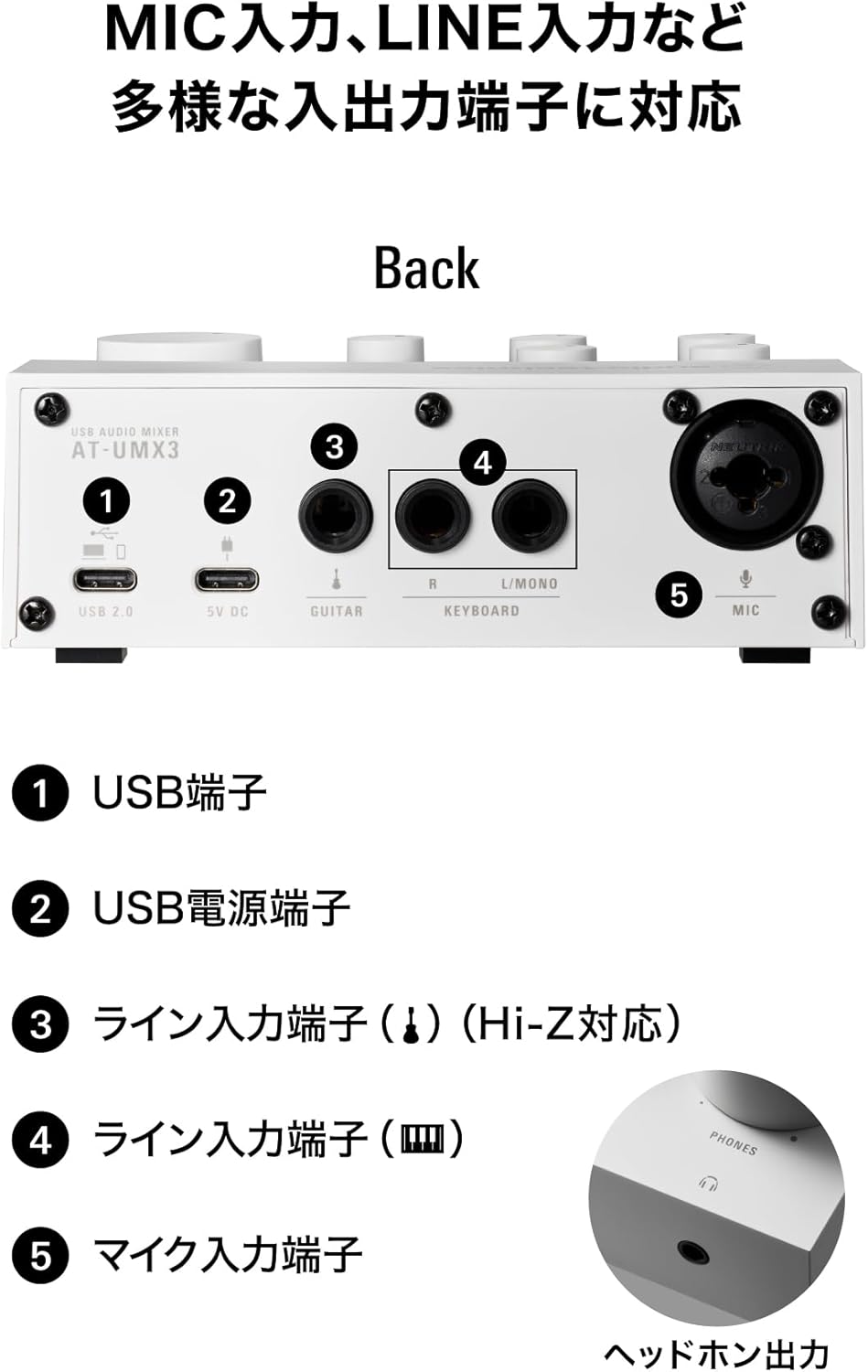
Figure 4: Rear panel connections of the AT-UMX3 WH, including USB, power, and various audio inputs.
Operating the Mixer
The AT-UMX3 WH provides intuitive controls for managing your audio inputs and outputs.
Input Level Adjustment
You can individually adjust the volume levels for the Microphone, Line, and USB inputs using their respective gain and level knobs.
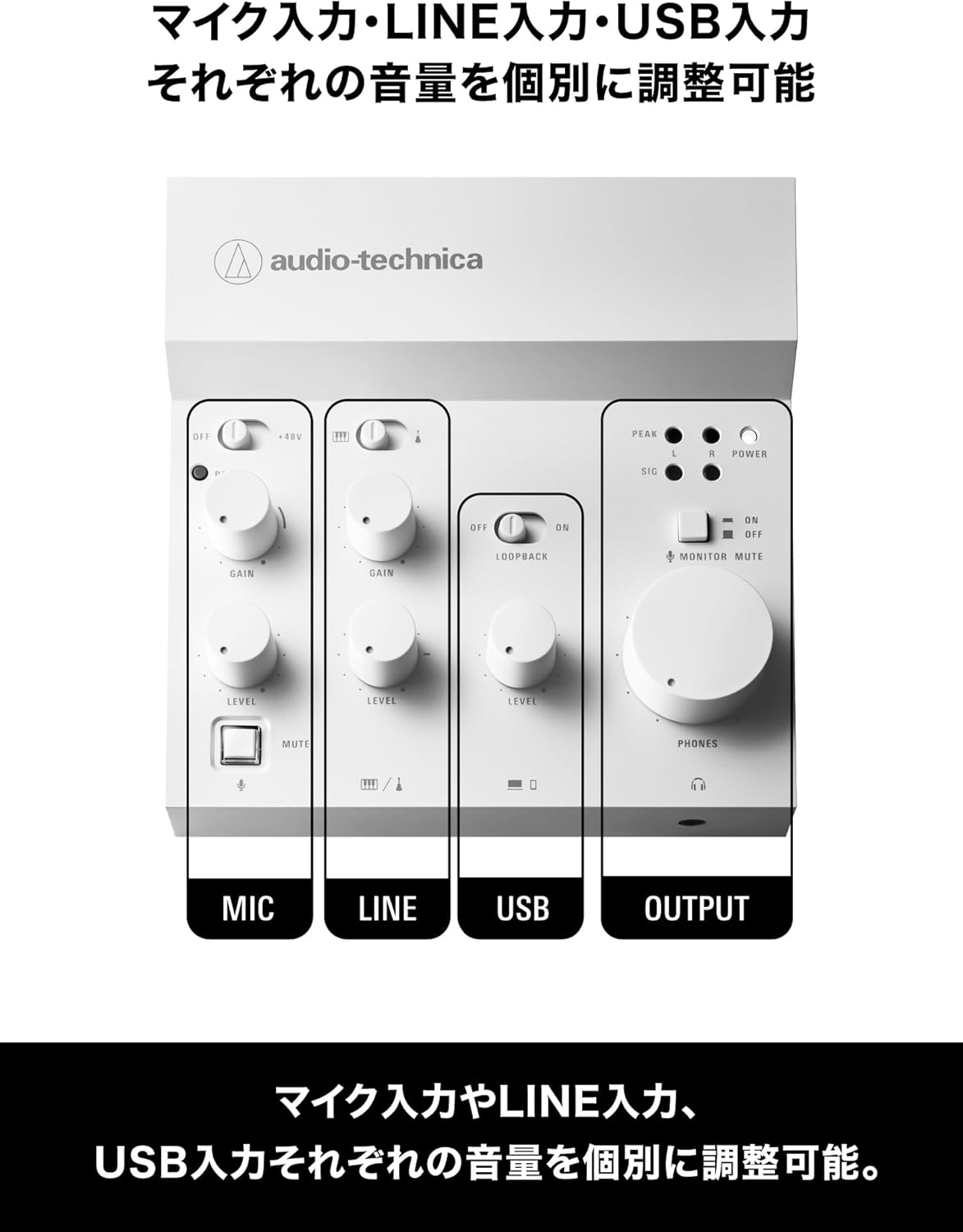
Figure 5: Control layout for MIC, LINE, USB inputs and the main OUTPUT section.
Loopback Function
The LOOPBACK function allows you to mix audio from your computer (such as BGM or karaoke tracks) with your microphone or instrument input and output the combined signal. This is essential for live streaming where you want to include background music or other audio sources.
- To activate Loopback, slide the "LOOPBACK" switch to the ON position.

Figure 6: The Loopback switch allows mixing computer audio with live inputs.
Direct Monitor Function
The direct monitor function enables zero-latency monitoring of your voice and instrument performance through your headphones. This means you hear your input directly without any delay caused by computer processing, ensuring accurate timing during recording or streaming.
Mute Functions
- Microphone Mute Switch: Press this button to instantly mute your microphone audio. This is useful for quick interruptions during streaming or recording.
- Microphone Monitor Mute Function: This function allows your voice to be streamed or recorded while muting it in your headphones. This is particularly useful if you find hearing your own voice in your headphones distracting during a live broadcast. To activate, slide the "MONITOR MUTE" switch to the ON position.

Figure 7: The dedicated Microphone Mute button.

Figure 8: The Monitor Mute switch for headphone monitoring control.
Specifications
| Feature | Detail |
|---|---|
| Model Number | AT-UMX3 WH |
| Brand | Audio-Technica |
| Color | White |
| Compatible Items | Microphone, Keyboard, Headphones, Guitar, Laptop |
| Operating System (OS) | Windows, PlayStation OS |
| Product Dimensions (D x W x H) | 4.4D x 12.7W x 4.4H cm |
| Product Weight | 334 grams |
| Connectivity Technology | USB |
| Number of Channels | 2 |
| Max Sampling Rate | 192kHz/24bit (A/D Converter) |

Figure 9: The AT-UMX3 WH features a high-performance A/D converter for studio-quality audio.
Troubleshooting
If you encounter issues with your AT-UMX3 WH, please refer to the following common troubleshooting steps:
- No Sound Output:
- Ensure all cables are securely connected.
- Check the volume levels on the mixer, your computer/device, and your headphones/speakers.
- Verify that the correct audio input/output device is selected in your computer's sound settings or streaming software.
- If using with a smartphone/tablet, ensure external power is supplied to the mixer.
- Distorted Audio:
- Reduce the gain and level settings on the mixer to prevent clipping (indicated by the PEAK LED).
- Ensure your microphone or instrument is not outputting too strong a signal.
- Check for interference from other electronic devices.
- Device Not Recognized:
- Try connecting to a different USB port on your computer.
- Restart your computer or device.
- Ensure your operating system is up to date.
- Try a different USB cable.
Warranty and Support
The Audio-Technica AT-UMX3 WH typically comes with a one-year warranty from the date of purchase. Please retain your proof of purchase for warranty claims.
For further assistance, technical support, or warranty inquiries, please visit the official Audio-Technica website or contact their customer service department. You can find more information and products at the Audio-Technica Official Store on Amazon.


