
1. Introduction
This manual provides detailed instructions for the installation, operation, and maintenance of the Auto Engineering HGM6120CAN Genset Controller. The HGM6120CAN is an advanced automatic control module designed for single generator sets, integrating digital, intelligent, and network technologies for efficient generator management.
It supports automatic start/stop, data measurement, alarm protection, and remote control capabilities. Please read this manual thoroughly before operating the device to ensure proper function and safety.
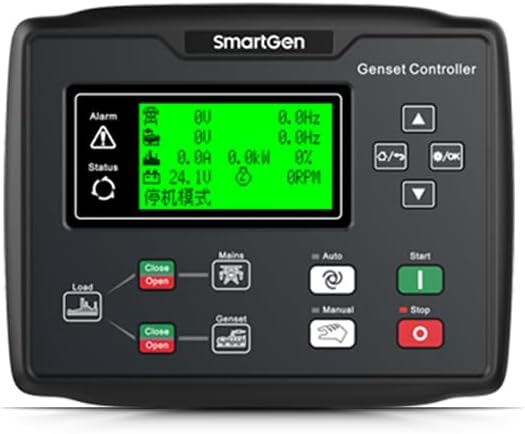
Figure 1: Front view of the HGM6120CAN Genset Controller, showing the LCD display and control interface.
2. Key Features
- Integrated Control: Combines digital, intelligent, and network technologies for comprehensive genset management.
- Automatic Operation: Supports automatic start/stop, data measurement, and alarm protection for single generator sets.
- Remote Capabilities: Features "three remote" functions: remote control, remote measurement, and remote communication.
- Multi-language LCD Display: Easy-to-read LCD display with support for English, Chinese, Spanish, Russian, Portuguese, Turkish, Polish, and French.
- Precision Measurement: Micro-processing technology enables precise measurements, value adjustments, timing, and threshold settings.
- Flexible Configuration: Parameters can be configured via the front panel or a PC using USB or RS485 interface.
- Robust Design: Operates within a wide temperature range of -25°C to 70°C and supports DC 8-35V power input.
- Compact and Reliable: Compact structure, simple connections, and high reliability suitable for various automatic control systems.
3. Setup and Installation
Proper installation is crucial for the reliable operation of the HGM6120CAN controller. Ensure all connections are secure and follow local electrical codes.
3.1 Physical Installation
The controller is designed for panel mounting. Ensure adequate space for ventilation and access to wiring terminals.
- Overall Dimensions: 209mm x 166mm x 45mm
- Installation Cutout: 186mm x 141mm
- Weight: Approximately 0.56 kg

Figure 2: Side view of the HGM6120CAN Genset Controller, illustrating its compact profile for panel mounting.
3.2 Electrical Connections
Refer to the wiring diagram on the back of the unit for all electrical connections. Ensure power is disconnected before making any connections.
- Working Power Range: DC 8-35V
- Connect main power, generator voltage inputs, current transformers, and control outputs as per the specific genset configuration.
- Utilize the CANBUS interface for communication where applicable.
- USB and RS485 interfaces are available for PC connection and parameter configuration.
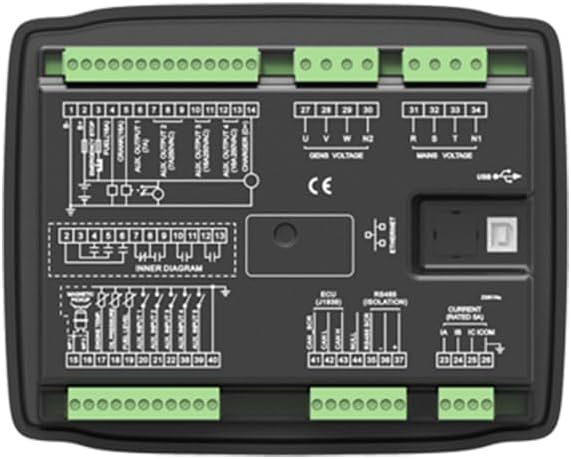
Figure 3: Rear view of the HGM6120CAN Genset Controller, displaying the comprehensive wiring diagram and various connection terminals for power, sensors, and communication.
4. Operating Instructions
The HGM6120CAN controller offers intuitive operation through its front panel and LCD display.
4.1 Basic Operation Modes
- Automatic Mode: The controller monitors mains power and automatically starts the generator upon mains failure and stops it upon mains restoration.
- Manual Mode: Allows for manual start and stop of the generator via the front panel buttons.
- Test Mode: For testing the generator without transferring load.
4.2 Data Monitoring and Alarms
The LCD display provides real-time data on generator parameters, including voltage, current, frequency, power, and engine status. The controller also features comprehensive alarm protection, indicating faults and shutting down the generator if necessary to prevent damage.
4.3 Parameter Configuration
All operational parameters, including timing, thresholds, and protection settings, can be adjusted:
- Front Panel: Use the navigation buttons and LCD display to access and modify settings directly on the unit.
- PC Software: Connect the controller to a computer via the USB or RS485 interface and use the dedicated software for advanced configuration and monitoring.
5. Maintenance
Regular maintenance ensures the longevity and reliable performance of your HGM6120CAN controller.
- Cleaning: Keep the unit clean and free from dust and moisture. Use a soft, dry cloth for cleaning the exterior. Do not use abrasive cleaners or solvents.
- Connection Checks: Periodically inspect all wiring connections for tightness and signs of corrosion. Loose connections can lead to intermittent operation or damage.
- Firmware Updates: Check the manufacturer's website for any available firmware updates to ensure optimal performance and access to new features.
- Environmental Conditions: Ensure the operating environment remains within the specified temperature and humidity ranges to prevent damage.
6. Troubleshooting
This section provides guidance for common issues. For complex problems, contact technical support.
- Controller Not Powering On:
- Verify the DC power supply (8-35V) is connected correctly and providing the correct voltage.
- Check all power wiring for breaks or loose connections.
- Generator Not Starting in Auto Mode:
- Ensure the controller is set to "Auto" mode.
- Check mains power status; the generator will only start if mains power is absent (in AMF mode).
- Verify all safety interlocks and engine parameters are within acceptable limits.
- Alarm Indication:
- Refer to the alarm messages on the LCD display.
- Consult the detailed alarm codes in the full technical manual (if available) for specific troubleshooting steps.
- Address the root cause of the alarm before resetting.
- Communication Issues (USB/RS485):
- Ensure the correct drivers are installed on the PC.
- Verify cable connections are secure.
- Check communication settings (baud rate, parity) in the software.
7. Specifications
| Parameter | Value |
|---|---|
| Model | HGM6120CAN |
| Working Power Range | DC 8-35V |
| Overall Dimensions | 209mm x 166mm x 45mm |
| Installation Cutout | 186mm x 141mm |
| Working Temperature | -25°C to 70°C |
| Item Weight | 0.56 kg (1.23 lbs) |
| Manufacturer | Auto Engineering |
| ASIN | B0DZCCCW5W |
| UPC | 602838313125 |
8. Warranty and Support
Specific warranty information for the HGM6120CAN Genset Controller is not provided in this document. For details regarding warranty coverage, terms, and conditions, please refer to the documentation included with your purchase or contact the manufacturer, Auto Engineering, directly.
For technical support, troubleshooting assistance beyond this manual, or inquiries about replacement parts, please contact your supplier or the manufacturer's customer service department.