
1. Introduction
This manual provides essential information for setting up, operating, maintaining, and troubleshooting your LANRUO GPD Win 4 2025 handheld PC game console. Please read this manual thoroughly before using the device to ensure proper function and longevity.

Image: The GPD Win 4 2025 handheld PC game console with its screen slid up, revealing the keyboard and displaying a game library interface.
2. Device Overview
The GPD Win 4 2025 is a compact, high-performance handheld PC designed for gaming and productivity. It features a 6-inch touchscreen, a physical keyboard, and integrated gaming controls.
2.1 Components and Controls
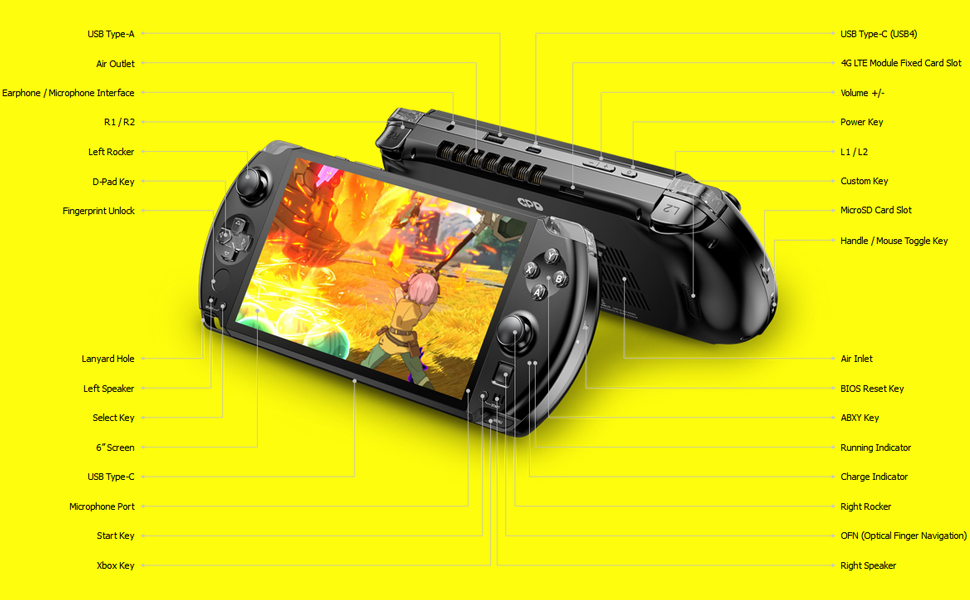
Image: A detailed diagram illustrating the various ports, buttons, and features of the GPD Win 4 2025, including USB-A, USB-C, earphone jack, triggers, joysticks, D-Pad, and fingerprint unlock.
- Left Side: USB Type-A, Air Outlet, Earphone/Microphone Interface, L1/R1, Left Rocker, D-Pad Key, Fingerprint Unlock, Lanyard Hole, Left Speaker, Select Key, 6" Screen, USB Type-C, Microphone Port, Start Key, Xbox Key.
- Right Side: USB Type-C (USB4), 4G LTE Module Fixed Card Slot, Volume +/-, Power Key, L1/L2, Custom Key, MicroSD Card Slot, Handle/Mouse Toggle Key, Air Inlet, BIOS Reset Key, ABXY Key, Running Indicator, Charge Indicator, Right Rocker, OPN (Optical Finger Navigation), Right Speaker.
- Keyboard: Concealed physical QWERTY keyboard with dome-switch keys and adjustable backlight.
3. Setup
3.1 Initial Power On and Charging
- Connect the device to a power source using the provided USB-C charger. The charge indicator light will illuminate.
- Once sufficiently charged, press and hold the Power Key for 2-3 seconds to turn on the device.
3.2 Network Connection
- Wi-Fi: The device supports IEEE 802.11 a/b/g/n/ac/ax (Wi-Fi 6) with 2.4G/5G dual-frequency bands. Access Wi-Fi settings in Windows 11 to connect to your preferred network.
- Bluetooth: Integrated Bluetooth 5.2 allows connection to wireless peripherals. Enable Bluetooth in Windows 11 settings to pair devices.
- 4G/LTE Module (Optional): If you have purchased the optional 4G/LTE back-mount module, insert a Nano-SIM card into the designated slot. Configure mobile network settings within Windows 11.
3.3 Fingerprint Unlock Setup
The device features a fingerprint sensor for secure and convenient access. Set up your fingerprint in Windows Hello settings within Windows 11 to avoid entering a password every time.

Image: A finger interacting with the fingerprint unlock sensor located on the GPD Win 4 2025, demonstrating its use for quick access.
4. Operating Instructions
4.1 Gaming Controls
The GPD Win 4 2025 is equipped with integrated gaming controls for an optimal handheld experience.
- ALPS 3D Joysticks: Utilize the high-precision joysticks for movement and camera control in games.
- D-Pad and ABXY Buttons: Standard directional pad and action buttons for gaming input.
- L1/R1/L2/R2 Triggers: Linear analog trigger buttons provide precise input for racing and shooting games.
- Custom Buttons: Two custom buttons are available on the back of the device for user-defined functions.
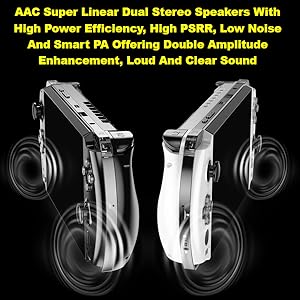
Image: A close-up view of the ALPS 3D joysticks on the GPD Win 4 2025, highlighting their design and placement for gaming.
4.2 Keyboard and Optical Finger Navigation
Slide the screen upwards to reveal the physical QWERTY keyboard. The keyboard features dome-switch keys and an adjustable backlight for comfortable typing in various lighting conditions.
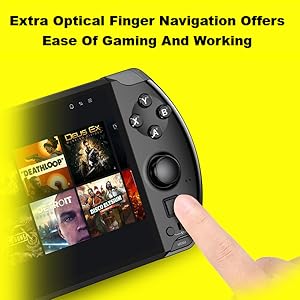
Image: The GPD Win 4 2025 with its screen slid up, showcasing the concealed physical keyboard with its illuminated keys.
The device also includes an Optical Finger Navigation (OPN) sensor, which functions as a mouse for precise cursor control.
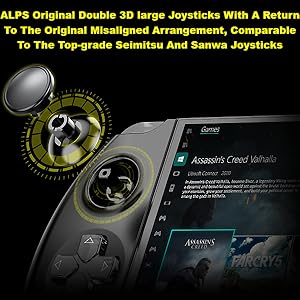
Image: A finger operating the optical finger navigation sensor on the GPD Win 4 2025, demonstrating its use for mouse-like control.
4.3 Audio
The GPD Win 4 2025 features AAC Super Linear Dual Stereo Speakers, providing clear and loud audio output. An earphone/microphone interface is also available for private listening or communication.
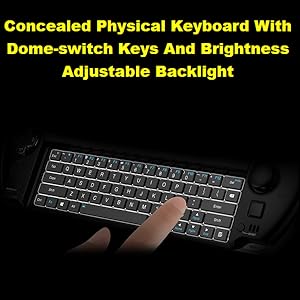
Image: A diagram illustrating the position and sound output of the AAC Super Linear Dual Stereo Speakers on the GPD Win 4 2025.
4.4 Docking Station (Sold Separately)
The GPD Win 4 2025 is compatible with a new official docking station (not included). This docking station provides additional connectivity options, including USB 3.2 Gen2 Type-A and Type-C ports, HDMI 2.0 for 4K@60Hz output, and an RJ45 Ethernet port.

Image: The GPD Win 4 2025 docked into its official docking station, with labels indicating the various interface ports available on the dock.
5. Maintenance
5.1 Battery Care
The device is equipped with a 45.62WH/3.85V Lithium Ion battery. To maximize battery life:
- Avoid extreme temperatures.
- Do not fully discharge the battery frequently.
- Store the device with a partial charge (around 50%) if not used for extended periods.
5.2 Cleaning
- Use a soft, lint-free cloth to clean the screen and exterior.
- Avoid abrasive cleaners or solvents.
- Keep air vents clear of dust and debris to ensure efficient cooling.

Image: An internal view of the GPD Win 4 2025, highlighting the large turbine fan and thick heat pipes designed for efficient heat dissipation.
6. Troubleshooting
6.1 System OS Recovery
If you encounter software or driver issues, a system re-installation can resolve many problems. Follow these steps:
- Long press the power button for 2-3 seconds to boot the device.
- Repeatedly click the "Tab" key when the power LED illuminates to enter the System Recovery page.
- On the System Recovery page, touch the "Start" icon on the screen.
- Wait for the automatic reinstallation process to complete. This will restore the system to its factory default state.
6.2 General Issues
- Device not powering on: Ensure the device is charged. Connect it to the charger and wait a few minutes before attempting to power on again.
- Screen not responding: Perform a hard reset by holding the power button for 10-15 seconds until the device turns off, then restart.
- Connectivity problems: Check Wi-Fi or Bluetooth settings in Windows 11. For 4G/LTE, ensure the SIM card is correctly inserted and activated.
7. Specifications
| Feature | Description |
|---|---|
| Processor | AMD Ryzen AI 9 HX-370 (12 Cores/24 Threads, 2 GHz Base, up to 5.1 GHz Max Turbo) |
| Graphics | AMD Radeon 890M RDNA3 (16 Graphics Cores, 2900 MHz) |
| RAM | 32GB LPDDR5x 7500 MT/s |
| Storage | 1TB M.2 SSD (PCIe 4.0 Support) |
| Screen | 6-inch H-IPS, 1920x1080 Resolution, 16:9 Aspect Ratio, 368ppi, Corning Gorilla Glass, DC Dimming |
| Operating System | Windows 11 Home |
| Network | Wi-Fi 6 (IEEE 802.11 a/b/g/n/ac/ax, 2.4G/5G, 2402Mbps), Bluetooth 5.2, Optional 4G/LTE (Nano-SIM) |
| Battery | 45.62WH/3.85V Lithium Ion |
| Ports | USB Type-A, USB Type-C (USB4 40Gbps, Dual Charging), Earphone/Microphone Interface, MicroSD Card Slot |
| Dimensions | 8.66 x 3.62 x 1.2 inches |
| Weight | 2.9 pounds |
| Manufacturer | GPD |
8. Warranty Information
For detailed warranty information regarding your GPD Win 4 2025, please refer to the warranty card included with your product packaging or contact the seller directly. Warranty terms and conditions may vary based on region and retailer.
9. Support
If you require further assistance or have questions not covered in this manual, please contact the LANRUO customer support team or the retailer from whom you purchased the device. Provide your product model number (GPD Win 4) and purchase details for efficient support.