
1. Introduction
This manual provides essential information for the safe and efficient operation, installation, and maintenance of your ElfinAura 10.5 Cu.Ft Rolling Commercial Refrigerator Display Case. Please read these instructions thoroughly before operating the appliance and retain them for future reference. This display case is designed for the storage and display of packaged food items, ensuring optimal freshness and visibility.

Figure 1: Front view of the ElfinAura 10.5 Cu.Ft Commercial Refrigerator Display Case.
2. Safety Information
To prevent injury to users or damage to the product, always observe the following basic safety precautions:
- Ensure the appliance is connected to a properly grounded power outlet with the correct voltage (110V).
- Do not use extension cords or adapters with this appliance.
- Keep ventilation openings clear of obstructions.
- Do not store explosive substances such as aerosol cans with a flammable propellant in this appliance.
- Unplug the appliance before cleaning or performing any maintenance.
- Do not touch cold surfaces with wet hands, as skin may stick to them.
- Ensure the appliance is placed on a stable, level surface to prevent tipping.
- Avoid placing the unit in direct sunlight or near heat sources.
3. Product Features
Your ElfinAura display case is equipped with several features designed for optimal performance and convenience:
- Bright LED Lighting: Interior LED lighting on all four sides and the top provides clear and attractive illumination for displayed items.
- Smart Digital Control: A digital controller with an LED display allows for easy temperature monitoring and adjustment.
- Flexible Storage: Adjustable PVC shelves can be customized to accommodate various item sizes.
- Freshness Maintenance: A ventilation cooling system and automatic defrost function maintain temperatures between 35.6-53.6°F (2-12°C).
- Anti-fogging Design: Two-sided ventilation holes and double-layer tempered glass prevent condensation, ensuring clear visibility.

Figure 2: Illustration of the stable compressor system for efficient cooling.

Figure 3: Double-tempered glass design for anti-fogging and insulation.
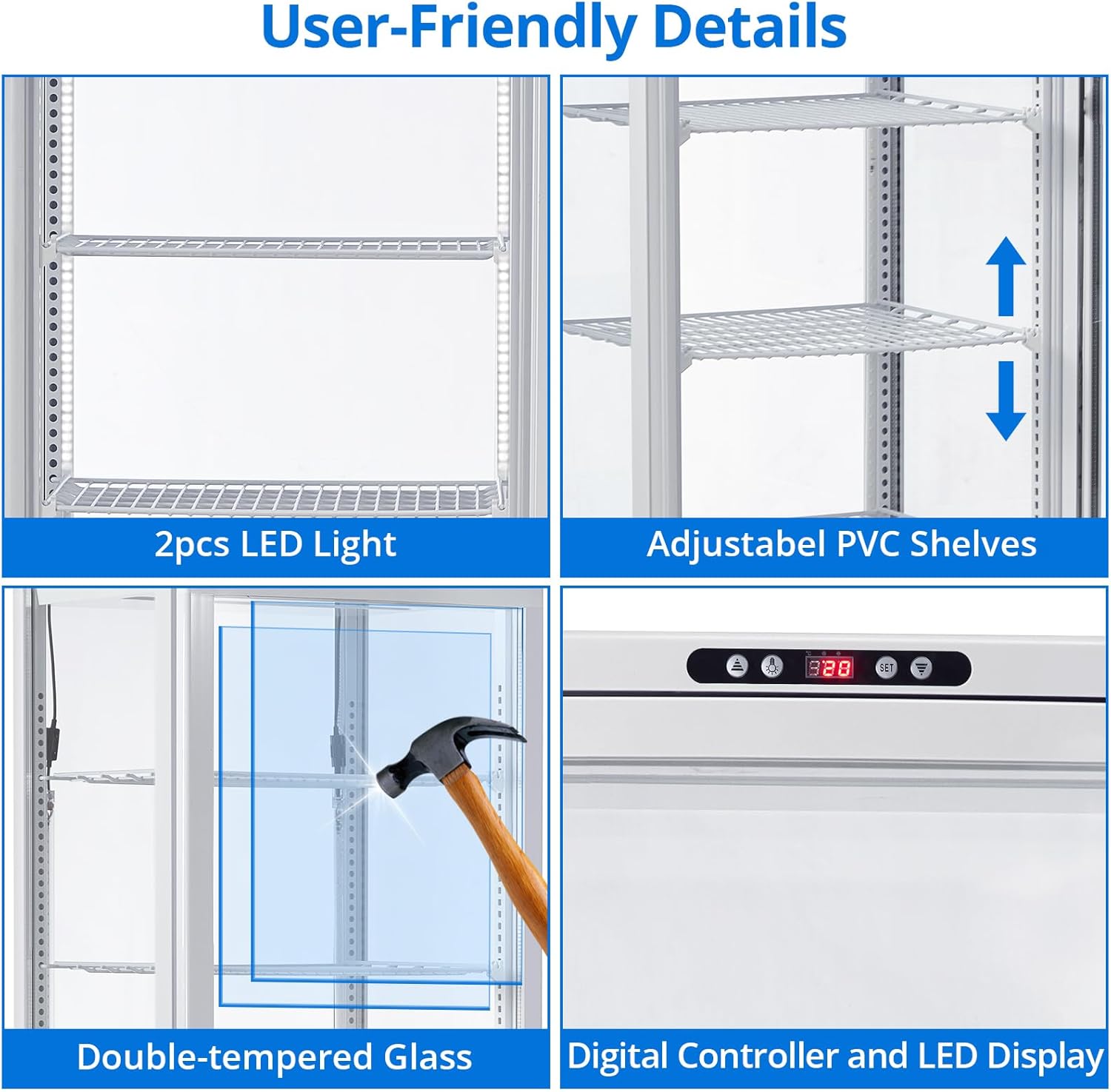
Figure 4: Close-up of user-friendly details: LED lights, adjustable shelves, tempered glass, and digital controller.
4. Setup and Installation
4.1 Unpacking
Carefully remove all packaging materials. Inspect the unit for any shipping damage. Report any damage immediately to your carrier and supplier. Keep packaging materials until the unit has been inspected.
4.2 Placement
Place the display case on a firm, level surface capable of supporting its weight. Ensure there is adequate ventilation around the unit, especially at the rear and sides, to allow for proper heat dissipation. Avoid placing the unit near direct sunlight, ovens, or other heat-generating equipment. The unit is equipped with rolling casters for easy positioning.
4.3 Electrical Connection
Before plugging in the unit, ensure the power supply matches the specifications on the rating label (110V). Plug the unit directly into a dedicated, grounded electrical outlet. Do not use extension cords or multi-outlet adapters.
4.4 Initial Startup
After placement and electrical connection, allow the unit to stand for at least 2 hours before plugging it in. This allows the refrigerant to settle. Once plugged in, the unit will begin to cool. Allow it to run for several hours empty to reach the desired temperature before loading products.
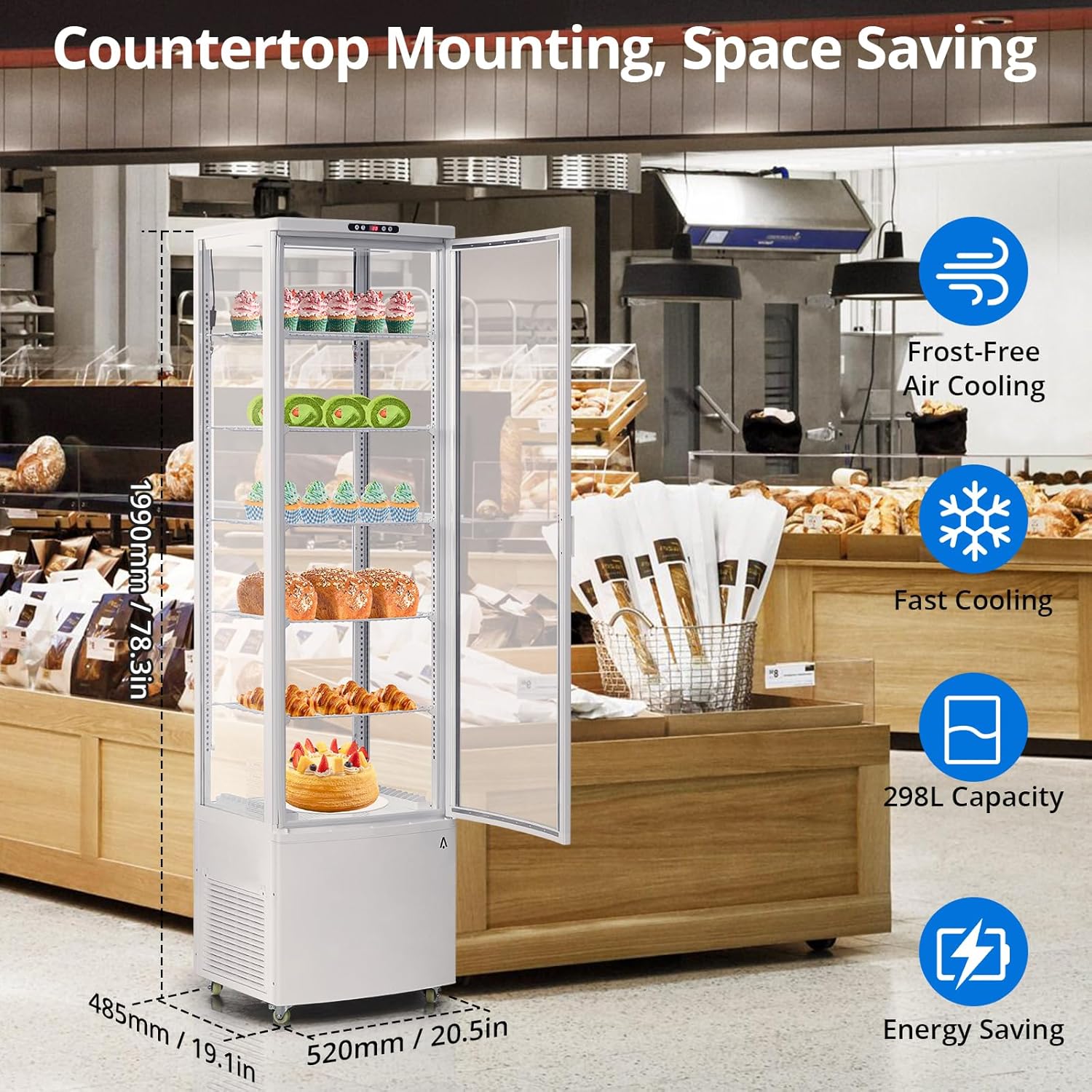
Figure 5: Product dimensions for placement planning.
5. Operating Instructions
5.1 Digital Controller
The display case features a digital controller for precise temperature management. The LED display shows the current internal temperature. Refer to Figure 4 for the location of the digital controller.
- Temperature Setting: Use the 'SET' button to enter temperature adjustment mode. Use the up/down arrows to set the desired temperature. Press 'SET' again to confirm.
- Temperature Range: The optimal operating temperature range for this unit is 35.6-53.6°F (2-12°C).
5.2 Automatic Defrost
The unit is equipped with an automatic defrost function. This system periodically melts away any frost buildup on the evaporator coil, ensuring efficient cooling and preventing ice accumulation. No manual intervention is typically required for defrosting.
5.3 LED Lighting
The interior LED lights can be controlled via a switch, typically located near the top of the unit or on the control panel. Turn the lights on to enhance product visibility and off to save energy when not needed.
6. Maintenance and Cleaning
Regular cleaning and maintenance are crucial for the longevity and efficient operation of your display case.
6.1 Daily Cleaning
- Wipe down interior and exterior surfaces with a soft cloth and mild, non-abrasive detergent.
- Clean glass doors with a glass cleaner to maintain clear visibility.
- Ensure no water enters the electrical components.
6.2 Monthly Maintenance
- Condenser Coil Cleaning: Unplug the unit. Using a soft brush or vacuum cleaner, carefully clean the condenser coil located at the bottom rear of the unit. A dirty condenser coil can reduce cooling efficiency and increase energy consumption.
- Drain Pan: Check and clean the drain pan to prevent water overflow and odors.
6.3 Shelf Adjustment
The PVC shelves are adjustable. To adjust, carefully lift the shelf and reposition the support clips to the desired height along the internal rails. Ensure shelves are securely seated before loading products.
7. Troubleshooting
Before contacting customer service, please refer to the following common issues and solutions:
| Problem | Possible Cause | Solution |
|---|---|---|
| Unit not cooling | Power cord unplugged; circuit breaker tripped; thermostat set too high; dirty condenser coil. | Check power connection; reset breaker; adjust thermostat; clean condenser coil. |
| Excessive noise | Unit not level; loose parts; fan obstruction. | Level the unit; check for loose components; ensure fan is clear. |
| Excessive condensation/fogging | Door not closing properly; high humidity; frequent door openings. | Check door seal; reduce door openings; ensure proper ventilation. |
| Lights not working | Light switch off; LED bulb failure. | Turn on light switch; contact support for bulb replacement. |
8. Specifications
Detailed technical specifications for your ElfinAura Commercial Refrigerator Display Case:
| Specification | Value |
|---|---|
| Brand Name | ElfinAura |
| Model Number | idO-A2EfLtRlFtU_six5YQDY9i |
| Item Weight | 222.7 Pounds |
| Product Dimensions (D x W x H) | 19.1 x 20.5 x 78.3 inches |
| Capacity | 10.5 Cubic Feet (298 Liters) |
| Installation Type | Freestanding |
| Color | White |
| Voltage | 110V |
| Defrost System | Automatic |
| Number of Doors | 1 |
| Shelves | 5 (Adjustable PVC) |
| Included Components | Display Cooler |
9. Warranty and Support
For warranty information or technical support, please refer to the documentation included with your purchase or contact ElfinAura customer service. Keep your purchase receipt and model number handy for faster service.