
1. Introduction
This manual provides essential information for the proper setup, operation, and maintenance of your BTF-LIGHTING WS2812B 22x22 484-Pixel LED Matrix. This flexible LED panel is designed for creating dynamic and customizable lighting displays, pixel art, and scrolling text. Please read these instructions carefully before use to ensure optimal performance and longevity of your product.
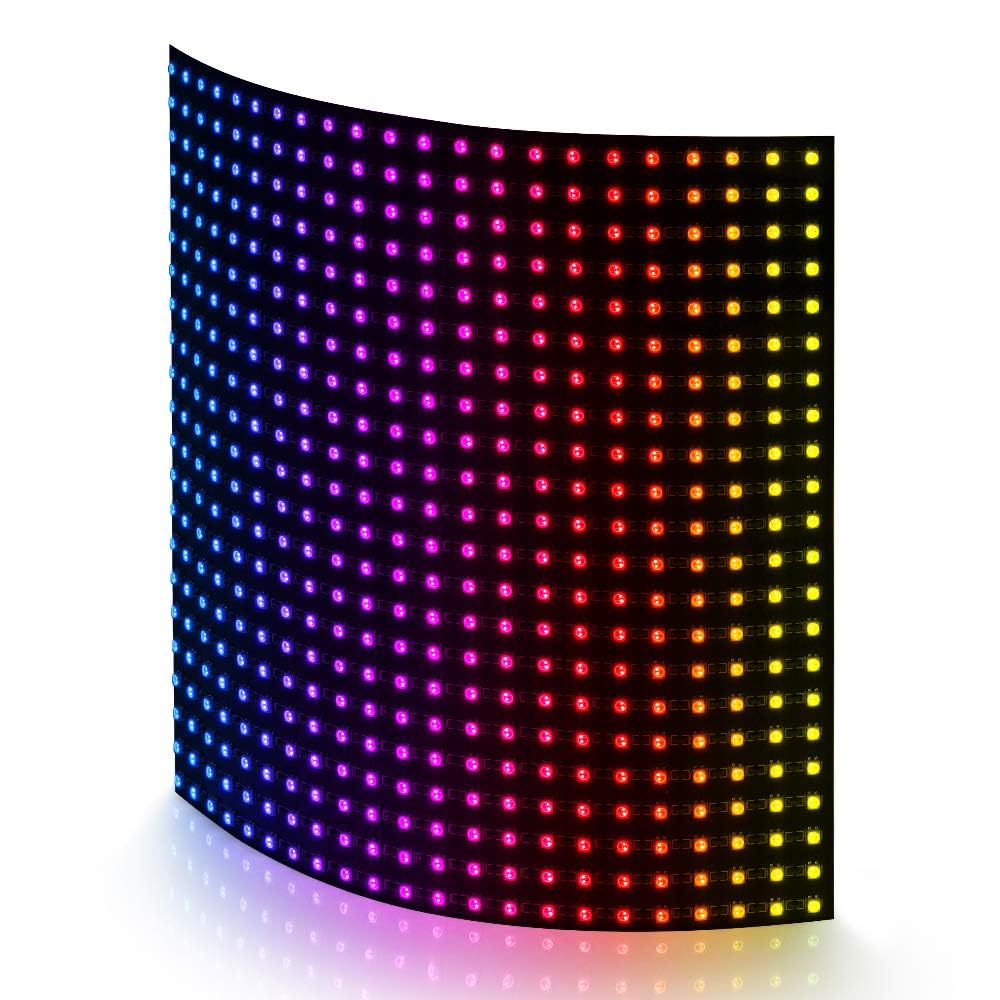
Image 1.1: BTF-LIGHTING WS2812B 22x22 484-Pixel LED Matrix.
2. Product Features
The BTF-LIGHTING WS2812B LED Matrix offers advanced capabilities for various lighting applications:
- High Pixel Density: Features a 22x22 configuration with 484 individually addressable pixels, measuring 16x16cm (6.3in x 6.3in).
- Individually Addressable LEDs: Each 2427SMD LED includes an integrated RGB IC chip, allowing independent control of color and brightness for every pixel.
- Flexible Design: The Flexible Printed Circuit Board (FPCB) allows for smooth bending, enabling installation on curved surfaces and creative display shapes.
- Expandable: Panels can be connected seamlessly via 3-pin JST connectors for larger, customized pixel displays.
- Wide Controller Compatibility: Compatible with popular programmable controllers such as WLED, K-1000C, Raspberry Pi, Arduino UNO R3, ESP8266, and ESP32. Supports music sync controllers like SP530E/SP802E (purchased separately).
- Durable Construction: Utilizes a double-layer copper PCB board with 35μm copper foil thickness for improved conductivity and reduced voltage drop, enhancing product durability and stability.

Image 2.1: Key features of the LED matrix, including brightness, individual addressability, color capabilities, and energy efficiency.
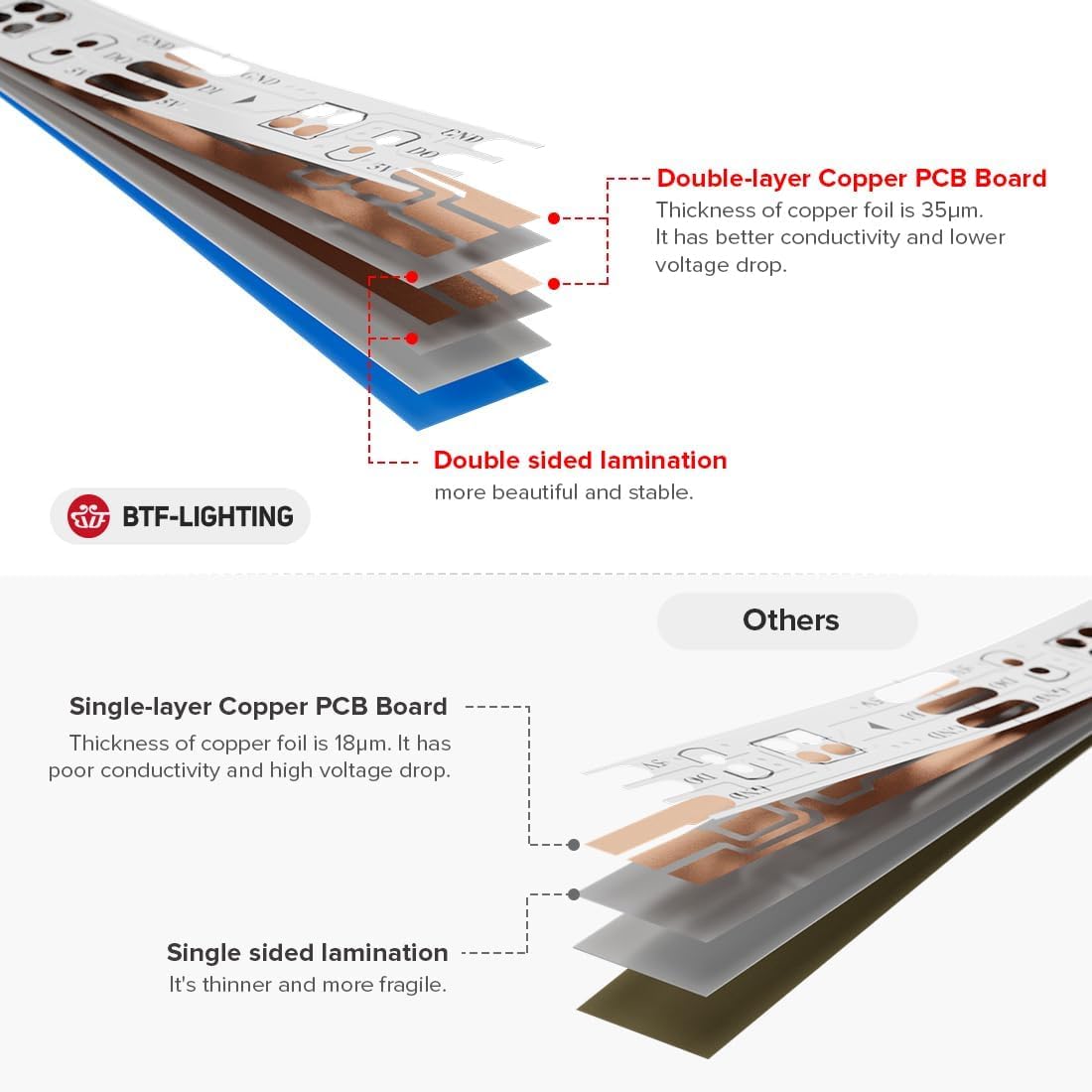
Image 2.2: Illustration comparing the robust double-layer copper PCB of this product with a single-layer alternative, highlighting improved conductivity and stability.

Image 2.3: Demonstrates the flexibility of the LED matrix, allowing it to conform to various shapes and surfaces.
3. Setup Instructions
Before setting up your LED matrix, ensure you have a compatible controller (e.g., Raspberry Pi, Arduino, or a dedicated LED controller like SP802E) and a stable 5V DC power supply.
3.1 Components Overview
The LED matrix typically includes:
- WS2812B 22x22 484-Pixel LED Matrix
- 3-pin JST connectors (male and female)
- Voltage-adding wires (for power distribution)

Image 3.1: Top and bottom view of the LED matrix, showing dimensions and connector types (3-pin female, voltage-adding wires, 3-pin male).

Image 3.2: Another view of the LED matrix, illustrating its 16cm x 16cm dimensions and the wiring for power and data connections.
3.2 Connecting the LED Matrix
- Power Supply: Connect the 5V DC power supply to the designated power input wires on the LED matrix. Ensure correct polarity (positive to +5V, negative to GND). For larger setups or high brightness, ensure your power supply can provide sufficient current (Amps).
- Data Connection: Connect the data output pin from your chosen controller (e.g., Arduino's digital pin, Raspberry Pi's GPIO) to the data input pin (DIN) of the LED matrix. The matrix uses a 3-pin JST connector for data and power.
- Ground Connection: Ensure a common ground connection between the LED matrix and your controller.
- Controller Setup: Refer to your specific controller's documentation for software setup and library installation (e.g., FastLED for Arduino, rpi_ws281x for Raspberry Pi, WLED firmware). Configure the controller for WS2812B LEDs and specify the correct number of pixels (484 for this 22x22 matrix).

Image 3.3: Overview of various controllers and their compatibility with the WS2812B LED matrix. Note that some controllers are sold separately.
4. Operating Instructions
Once the LED matrix is correctly wired and your controller is configured, you can begin programming and displaying content.
4.1 Basic Operation
The operation of the LED matrix is primarily controlled by the software running on your chosen microcontroller or dedicated LED controller. Common functionalities include:
- Scrolling Text: Display custom messages that scroll across the matrix.
- Pixel Art & Animations: Create static images or dynamic animations pixel by pixel.
- Dynamic Lighting Effects: Implement various pre-programmed or custom effects such as fades, chases, fireworks, and KTV ambiance.
- Music Synchronization: With compatible controllers (e.g., SP530E/SP802E), the matrix can react to audio input, creating visual sound effects.

Image 4.1: Examples of diverse visual effects achievable with the LED matrix, including patterns, text, and abstract designs.
4.2 Using a Controller App (Example)
Many modern LED controllers offer smartphone applications for easy control and customization. The following video demonstrates the use of an app to control an LED matrix, showcasing various effects, material libraries, scrolling text, and user-customizable doodle effects. While the video mentions a WS2815 matrix, the general principles of app-based control apply to WS2812B matrices with compatible controllers.
Video 4.1: Demonstration of app control for an LED matrix, showing dynamic effects, text display, and sound-reactive patterns. Note: The video references a WS2815 matrix, but the control concepts are similar for WS2812B.
5. Maintenance
Proper maintenance ensures the longevity and optimal performance of your LED matrix.
- Cleaning: Gently wipe the surface of the LED matrix with a soft, dry, anti-static cloth. Avoid using liquid cleaners or abrasive materials, as these can damage the LEDs or the FPCB.
- Ventilation: When operating at high brightness or for extended periods, the LEDs can generate heat. Ensure adequate ventilation around the matrix to prevent overheating, which can reduce LED lifespan.
- Storage: Store the LED matrix in a cool, dry environment away from direct sunlight and extreme temperatures. Avoid folding or creasing the flexible PCB sharply.
- Handling: Handle the matrix by its edges to avoid putting pressure directly on the LEDs or circuit traces.
6. Troubleshooting
If you encounter issues with your LED matrix, refer to the following common problems and solutions:
| Problem | Possible Cause | Solution |
|---|---|---|
| No lights or only a few LEDs light up. | Incorrect power connection, insufficient power, faulty data connection. | Verify 5V DC power supply is correctly connected and provides enough current. Check data input (DIN) and ground (GND) connections for continuity and correct polarity. |
| LEDs flicker or display incorrect colors. | Unstable power supply, poor data signal, incorrect controller configuration. | Ensure power supply is stable and adequately rated. Add a large capacitor (e.g., 1000µF) across the 5V and GND lines near the matrix. Check controller settings for correct LED type (WS2812B) and pixel count. Ensure data line is not too long or shielded if necessary. |
| Only the first few LEDs work, or patterns are corrupted. | Data line issue, incorrect pixel count in software. | Double-check the data line connection. Verify that the pixel count configured in your controller software matches the actual 484 pixels of the matrix. |
| A section of LEDs is dead or displays wrong colors. | Damaged individual LED or connection point. | Individual LEDs are addressable. If a single LED or a small section is faulty, it might be a hardware issue. In some cases, a faulty LED can be bypassed, but this requires advanced soldering skills. |
7. Specifications
| Feature | Specification |
|---|---|
| Model Number | 2427SMD2222 |
| LED Type | WS2812B (2427SMD) |
| Pixel Configuration | 22x22 (484 Pixels Total) |
| Dimensions | 16cm x 16cm (6.3in x 6.3in) |
| Operating Voltage | DC 5V |
| Connectivity | 3-pin JST Connectors |
| Material | Flexible FPCB (Metal, Plastic) |
| Indoor/Outdoor Usage | Indoor |
| Water Resistance Level | Not Water Resistant |
| Special Features | Individually Addressable, Flexible, Chasing Color, Durable |
8. Warranty and Support
For warranty information, technical support, or any inquiries regarding your BTF-LIGHTING WS2812B LED Matrix, please contact BTF-LIGHTING directly through their official channels or the retailer where the product was purchased. Ensure you have your model number (2427SMD2222) and purchase details available when seeking support.


