
1. Introduction
Thank you for choosing the GUENZO Motorcycle Bluetooth Full Face Helmet. This manual provides essential information for the safe and effective use of your helmet, including setup, operation, maintenance, and specifications. Please read this manual thoroughly before using the product and retain it for future reference. Your safety is our priority.
2. Safety Information
This helmet complies with DOT FMVSS-218 and ECE safety standards, ensuring a high level of protection. Always prioritize safety when riding.
- Proper Fit: Ensure the helmet fits snugly and securely. An improperly fitted helmet may not provide adequate protection. Refer to the sizing guide in Section 4.1.
- Visor Use: Always ride with the main visor down to protect your eyes from debris and wind. Use the integrated sun visor for glare reduction as needed.
- Helmet Care: Do not modify the helmet in any way. Avoid exposing the helmet to harsh chemicals, as this can damage the shell and protective layers.
- Bluetooth Usage: Use the Bluetooth communication system responsibly. Distraction while riding can be dangerous. Keep volume at a level that allows you to hear ambient traffic sounds.
- Impact Damage: If the helmet sustains an impact, even if no visible damage is present, it should be replaced. The protective capabilities may be compromised.
3. Product Overview
3.1 Helmet Components and Materials
The GUENZO helmet is constructed with multiple layers designed for protection and comfort.

This image illustrates the internal structure of the helmet, highlighting its high-quality materials. From outer to inner, it features an environmental protection paint finish, an ABS high-strength plastic shell, an EPS cushion layer, and a mesh cotton lining for comfort. The image also displays the DOT certification mark.
- Outer Shell: Made from sturdy and durable ABS high-strength plastic, designed to resist impact.
- Buffer Layer: High-strength EPS (Expanded Polystyrene) buffer layer absorbs impact energy.
- Inner Lining: Soft and comfortable mesh cotton lining, completely removable and washable for hygiene.
- Visors: Features an HD outer lens and a built-in retractable HD double sun visor for varying light conditions.
- Ventilation System: Multiple vents (top, tail, mouth) for optimal airflow and comfort.
- Retention System: Equipped with a quick-release buckle for easy and secure fastening.
3.2 Key Features

This image shows the helmet's HD double sun visor system, designed for clear vision in various lighting conditions, including bright sun and overcast weather.
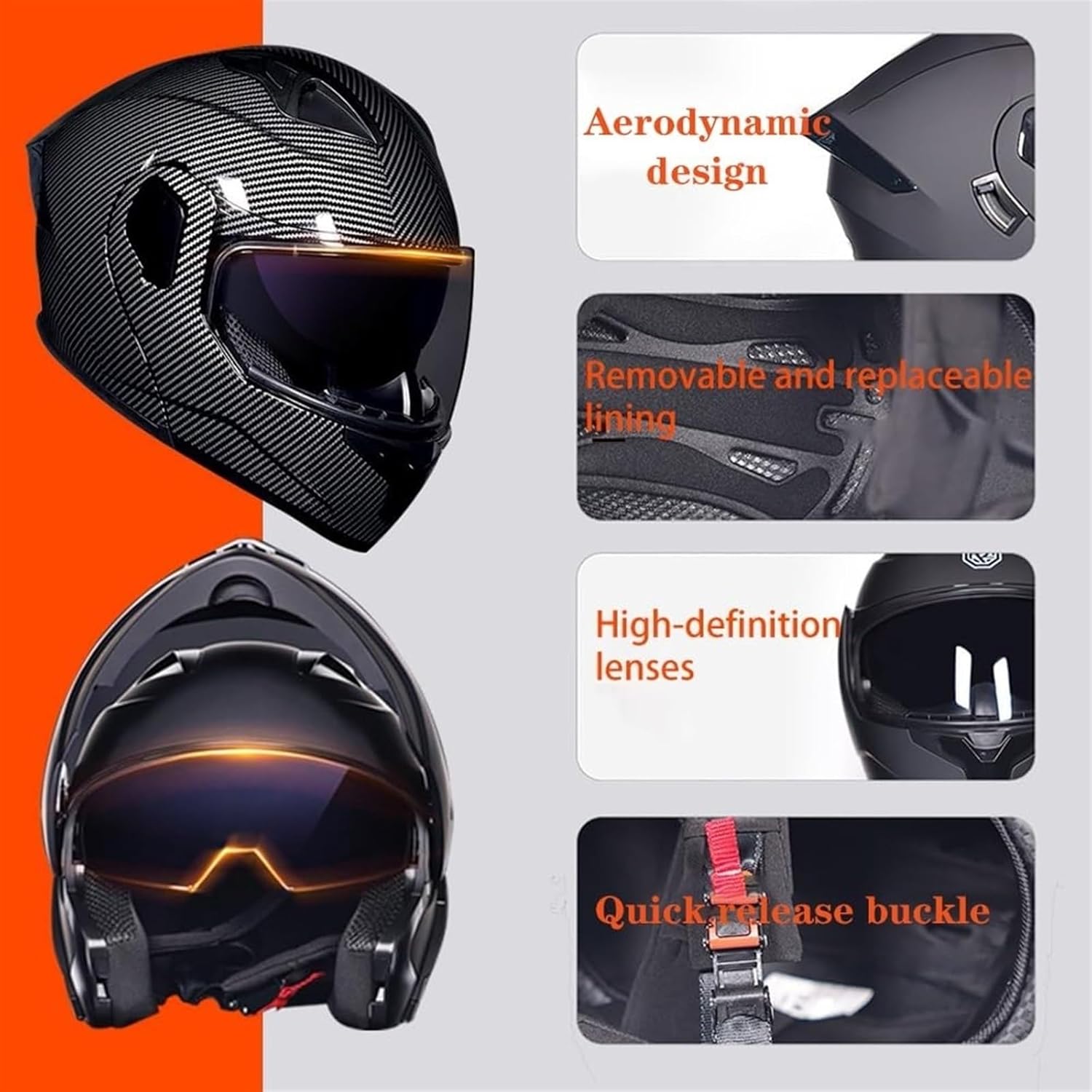
This image details several key features: the aerodynamic design for reduced air resistance, the removable and replaceable inner lining for hygiene, high-definition lenses for clear vision, and the quick-release buckle for secure and convenient fastening.
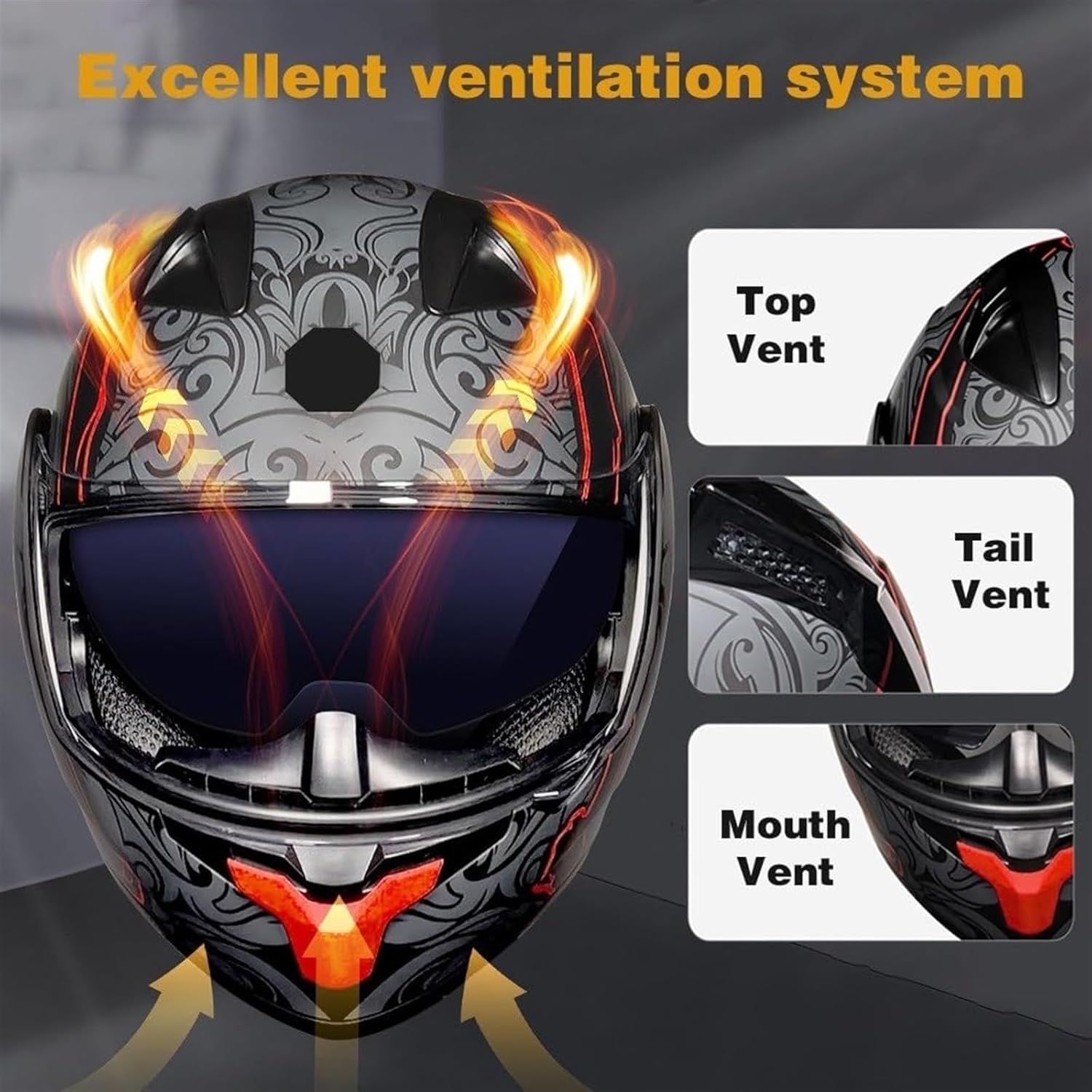
This image illustrates the helmet's excellent ventilation system, featuring clearly marked top, tail, and mouth vents designed to provide comfortable air circulation and prevent stuffiness during rides.
- Aerodynamic Design: Streamlined helmet body reduces air resistance and noise, enhancing riding comfort.
- Integrated Bluetooth System (Y70):
- Dual-core Bluetooth 5.3 chip for stable connection and lower power consumption.
- IPX6 waterproof rating.
- RGB colorful lighting effect modes.
- Built-in 2000mAh lithium battery.
- Supports connecting two mobile phones simultaneously.
- AI voice assistant support.
- Automatic answer for incoming calls (can be switched to manual).
4. Setup
4.1 Helmet Sizing
Proper helmet sizing is crucial for safety and comfort. Measure your head circumference and compare it to the chart below. If the helmet size is not suitable after purchase, the inner lining can be replaced.
| Size | Head Circumference (inches) | Head Circumference (CM) |
|---|---|---|
| M | 22.44 ~ 22.83 | 57 ~ 58 |
| L | 23.22 ~ 23.62 | 59 ~ 60 |
| XL | 24.00 ~ 24.40 | 61 ~ 62 |
| XXL | 24.80 ~ 25.20 | 63 ~ 64 |
4.2 Bluetooth Module Initial Setup
The Bluetooth module is integrated into the helmet. Follow these steps for initial use:
- Charging: Before first use, fully charge the Bluetooth module. Connect the charging cable to the charging port on the module and a USB power source. The charging indicator (red light) will illuminate. It takes approximately 2 hours for a full charge.
- Power On: Press and hold the Power button on the Bluetooth module until the working indicator light (red, yellow, blue, green) illuminates.
- Pairing Mode: Once powered on, the module will automatically enter pairing mode, indicated by a flashing light.
- Connect to Device: On your mobile phone or Bluetooth-enabled device, search for available Bluetooth devices and select "Y70" to connect. Once connected, the indicator light will change to a steady color or flash slowly.
- Connecting Two Mobile Phones: The Y70 module supports simultaneous connection to two mobile phones. Follow the pairing steps for the first phone, then repeat for the second. The module will manage connections for music, navigation, and calls.
5. Operating Instructions
5.1 Bluetooth Module Controls (Y70)

This image showcases the Y70 Bluetooth module's capabilities, including its dual-core Bluetooth 5.3 chip for stable connections, up to 30 hours of talk time, and intelligent noise reduction for clear audio. It also depicts the module's use in communication while riding.

This detailed diagram labels the various buttons and ports on the Y70 Bluetooth module, including the power button, volume controls, mode button, charging port, and headphone jack. Key specifications such as battery capacity, talk time, and waterproof level are also listed.
- Power Button (Center):
- Press and hold: Power On/Off.
- Short press: Play/Pause music.
- Short press during incoming call: Answer call.
- Short press during active call: End call.
- Double press: Last code replay (redial).
- Volume - / Previous Song Button:
- Short press: Decrease volume.
- Long press: Play previous song.
- Volume + / Next Song Button:
- Short press: Increase volume.
- Long press: Play next song.
- Mode Button: Short press to cycle through RGB lighting effect modes.
- AI Voice Assistant: Activate by a specific button press (refer to the diagram for exact button, usually a long press on a specific button or a combination).
- Automatic Call Answering: The system is set to automatically answer incoming calls by default. This can be switched to manual answering through device settings if desired.
5.2 Visor Operation
- Main Visor: To open or close the main clear visor, grasp the tab at the bottom center and lift or lower it. The visor has multiple detent positions.
- Retractable Sun Visor: The integrated sun visor is operated by a slider mechanism located on the side of the helmet (typically left side). Slide it down to deploy the sun visor and up to retract it.
5.3 Ventilation System
The helmet features three adjustable vents to control airflow:
- Top Vent: Located on the top of the helmet. Slide the control to open or close the vent.
- Tail Vent: Located at the rear of the helmet. This vent helps exhaust warm air. Slide the control to open or close.
- Mouth Vent: Located on the chin bar. Slide the control to direct airflow to the face and reduce visor fogging.
6. Maintenance
6.1 Helmet Cleaning
- Exterior: Clean the helmet shell with a soft cloth, warm water, and mild soap. Avoid abrasive cleaners or solvents.
- Visors: Clean visors with a soft, damp cloth and mild soap. Do not use harsh chemicals or paper towels, as they can scratch the surface. Allow to air dry.
6.2 Inner Lining Removal and Washing
The inner lining is fully removable and washable to maintain hygiene.
- Carefully detach the inner lining components from the helmet interior. They are typically secured with snaps or Velcro.
- Hand wash the lining with mild soap and cool water. Do not machine wash or tumble dry.
- Rinse thoroughly and allow to air dry completely before re-installing into the helmet.
6.3 Bluetooth Module Care
- Keep the module dry. Although it is IPX6 waterproof, avoid prolonged submersion.
- Do not expose the module to extreme temperatures.
- Clean with a dry, soft cloth.
7. Troubleshooting
- Bluetooth Not Pairing:
- Ensure the Bluetooth module is charged and powered on.
- Make sure your device's Bluetooth is enabled and discoverable.
- Move the devices closer to each other.
- Try restarting both the Bluetooth module and your device.
- Clear previous Bluetooth connections on your device and try pairing again.
- No Sound or Low Volume:
- Check the volume levels on both the Bluetooth module and your connected device.
- Ensure the module is properly connected to your device.
- Verify that the speakers are correctly positioned inside the helmet.
- Short Battery Life:
- Ensure the module is fully charged before use.
- Battery life can be affected by extreme temperatures or continuous high-volume usage.
- If the issue persists, contact customer support.
- Helmet Fit Issues:
- Refer to the sizing guide in Section 4.1.
- If the fit is uncomfortable, consider replacing the inner lining with a different size if available.
8. Specifications
8.1 Helmet Specifications
- Weight: Approximately 1400g
- Material: ABS high-strength plastic shell, high-strength EPS buffer layer
- Certifications: DOT FMVSS-218, ECE (Approved)
- Application: Unisex, Four Seasons General
- Sizes: M (57-58CM), L (59-60CM), XL (61-62CM), XXL (63-64CM)
8.2 Bluetooth Module (Y70) Specifications
- Bluetooth Version: 5.3
- Battery Type: Built-in polymer lithium battery
- Battery Capacity: 2000mAh
- Charging Time: Approximately 2 hours
- Standby Time: Approximately 270 hours
- Talk Time: Approximately 30 hours
- Transmission Distance: Up to 18 meters (without obstacles)
- Waterproof Level: IPX6
- AI Voice Assistant: Supported
- RGB Light: 6 lighting effect modes
- Speaker Diameter: 40mm
- Multi-device Connection: Supports connecting two mobile phones simultaneously
9. Warranty and Support
GUENZO is committed to providing high-quality products and customer satisfaction. While specific warranty details are not provided in this manual, if you encounter any issues or have questions regarding your GUENZO Motorcycle Bluetooth Full Face Helmet, please contact our professional online service team. We aim to resolve any concerns promptly.
For support, please refer to the contact information provided at the point of purchase or visit the official GUENZO store online.