
BeNtli XBATR640US
BeNtli Replacement Vacuum Cleaner Battery Instruction Manual
Model: XBATR640US
1. Introduction
This manual provides essential information for the safe and effective use of your BeNtli replacement vacuum cleaner battery. This high-capacity battery is designed to provide long-lasting and stable power output for compatible vacuum cleaners, ensuring optimal performance.
The battery features high energy density characteristics, allowing it to store more electrical energy efficiently within a compact volume. It is manufactured using high-quality electrode materials and advanced processes, contributing to a long cycle life and excellent cold and heat resistance.
2. Safety Information
Please read and understand all safety warnings before using the battery. Failure to follow these instructions may result in electric shock, fire, or serious injury.
- Do not disassemble, open, or shred the battery pack.
- Do not expose the battery to heat or fire. Avoid storage in direct sunlight.
- Do not short-circuit a battery pack. Do not store battery packs haphazardly in a box or drawer where they may short-circuit each other or be short-circuited by conductive materials.
- Do not subject battery packs to mechanical shock.
- In the event of a battery leaking, do not allow the liquid to come into contact with the skin or eyes. If contact has been made, wash the affected area with copious amounts of water and seek medical advice.
- Do not use any charger other than that specifically provided for use with the equipment.
- Keep the battery clean and dry.
- Observe the plus (+) and minus (-) marks on the battery and equipment and ensure correct use.
- Dispose of the battery properly according to local regulations. Do not dispose of with household waste.
3. Compatibility
This replacement battery is compatible with the following Shark vacuum cleaner models:
- Shark IP3000
- Shark POWERDETECT XBATR640
- Shark XBATR640US
4. Package Contents
Your package should contain the following item:
- 1 x BeNtli Replacement Vacuum Cleaner Battery (Model: XBATR640US)
5. Setup and Installation
Follow these steps to install the replacement battery into your compatible Shark vacuum cleaner or charging dock.
- Power Off and Unplug: Ensure your vacuum cleaner is powered off and unplugged from any power source before attempting battery replacement.
- Locate Battery Compartment: Identify the battery compartment on your vacuum cleaner. Refer to your vacuum cleaner's original manual if you are unsure of its location.
- Remove Old Battery (if applicable): If replacing an existing battery, carefully unlatch or unscrew the old battery from its compartment and remove it.
- Insert New Battery: Align the BeNtli replacement battery with the battery compartment. Gently slide the battery into place, ensuring the contacts align correctly. You should hear a click or feel it securely latch into position.
- Secure Battery: If your vacuum cleaner requires screws or latches to secure the battery, ensure they are properly fastened.
- Initial Charge: It is recommended to fully charge the new battery before its first use. Refer to the "Charging" section for instructions.
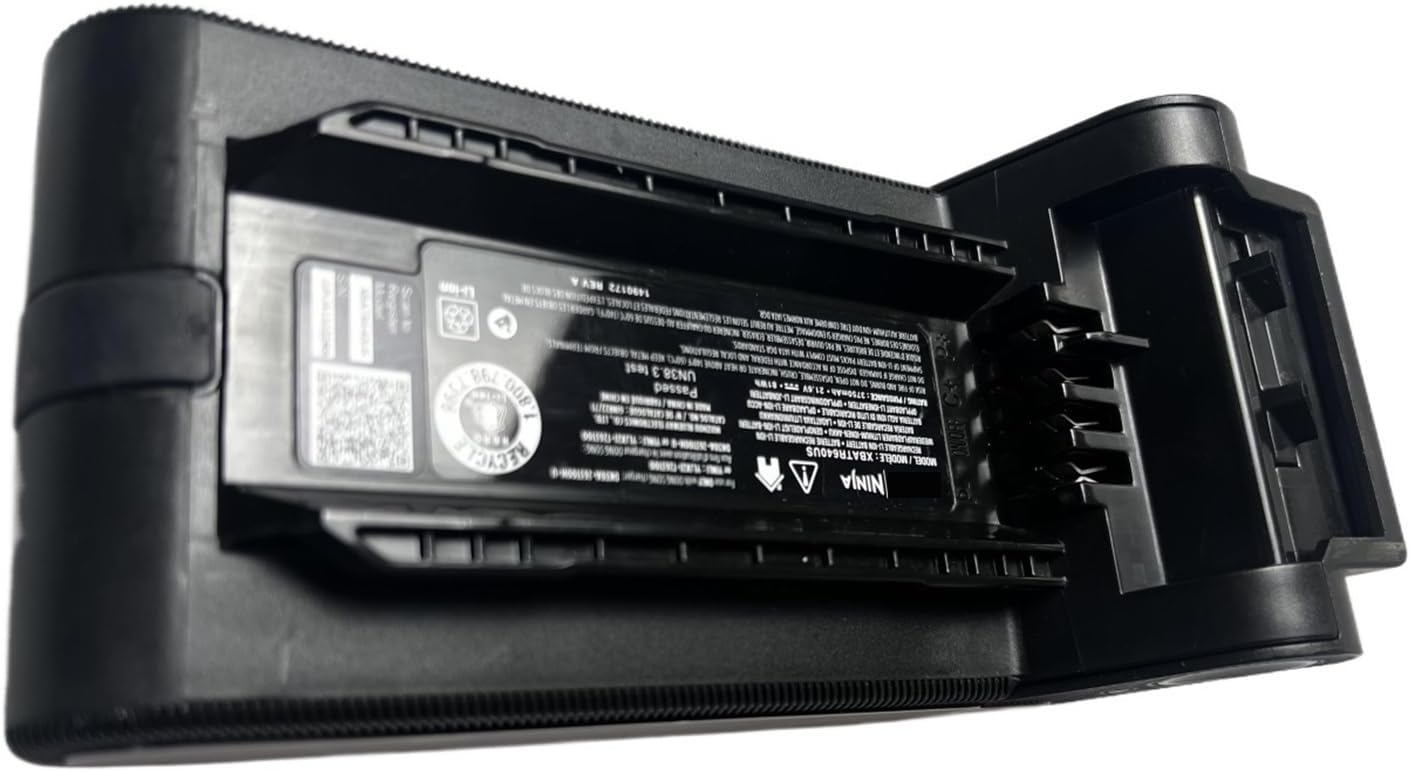
Image: The BeNtli replacement battery (XBATR640US) shown partially inserted into a compatible vacuum cleaner's battery slot, demonstrating the correct orientation for installation.

Image: An underside view of the BeNtli replacement battery, highlighting the electrical contacts that connect with the vacuum cleaner or charging dock.
6. Charging
To charge your BeNtli replacement battery, use the original charger and charging dock provided with your Shark vacuum cleaner. This battery is designed to be compatible with the existing charging system.
- Place Vacuum on Charger: If the battery is installed in the vacuum, place the vacuum cleaner onto its charging dock.
- Insert Battery into Dock (if removable): If your vacuum model allows for battery removal for charging, insert the battery directly into the standalone charging dock.
- Monitor Charging Indicator: Refer to your vacuum cleaner's or charging dock's indicator lights to confirm charging status. Charging times may vary.
- Full Charge: Allow the battery to fully charge before its first use and whenever possible to maximize battery life.
Important: Only use the charger specifically designed for your Shark vacuum cleaner model. Using an incompatible charger may damage the battery or pose a safety risk.
7. Operation
Once the battery is fully charged and installed, your vacuum cleaner is ready for operation. The BeNtli battery provides stable and consistent power output, ensuring your vacuum performs effectively throughout its run time.
- Operate your vacuum cleaner as per its original instruction manual.
- The battery is designed for long-lasting performance, providing ample power for typical cleaning tasks.
- Monitor your vacuum's battery indicator to know when recharging is necessary.
8. Maintenance and Care
Proper care and maintenance will help extend the life of your BeNtli replacement battery.
- Regular Charging: For optimal battery health, avoid completely draining the battery before recharging. Recharge it regularly, even if not fully depleted.
- Storage: If storing the battery for an extended period, store it in a cool, dry place at approximately 50% charge. Avoid extreme temperatures. The battery has excellent cold and heat resistance, but prolonged exposure to extreme conditions can still affect its lifespan.
- Cleaning: Keep the battery contacts clean and free of dust or debris. Use a dry cloth to wipe them if necessary.
- Avoid Physical Damage: Protect the battery from drops, impacts, and punctures.
- Disposal: When the battery reaches the end of its life, dispose of it responsibly at a designated recycling facility. Do not incinerate or dispose of in general waste.
9. Troubleshooting
If you experience issues with your BeNtli replacement battery, consider the following common solutions:
- Battery Not Charging:
- Ensure the battery is correctly seated in the vacuum or charging dock.
- Verify that the charger is properly plugged into a working power outlet.
- Check for any obstructions or dirt on the battery contacts and the charger contacts. Clean if necessary.
- Confirm you are using the original Shark vacuum charger.
- Short Run Time:
- Ensure the battery is fully charged before use.
- Over time, all rechargeable batteries experience a decrease in capacity. If the battery is old, it may be nearing the end of its lifespan.
- Check if the vacuum cleaner itself has any blockages or issues that might cause it to draw excessive power.
- Battery Not Fitting:
- Double-check the compatibility list in Section 3 to ensure your vacuum model is supported.
- Ensure the battery is oriented correctly before attempting to insert it. Do not force the battery into the compartment.
If problems persist after trying these steps, please contact customer support.
10. Specifications
| Feature | Specification |
|---|---|
| Model Number | XBATR640US |
| Capacity | 3750mAh / 81.0Wh |
| Compatible Models | Shark IP3000, POWERDETECT XBATR640, XBATR640US |
| Battery Type | Li-ion (Lithium-ion) |
| Item Weight | 1.76 ounces (50 Grams) |
| Package Dimensions | 1.18 x 0.79 x 0.39 inches |
| Manufacturer | leiyanhua (Brand: BeNtli) |
| Country of Origin | China |

Image: A detailed view of the battery's label, clearly displaying the model number XBATR640US, battery type, and other regulatory information.
11. Warranty and Support
Specific warranty details for this BeNtli replacement battery are not provided in the product information. Please refer to the seller's return policy or contact the seller directly for warranty information and customer support regarding your purchase.
For general inquiries or technical assistance, you may contact the seller through the platform where the purchase was made.
Ask a question about this manual
Ask about setup, troubleshooting, compatibility, parts, safety, or missing instructions. Manuals+ will review the question and use this page’s manual context to help answer it.