
MAXRIENY O2 Digital oscilloscope
MAXRIENY O2 Digital Oscilloscope User Manual
Model: O2 Digital Oscilloscope
Brand: MAXRIENY
1. Introduction
This manual provides comprehensive instructions for the operation, maintenance, and troubleshooting of the MAXRIENY O2 Digital Oscilloscope. This device is a versatile 2-in-1 tool, combining a dual-channel 50MHz oscilloscope with a signal generator, designed for accurate signal acquisition and waveform display.
Key Features:
- Dual Channel 50MHz Oscilloscope with 250MSa/s real-time sampling rate.
- Integrated Signal Generator capable of producing 7 types of waveforms.
- 3.98-inch TFT full-view angle touchscreen for intuitive operation.
- Supports Chinese and English language switching.
- Data transfer, storage, preview, and export capabilities.
- Long-lasting 3000mAh lithium battery.
- Compact, ultra-thin body with soft silicone cover for durability.
2. Package Contents
Verify that all items listed below are included in your package:
- 1 × O2 Dual-Channel Oscilloscope
- 2 × Oscilloscope Probes
- 1 × USB Type-C Data Cable
- 1 × EVA Storage Bag
- 1 × User's Manual
- 1 × Regulating Rod
- 8 × Color Rings

Figure 2.1: O2 Digital Oscilloscope and its complete set of accessories, including probes, USB cable, storage bag, and user manual.
3. Product Overview
The O2 Digital Oscilloscope features a user-friendly design with a responsive touchscreen and intuitive controls.
3.1 Device Layout

Figure 3.1: The O2 Digital Oscilloscope in an operational setting, showcasing its 50MHz dual-channel touch display and compact form factor.

Figure 3.2: A detailed view of the 3.98-inch full-view TFT touchscreen, highlighting its touch-sensitive interface for easy navigation and data interaction.
3.2 Power and Charging
The device is powered by a built-in 3000 mAh lithium-ion battery, providing extended operational time. Charging is facilitated via the Type-C interface, which also supports data transfer.

Figure 3.3: The oscilloscope connected to a power source via its Type-C port, illustrating its long-range battery life and convenient charging capability.
4. Setup
4.1 Initial Charge
Before first use, fully charge the oscilloscope using the provided USB Type-C cable and a compatible power adapter (not included). The charging indicator will show progress.
4.2 Attaching Probes
Connect the oscilloscope probes to the BNC connectors labeled "OSC 1" and "OSC 2" on the top of the device. Ensure a secure connection by twisting the probe connector until it locks into place.
4.3 Powering On/Off
Press and hold the power button located on the side of the device to power on or power off the oscilloscope. A short press will typically toggle the screen or enter/exit standby mode.
5. Operating Instructions
This section details the primary functions and modes of the O2 Digital Oscilloscope.
5.1 Basic Operation and Navigation
The device features a touchscreen interface for most operations. Use the function wheel on the side for fine adjustments or menu navigation where applicable.
Video 5.1: Demonstrates various operational aspects of the O2 handheld oscilloscope, including power on/off, probe connection, waveform display, and menu navigation.
5.2 Oscilloscope Mode
The oscilloscope mode allows for real-time waveform display and analysis.
- Automatic Measurement: Press the AUTO button for one-button automatic setting of all parameters to display measured waveforms. Long press the AUTO button to quickly calibrate the baseline.
- Trigger Function: Utilize the full trigger function (Auto/Normal/Single) to capture specific waveform events.
- Vertical Sensitivity: Adjust the vertical sensitivity (20mV/div-10V/div) to scale the waveform vertically.
- Horizontal Sampling Rate: Adjust the horizontal sampling rate (1.5Sa/s-250MSa/s) to control the time base.
- Display Mode: Switch between XT, XY, and Scroll display modes as needed for different analysis requirements.
- Afterglow Time: Configure the afterglow time (min, 500ms, 1s, 10s, unlimited) to observe waveform persistence.
5.3 Signal Generator Mode
The built-in signal generator can output various waveforms.
- Waveform Types: Generate Sine, Square, Triangle, Half, Full, Ramp, and DC waveforms.
- Frequency Range: Set the frequency from 0Hz to 2MHz.
- Output Amplitude: Adjust the output amplitude from 0.1V to 3.0V.
- Square Wave Duty Cycle: For square waves, adjust the duty cycle from 1% to 99%.
5.4 Data Storage and Export
The oscilloscope supports storing previewed data and exporting it for further analysis.
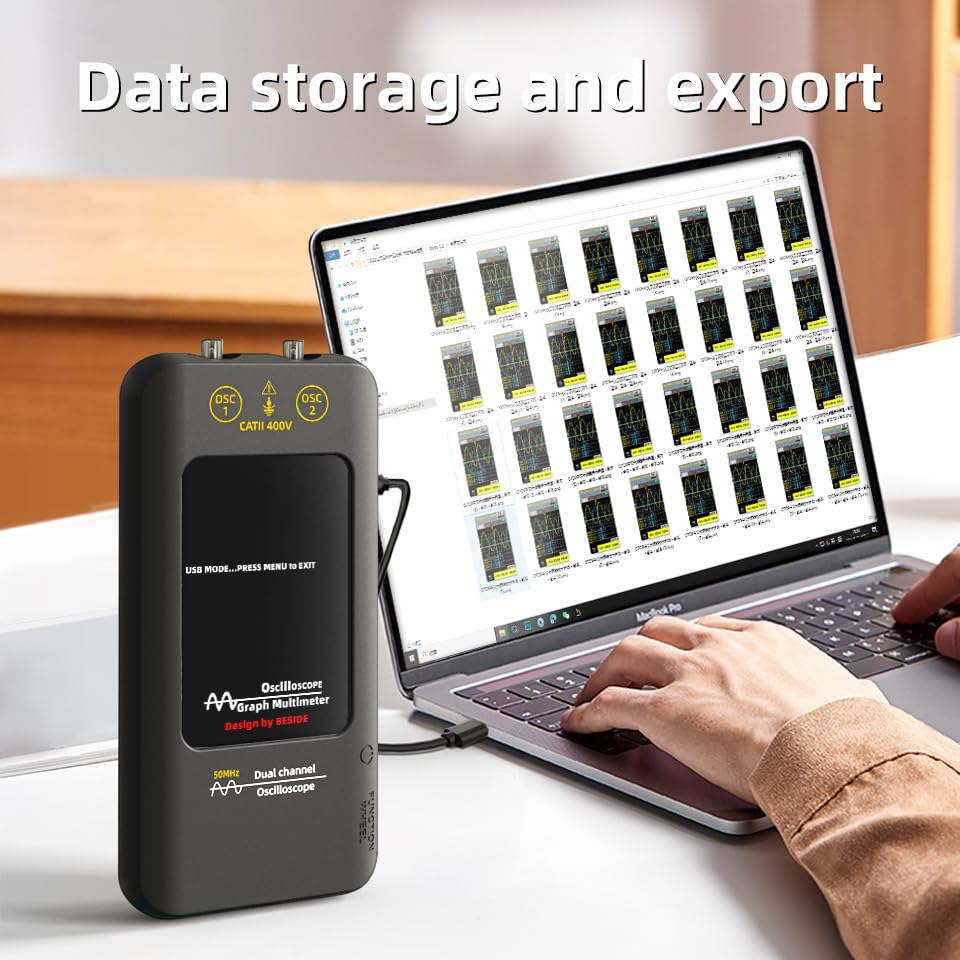
Figure 5.1: The oscilloscope connected to a laptop via its Type-C port, demonstrating its data storage and export capabilities for waveform analysis.
6. Maintenance
6.1 Cleaning
To clean the device, use a soft, dry cloth. For stubborn dirt, a slightly damp cloth with mild soap can be used, ensuring no liquid enters the device openings. Do not use abrasive cleaners or solvents.
6.2 Storage
When not in use, store the oscilloscope in its EVA storage bag to protect it from dust, moisture, and physical damage. Store in a cool, dry place away from direct sunlight and extreme temperatures.

Figure 6.1: The compact design of the O2 Digital Oscilloscope, easily fitting into a pocket, emphasizes its portability and ease of storage.
7. Troubleshooting
If you encounter issues with your O2 Digital Oscilloscope, refer to the following common problems and solutions:
- Device does not power on:
- Ensure the battery is sufficiently charged. Connect the device to a power source using the USB Type-C cable.
- Press and hold the power button for at least 3 seconds.
- No waveform displayed:
- Check if probes are securely connected to the BNC inputs.
- Verify that the input signal is within the device's measurement range.
- Press the AUTO button to automatically adjust settings.
- Ensure the correct channel (CH1 or CH2) is enabled on the display.
- Waveform is unstable or noisy:
- Check probe connections for looseness.
- Ensure proper grounding of the circuit being tested.
- Adjust the trigger settings (level, mode) to stabilize the waveform.
- Consider the probe attenuation setting (x1 or x10) and ensure it matches the device setting.
- Touchscreen is unresponsive:
- Restart the device by powering it off and on again.
- Ensure the screen is clean and free of debris.
If the issue persists after attempting these solutions, please contact customer support.
8. Specifications
| Feature | Specification |
|---|---|
| Display | 3.98 inches with resistance touch TFT LCD screen |
| Bandwidth | 50MHz dual-channel real-time sampling |
| Real-time Sampling Rate | 250MSa/s |
| Number of Channels | 2 channels DC AC |
| Input Impedance | 1MΩ, @16pF |
| Probe Attenuation | ×1, ×10 |
| Maximum Input Voltage | ×1 range <150V, ×10 range <300V (DC + AC peak) |
| Horizontal Sampling Rate Range | 1.5Sa/s-250MSa/s |
| Vertical Sensitivity | 20mV/div-10V/div |
| Automatic Measurement | Period, frequency, peak-to-peak, maximum value, minimum value, duty cycle, root mean square |
| Display Mode | XT, XY, Scroll |
| Afterglow Time | min, 500ms, 1s, 10s, unlimited |
| Signal Generator | |
| Waveform Type | Sine, Square, Triangle, Half, Full, Ramp, DC |
| Frequency Range | 0Hz-2MHz |
| Output Channel | 1 |
| Output Amplitude | 0.1V-3.0V |
| Minimum Resolution | 1Hz |
| Square Wave Duty Cycle | 1%-99% |
| Size | 170.0 × 80.9 × 23.9mm |
| Weight | 268g |
| Battery | 3000 mAh Lithium-ion battery |
9. Warranty and Support
9.1 Warranty Information
This product comes with a standard manufacturer's warranty. Please refer to the warranty card included in your package or contact the seller for specific warranty terms and conditions.
9.2 Customer Support
For technical assistance, troubleshooting not covered in this manual, or warranty claims, please contact MAXRIENY customer support through the platform where you purchased the product. Provide your model number (O2 Digital Oscilloscope) and purchase details when contacting support.
Related Documents - O2 Digital oscilloscope
 |
FNIRSI 2C53P 50M Dual-Channel Flat-Panel Oscilloscope User Manual and Specifications Comprehensive guide for the FNIRSI 2C53P, a 3-in-1 digital oscilloscope, multimeter, and signal generator. Features include 50MHz bandwidth, 250MSa/s sampling rate, 4.3-inch touchscreen, and detailed operational instructions. |
 |
FNIRSI 2C53T Handheld 3-in-1 Oscilloscope, Multimeter, and Signal Generator - Specifications Detailed specifications and features for the FNIRSI 2C53T, a versatile 3-in-1 handheld electronic test instrument. It combines a 50MHz oscilloscope, 20000-count multimeter, and 50kHz signal generator with intelligent anti-burning protection. |
 |
DSCope U2P20 USB-based Digital Oscilloscope Datasheet Technical specifications and features of the DSCope U2P20, a portable USB-based digital oscilloscope with 50MHz bandwidth and up to 200MSa/s sample rate. |
 |
HoldPeak Handheld Oscilloscope User Manual Comprehensive user manual for the HoldPeak handheld oscilloscope, detailing its features as a 3-in-1 oscilloscope, signal generator, and multimeter. Includes operation instructions, safety precautions, and technical specifications for the 50MHz dual-channel device. |
 |
ZOYI ZT-703S User Manual: Oscilloscope, Multimeter, Signal Generator Guide Comprehensive guide for the ZOYI ZT-703S, a 3-in-1 handheld device featuring a 50MHz dual-channel oscilloscope, 25,000-count digital multimeter, and signal generator with a 3.5-inch IPS display for diverse measurement needs. |
Ask a question about this manual
Ask about setup, troubleshooting, compatibility, parts, safety, or missing instructions. Manuals+ will review the question and use this page’s manual context to help answer it.