
Domus Homeware B0DZ2BN5R9
Domus Homeware Mid-Century Elegant Tufted Design LED Music System Queen Size Bed Frame User Manual
Model: B0DZ2BN5R9
1. Introduction
Thank you for purchasing the Domus Homeware Mid-Century Elegant Tufted Design LED Music System Queen Size Bed Frame. This manual provides essential information for the safe and efficient assembly, operation, and maintenance of your new bed frame. Please read this manual thoroughly before beginning assembly or use, and retain it for future reference.

Image: The fully assembled Domus Homeware Queen Size Bed Frame, showcasing its elegant tufted design, integrated LED lighting, and convenient charging ports on the headboard. The bed is shown in a bedroom setting with bedding and nightstands.
2. Safety Instructions
- Always follow all assembly instructions carefully.
- Ensure all bolts and screws are securely tightened before use. Periodically check and re-tighten as necessary.
- Do not exceed the maximum weight capacity of 800 lbs.
- Keep small parts and packaging materials away from children during assembly to prevent choking hazards.
- Use only the provided components and hardware. Do not substitute parts.
- Unplug the bed frame from the power outlet before cleaning or performing any maintenance on the electrical components.
- Avoid spilling liquids directly onto the headboard's electrical components.
3. Setup and Assembly
Assembly of your Domus Homeware bed frame is designed to be straightforward. An electric screwdriver is included to assist with the process.
3.1 Unpacking and Component Check
Carefully unpack all components and compare them against the parts list provided in your packaging. Ensure all parts are present and undamaged before proceeding.
3.2 Frame Assembly
Begin by assembling the main frame components. The design features reinforced legs and tempered thick steel corner plates for stability. The noise-free assembly ensures a quiet structure.
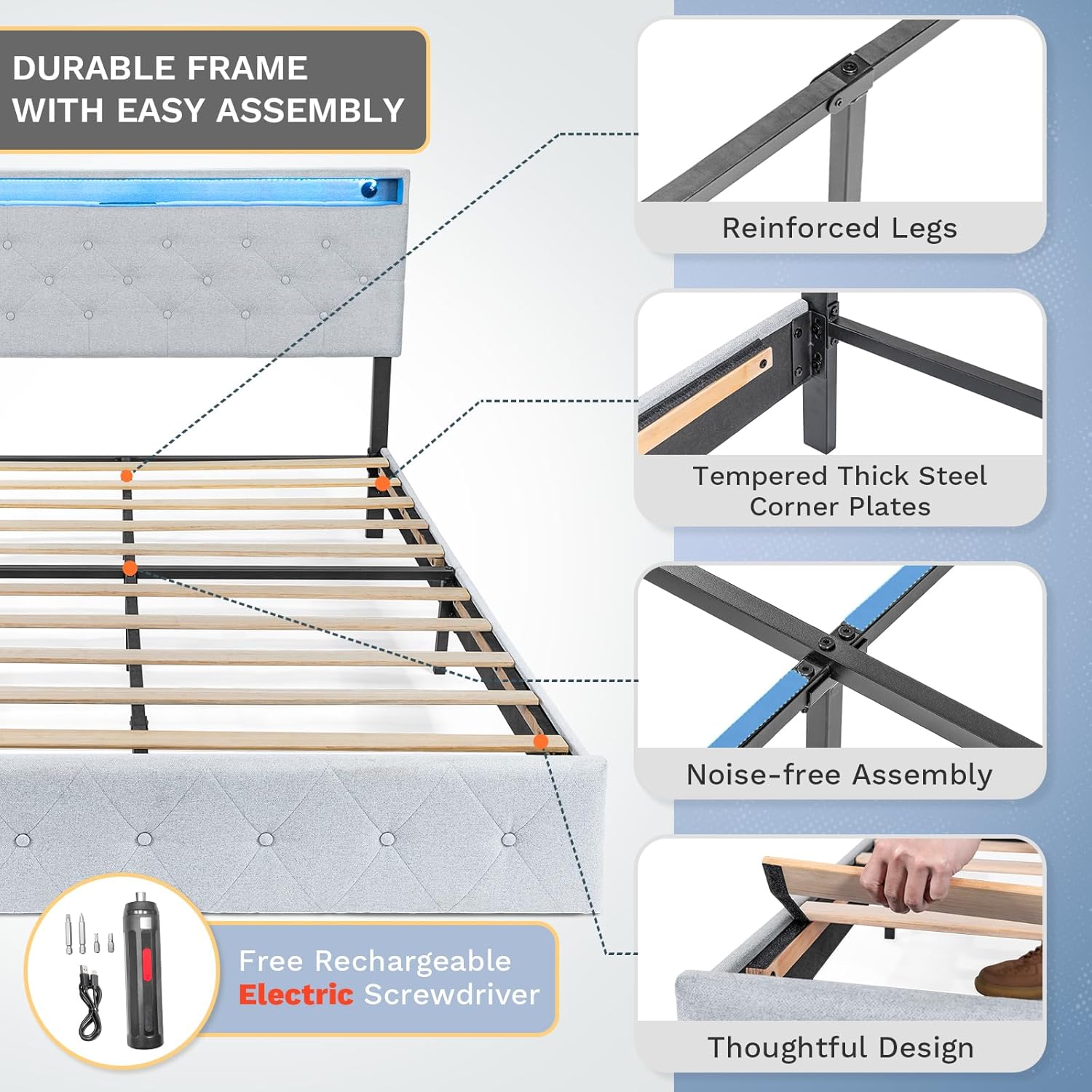
Image: A visual representation of the bed frame's durable construction, highlighting reinforced legs, tempered steel corner plates, and the noise-free assembly mechanism. The included electric screwdriver is also shown.
3.3 Slat Installation
Install the wooden slats into the designated slots on the bed frame. The thoughtful design ensures secure placement of the slats, contributing to the overall stability and support for your mattress.

Image: A close-up view demonstrating the installation of a wooden slat into the bed frame, illustrating the secure and thoughtful design for mattress support.
3.4 Headboard Attachment and Adjustment
Attach the upholstered headboard to the assembled frame. The headboard features a soft padded design and is adjustable by 4 inches to accommodate various mattress heights and user preferences.

Image: A visual representation highlighting the soft padding of the headboard and the mechanism for its 4-inch height adjustment, designed for maximum comfort.
4. Operating Instructions
4.1 LED Lighting System
The integrated smart LED lighting system allows you to customize the ambiance of your bedroom. It can change color according to your mood and even synchronize with music. Control is typically managed via a dedicated mobile application.
- App Control: Download the specified mobile application (refer to packaging or included instructions for app name/QR code).
- Color Selection: Choose from over 60,000 colors.
- Brightness Adjustment: Adjust the intensity of the light.
- Timing Option: Set schedules for the lights to turn on/off.
- Music Mode: Enable the lights to react to music played through the integrated system.

Image: A visual guide to the smart LED lighting system, demonstrating its ability to change color based on mood and music, controlled via a mobile application with options for color, brightness, timing, and music mode.
4.2 Integrated Charging Ports
The thickened upholstered headboard includes a built-in essentials tray and integrated charging ports for your convenience. This layered charging dock provides multiple options for powering your devices.
- AC Outlets: Two 125V/12A AC outlets for standard plugs.
- USB Port: One standard USB port for charging compatible devices.
- Type-C Port: One Type-C USB port for modern devices.
- Essentials Tray: Use the tray to hold your phone, glasses, or remote control while charging.

Image: A detailed view of the smart device charging headboard, showcasing the built-in essentials tray and the layered charging dock with two AC outlets, one USB port, and one Type-C port.
5. Maintenance
- Cleaning: For the upholstered parts, use a soft, damp cloth and mild soap if necessary. Avoid harsh chemicals. For the metal frame, wipe with a dry or slightly damp cloth.
- Electrical Components: Ensure the bed frame is unplugged before cleaning the headboard's electrical components. Use a dry cloth to wipe dust.
- Hardware Check: Periodically check all bolts, screws, and connections to ensure they remain tight. Re-tighten as needed to maintain stability and prevent noise.
- Mattress Placement: The embedded design of the bed frame helps secure the mattress and prevents shifting. Ensure your mattress is properly seated within the frame.

Image: A comparison illustrating the embedded design of the bed frame, which securely holds the mattress in place and prevents slipping, contrasting it with a regular flat design where mattresses may shift.
6. Troubleshooting
| Problem | Possible Cause | Solution |
|---|---|---|
| Bed frame is wobbly or noisy. | Loose bolts or connections. | Check and re-tighten all assembly bolts and screws. Ensure all components are properly aligned. |
| LED lights are not working. | Not plugged in, power outage, app connection issue, or LED strip damage. | Ensure the bed frame is properly plugged into a working power outlet. Check the mobile app connection. If issues persist, contact customer support. |
| Charging ports are not functioning. | Not plugged in, power outage, or port damage. | Verify the bed frame is plugged in. Test with different devices and cables. If still not working, contact customer support. |
| Mattress slides on the frame. | Mattress not properly seated or not compatible with embedded design. | Ensure the mattress is fully pushed into the embedded frame. The design is intended to prevent slipping. |
7. Specifications
| Feature | Detail |
|---|---|
| Model | B0DZ2BN5R9 |
| Size | Queen (80''L x 60''W) |
| Product Dimensions | 82.5"L x 61"W x 41"H |
| Color | Grey |
| Finish Type | Upholstered |
| Material | High quality steel, Padded grey boards |
| Maximum Weight Recommendation | 800 Pounds |
| Headboard Adjustment | 4 inches (adjustable height) |
| Included Components | Headboard, Frame, Slats, Electric Screwdriver |
| Special Feature | Noiseless, LED Music System, Charging Ports (2 AC, 1 USB, 1 Type-C) |
| Compatible Mattress Size | Queen |
| Box Spring Needed | No |
| Memory Foam Mattress Compatible | Yes |
| Manufacturer | Domus Homeware |
| UPC | 810029496940 |
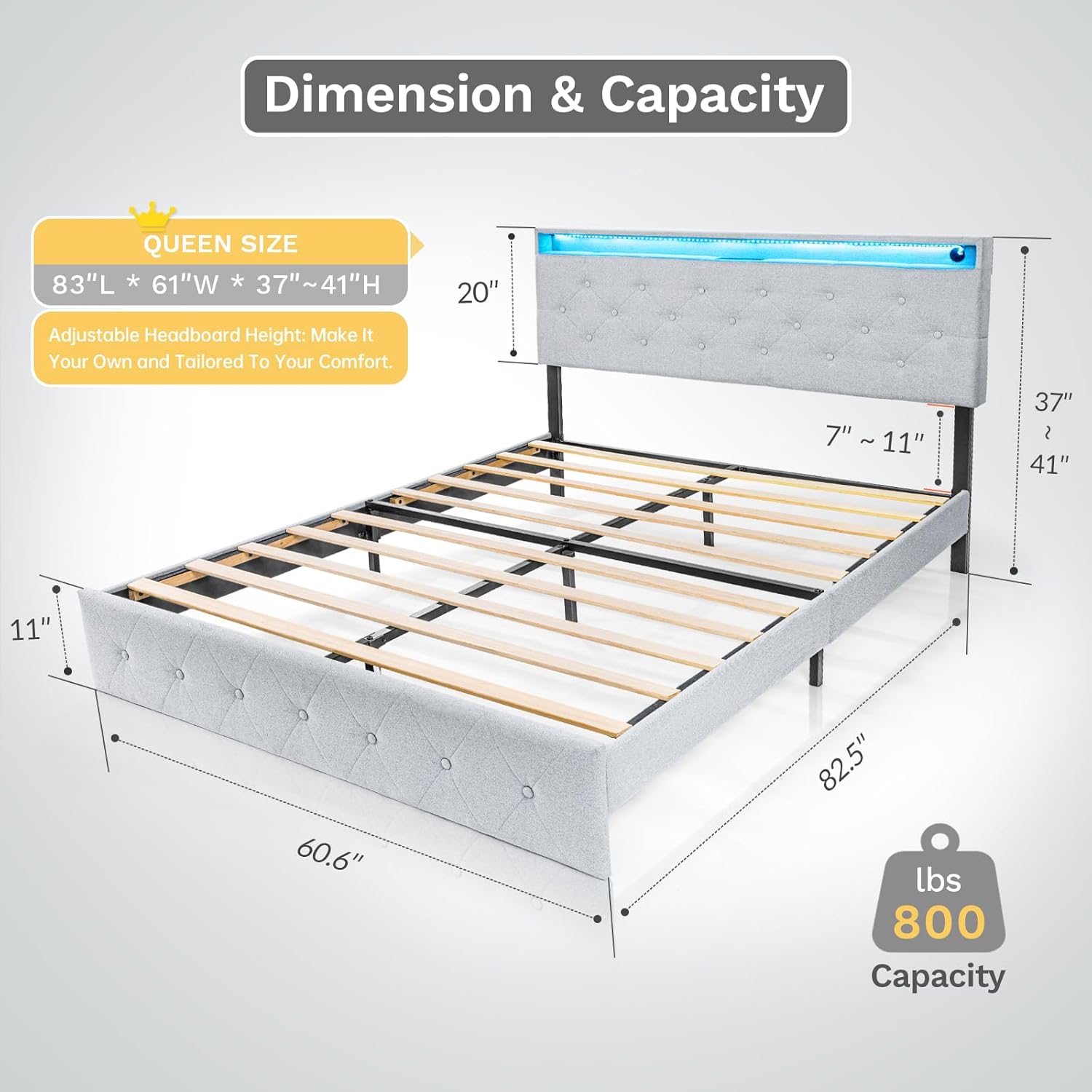
Image: A detailed diagram illustrating the dimensions of the Queen size bed frame (83"L x 61"W x 37"-41"H) and its maximum weight capacity of 800 lbs.
8. Warranty and Support
For warranty information and customer support, please refer to the documentation included with your product packaging or contact Domus Homeware directly through their official website or the retailer where the product was purchased.
Manufacturer: Domus Homeware
ASIN: B0DZ2BN5R9
UPC: 810029496940
Ask a question about this manual
Ask about setup, troubleshooting, compatibility, parts, safety, or missing instructions. Manuals+ will review the question and use this page’s manual context to help answer it.