
G-Tide Sv30
G-Tide SV30 Portable Bluetooth Speaker
User Manual
Introduction
Thank you for purchasing the G-Tide SV30 Portable Bluetooth Speaker. This manual provides essential information for the safe and efficient operation of your device. Please read it thoroughly before use and retain it for future reference.
Safety Information
- Do not expose the speaker to extreme temperatures or direct sunlight for prolonged periods.
- Avoid dropping or subjecting the speaker to strong impacts.
- Do not disassemble, repair, or modify the speaker yourself. Contact qualified service personnel for any repairs.
- Keep the speaker away from water and liquids, despite its IPX6 rating, to prevent damage to internal components.
- Use only the provided charging cable or a certified equivalent.
- Clean the speaker with a soft, dry cloth. Do not use abrasive cleaners or solvents.
Product Overview
Key Features
- Portable Design: Compact cylindrical speaker with an elastic hanger for easy transport and use outdoors or indoors.
- Versatile Connectivity: Equipped with wireless Bluetooth, USB port, and Type-C input for multiple playback options.
- LED Illumination: RGB LED light system that creates attractive visual effects while playing music.
- Sound Quality: Reproduces Hi-Fi audio with exceptional clarity for a superior listening experience.
- Additional Features: Includes intuitive controls to adjust volume, change tracks, and customize lighting effects.
- IPX6 Water Resistance: Provides protection against strong water jets.
- TWS Function: Allows connection of two SV30 speakers for true wireless stereo sound.
Package Contents
- G-Tide SV30 Bluetooth Speaker
- Elastic Strap
- USB Type-C Charging Cable
- User Manual (this document)
Speaker Components and Controls
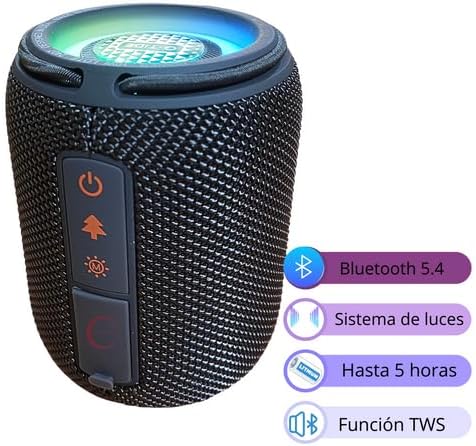
Figure 1: Front view of the G-Tide SV30 speaker highlighting key features.

Figure 2: Detailed view of the control panel and input/output ports.
- Power Button: Press and hold to turn on/off. Short press to play/pause.
- Mode Button: Short press to switch between Bluetooth, USB, and MicroSD modes.
- Light Mode Button: Short press to cycle through LED light effects. Press and hold to turn lights off/on.
- Volume Down / Previous Track Button: Short press for previous track, long press for volume down.
- Volume Up / Next Track Button: Short press for next track, long press for volume up.
- USB Port: For USB flash drive playback.
- MicroSD Card Slot: For MicroSD card playback.
- Type-C Charging Port: For charging the speaker.
Setup
Initial Charging
Before first use, fully charge the speaker. Connect the provided USB Type-C cable to the speaker's Type-C charging port and the other end to a USB power adapter (not included) or a computer's USB port.
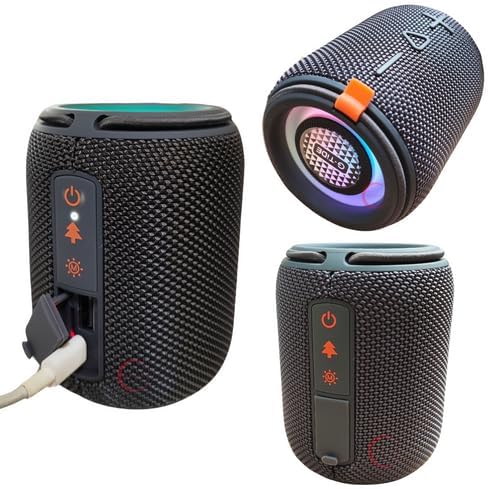
Figure 3: Charging the G-Tide SV30 speaker via the Type-C port.
The LED indicator will show charging status and turn off when fully charged. A full charge takes approximately 2-3 hours.
Powering On/Off
- To power on: Press and hold the Power button (⏻) for 2-3 seconds until you hear an audible prompt.
- To power off: Press and hold the Power button (⏻) for 2-3 seconds until you hear an audible prompt.
Operating Instructions
Bluetooth Pairing
- Ensure the speaker is powered on and in Bluetooth mode (indicated by a flashing blue LED). If not, short press the Mode button to switch to Bluetooth mode.
- Enable Bluetooth on your device (smartphone, tablet, computer).
- Search for "SV30" in the list of available Bluetooth devices.
- Select "SV30" to connect. Once connected, the LED indicator will stop flashing and remain solid blue, and you will hear a confirmation sound.
- You can now play audio from your device through the speaker.
Note: The speaker will automatically attempt to reconnect to the last paired device when powered on.
Music Playback
- Play/Pause: Short press the Power button (⏻).
- Next Track: Short press the Volume Up / Next Track button (▶).
- Previous Track: Short press the Volume Down / Previous Track button (◀).
- Volume Up: Press and hold the Volume Up / Next Track button (▶).
- Volume Down: Press and hold the Volume Down / Previous Track button (◀).
TWS (True Wireless Stereo) Function
The TWS function allows you to pair two G-Tide SV30 speakers together for a true stereo sound experience.
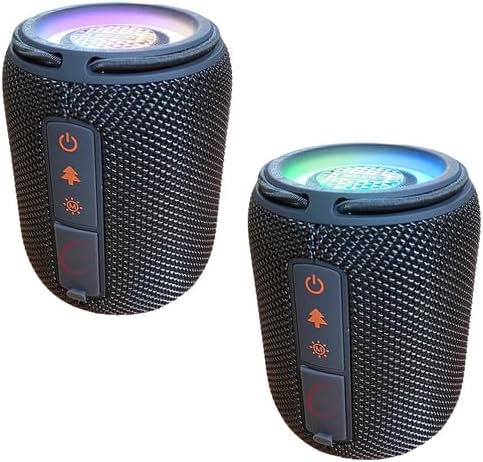
Figure 4: Two SV30 speakers ready for TWS pairing.
- Ensure both SV30 speakers are powered on and not connected to any Bluetooth device.
- On one of the speakers (this will be the primary speaker), double-press the Power button. It will enter TWS pairing mode.
- The two speakers will automatically search for and connect to each other. You will hear a confirmation sound once paired.
- Once TWS is established, connect your device to the primary speaker via Bluetooth as described in the "Bluetooth Pairing" section.
- Audio will now play in stereo through both speakers.
- To disconnect TWS, double-press the Power button on either speaker.
LED Light Modes
The SV30 speaker features dynamic RGB LED lights. Short press the Light Mode button (💡) to cycle through different light effects. Press and hold the Light Mode button to turn the lights off or on.
USB and MicroSD Playback
Insert a USB flash drive into the USB port or a MicroSD card into the MicroSD slot. The speaker will automatically switch to the corresponding mode and begin playing audio files. Use the playback controls as described above.
Maintenance
Cleaning
Wipe the speaker with a soft, dry, lint-free cloth. Do not use liquid cleaners, sprays, or solvents. Ensure the port cover is securely closed before cleaning or if exposed to water.
Storage
When not in use for extended periods, store the speaker in a cool, dry place away from direct sunlight and extreme temperatures. It is recommended to charge the speaker at least once every three months to maintain battery health.
Troubleshooting
| Problem | Possible Cause / Solution |
|---|---|
| Speaker does not turn on. | Battery is low. Charge the speaker fully. |
| Cannot pair with Bluetooth device. |
|
| No sound or low volume. |
|
| TWS pairing fails. |
|
| LED lights are not working. | Short press the Light Mode button to cycle through modes, or long press to turn them on if they were off. |
Specifications
| Feature | Detail |
|---|---|
| Model Name | SV30 |
| Manufacturer | G-Tide |
| Connectivity Technology | Bluetooth, Type-C, USB |
| Speaker Type | Portable |
| Special Features | Bluetooth, USB Port, RGB LED Lights, Type-C Port, Hi-Fi Sound, IPX6 Water Resistance, TWS Function |
| Power Source | Rechargeable Battery |
| Battery Life | 5 Hours |
| Input Voltage | 3.7 Volts |
| Material | Plastic |
| Color | Black |
| Product Dimensions | 8D x 8W x 15H centimeters |
| Product Weight | 500 Grams |
| Speaker Maximum Output Power | 10 Watts |
| Frequency Response | 20 KHz |
| Impedance | 4 Ohm |
| Subwoofer Diameter | 55 Millimeters |
Warranty and Support
This product comes with a manufacturer's warranty. Please refer to the warranty card included in your package for specific terms and conditions. For technical support, troubleshooting assistance, or warranty claims, please contact the retailer or manufacturer directly.
Manufacturer: G-Tide
Please retain your proof of purchase for warranty purposes.
Ask a question about this manual
Ask about setup, troubleshooting, compatibility, parts, safety, or missing instructions. Manuals+ will review the question and use this page’s manual context to help answer it.