
1. Introduction
This manual provides comprehensive instructions for the safe and effective operation of your L600 Pro MAX Professional Drone. Designed for advanced aerial photography, this drone features a 4K HD camera, 360° laser obstacle avoidance, and extended flight capabilities. Please read this manual thoroughly before first use to ensure optimal performance and safety.
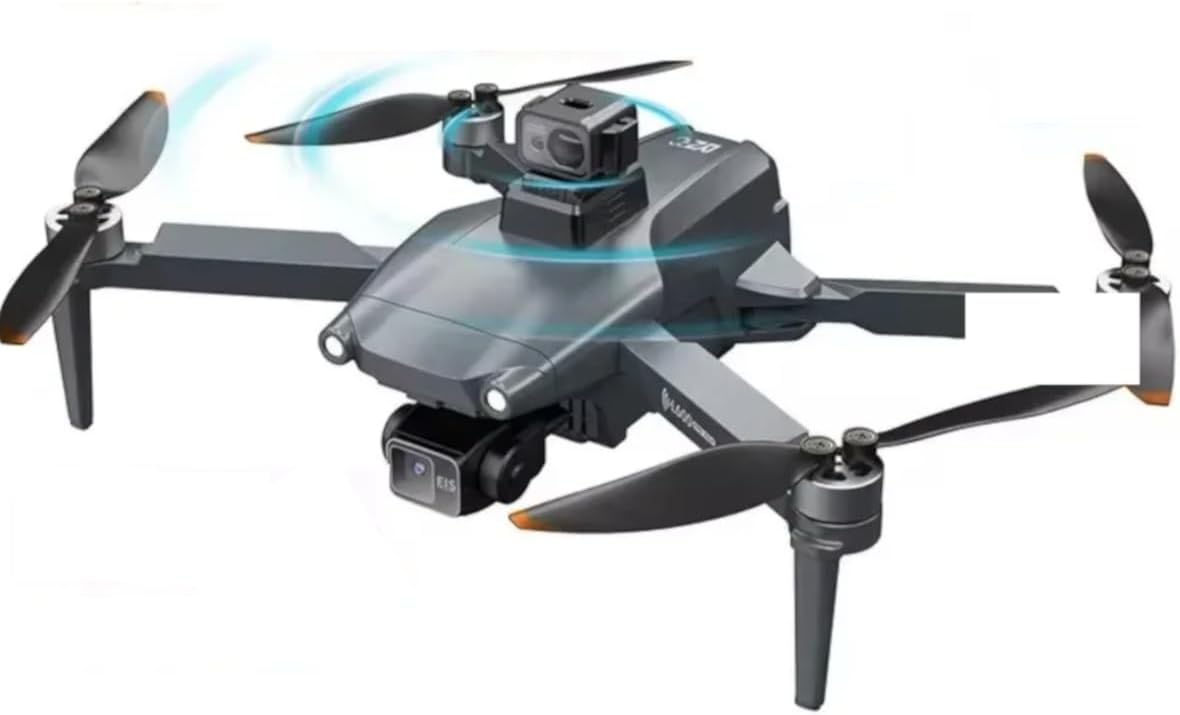
Figure 1.1: The L600 Pro MAX Professional Drone, showcasing its sleek design and integrated camera system.
Key Features:
- Advanced Camera System: Equipped with a 4K HD camera (4096x3072P photo resolution) and a three-axis mechanical self-stabilizing gimbal for superior aerial photography and stable video recording (2048x1080P).
- 360° Laser Obstacle Avoidance: Intelligent detection system provides all-directional protection, including navigation through narrow corridors.
- Extended Flight Performance: Up to 29 minutes of flight time with a 7.4V 4500mAh battery and an impressive 3000M remote control range.
- GPS Module: Ensures precise positioning, stable hovering, and a maximum flight altitude of 300M.
- Smart Functions: Supports 30G SD card storage, features anti-shake lens technology, and includes smartphone app control with live video transmission up to 800M.

Figure 1.2: Visual representation of the drone's flagship features, including three-axis anti-shake gimbal, 4K HD, 360° laser obstacle avoidance, and GPS positioning.
2. Setup
2.1 Unboxing and Component Check
Carefully unpack all components from the box and verify against the list below. If any items are missing or damaged, contact customer support.
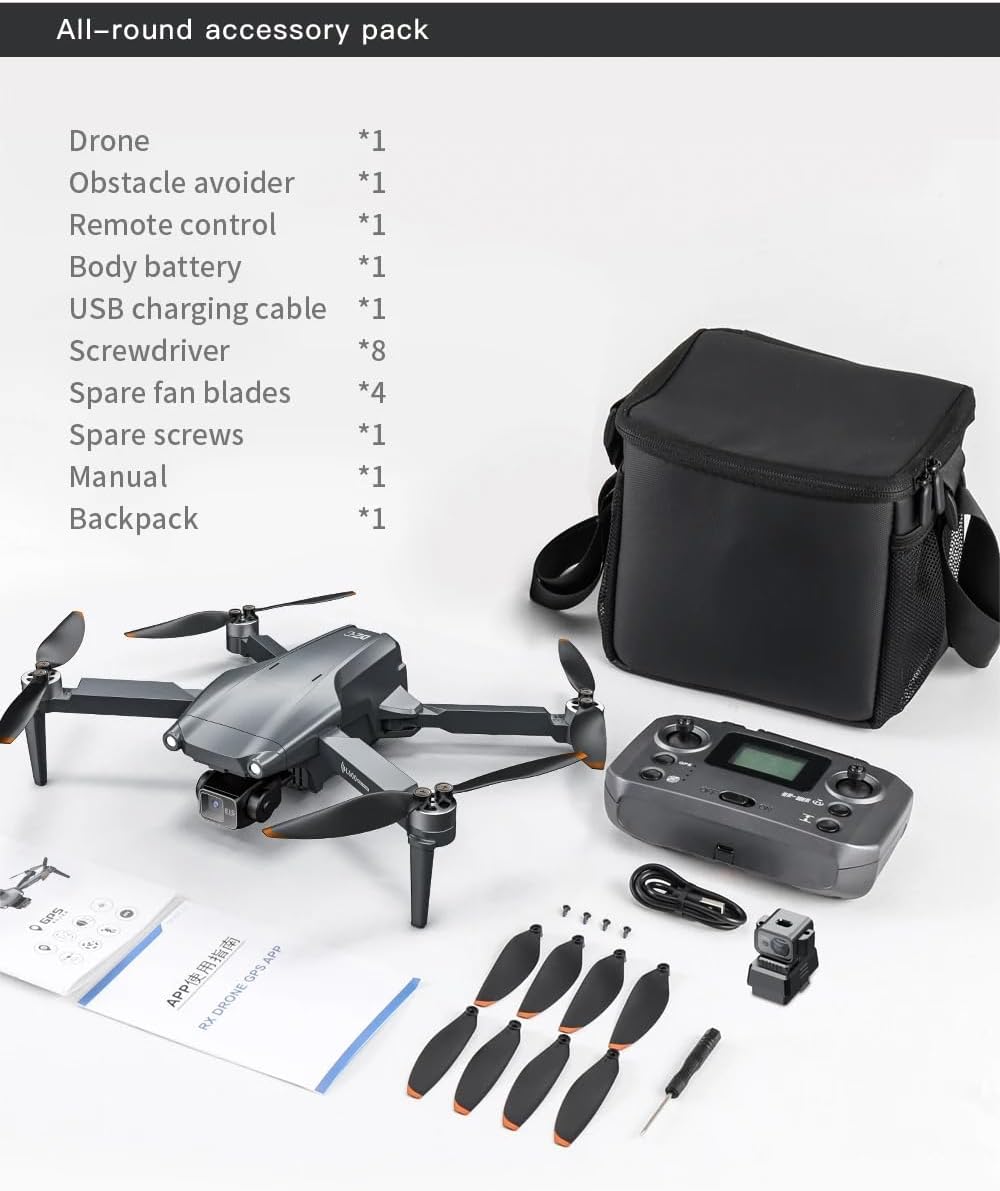
Figure 2.1: The complete accessory pack for the L600 Pro MAX drone, including the drone, remote control, battery, and various tools.
- Drone (x1)
- Obstacle Avoider (x1)
- Remote Control (x1)
- Body Battery (x1)
- USB Charging Cable (x1)
- Screwdriver (x1)
- Spare Fan Blades (x4)
- Spare Screws (x1 set)
- User Manual (x1)
- Backpack (x1)
2.2 Battery Installation and Charging
The drone is powered by a 7.4V 4500mAh Lithium Ion battery. Ensure the battery is fully charged before each flight.
- Insert the drone battery into the designated compartment on the drone body. Ensure it clicks securely into place.
- Connect the USB charging cable to the battery and a compatible USB power adapter (not included).
- The charging indicator light will show the charging status. Refer to the battery's specific instructions for full charging time.
- The remote control also requires batteries (1x 9V battery included). Install them into the remote control's battery compartment.
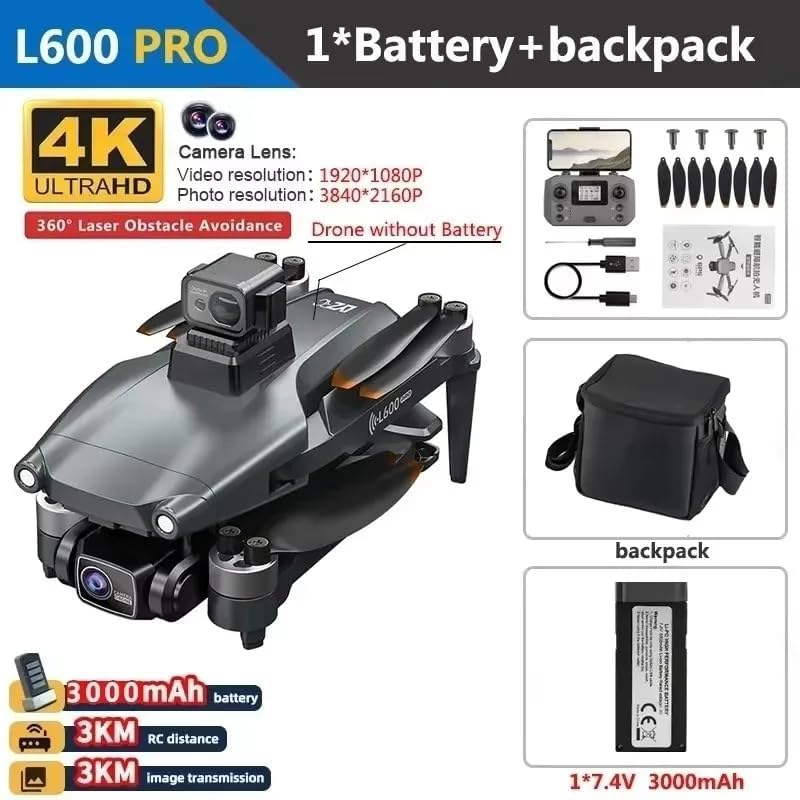
Figure 2.2: The L600 Pro MAX drone, its remote control, and the included battery, illustrating the main components for operation.
2.3 Propeller Installation
Attach the propellers to the motor shafts. Ensure correct orientation (A and B propellers) as indicated on the drone arms and propellers. Use the provided screwdriver to secure them firmly.
2.4 App Download and Connection
Download the official drone control application from your smartphone's app store. Follow the in-app instructions to connect your smartphone to the drone's Wi-Fi network for live video transmission and advanced control features.
3. Operation
3.1 Pre-Flight Checklist
- Ensure drone and remote control batteries are fully charged.
- Check that propellers are securely attached and undamaged.
- Verify GPS signal acquisition before takeoff for stable flight.
- Ensure sufficient open space for flight, away from obstacles, people, and restricted areas.
3.2 Basic Flight Controls
Familiarize yourself with the remote control layout and functions. The drone supports stable hovering thanks to its GPS module.
- Takeoff/Landing: Use the dedicated one-key takeoff/landing button or manual stick control.
- Altitude Control: Left joystick (throttle).
- Directional Control: Right joystick (forward/backward, left/right).
- Yaw Control: Left joystick (rotate left/right).
3.3 360° Laser Obstacle Avoidance
The L600 Pro MAX features an intelligent 360° laser obstacle avoidance system. When activated, the drone will automatically detect and maneuver around obstacles in all directions, providing enhanced safety during flight, especially in complex environments like corridors.
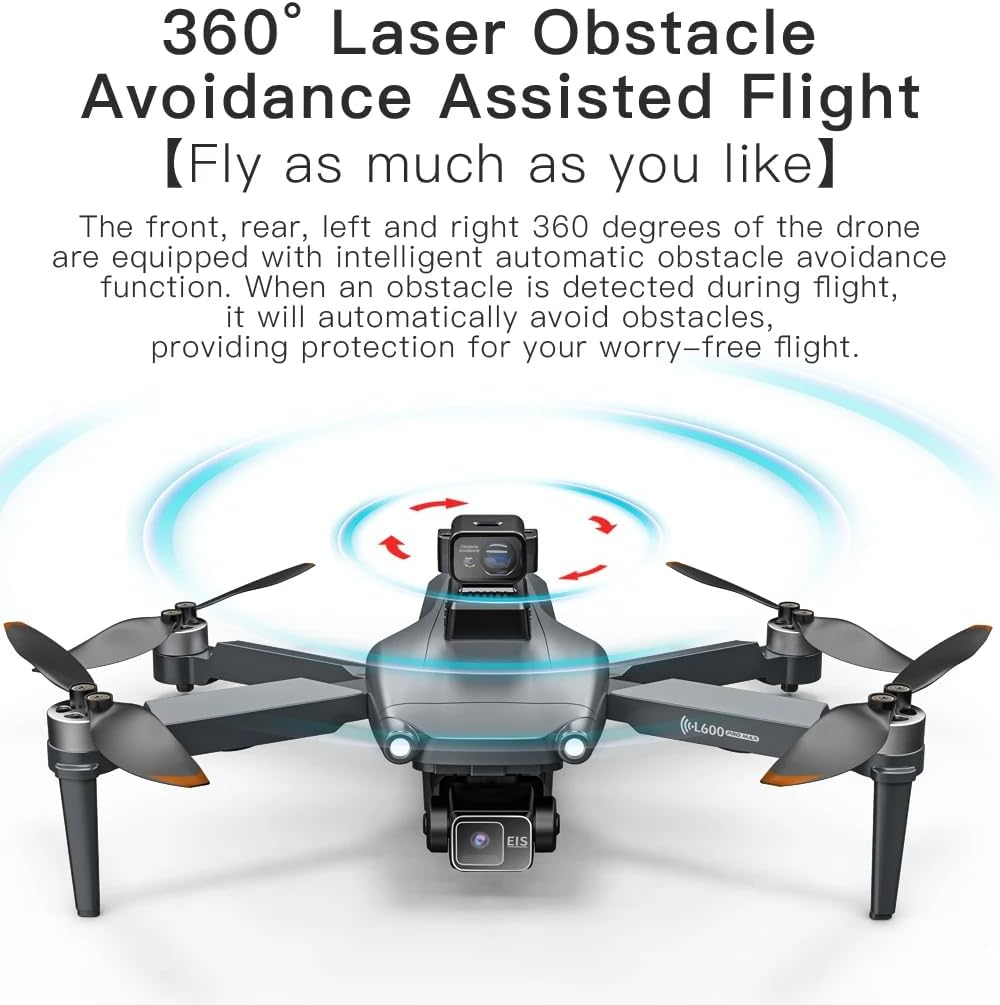
Figure 3.1: The drone's 360° laser obstacle avoidance system in action, illustrating its ability to detect and avoid surrounding objects.
3.4 Camera and Gimbal Operation
The integrated 4K HD camera and three-axis mechanical self-stabilizing gimbal ensure high-quality aerial footage. The anti-shake lens technology further enhances image clarity.

Figure 3.2: The L600 Pro MAX drone highlighting its laser obstacle avoidance system and the advanced 4K camera with a three-axis gimbal.
- Photo Capture: Press the dedicated photo button on the remote control or within the app. Photos are captured at 4096x3072P resolution.
- Video Recording: Press the dedicated video button to start/stop recording. Videos are recorded at 2048x1080P resolution.
- Gimbal Control: Adjust the camera angle using the gimbal control dial on the remote control or via the app.
- Storage: Insert a micro SD card (up to 30G, not included) into the drone's SD card slot for storing photos and videos.
3.5 Intelligent Flight Modes
Utilize the drone's intelligent flight modes for enhanced creativity and ease of use:
- GPS Follow Mode: The drone will automatically follow the remote controller or a designated subject.
- Image Follow Mode: The drone will track and follow a selected subject based on visual recognition.
- Corridor Navigation: Advanced feature for navigating through narrow spaces with obstacle avoidance.
- Night Flying Capability: Optimized for low-light conditions.
- Route Planning Shooting: Plan a flight path on the app for automated flight and shooting.
4. Maintenance
Regular maintenance ensures the longevity and optimal performance of your L600 Pro MAX drone.
4.1 General Cleaning
- Wipe the drone body (metal and plastic components) with a soft, dry cloth after each use to remove dust and debris.
- Ensure the camera lens and obstacle avoidance sensors are clean and free from smudges. Use a lens cleaning cloth if necessary.
- Avoid using harsh chemicals or abrasive materials that could damage the drone's surface or electronic components.
4.2 Battery Care and Storage
- Store batteries in a cool, dry place, away from direct sunlight and extreme temperatures.
- Do not overcharge or over-discharge the Lithium Ion battery.
- If storing for extended periods, charge the battery to approximately 50-60% capacity.
- Inspect batteries regularly for any signs of swelling, leakage, or damage. Discontinue use if any issues are observed.
4.3 Propeller Inspection and Replacement
- Before each flight, inspect all propellers for cracks, bends, or chips. Damaged propellers can affect flight stability and safety.
- If a propeller is damaged, replace it immediately with a spare fan blade from the accessory pack. Ensure the correct A/B propeller type is used for each motor.
- Use the provided screwdriver to loosen and tighten the propeller screws.
5. Troubleshooting
This section addresses common issues you might encounter with your L600 Pro MAX drone. For problems not listed here, please contact customer support.
| Problem | Possible Cause | Solution |
|---|---|---|
| Drone does not power on. | Battery not charged or improperly installed. | Ensure battery is fully charged and correctly inserted. Check remote control batteries. |
| Drone unstable during flight. | Weak GPS signal, unbalanced propellers, or calibration issue. | Fly in an open area with clear sky for strong GPS. Check propellers for damage. Perform IMU/compass calibration as per app instructions. |
| No live video feed on smartphone. | Wi-Fi not connected, app not running, or drone too far. | Ensure smartphone is connected to the drone's Wi-Fi network. Restart the app. Reduce distance between drone and smartphone. |
| Obstacle avoidance not working. | Sensors are dirty or obstructed, or feature is disabled. | Clean the laser sensors. Ensure the obstacle avoidance feature is enabled in the app settings. |
| Poor image/video quality. | Dirty lens, vibration, or insufficient lighting. | Clean the camera lens. Ensure propellers are balanced. Fly in well-lit conditions. Check SD card speed. |
6. Specifications
Detailed technical specifications for the L600 Pro MAX Professional Drone.
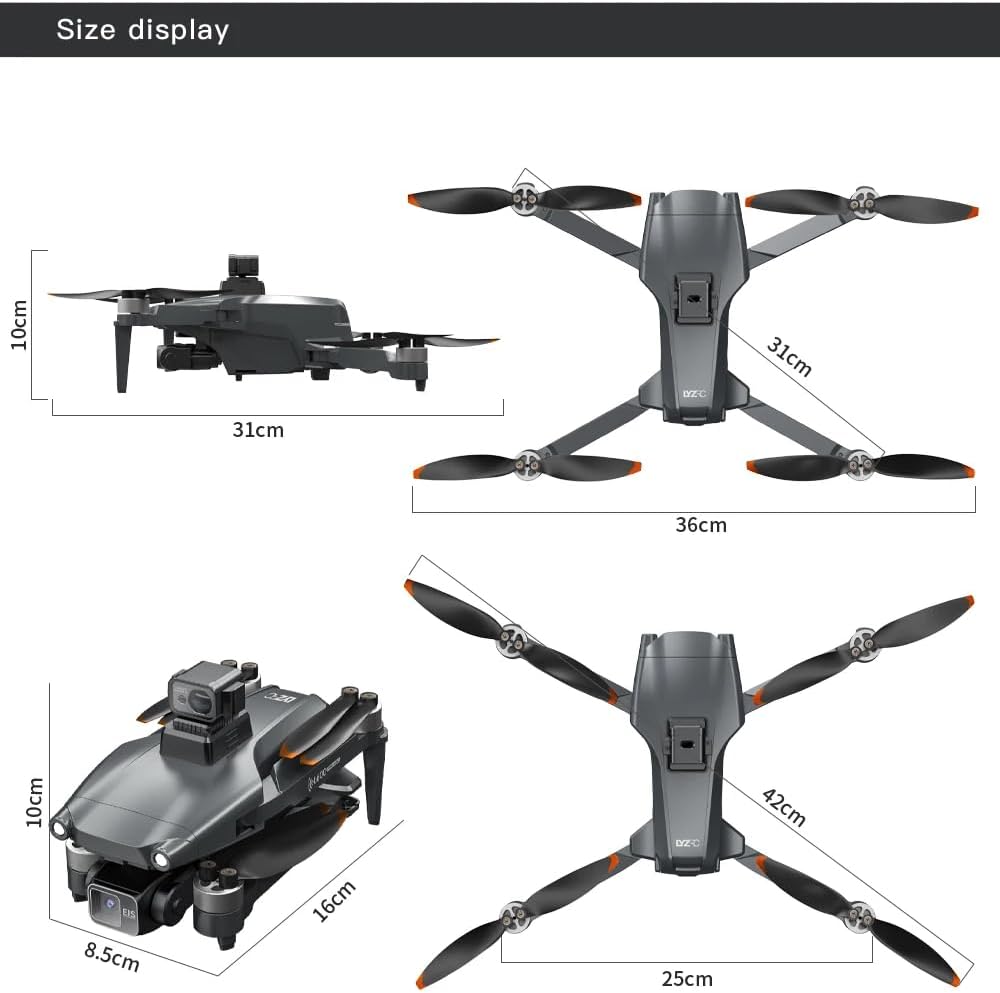
Figure 6.1: Dimensional overview of the L600 Pro MAX drone, showing its folded and unfolded sizes.
| Feature | Detail |
|---|---|
| Model Name | L600 Pro MAX (L600 PRO OAS 4K 1B) |
| Brand | Generic |
| Dimensions (Folded) | Approximately 16cm L x 8.5cm W x 10cm H |
| Dimensions (Unfolded) | Approximately 31cm L x 31cm W x 10cm H (without obstacle avoidance module) / 42cm L x 36cm W x 10cm H (with obstacle avoidance module) |
| Item Weight | 330g (11.6 Ounces) |
| Camera Resolution (Photo) | 4096x3072P (4K HD) |
| Camera Resolution (Video) | 2048x1080P |
| Gimbal | Three-axis Mechanical Self-stabilizing |
| Obstacle Avoidance | 360-degree Laser Obstacle Detection |
| Flight Time | Up to 29 minutes |
| Battery | 7.4V 4500mAh Lithium Ion |
| Remote Control Distance | Up to 3000M |
| Live Video Transmission Distance | Up to 800M (via 5G system) |
| Max Flight Altitude | 300M |
| Storage Support | Up to 30G SD card |
| Connectivity | GPS, Wi-Fi |
| Material | Metal, Plastic |
| Skill Level | Intermediate |
7. Warranty and Support
For information regarding warranty coverage, technical support, or service inquiries, please refer to the warranty card included with your product or visit the manufacturer's official website. You may also contact the seller directly for assistance.
Manufacturer: HKDA