
1. Introduction
Thank you for choosing the Haino Teko Germany HainoTeko-2 Smart Watch. This manual provides essential information for setting up, operating, and maintaining your device. Please read it carefully to ensure optimal performance and longevity of your smartwatch.
The HainoTeko-2 features a high-resolution AMOLED display, comprehensive health and fitness tracking, and seamless Bluetooth connectivity for calls and notifications. It comes with three interchangeable straps to suit various occasions.

Image: Haino Teko-2 Smart Watch showcasing its versatile design with three included straps.
2. Package Contents
Please verify that all items are present in your package:
- Haino Teko Germany HainoTeko-2 Smart Watch
- Stainless Steel Strap
- Leather Strap
- Silicone Strap
- Charging Cable
- User Manual (this document)
- Warranty Card
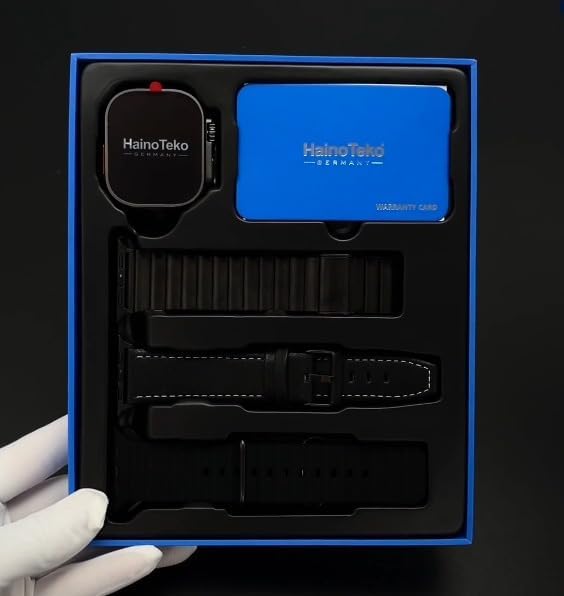
Image: Unboxing view of the Haino Teko-2 Smart Watch and its accessories.
3. Setup
3.1. Charging the Smart Watch
- Connect the charging cable to the charging port on the back of the watch.
- Plug the other end of the cable into a USB power adapter (not included) or a computer's USB port.
- The watch display will indicate charging status. Ensure the watch is fully charged before first use.
3.2. Powering On/Off
- To Power On: Press and hold the side button until the Haino Teko logo appears.
- To Power Off: Press and hold the side button, then select 'Power Off' on the screen.
3.3. Pairing with Your Smartphone
- Ensure your smartphone's Bluetooth is enabled.
- Download the official Haino Teko companion application by scanning the QR code provided in the package or searching for it in your smartphone's app store.
- Open the application and follow the on-screen instructions to add your HainoTeko-2 Smart Watch.
- Confirm the pairing request on both your smartphone and the watch.
3.4. Attaching/Changing Straps
The HainoTeko-2 Smart Watch comes with a quick-release mechanism for strap changes. Locate the small pin on the underside of each strap. Slide the pin inwards to detach or attach a strap. Ensure the strap is securely fastened before wearing the watch.
4. Operating Instructions
4.1. Basic Navigation
- Touchscreen: Swipe left, right, up, or down to navigate through menus and screens. Tap to select items.
- Side Button: Press to return to the home screen or wake the display. Press and hold for power options.
4.2. Making and Receiving Calls
Once paired with your smartphone, you can make and receive calls directly from your watch using its built-in microphone and speaker.
- To Make a Call: Access the 'Phone' or 'Contacts' app on your watch, select a contact, or dial a number.
- To Receive a Call: When a call comes in, tap the green answer icon on your watch screen.
4.3. Notifications
The watch supports receiving call, text, and email notifications from your paired smartphone. Ensure notification permissions are granted in the companion app and your phone's settings.
4.4. Health and Fitness Tracking
The HainoTeko-2 monitors various health metrics:
- Heart Rate Monitoring: Continuous heart rate tracking is available. Access the Heart Rate app on your watch to view real-time data.
- Activity Tracking: Tracks steps, calories burned, and distance traveled.
- Multi-Sport Mode: Select from various sport modes (e.g., running, walking, jogging) to get specific workout data.

Image: Haino Teko-2 Smart Watch worn on a wrist, illustrating its use for daily activity and health monitoring.
4.5. Music Player
Control music playback on your smartphone directly from your watch. Open the 'Music' app on your watch to play, pause, skip tracks, and adjust volume.
4.6. GPS Functionality
The watch utilizes your smartphone's GPS for location tracking during outdoor activities. Ensure your phone is with you and GPS is enabled for accurate data.
5. Maintenance
5.1. Cleaning Your Smart Watch
Wipe the watch screen and body with a soft, lint-free cloth. For stubborn dirt, slightly dampen the cloth with water. Avoid using harsh chemicals or abrasive materials.
5.2. Water Resistance
The HainoTeko-2 Smart Watch is designed to be waterproof. However, it is not suitable for hot water, saunas, or deep-sea diving. Avoid prolonged exposure to water and dry the watch thoroughly if it gets wet.
5.3. Battery Care
To prolong battery life, avoid extreme temperatures. Charge the watch regularly and do not let the battery completely drain for extended periods.
6. Troubleshooting
- Watch not turning on: Ensure the watch is fully charged. Connect it to the charger for at least 30 minutes.
- Unable to pair with smartphone:
- Ensure Bluetooth is enabled on both devices.
- Make sure the watch is within range of your phone.
- Restart both the watch and the smartphone.
- Clear Bluetooth cache on your phone (if applicable) and try again.
- Notifications not appearing:
- Check notification permissions in the companion app.
- Ensure notifications are enabled in your phone's system settings for the relevant apps.
- Verify the watch is connected via Bluetooth.
- Inaccurate health data: Ensure the watch is worn snugly on your wrist, not too tight or too loose. Clean the sensor on the back of the watch.
7. Specifications
| Model Name | HainoTeko-2 |
| Display | Super AMOLED High-Resolution Multi-Touch Display |
| Connectivity | Bluetooth |
| Special Features | Music Player, Notifications, Phone Call, Touchscreen, Fitness & Health Tracking |
| GPS | Via Smartphone |
| Battery Cell Composition | Lithium Polymer |
| Item Shape | Round |
| Color | Black |
| Manufacturer | Generic |
8. Warranty Information
The Haino Teko Germany HainoTeko-2 Smart Watch comes with a limited manufacturer's warranty. Please refer to the included Warranty Card for specific terms, conditions, and duration of coverage. Keep your proof of purchase for warranty claims.
9. Support
For further assistance, technical support, or inquiries not covered in this manual, please refer to the contact information provided on your Warranty Card or visit the official Haino Teko Germany website. Ensure you have your model number (HainoTeko-2) and proof of purchase ready when contacting support.


