
Introduction
This manual provides detailed instructions for the installation, operation, and maintenance of your BRTRIBE 4 Gang Wireless Control Switch Panel. This system is designed for universal application in various vehicles, including 4x4s, off-road vehicles, cars, trucks, boats, ATVs, UTVs, and caravans, offering a convenient and safe way to manage auxiliary lighting and accessories.
The wireless control panel features a magnetic, non-destructive installation, USB charging, and an integrated control box with robust safety features. Please read this manual thoroughly before use to ensure proper function and safety.
Package Contents
Before beginning installation, verify that all components are present in the package:
- 1 x 4 Gang Wireless Switch Panel (Remote Control)
- 1 x Circuit Control Box
- 2 x Double-sided Adhesive Tape
- 1 x Battery Cables (Red and Black)
- 12 x U-shaped Connectors
- 1 x 50pcs DIY Stickers (for labeling switches)
- 1 x Charging Cable (USB)
- 1 x User Manual (this document)
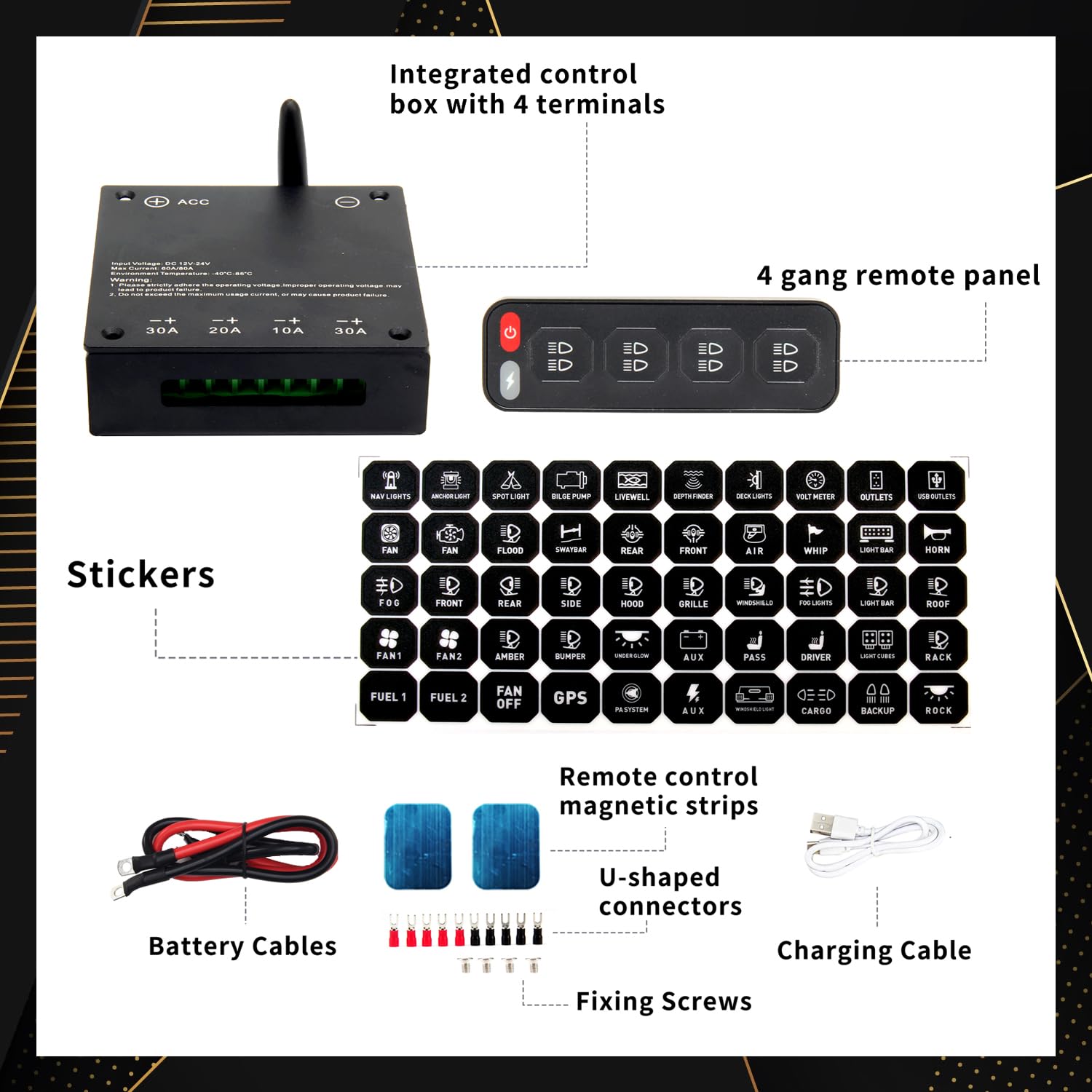
Figure 1: Overview of included components. Ensure all items are present before proceeding with installation.
Setup and Installation
The BRTRIBE 4 Gang Wireless Control Switch Panel is designed for straightforward installation. Follow these steps carefully:
1. Mounting the Control Box
The integrated control box comes with adhesive on the bottom, allowing it to be directly attached anywhere in the vehicle where it is protected from direct water exposure and excessive heat. Choose a location that allows for easy connection to the vehicle's battery and the accessories you wish to control.
2. Wiring the Control Box
- Connect to Battery: Connect the positive pole on the battery to the positive terminal (ACC) on the control box via the red battery cable. Connect the negative pole on the battery to the negative terminal on the control box via the black battery cable.
- Connect to ACC Line (Optional but Recommended): Connect the control box to the vehicle's ACC (Accessory) line via the white cable. This allows the unit to power on/off with the vehicle's ignition.
- Connect Accessories: Connect your desired accessories (e.g., LED light bar, work lights, driving lights) to the connecting terminals on the control box using the U-shaped connectors. The control box has four circuits with varying maximum current capacities: 30A (Circuit 1), 20A (Circuit 2), 10A (Circuit 3), and 30A (Circuit 4). Ensure the current draw of your accessories does not exceed these limits for each circuit.

Figure 2: Wiring diagram for the control box, illustrating connections for power and accessories.
3. Mounting the Wireless Switch Panel
The wireless switch panel features magnetic non-destructive installation. It can be magnetically fixed to any suitable metal surface within your vehicle for easy access and removal. Use the provided double-sided adhesive tape if a magnetic surface is not available or for additional security.

Figure 3: Magnetic mounting of the wireless switch panel for convenient placement.
4. Applying DIY Stickers
Use the provided 50pcs DIY stickers to label each switch button on the wireless panel according to the accessory it controls (e.g., Light Bar, Whip, Light Cubes, Rock Lights). This enhances usability and organization.
Operating Instructions
The BRTRIBE 4 Gang Wireless Control Switch Panel provides intuitive control over your connected accessories.
1. Powering On/Off
Press the power button on the wireless switch panel to turn the unit on or off. If connected to the ACC line, the unit may power on/off with the vehicle's ignition.
2. Controlling Individual Lights/Accessories
Each of the four buttons on the wireless panel corresponds to a specific circuit on the control box. Press the respective button to turn the connected accessory ON or OFF.
3. Lighting Mode Distribution System
The system supports advanced lighting modes:
- One-Click All Flashing: A dedicated button or sequence allows all connected lights to flash simultaneously. Refer to the specific button layout on your panel.
- Control Single Light Flashing Separately: Individual buttons may allow for specific flashing patterns or modes for their respective connected accessories.
4. Wireless Control Range
The wireless control panel operates effectively within a 20-meter range from the control box, providing flexibility in operation.

Figure 4: Wireless control panel in use, highlighting its convenient placement and operation.
Maintenance
To ensure the longevity and optimal performance of your BRTRIBE Wireless Control Switch Panel, follow these maintenance guidelines:
- Regular Cleaning: Wipe the control box and wireless panel with a soft, dry cloth to remove dust and debris. Avoid using abrasive cleaners or solvents.
- Battery Charging: The wireless switch panel has a built-in Lithium Ion battery. Charge it conveniently using the provided USB charging cable. Ensure the battery is charged regularly to maintain wireless functionality.
- Inspect Wiring: Periodically check all wiring connections to the control box and battery for tightness and signs of wear or corrosion. Secure any loose connections.
- Fuse Inspection: The integrated control box includes fuses for each circuit. In case of a circuit malfunction, inspect the corresponding fuse. Extra fuses are provided for replacement. Always replace a blown fuse with one of the same amperage rating.
- Environmental Protection: While the control box has an IP65 waterproof rating, avoid prolonged exposure to extreme moisture or direct water spray to prevent potential damage.
Troubleshooting
If you encounter issues with your BRTRIBE Wireless Control Switch Panel, refer to the following common problems and solutions:
| Problem | Possible Cause | Solution |
|---|---|---|
| Wireless panel not responding. | Low battery in wireless panel; out of range; pairing issue. | Charge the wireless panel using the USB cable. Move closer to the control box (within 20m). Re-pair the panel with the control box if necessary (refer to pairing instructions, if applicable, not detailed in current product info). |
| Connected accessory not turning on. | Blown fuse; loose wiring connection; accessory malfunction; exceeding circuit current limit. | Check the corresponding fuse in the control box and replace if blown (use correct amperage). Verify all wiring connections are secure. Test the accessory directly to confirm it is functional. Ensure the accessory's current draw does not exceed the circuit's maximum (30A, 20A, 10A, 30A). |
| Control box not receiving power. | Loose battery connections; vehicle battery low/dead; ACC line not providing power. | Check the red and black battery cables for secure connection. Ensure vehicle battery is charged. Verify the ACC line is active when the ignition is on. |
| Panel battery not holding charge. | Aging battery; faulty charging cable/port. | Ensure the charging cable is fully inserted and functional. If the issue persists, the battery may need replacement. Contact BRTRIBE customer support for assistance. |
If the problem persists after attempting these solutions, please contact BRTRIBE customer support for further assistance.
Specifications
| Feature | Specification |
|---|---|
| Product Dimensions | 4.53 x 1.46 x 0.31 inches (Control Box); 2.11 Pounds (Total Weight) |
| Item Model Number | 4 Gang |
| Batteries | 1 Lithium Ion battery required (included in wireless panel) |
| Input Voltage | DC 12-24V |
| Max Current | 80A (Total System) |
| Rated Voltage | 12V 20A / 24V 10A (per circuit, varies) |
| Circuit Current Limits | Circuit 1: 30A, Circuit 2: 20A, Circuit 3: 10A, Circuit 4: 30A |
| Operating Temperature | -40°F to +185°F (-40°C to +85°C) |
| IP Rating | IP65 Waterproof Rate |
| Wireless Control Range | Up to 20 meters |
| Charging Port | USB (Type-C compatible) |
| Manufacturer | BRTRIBE |
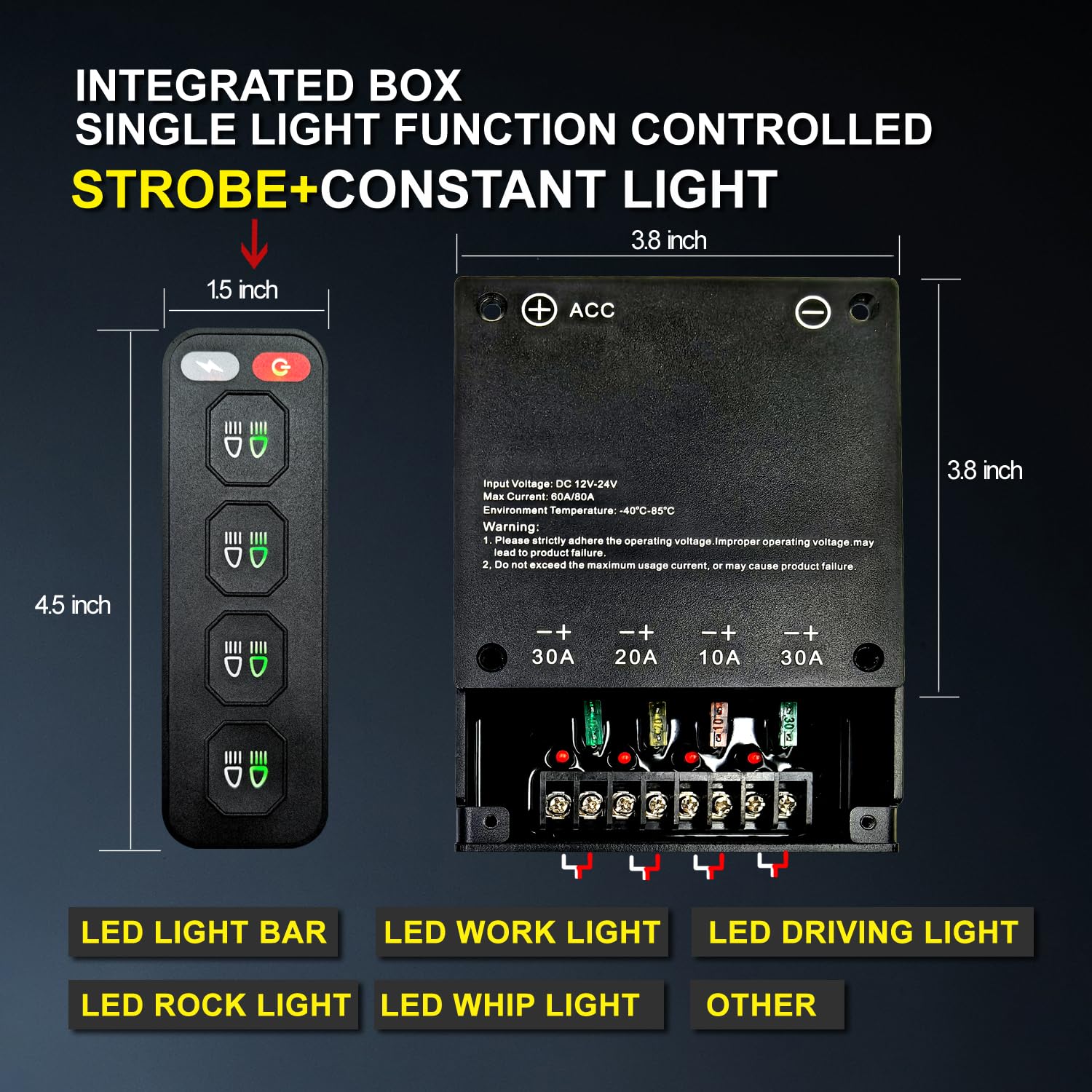
Figure 5: Control box and remote dimensions, illustrating the compact design and internal components.
Warranty and Support
BRTRIBE stands behind the quality of its products.
Manufacturer Warranty
This product comes with a 2-Year Manufacturer Warranty. This warranty covers free replacement for any quality problems caused by non-human reasons. Please retain your proof of purchase for warranty claims.
Customer Support
If you have any questions, concerns, or require assistance with your BRTRIBE 4 Gang Wireless Control Switch Panel, please do not hesitate to contact our customer service team. We are committed to providing perfect after-sales service.
For support, please visit the official BRTRIBE store on Amazon or use the contact information provided with your purchase documentation.