
1. Introduction
This manual provides essential information for the proper setup, operation, and maintenance of your Select Sound DW3292-RK 32-inch Bluetooth Soundbar. Please read it thoroughly before using the product to ensure optimal performance and safety.

Image 1.1: Front view of the Select Sound DW3292-RK 32-inch Bluetooth Soundbar.
2. Product Features
The Select Sound DW3292-RK Soundbar is designed to enhance your audio experience with a range of advanced features:
- Versatile Connectivity: Equipped with Bluetooth, HDMI, USB ports, and a 3.5mm auxiliary input for multiple device connection options.
- Elegant Design: 81-centimeter soundbar with a modern touch panel and premium finish that complements any space.
- Intuitive Control: Integrated touch panel and included remote control for comfortable and precise operation of all functions.
- Sound Power: 25W speaker system that offers clear and immersive audio to enhance your audiovisual experience.
- Total Compatibility: Works perfectly with televisions, Roku devices, smartphones, and tablets for multimedia playback.

Image 2.1: Roku TV compatibility features, including simple setup and remote control access.

Image 2.2: Key features of the DW3292-RK soundbar, including connectivity options and power output.
3. Package Contents
Verify that all items are present in the package:
- Select Sound DW3292-RK Soundbar
- Remote Control
- Power Adapter
- User Manual
- Mounting Kit (for wall mounting, if applicable)
4. Setup and Installation
Follow these steps to set up your soundbar:
- Placement: Place the soundbar on a stable, flat surface in front of your TV, or mount it on the wall below your TV using the provided mounting kit. Ensure there are no obstructions in front of the soundbar.
- Power Connection: Connect the power adapter to the DC IN port on the soundbar and then plug it into a power outlet.
- Audio Connection: Choose your preferred audio connection method (HDMI ARC, Optical, USB, or AUX) and connect the soundbar to your TV or other audio source.
- Power On: Press the power button on the soundbar or the remote control to turn on the device.

Image 4.1: Example placement of the soundbar on a TV stand.
Video 4.1: An overview of the soundbar, highlighting its features and how it complements your screen.
5. Operating Instructions
The soundbar can be operated using the touch panel on the device or the included remote control.
5.1 Touch Panel Controls
The touch panel on top of the soundbar provides quick access to basic functions:
- Power Button: Press to turn the soundbar on or off.
- Volume Up (+): Increase the volume.
- Volume Down (-): Decrease the volume.
- Play/Pause: Play or pause audio playback.
- Input/Mode Button: Cycle through available input modes (Bluetooth, HDMI, USB, AUX).
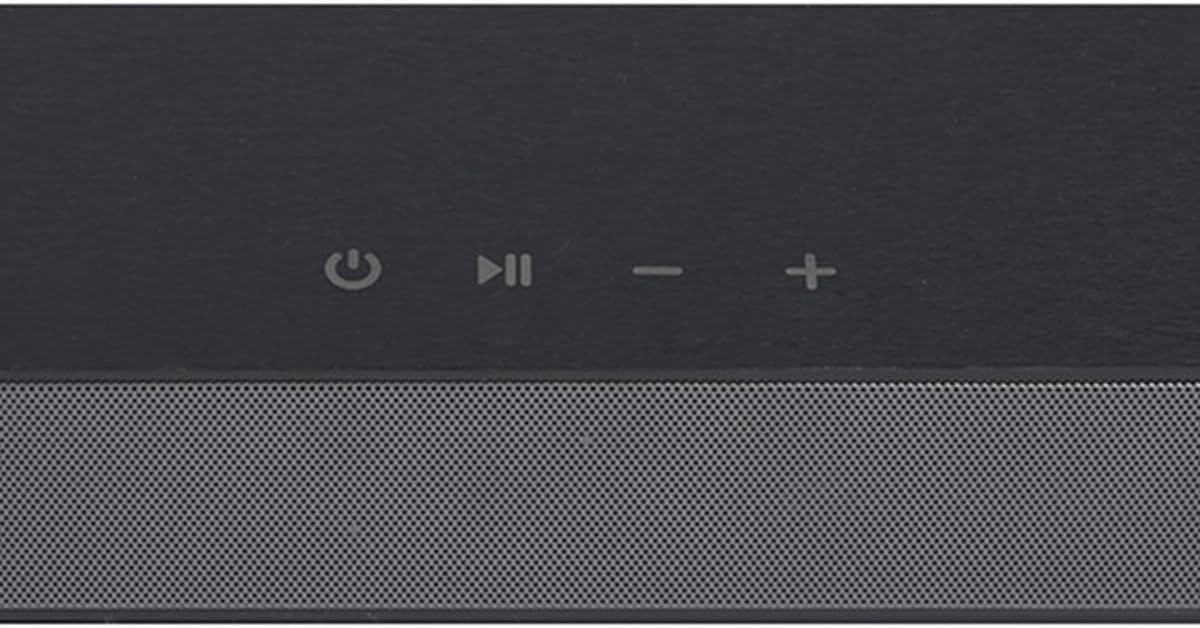
Image 5.1: Top panel touch controls of the soundbar.
5.2 Remote Control
The remote control offers comprehensive control over all soundbar functions, including power, volume, input selection, and sound modes.
6. Connectivity
The soundbar offers multiple ways to connect to your devices:
6.1 Bluetooth Connection
To connect via Bluetooth:
- Turn on the soundbar and switch to Bluetooth mode using the Input/Mode button. The Bluetooth indicator light will flash.
- Enable Bluetooth on your device (smartphone, tablet, etc.) and search for available devices.
- Select "Select Sound DW3292-RK" from the list. Once connected, the Bluetooth indicator light will be solid.
6.2 Wired Connections (HDMI, USB, AUX)
The soundbar features the following wired input ports:
- HDMI (ARC): Connect to your TV's HDMI ARC port for high-quality audio and control via your TV remote.
- USB: Insert a USB drive to play audio files directly from the soundbar.
- AUX (3.5mm): Connect to devices with a 3.5mm audio output using an auxiliary cable.
Use the Input/Mode button on the soundbar or remote to select the desired input source.

Image 6.1: Rear panel with various connectivity ports.
7. Maintenance
To ensure the longevity and optimal performance of your soundbar, follow these maintenance guidelines:
- Cleaning: Use a soft, dry cloth to clean the surface of the soundbar. Do not use liquid cleaners or abrasive materials.
- Storage: When not in use for extended periods, store the soundbar in a cool, dry place away from direct sunlight and extreme temperatures.
- Avoid Moisture: Keep the soundbar away from water and high humidity to prevent damage.
8. Troubleshooting
If you encounter issues with your soundbar, refer to the following common problems and solutions:
- No Power: Ensure the power adapter is securely connected to both the soundbar and a working power outlet.
- No Sound: Check the volume levels on both the soundbar and your connected device. Verify that the correct input source is selected. Ensure all audio cables are properly connected.
- Bluetooth Connection Issues: Make sure the soundbar is in Bluetooth pairing mode. Disable and re-enable Bluetooth on your device, then try pairing again. Ensure your device is within the effective range (up to 10 meters).
- Remote Control Not Working: Check the batteries in the remote control and replace them if necessary. Ensure there are no obstructions between the remote and the soundbar.
If the problem persists, please contact customer support for further assistance.
9. Specifications
Detailed technical specifications for the Select Sound DW3292-RK Soundbar:
| Model Name | DW3292-RK |
| Speaker Type | Soundbar |
| Max Speaker Output Power | 25 Watts |
| Surround Sound Channel Configuration | 2.1 |
| Wireless Communication Technology | Bluetooth |
| Connectivity Technology | Bluetooth, HDMI, USB, AUX |
| Control Method | Touch, Remote Control |
| Product Dimensions | 9D x 80W x 7H centimeters |
| Product Weight | 1.6 Kilograms |
| Power Source | Electric Cord |
| Color | Black |
| Manufacturer | Select Sound |

Image 9.1: Soundbar dimensions.
10. Warranty and Support
This product comes with a limited warranty. For warranty details, technical support, or service inquiries, please refer to the warranty card included in your package or visit the official Select Sound website.