
Introduction
This instruction manual provides essential information for the installation, operation, maintenance, and troubleshooting of the FGJDFD Compatible Daewoo Washer Computer Control Board, model DWF-A1088 (Part Number 11210761). This control board is designed as a high-quality replacement part to ensure the reliable and efficient operation of compatible Daewoo washing machines. Please read this manual thoroughly before attempting any installation or repair.
Safety Information
Always prioritize safety when working with electrical appliances. Failure to follow these safety guidelines may result in electric shock, injury, or damage to the appliance.
- Disconnect Power: Before beginning any installation, maintenance, or repair work, always unplug the washing machine from the power outlet or turn off the circuit breaker to prevent electric shock.
- Professional Installation Recommended: If you are not experienced with appliance repair or electrical work, it is highly recommended to seek assistance from a qualified technician.
- Handle with Care: Electronic components are sensitive. Avoid touching the circuit board's components directly with bare hands to prevent electrostatic discharge (ESD) damage. Use anti-static precautions if available.
- Inspect for Damage: Before installation, carefully inspect the control board for any visible damage. Do not install a damaged board.
- Proper Tools: Use appropriate insulated tools for the task.
Product Overview
The DWF-A1088 11210761 Computer Control Board is a critical component responsible for managing the various functions of your Daewoo washing machine. It processes user inputs, controls motor operations, water levels, spin cycles, and other washing parameters. This replacement board is designed to restore your washing machine's functionality and efficiency.
Key Features:
- Compatible with specific Daewoo washing machine models for seamless integration.
- High-quality construction ensures reliable and efficient operation.
- Designed for durability and long-lasting performance.
- Contributes to optimal wash results and increased washer efficiency.
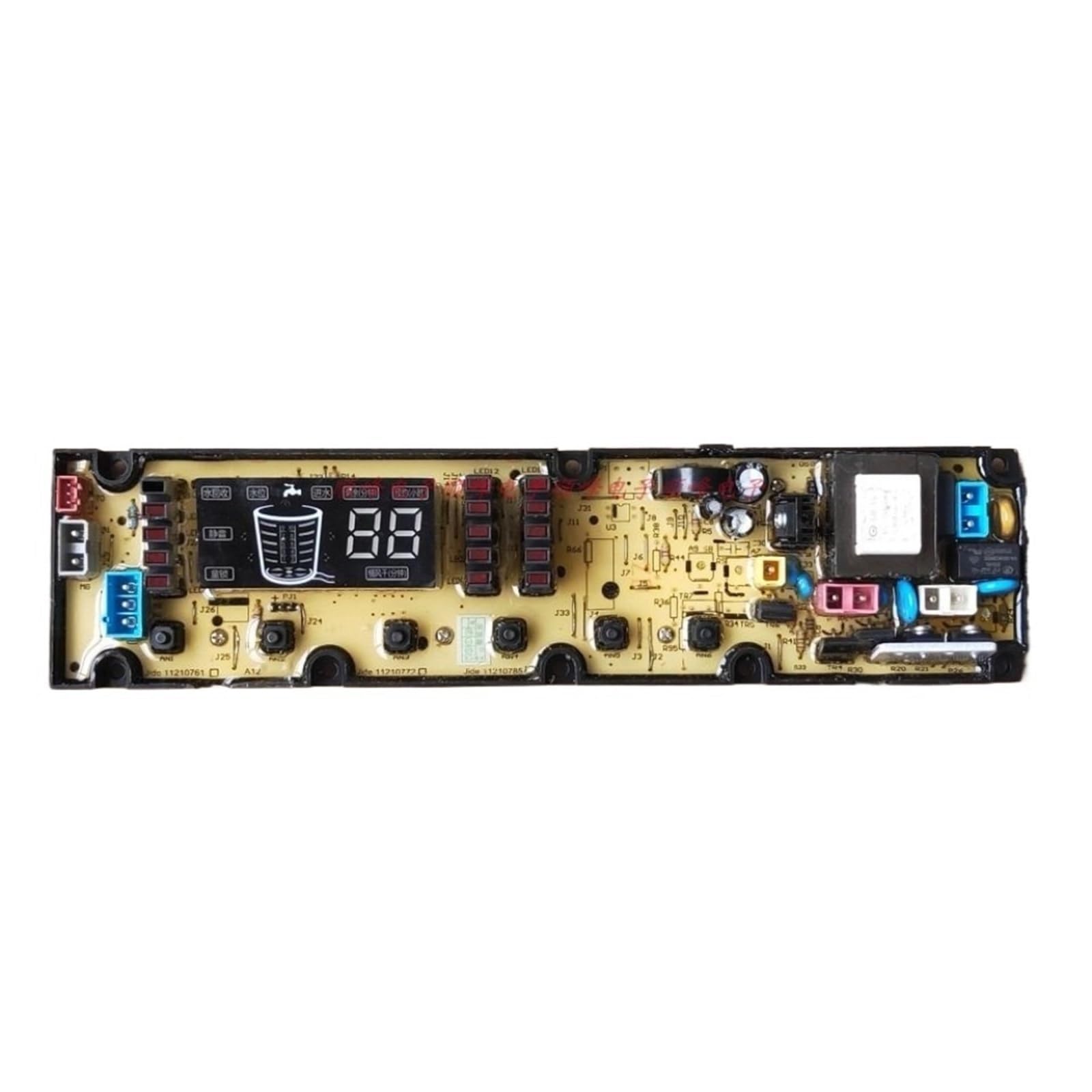
Image: The FGJDFD Compatible Daewoo Washer Computer Control Board DWF-A1088. This image displays the main circuit board with various electronic components, connectors, and a central processing unit, illustrating its complex design and function as the brain of the washing machine.
Setup and Installation
The installation of a washing machine control board requires careful attention to detail. If you are unsure about any step, consult a professional technician.
- Power Disconnection: Ensure the washing machine is completely unplugged from the power supply.
- Access the Control Board: Depending on your specific Daewoo washing machine model, you may need to remove the top panel, back panel, or control console to access the existing control board. Refer to your washing machine's service manual for exact instructions.
- Document Connections: Before disconnecting any wires, take clear photos or make a diagram of all wire connections to the old control board. This will be crucial for correct reassembly.
- Disconnect Wires: Carefully disconnect all wire harnesses and connectors from the old control board. Note that some connectors may have locking tabs that need to be pressed.
- Remove Old Board: Unscrew or unclip the old control board from its mounting brackets.
- Install New Board: Position the new FGJDFD DWF-A1088 control board in the same location and secure it with the original screws or clips.
- Reconnect Wires: Using your photos or diagrams, carefully reconnect all wire harnesses and connectors to the new control board. Ensure all connections are secure and correctly seated.
- Reassemble Washer: Replace any panels or consoles that were removed.
- Test Functionality: Plug the washing machine back into the power outlet. Run a short test cycle to verify that all functions are operating correctly.
Operating Instructions
Once the FGJDFD DWF-A1088 control board is correctly installed, your Daewoo washing machine should operate according to its original specifications. There are no specific operating instructions for the control board itself, as it functions as an internal component of the appliance.
- Refer to your Daewoo washing machine's original user manual for detailed instructions on selecting wash cycles, water temperature, spin speed, and other operational settings.
- Ensure the washing machine is properly loaded and detergent is added according to the garment and detergent manufacturer's recommendations.
- Start the desired wash cycle using the washing machine's control panel.
Maintenance
The computer control board itself requires minimal direct maintenance. Its longevity is primarily dependent on proper installation and the overall condition of the washing machine.
- Keep Dry: Ensure the area around the control board remains dry. Moisture can cause short circuits and damage electronic components.
- Clean Connections: Periodically, if accessible and with power disconnected, you may gently inspect wire connections for corrosion or looseness. Clean with a soft, dry brush if necessary.
- Avoid Overloading: Overloading the washing machine can put undue stress on all components, including the control board.
- Regular Appliance Maintenance: Follow the general maintenance guidelines for your washing machine, such as cleaning the detergent dispenser, lint filter, and drum, to ensure overall optimal performance.
Troubleshooting
If your washing machine experiences issues after installing the new control board, consider the following troubleshooting steps:
- No Power:
- Check if the washing machine is properly plugged into a working outlet.
- Verify the circuit breaker has not tripped.
- Ensure all wire connections to the control board are secure.
- Incorrect Cycle Operation:
- Double-check all wire connections against your documentation from step 3 of installation. Incorrect wiring is a common cause of malfunction.
- Ensure the control panel buttons are functioning correctly and not stuck.
- Error Codes Displayed:
- Refer to your Daewoo washing machine's original user manual or service manual to interpret specific error codes. The control board processes these codes, but the issue might lie with another component (e.g., water level sensor, motor, door lock).
- Partial Functionality:
- If some functions work but others do not, re-inspect the specific wire connections related to the non-functioning parts.
- Still Experiencing Issues: If troubleshooting steps do not resolve the problem, it is advisable to contact a qualified appliance repair technician.
Specifications
| Item Name | Washing Machine Control Board |
| Part Number | DWF-A1088, 11210761 |
| Compatibility | Compatible with Daewoo Washer models (verify specific model compatibility) |
| Type | Washing Machine Accessories |
| Package Dimensions | 1.18 x 0.79 x 0.39 inches |
| Item Weight | 1.76 ounces |
Warranty and Support
For information regarding warranty coverage or technical support for your FGJDFD Compatible Daewoo Washer Computer Control Board DWF-A1088, please refer to the retailer or manufacturer from whom you purchased the product. Keep your proof of purchase for any warranty claims.
For general washing machine issues not directly related to the control board, consult your original Daewoo washing machine's user manual or contact Daewoo customer service.