1. Introduction
This instruction manual provides essential information for the safe and correct installation, operation, and maintenance of your CFguang BN41-02703A BN41-02703 Main Board. This component is designed as a replacement part for specific Samsung television models. Please read this manual thoroughly before proceeding with any installation or repair work.
Important Safety Notice:
- Always disconnect the television from the power supply before attempting any installation or repair.
- Electronic components can be sensitive to static electricity. Use appropriate anti-static precautions (e.g., anti-static wrist strap) when handling the main board.
- If you are not confident in performing the installation yourself, it is highly recommended to seek assistance from a qualified technician.
2. Product Overview
The CFguang BN41-02703A BN41-02703 Main Board is a critical component responsible for the overall functionality of your television, including image processing, audio output, and input/output management. Replacing a faulty main board can restore your TV's performance and extend its operational life.
Key Features:
- Ensures reliable performance for your TV display.
- Durable construction for long-term use.
- Designed for straightforward installation, simplifying repair tasks.
- Offers consistent functionality across compatible models.

Figure 2.1: Top view of the CFguang BN41-02703A BN41-02703 Main Board, showing the central processor heatsink, various integrated circuits, and input/output ports.
3. Compatibility
This main board is compatible with the following Samsung TV models and sizes:
- Applicable Sizes: 55 inches, 65 inches
- Part Numbers: BN41-02703A, BN41-02703
- Compatible TV Models:
- UE55RU7092
- UE55RU7179
- UE55RU7099
- UE55RU7100UXRU
Please verify the part number on your existing main board matches BN41-02703A or BN41-02703 to ensure compatibility before installation.

Figure 3.1: Close-up view of the main board label indicating the model code BN41-02703A.
4. Setup and Installation
Warning: Installation should only be performed by individuals with experience in electronics repair. Improper installation can damage the TV or cause personal injury.
4.1. Pre-Installation Steps
- Disconnect Power: Ensure the television is completely unplugged from the wall outlet.
- Prepare Workspace: Work on a clean, flat, and static-free surface.
- Gather Tools: You will typically need a Phillips head screwdriver, a plastic prying tool, and an anti-static wrist strap.
- Access the TV's Interior: Carefully remove the back panel of your television according to your TV's specific service manual.
4.2. Removing the Old Main Board
- Locate the Main Board: Identify the existing main board within the TV chassis.
- Disconnect Cables: Carefully disconnect all cables connected to the main board. This includes ribbon cables, power cables, and antenna/HDMI cables. Note their positions for re-connection.
- Unscrew the Board: Remove all screws securing the main board to the TV chassis.
- Remove the Board: Gently lift and remove the old main board from the TV.
4.3. Installing the New Main Board
- Position the New Board: Carefully place the CFguang BN41-02703A BN41-02703 Main Board into the TV chassis, aligning it with the screw holes and connectors.
- Secure the Board: Fasten the new main board with the screws previously removed. Do not overtighten.
- Reconnect Cables: Reconnect all cables to their corresponding ports on the new main board. Ensure all connections are firm and correctly oriented. Refer to Figure 4.1 for common port types.
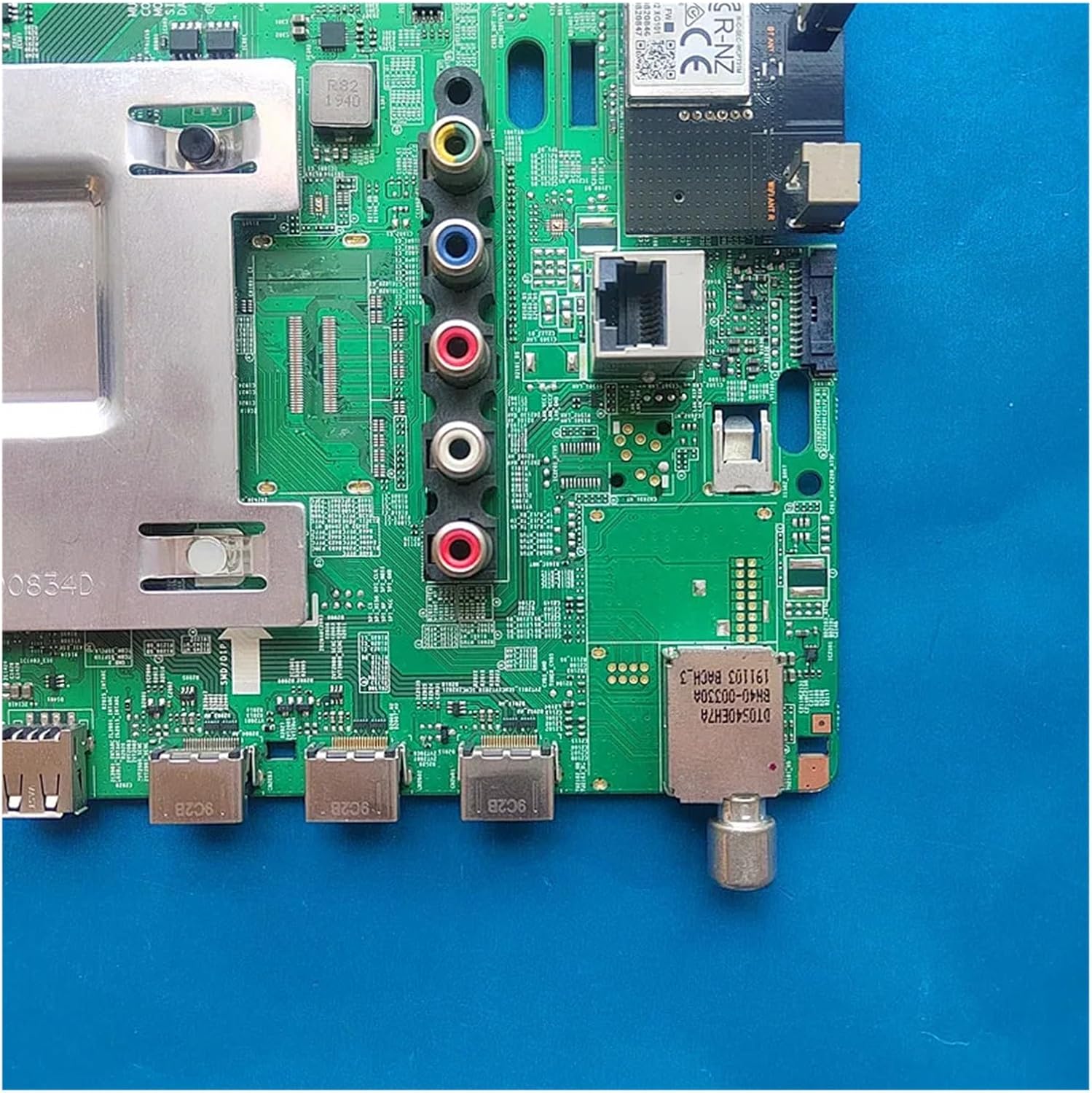
Figure 4.1: Detailed view of the main board's various input and output ports.

Figure 4.2: Rear view of the main board, illustrating the circuit board layout.
4.4. Post-Installation
- Replace Back Panel: Carefully reattach the TV's back panel.
- Power On: Plug the TV back into the power outlet and power it on.
- Initial Setup: The TV may require an initial setup process (e.g., channel scan, network configuration) after a main board replacement. Follow the on-screen prompts.
5. Operation
Once the CFguang BN41-02703A BN41-02703 Main Board is correctly installed, your television should resume normal operation. All functions, including picture display, sound output, and input source selection, should be fully restored. If any issues arise, refer to the Troubleshooting section.
6. Maintenance
The main board itself requires no routine maintenance. To ensure its longevity and the overall health of your television, follow these general guidelines:
- Keep the television in a clean, dry environment, away from excessive dust and moisture.
- Ensure adequate ventilation around the TV to prevent overheating.
- Avoid physical shocks or impacts to the television.
7. Troubleshooting
If you encounter problems after installing the new main board, consider the following troubleshooting steps:
- No Power: Double-check that the TV is securely plugged into a working power outlet. Verify all internal power cables connected to the main board are seated correctly.
- No Picture/Sound: Ensure all ribbon cables and audio/video input cables are firmly connected to the main board. Check the input source selection on your TV.
- Incorrect Display/Distorted Image: Re-verify all ribbon cable connections, especially those leading to the display panel. Ensure the main board is fully compatible with your specific TV model.
- Intermittent Issues: Ensure all screws securing the main board are tightened appropriately and that no loose connections are present.
If problems persist after performing these checks, it is advisable to consult a professional television repair technician.
8. Specifications
| Feature | Detail |
|---|---|
| Brand | CFguang |
| Model Name | BN41-02703A |
| Part Numbers | BN41-02703A, BN41-02703 |
| Compatible TV Sizes | 55 inches, 65 inches |
| Compatible TV Models | UE55RU7092, UE55RU7179, UE55RU7099, UE55RU7100UXRU |
| Package Dimensions | 1.18 x 0.79 x 0.39 inches |
| Item Weight | 1.76 ounces |
| ASIN | B0DYVM4T5R |
9. Warranty and Support
For information regarding warranty coverage and technical support for your CFguang BN41-02703A BN41-02703 Main Board, please refer to the documentation provided at the time of purchase or contact your seller directly. Keep your purchase receipt as proof of purchase.