
Uho-S2
Uniarch (Uho-S2) 2MP HD Pan & Tilt Smart PT Wi-Fi Camera User Manual
Model: Uho-S2
Product Overview
The Uniarch Uho-S2 is a 2MP HD Pan & Tilt Smart PT Wi-Fi Camera designed for comprehensive surveillance. It features high-definition imaging, advanced night vision, and smart tracking capabilities to ensure reliable monitoring. With its two-way audio function, you can communicate directly through the camera.
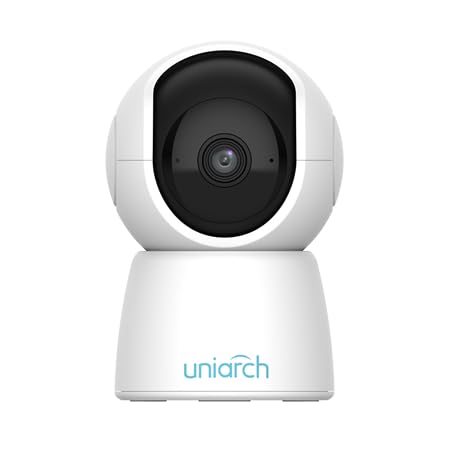
Figure 1: Front view of the Uniarch Uho-S2 Wi-Fi Camera, showing the lens and the Uniarch logo on the base.
Key Features:
- 2MP HD image resolution for clear video capture.
- HD night vision for effective monitoring in low-light conditions up to 10 meters.
- Fast auto tracking and smooth pan-tilt functionality for dynamic area coverage (360-degree viewing angle).
- Multiple detection methods including Human Body Detection and Motion Detection.
- Two-way audio with built-in microphone and speaker for interactive communication.
Package Contents
Verify that all items are present in the package:
- Uniarch Uho-S2 Wi-Fi Camera
- Mounting Screw(s)
- Power Adapter
- User Manual (this document)

Figure 2: The retail packaging for the Uniarch Uho-S2 Pan & Tilt WiFi Camera, indicating the model and key features.
Setup Guide
1. Powering On the Camera
- Connect the power adapter to the camera's power input port (DC 5V/1A).
- Plug the power adapter into a standard electrical outlet.
- Wait for the camera's indicator light to show a stable status, indicating it is ready for configuration.
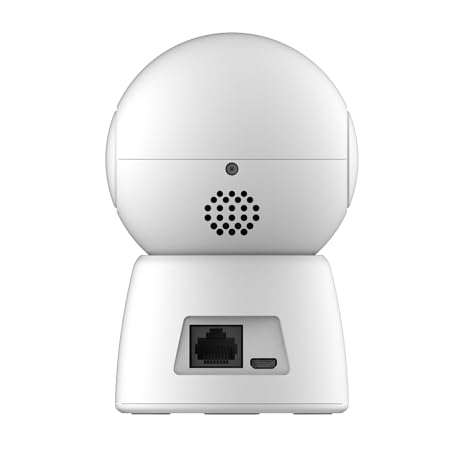
Figure 3: Rear view of the Uniarch Uho-S2 camera, highlighting the Ethernet port and the power input port.
2. Network Connection (Wi-Fi)
The camera supports 2.4G Wi-Fi (IEEE802.11b/g/n).
- Download the official Uniarch mobile application from your device's app store.
- Create an account or log in if you already have one.
- Follow the in-app instructions to add a new device. This typically involves scanning a QR code on the camera or manually entering its serial number.
- Select your 2.4GHz Wi-Fi network and enter the password when prompted.
- Ensure your mobile device is connected to the same 2.4GHz Wi-Fi network during the setup process.
3. Mounting the Camera (Optional)
The camera can be placed on a flat surface or mounted using the included screws.
- Choose a suitable location for optimal viewing angle (360 degrees pan/tilt capability).
- If mounting, mark the drill holes using the camera's base as a template.
- Drill pilot holes and insert wall anchors if necessary.
- Secure the camera base using the provided mounting screws.
Operating Instructions
Live View and Playback
- Open the Uniarch mobile application.
- Select your Uho-S2 camera from the device list to access the live view.
- Use the on-screen controls to pan and tilt the camera for desired viewing angles.
- Access recorded footage through the playback function within the app.
Two-Way Audio
- While in live view, tap the microphone icon to speak through the camera's speaker.
- The camera's built-in microphone will capture audio from the camera's environment.
Motion Detection and Tracking
- Navigate to the camera settings in the app.
- Enable "Motion Detection" and "Human Body Detection" as required.
- Configure alert notifications to receive real-time alerts on your mobile device when motion is detected.
- The camera's auto-tracking feature will automatically follow detected movement within its field of view.
Maintenance
- Cleaning: Gently wipe the camera lens and body with a soft, dry cloth. Avoid using harsh chemicals or abrasive materials.
- Firmware Updates: Regularly check for and install firmware updates through the Uniarch mobile application to ensure optimal performance and security.
- Power Supply: Ensure the camera is connected to a stable power source (DC 5V/1A). Avoid power fluctuations.
- Environmental Conditions: While rated for outdoor use, protect the camera from extreme weather conditions if possible to prolong its lifespan.
Troubleshooting
| Problem | Possible Cause | Solution |
|---|---|---|
| Camera not powering on | No power supply; faulty adapter | Check power connection; try a different outlet; ensure adapter is working. |
| Unable to connect to Wi-Fi | Incorrect Wi-Fi password; 5GHz network selected; camera too far from router | Verify password; ensure 2.4GHz network is selected; move camera closer to router or use a Wi-Fi extender. |
| Poor video quality | Insufficient network bandwidth; dirty lens | Check internet speed; clean the camera lens. |
| Two-way audio not working | Microphone/speaker disabled in app; volume too low | Check app settings for audio permissions and volume levels. |
Specifications
| Model Number | Uho-S2 |
| Video Resolution | 2MP HD |
| Viewing Angle | 360 Degrees (Pan & Tilt) |
| Night Vision Range | 10 Metres |
| Wireless Connectivity | 2.4G Wi-Fi (IEEE802.11b/g/n), built-in antenna |
| Audio | Two-way audio (built-in Mic and speaker) |
| Detection Methods | Human Body Detection, Motion Detection |
| Power Source | DC 5V/1A |
| Dimensions (L x W x H) | 20 x 15 x 10 Centimeters |
| Weight | 270 Grams |
| Indoor/Outdoor Usage | Outdoor |
| Manufacturer | Uniview Technologies |
| Country of Origin | China |
Warranty and Support
For warranty information and technical support, please refer to the official Uniarch website or contact their customer service. Keep your purchase receipt as proof of purchase for warranty claims.
Manufacturer: Uniview Technologies
Model: Uho-S2
For further assistance, please visit the manufacturer's support page or contact your retailer.