1. Product Overview
The AstroAI L7 Mini Portable Tire Inflator is a compact, cordless air compressor designed for convenient inflation of various items, including car tires, motorcycle tires, bicycle tires, and sports balls. It features a digital pressure gauge, auto shut-off function, and multiple preset inflation modes.
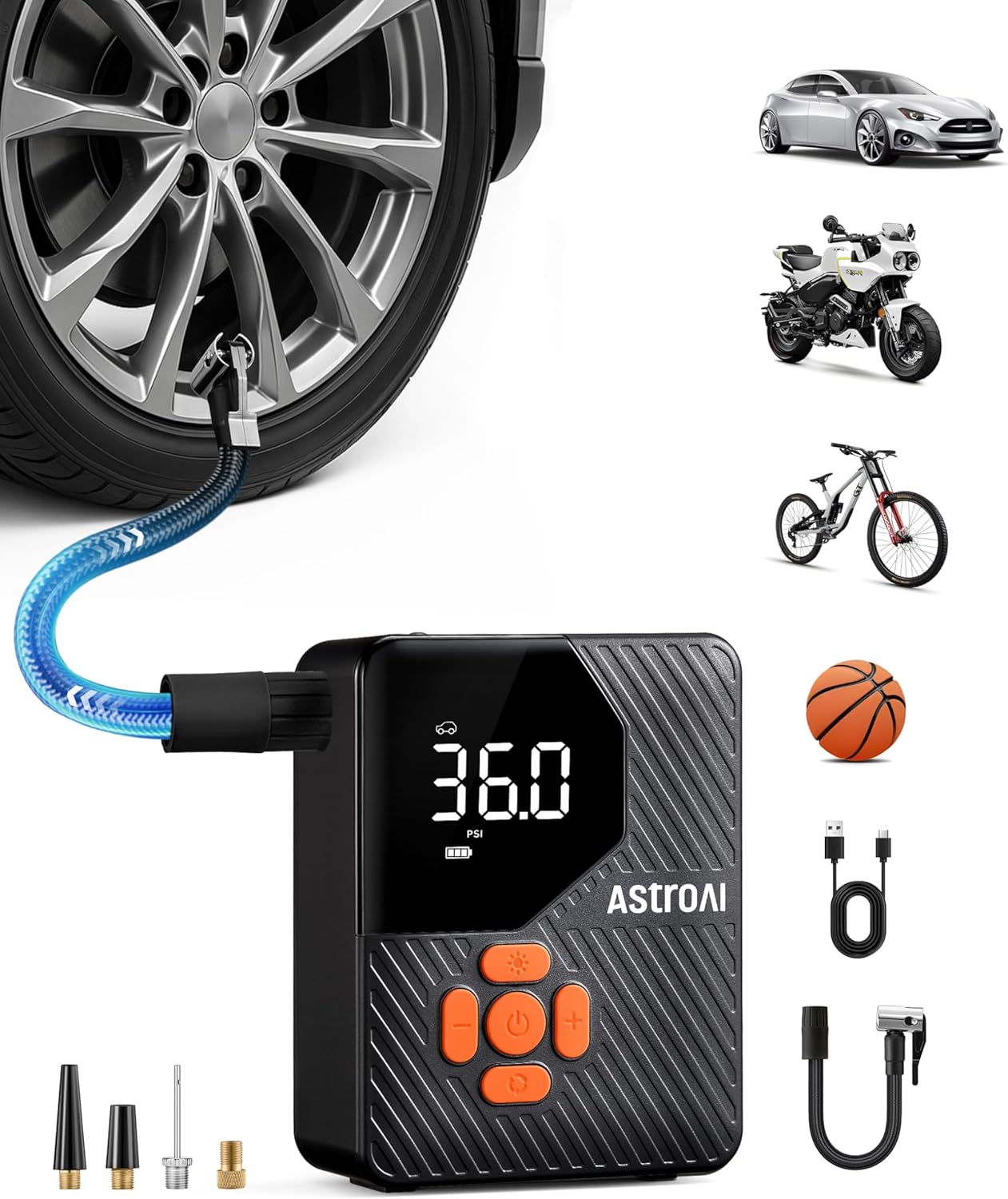
Image 1.1: AstroAI L7 Mini Portable Tire Inflator and its applications.
Package Contents:
- Cordless Tire Inflator × 1
- Quick Connector× 1
- USB Charging Cord× 1
- Air Nozzles× 1 (various types)
- Needle Valve Adapter× 1
- Presta to Schrader Adapter× 1
- User Manual× 1
2. Safety Information
Please read all safety instructions before using the AstroAI L7 Mini Portable Tire Inflator to prevent injury or damage to the device. Keep this manual for future reference.
- Do not leave the inflator unattended while in operation.
- Keep out of reach of children.
- Do not operate near flammable liquids or gases.
- Ensure the correct pressure setting for the item being inflated to avoid over-inflation.
- Allow the device to cool down after prolonged use to prevent overheating.
- Store the inflator in a dry, cool place.
3. Setup and Charging
3.1 Initial Charge
Before first use, fully charge the inflator. Connect the provided USB charging cord to the inflator's charging port and a suitable USB power source (e.g., wall adapter, car charger, power bank). The battery indicator on the display will show charging status.

Image 3.1: The inflator's battery capacity allows for multiple inflations on a single charge.
3.2 Attaching the Air Hose and Nozzles
- Screw the quick connector onto the inflator's air outlet.
- Select the appropriate air nozzle or adapter for the item you intend to inflate.
- Attach the selected nozzle/adapter to the quick connector.

Image 3.2: Included accessories for various inflation needs.
4. Operating Instructions
4.1 Powering On/Off
Press and hold the power button for 1.5 seconds to turn the inflator on or off.

Image 4.1: Quick start guide for inflation.
4.2 Selecting Inflation Mode and Units
- Mode Selection: Press the 'M' button to cycle through the 5 preset modes: Car, Motorcycle, Bicycle, Ball, and Custom. Each mode has a default pressure setting.
- Unit Selection: In any mode, press the 'U' button to switch between pressure units: PSI, BAR, KPA, and KG/CM².

Image 4.2: Smart one-press presetting and unit selection.
4.3 Setting Desired Pressure
After selecting a mode, use the '+' and '-' buttons to adjust the target pressure value. The display will show the current pressure and the target pressure.
4.4 Inflation Process
- Connect the appropriate nozzle/adapter to the item's valve stem. Ensure a secure connection to prevent air leakage.
- The display will show the current pressure of the item.
- Press the power button to start inflation. The inflator will automatically stop once the preset target pressure is reached.
- Disconnect the nozzle from the item.

Image 4.3: Inflating a car tire with the AstroAI L7 Mini.
4.5 Auto Shut-Off Feature
The inflator is equipped with an auto shut-off feature that automatically stops inflation once the preset pressure is achieved. This prevents over-inflation and ensures safety.

Image 4.4: The auto shut-off feature provides safe and efficient inflation.
4.6 Flashlight Modes
The built-in flashlight has three modes: Flashlight, Strobe, and SOS. Press the flashlight button to cycle through these modes. This feature is useful for low-light conditions or emergency signaling.

Image 4.5: The 3-mode flashlight for various situations.
5. Maintenance
5.1 Cleaning
Wipe the exterior of the inflator with a soft, damp cloth. Do not use harsh chemicals or abrasive cleaners. Ensure the device is dry before storage.
5.2 Storage
Store the inflator in a cool, dry place, away from direct sunlight and extreme temperatures. Keep all accessories organized to prevent loss.
5.3 Battery Care
To prolong battery life, charge the inflator regularly, even if not in frequent use. Avoid fully discharging the battery for extended periods.
6. Troubleshooting
| Problem | Possible Cause | Solution |
|---|---|---|
| Inflator does not turn on. | Low battery; Power button not held long enough. | Charge the battery; Press and hold the power button for 1.5 seconds. |
| Inflator does not inflate. | Hose not securely connected; Target pressure not set; Battery too low. | Ensure hose is tightly screwed; Set a target pressure; Charge the battery. |
| Inaccurate pressure reading. | Hose not properly connected to valve; Sensor malfunction. | Reconnect hose securely; Contact customer support if issue persists. |
| Device overheats during use. | Prolonged continuous operation. | Allow the device to cool down for 10-15 minutes before resuming use. |
7. Specifications
| Feature | Detail |
|---|---|
| Brand | AstroAI |
| Model | L7 Mini (ACL7MINIOR) |
| Power Source | Battery Powered |
| Maximum Pressure | 150 PSI |
| Pressure Units | PSI, BAR, KPA, KG/CM² |
| Product Dimensions | 3.15 x 1.89 x 4.17 inches |
| Item Weight | 1.19 pounds |
| Battery Type | Rechargeable Lithium-ion (internal) |
| Flashlight Modes | Flashlight, Strobe, SOS |
Note: The maximum pressure capability is 150 PSI. The value of 36 PSI mentioned in some specifications refers to a common recommended pressure for standard car tires.
Regarding battery type, the device uses an internal rechargeable lithium-ion battery, not standard 'A' batteries as might be implied by a typo in the raw specifications.
8. Warranty and Support
8.1 Warranty Information
The AstroAI L7 Mini Portable Tire Inflator typically comes with a 2-year warranty from the date of purchase. This warranty covers defects in materials and workmanship under normal use. Please retain your proof of purchase for warranty claims. For specific warranty terms and conditions, refer to the warranty card included in your package or visit the official AstroAI website.
8.2 Customer Support
For technical assistance, troubleshooting, or warranty inquiries, please contact AstroAI Customer Support. You can usually find contact information on the official AstroAI website or through the retailer where you purchased the product.
Website: www.astroai.com
Email: support@astroai.com