
1. Introduction
Thank you for choosing the Putilsen Mount Dual Monitor Stand. This heavy-duty, free-standing monitor stand is designed to enhance your workspace by supporting two 17-49 inch flat or curved ultrawide monitors. It offers extensive adjustment options for an ergonomic viewing experience and helps organize your desk space. This manual provides detailed instructions for assembly, operation, and maintenance to ensure safe and optimal use of your monitor stand.
2. Safety Information
- Read all instructions carefully before assembly and use. Failure to do so may result in personal injury or product damage.
- Ensure all components are present and undamaged before assembly. Do not use if any parts are missing or defective.
- Do not exceed the maximum weight capacity of 20 kg (44 lbs) per monitor arm.
- Ensure your desk surface is stable and capable of supporting the combined weight of the stand and monitors.
- Keep children and pets away during assembly. Small parts may be a choking hazard.
- Tighten all screws firmly, but do not overtighten to avoid stripping threads.
- Regularly check all connections and fasteners to ensure they remain secure.
- Use the product only for its intended purpose as described in this manual.
3. Package Contents
Please verify that all parts are included in your package:
- 1 x Monitor Stand Base
- 1 x Main Support Pole
- 2 x Monitor Mounting Arms
- 2 x VESA Plates (75x75mm and 100x100mm compatible)
- 1 x Hardware Kit (screws, washers, spacers, Allen keys)
- 1 x Instruction Manual
Note: The exact number and type of screws may vary slightly. Refer to the detailed assembly guide included in the package for precise component identification.
4. Setup and Assembly
Follow these steps to assemble your Putilsen Mount Dual Monitor Stand:
4.1. Base Assembly
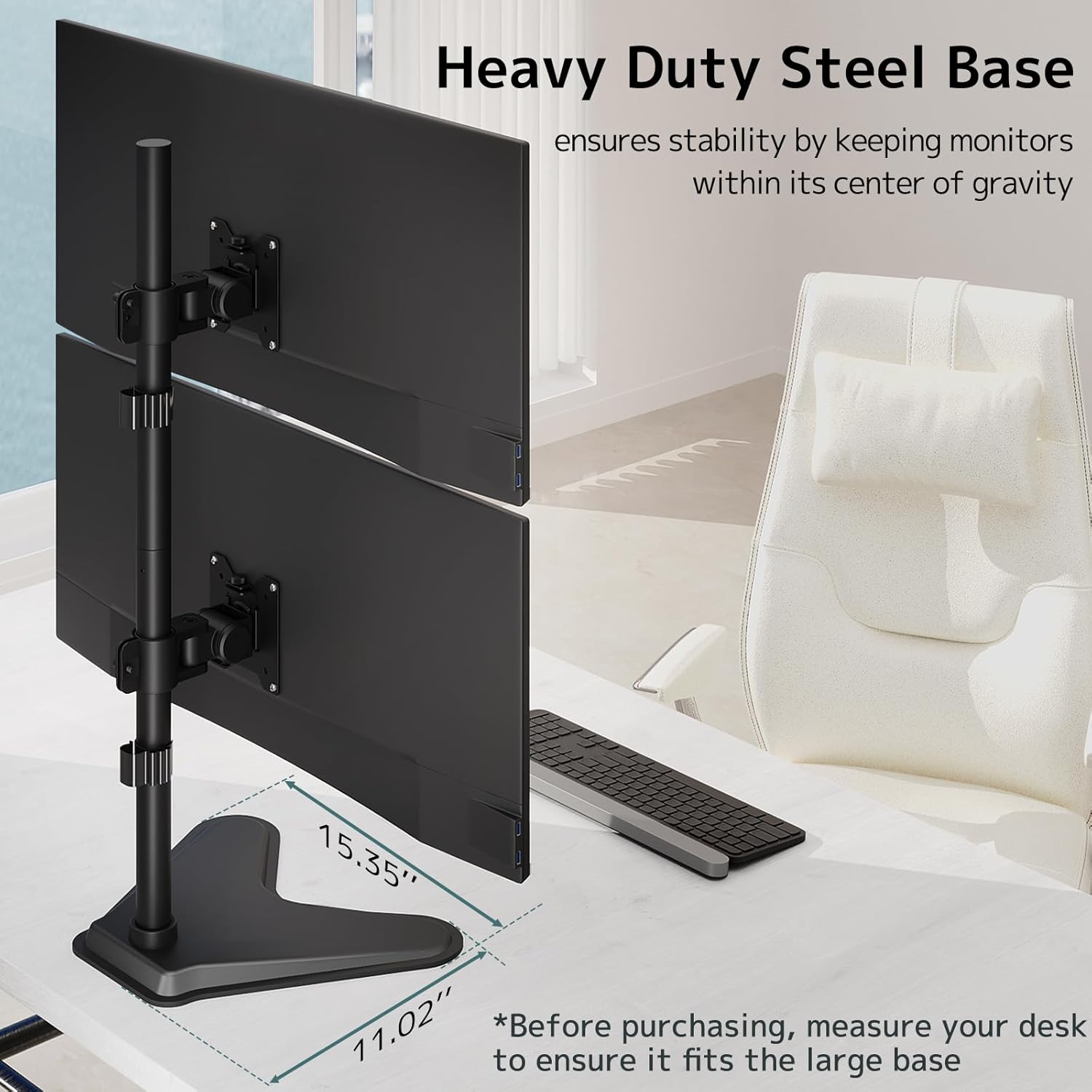
- Place the heavy-duty steel base (39 x 28 cm) on a stable, flat surface.
- Attach the main support pole to the base using the provided screws and tools. Ensure it is securely fastened.
4.2. Attaching VESA Plates to Monitors
- Carefully lay your monitor face down on a soft, clean surface to prevent scratches.
- Identify the VESA mounting holes on the back of your monitor. This stand supports VESA 75x75mm and 100x100mm patterns.
- Attach the VESA plate to the back of your monitor using the appropriate screws and washers from the hardware kit. Do not overtighten.
4.3. Mounting Monitors to the Stand
- Slide the monitor arm onto the main support pole at your desired height. The pole features multiple height adjustment points.
- Secure the monitor arm in place using the locking mechanism.
- Carefully lift your monitor (with the VESA plate attached) and hook it onto the monitor arm. Secure it with the provided screws or quick-release mechanism.

4.4. Cable Management
Utilize the integrated cable management clips or channels on the stand to route and organize your monitor cables. This helps maintain a tidy workspace and prevents cable damage.
4.5. Visual Assembly Guide (Video)
5. Operating Instructions
The Putilsen Mount Dual Monitor Stand offers extensive flexibility to achieve your ideal viewing angle:
- Height Adjustment: Loosen the locking mechanism on the main pole to slide the monitor arms up or down. Retighten to secure.
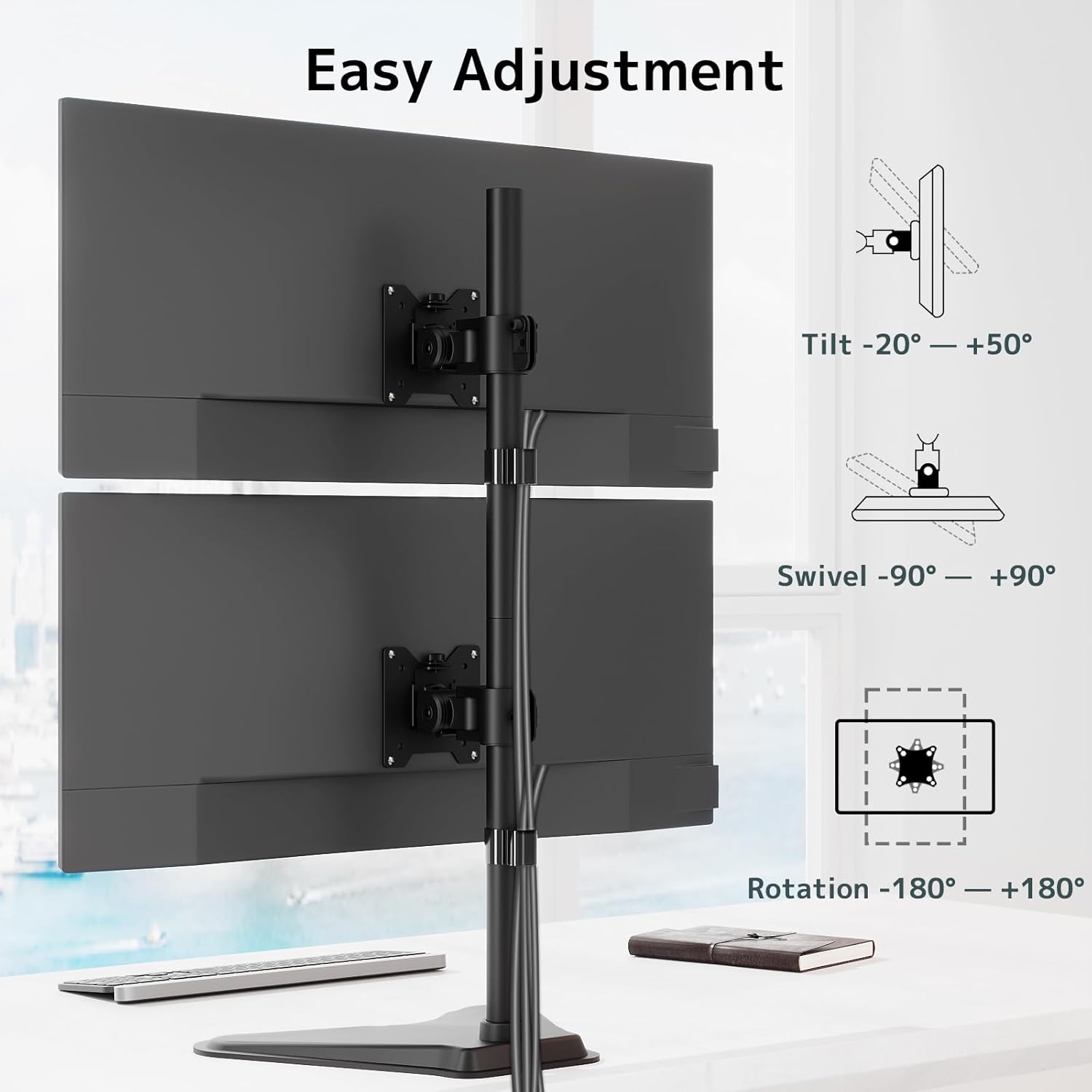
- Tilt: Each monitor arm can be tilted from -20° to +50°. Adjust the tilt knob on the VESA plate to achieve your preferred vertical angle.
- Swivel: Monitors can swivel from -90° to +90° horizontally. This allows for easy screen sharing or adjusting the viewing direction.
- Rotation: Rotate your monitors from -180° to +180° to switch between landscape and portrait orientations.

6. Maintenance
- Cleaning: Wipe the stand with a soft, damp cloth. Avoid abrasive cleaners or solvents that could damage the finish.
- Tightness Check: Periodically check all screws and connections to ensure they are tight and secure. Retighten if necessary.
- Lubrication: Moving parts generally do not require lubrication. If any joints become stiff, a small amount of silicone-based lubricant can be applied.
- Weight Distribution: Ensure monitors are balanced on the arms to prevent undue stress on the stand.
7. Troubleshooting
- Monitors are not stable/wobble:
- Ensure the stand base is on a flat, stable surface.
- Check all screws and connections, especially those attaching the pole to the base and the monitors to the VESA plates.
- Verify that the monitor weight does not exceed the maximum capacity of 20 kg per arm.
- Difficulty adjusting monitor position:
- Ensure all adjustment knobs and levers are loosened before attempting to move the monitor.
- If a joint is stiff, apply a small amount of silicone lubricant.
- Monitors are not level:
- Adjust the tilt and rotation settings on each monitor arm individually until both screens are level.
- Ensure the monitor arms are secured at the same height on the main pole.
8. Specifications
| Feature | Detail |
|---|---|
| Brand | Putilsen Mount |
| Model | B0DYV79R84 |
| Compatible Monitor Size | 17-49 inches (flat or curved) |
| VESA Compatibility | 75x75mm, 100x100mm |
| Weight Capacity | Up to 20 kg (44 lbs) per arm |
| Base Dimensions | 39 x 28 cm (15.35" x 11.02") |
| Material | Alloy Steel |
| Tilt Range | -20° to +50° |
| Swivel Range | -90° to +90° |
| Rotation Range | -180° to +180° |
| Mounting Type | Tabletop (Free-standing) |

9. Warranty and Support
This Putilsen Mount product is covered by a 10-year customer service warranty. For any questions, issues, or support needs, please contact our customer service team. We are committed to providing exceptional service and ensuring your satisfaction.
Contact information can typically be found on the product packaging or the official Putilsen Mount website.