
Introduction
This manual provides detailed instructions for the proper use and maintenance of your 82Ms-A Scientific Calculator. Designed for students and professionals, this calculator features a 2-line display, multi-function keys, and supports up to 240 functions, including trigonometric calculations. Please read this manual thoroughly to ensure optimal performance and longevity of your device.
What's in the Box

Image: The 82Ms-A Scientific Calculator as packaged, indicating one unit is included.
- 82Ms-A Scientific Calculator (1 unit)
- User Manual (this document)
Setup
Battery Installation

Image: A detailed view showing the open battery compartment of the calculator, revealing two AAA batteries.
The 82Ms-A Scientific Calculator is powered by a long-lasting battery. To install or replace batteries:
- Ensure the calculator is turned OFF.
- Locate the battery compartment cover on the back of the calculator.
- Slide the cover off in the direction indicated by the arrow (if present).
- Insert new batteries, ensuring correct polarity (+/-) as marked inside the compartment.
- Replace the battery compartment cover until it clicks securely into place.
Operating Instructions
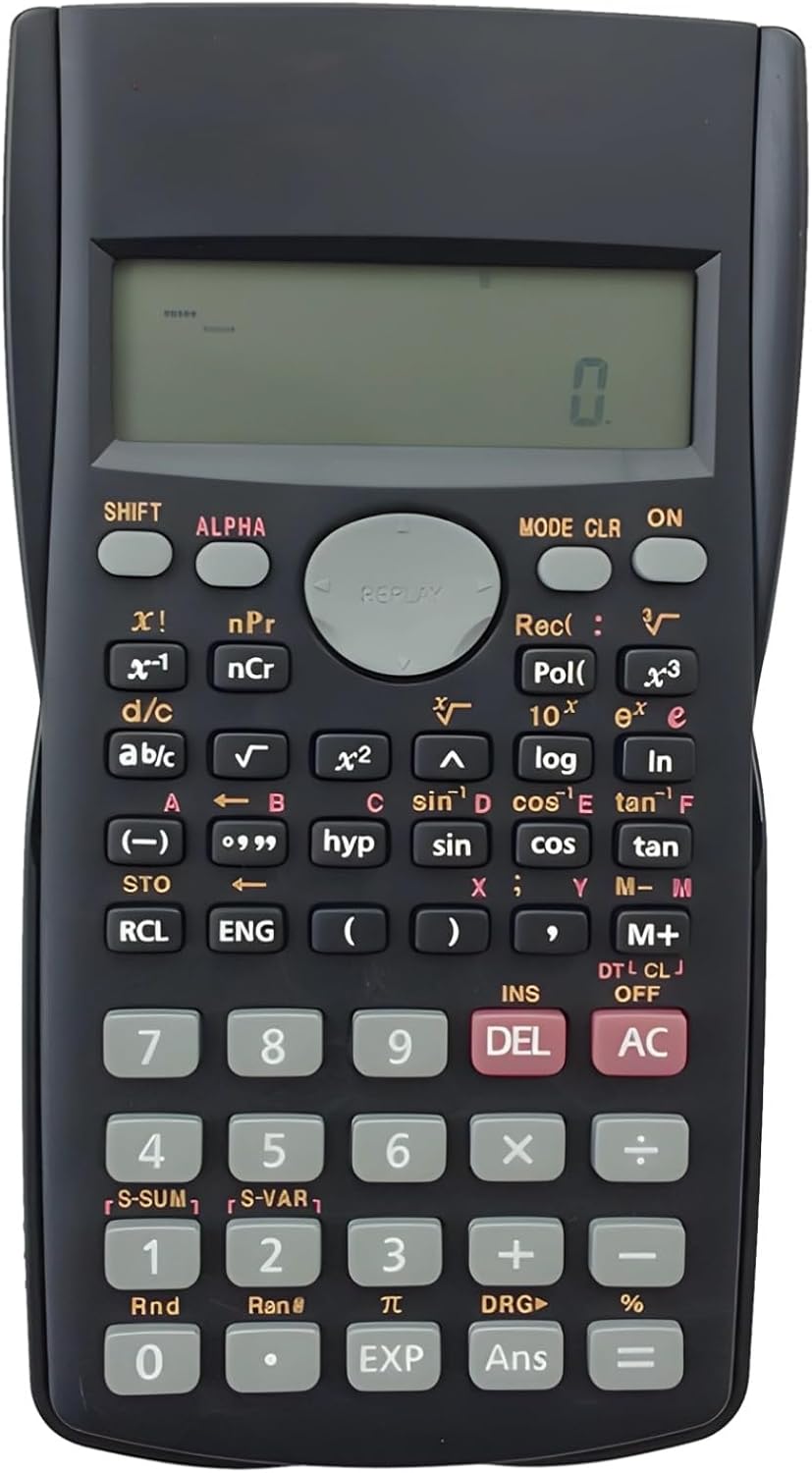
Image: The full layout of the 82Ms-A Scientific Calculator, highlighting its 2-line display and various function keys.
Power On/Off
- To turn on: Press the ON key.
- To turn off: Press SHIFT then AC (OFF).
Basic Calculations
Enter numbers using the numeric keypad. Use the +, -, ×, and ÷ keys for standard arithmetic operations. Press = to display the result.
Multi-Function Keys and 2-Line Display
The calculator features a 2-line display, showing both the input expression and the result simultaneously. Many keys have multiple functions, indicated by colored labels above or below them. These functions are accessed using the SHIFT and ALPHA keys.
- SHIFT: Activates the yellow-labeled functions. Press SHIFT, then the desired key.
- ALPHA: Activates the red-labeled functions (variables, constants). Press ALPHA, then the desired key.
- MODE: Changes the calculator's mode (e.g., COMP, STAT, EQN). Press MODE repeatedly to cycle through options.
- CLR: Clears specific data or settings. Press SHIFT then CLR to access clear options.
- DEL: Deletes the character at the cursor position.
- AC: Clears all input and returns to the initial state.
Advanced Functions
The 82Ms-A supports 240 functions, including trigonometric (sin, cos, tan), logarithmic (log, ln), power (x², x³), roots (√, ³√), fractions (a b/c), and statistical calculations. Refer to the specific key labels and their SHIFT/ALPHA functions for detailed usage.
- Trigonometric Functions: Use sin, cos, tan keys. For inverse functions (sin⁻¹, cos⁻¹, tan⁻¹), use SHIFT with these keys.
- Logarithmic Functions: Use log (base 10) and ln (natural logarithm) keys.
- Power and Root Functions: Use x² for squaring, SHIFT then x² for square root (√). For other powers and roots, use x³ or SHIFT then x³ (³√).
- Fractions: Use the a b/c key to input and convert fractions.
Maintenance
Cleaning
To clean the calculator, use a soft, dry cloth. For stubborn dirt, slightly dampen the cloth with water or a mild, non-abrasive cleaner. Do not use strong solvents, alcohol, or abrasive cleaners, as these can damage the casing and display.
Storage
Store the calculator in a cool, dry place away from direct sunlight and extreme temperatures. If storing for an extended period, it is recommended to remove the batteries to prevent leakage.
Troubleshooting
| Problem | Possible Cause | Solution |
|---|---|---|
| Calculator does not turn on. | Dead or incorrectly installed batteries. | Replace batteries with new ones, ensuring correct polarity. |
| Display is dim or blank. | Low battery power. | Replace batteries. |
| Incorrect calculation results. | Incorrect mode setting or previous calculation error. | Press AC to clear. Check the current mode using the MODE key and adjust if necessary. |
| Keys are unresponsive. | Dust or debris under keys; internal malfunction. | Gently clean around the keys. If problem persists, contact support. |
Specifications

Image: The 82Ms-A Scientific Calculator with its length, width, and thickness measurements indicated.
| Feature | Detail |
|---|---|
| Model Number | 71T71524TQPRRJC1J26SKQF |
| Display Type | 2-Line Display |
| Number of Functions | Up to 240 functions |
| Power Source | Battery Powered |
| Dimensions (L x W x H) | 6.1 x 3.27 x 0.39 inches |
| Item Weight | 5.3 ounces |
| Color | Black |
| Material | Plastic |
Warranty and Support
Specific warranty information for this product is not provided within this manual. For warranty details, technical support, or service inquiries, please refer to the product packaging or contact the retailer from whom the product was purchased. Keep your purchase receipt as proof of purchase.


